Quick Summary: A robots.txt file is a plain text file placed in a website’s root directory that tells search engine crawlers which pages or sections they can or cannot access. It’s primarily used to manage crawler traffic and prevent server overload, not to hide pages from search results. According to Google Search Central, robots.txt helps control how search engines crawl your site, but to actually block pages from appearing in search results, you need noindex tags or password protection instead.
Search engines send automated bots to crawl websites every single day. These crawlers index content, follow links, and decide what appears in search results. But here’s the thing—not every page on a website needs to be crawled. Some pages waste crawler resources, and some shouldn’t be indexed at all.
That’s where robots.txt comes in.
This small text file gives instructions to web crawlers about which parts of a site they can access. It’s been around since the early 1990s and remains a fundamental part of technical SEO. Understanding how robots.txt works can prevent indexing disasters, improve crawl efficiency, and keep sensitive areas of a website protected.
Let’s break down exactly what robots.txt is, how it functions, and why it matters for SEO in 2026.
Understanding the Robots.Txt File
According to Google Search Central, a robots.txt file tells search engine crawlers which URLs the crawler can access on a site. It’s primarily used to manage crawler traffic and avoid overloading servers with requests.
The file sits in the root directory of a website. For a site like example.com, the robots.txt file would be located at example.com/robots.txt. Search engines check this location before crawling any other pages.
Here’s what makes robots.txt unique: it’s a plain text file that follows the Robots Exclusion Protocol (REP). The REP emerged from a 1994 consensus and is now widely recognized by major search engines including Google, Bing, and others.
How Robots.Txt Actually Works
When a search engine bot wants to crawl a website, it follows a specific sequence:
- The bot attempts to access the robots.txt file at the root domain
- If the file exists, the bot reads and parses the instructions
- The bot follows the directives that apply to its user-agent
- Only then does it proceed to crawl allowed pages
According to robotstxt.org, the standard emerged from a consensus among robot authors and interested parties in 1994. It’s technically voluntary—bots choose to respect it—but all legitimate search engines honor robots.txt directives.

What Robots.Txt Can and Cannot Do
There’s a common misconception about robots.txt. Many site owners think it prevents pages from appearing in search results. It doesn’t.
Google Search Central explicitly states that robots.txt is not a mechanism for keeping web pages out of Google. If other sites link to a blocked page, it can still appear in search results—just without a description.
To actually prevent indexing, sites need to use:
- Noindex meta tags in the page HTML
- X-Robots-Tag HTTP headers
- Password protection or authentication requirements
Robots.txt controls crawling behavior, not indexing. That’s a crucial distinction.
The Basic Syntax of Robots.Txt
The robots.txt file uses straightforward syntax. Even without technical expertise, the format is readable and logical.
Here’s a basic example:
User-agent: *
Disallow: /admin/
Disallow: /temp/
Allow: /temp/public/
Sitemap: https://www.example.com/sitemap.xml
Let’s decode each part.
User-Agent Directive
The user-agent line specifies which crawler the following rules apply to. The asterisk (*) means all bots. Specific bots can be targeted by name:
- Googlebot (Google’s main crawler)
- Googlebot-Image (Google’s image crawler)
- Bingbot (Microsoft Bing’s crawler)
- AhrefsBot (Ahrefs SEO tool crawler)
Multiple user-agent sections can exist in one file, each with different rules.
Disallow Directive
The Disallow directive tells bots which URLs or paths they cannot access. A few examples:
| Directive | What It Blocks |
|---|---|
| Disallow: /admin/ | All URLs starting with /admin/ |
| Disallow: /*.pdf$ | All PDF files sitewide |
| Disallow: / | Everything on the site |
| Disallow: | Nothing (allows all) |
Allow Directive
The Allow directive creates exceptions to Disallow rules. It’s particularly useful for allowing access to specific subdirectories within blocked sections.
For example:
User-agent: *
Disallow: /private/
Allow: /private/public-resources/
This blocks the entire /private/ directory except the /private/public-resources/ folder.
Sitemap Directive
Including sitemap locations helps search engines find and crawl important pages more efficiently. Multiple sitemap lines can be added:
Sitemap: https://example.com/sitemap.xml
Sitemap: https://example.com/sitemap-images.xml
According to Google’s documentation, listing sitemaps in robots.txt is considered a best practice for crawl efficiency.
Why Robots.Txt Matters for SEO
Managing how search engines crawl a website directly impacts SEO performance. Robots.txt provides control over this process.
Preventing Crawl Budget Waste
Search engines allocate a crawl budget to each site—the number of pages their bots will crawl during a given period. Large sites with thousands of pages can quickly exhaust this budget on low-value content.
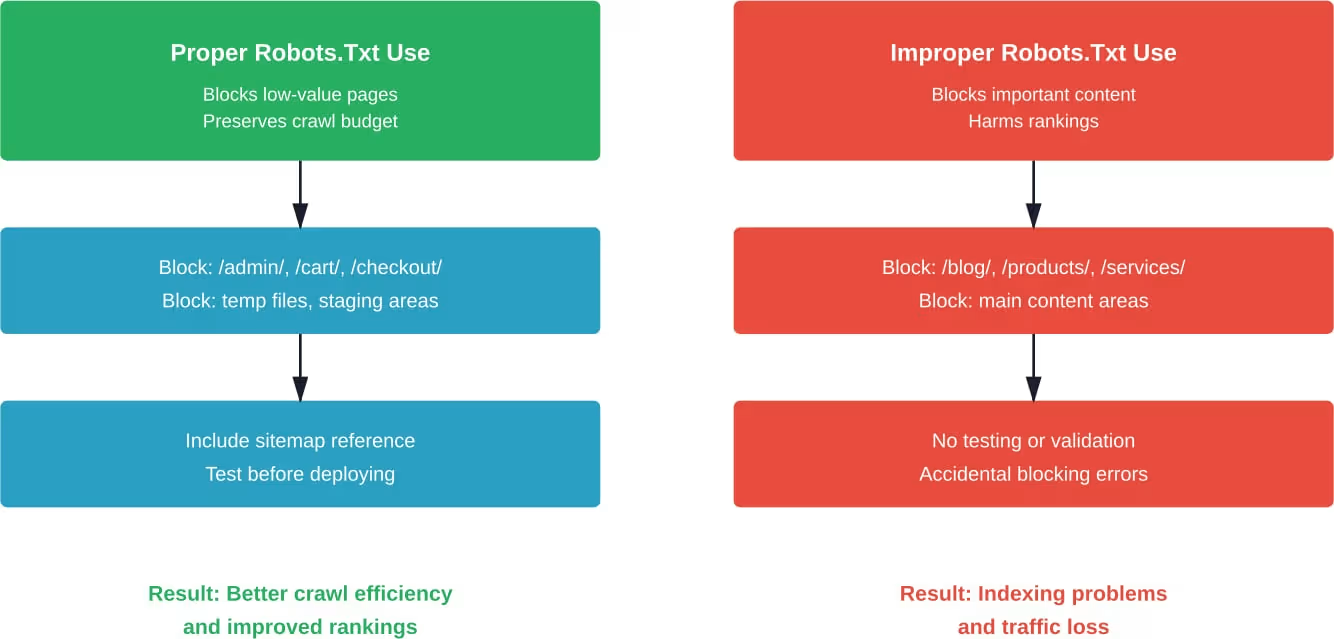
Using robots.txt to block crawlers from accessing duplicate pages, staging areas, or admin sections preserves crawl budget for important content. This becomes especially critical for e-commerce sites with faceted navigation creating thousands of URL variations.
Protecting Server Resources
Aggressive crawling can strain server resources, particularly for smaller sites or those with limited hosting. According to Bing Webmaster Blog, controlling crawl rate through robots.txt (and crawl delay directives) helps accommodate web server load issues.
Real talk: if a site goes down because bots are hammering it with requests, that’s an SEO disaster. Rankings drop, users get error pages, and recovery takes time.
Avoiding Duplicate Content Issues
When search engines crawl and index multiple versions of the same content, duplicate content issues arise. While Google claims it handles duplicates well, why risk it?
Blocking parameter-based URLs, print versions, or session ID variations prevents unnecessary duplicate indexing.
Fix Technical SEO and Improve Visibility
Understanding robots.txt is just one part of technical SEO, and LENGREO focuses on optimizing the full technical foundation to improve crawlability and rankings. Technical issues can limit even the best content, so having a solid foundation is critical for long term SEO success.
- crawl and index optimization
- site structure improvements
- performance and speed
If you want to resolve technical issues and improve search visibility, get a free consultation with LENGREO.
Common Robots.Txt Use Cases
Different websites have different needs. Here are practical scenarios where robots.txt proves essential.
Blocking Search Functions and Filter Pages
E-commerce sites generate countless URLs through faceted navigation—filtering by size, color, price range, and other attributes. Each combination creates a unique URL that dilutes link equity and wastes crawl budget.
Example robots.txt for an e-commerce site:
User-agent: *
Disallow: /*?filter=
Disallow: /*?sort=
Disallow: /search?*
Disallow: /cart
Disallow: /checkout
Protecting Staging and Development Areas
Development sites, staging environments, and testing areas should never appear in search results. Blocking them prevents accidental indexing:
User-agent: *
Disallow: /staging/
Disallow: /dev/
Disallow: /test/
Controlling PDF and Media File Crawling
Some sites have hundreds of PDFs or downloadable resources. If these aren’t intended for search visibility, block them:
User-agent: *
Disallow: /*.pdf$
Disallow: /*.doc$
Disallow: /*.xls$
Blocking Specific Bots
Not all crawlers are welcome. Some scrape content, some are malicious, and others waste resources without adding value:
User-agent: AhrefsBot
Disallow: /
User-agent: SemrushBot
Disallow: /
User-agent: *
Disallow: /admin/
This blocks specific SEO tool crawlers while allowing major search engines.
Best Practices for Robots.Txt Files
Creating an effective robots.txt file requires following established guidelines and avoiding common pitfalls.
Location and Accessibility
The robots.txt file must be placed in the root directory of the domain. It won’t work in subdirectories. For example.com, the file must be at example.com/robots.txt, not example.com/pages/robots.txt.
The file must be accessible via HTTP/HTTPS. According to Google’s interpretation of the robots.txt specification, if the file returns a 404 error, Google assumes no crawl restrictions exist and proceeds to crawl everything.
Case Sensitivity Matters
Directives are case-sensitive. Disallow: /Admin/ does not block /admin/. Always use lowercase for consistency unless specific capitalization is required.
Wildcard and Pattern Matching
Modern robots.txt syntax supports wildcards for more flexible rules:
| Pattern | Meaning | Example |
|---|---|---|
| * | Matches any sequence | Disallow: /*.jpg$ blocks all JPG files |
| $ | End of URL | Disallow: /*.pdf$ blocks PDFs, but not /file.pdf?v=1 |
Testing Before Deployment
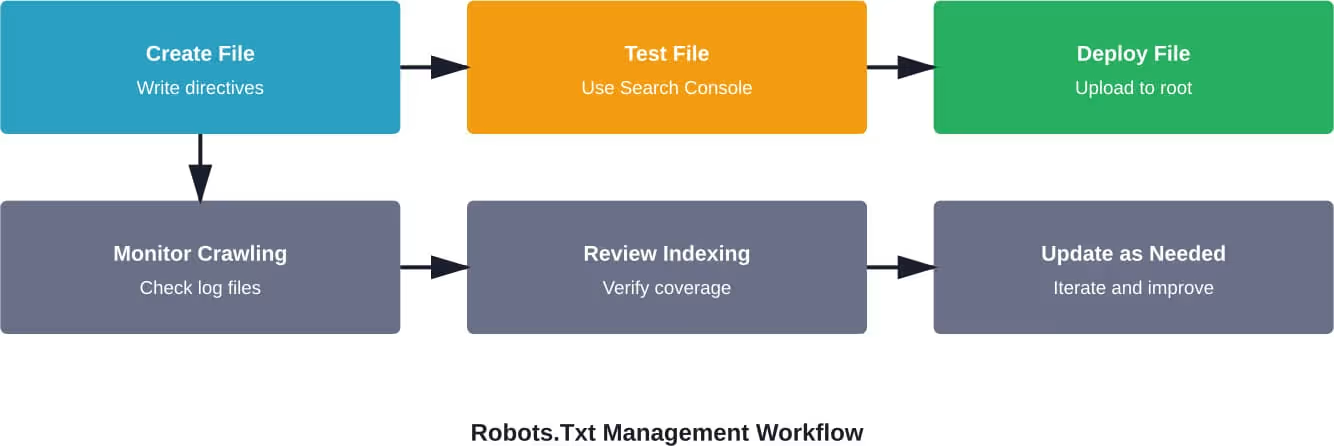
Never deploy robots.txt without testing. Google Search Console includes a robots.txt tester that shows exactly how Googlebot interprets the file. Mistakes here can be catastrophic—accidentally blocking the entire site has happened to major companies.
The Crawl-Delay Directive
While not officially supported by Google, Bing and other search engines recognize the crawl-delay directive. According to the Bing Webmaster Blog, this controls the pace at which bots crawl a site:
User-agent: *
Crawl-delay: 10
This tells bots to wait 10 seconds between requests. Use this sparingly—most sites don’t need it, and it can slow down indexing.
Robots.Txt Versus Meta Robots Tags
Understanding the difference between robots.txt and meta robots tags prevents confusion and indexing errors.
Robots.txt controls crawling—whether bots can access a page. Meta robots tags control indexing—whether a page appears in search results.
These two mechanisms work independently:
| Scenario | Robots.Txt | Meta Tag | Result |
|---|---|---|---|
| Block crawling and indexing | Disallow: /page/ | N/A | Page not crawled; may still appear in results if linked externally |
| Allow crawling, prevent indexing | Allow | noindex | Page crawled but not indexed |
| Block crawling, prevent indexing | Disallow: /page/ | noindex | Problem: bot can’t see noindex tag because it’s blocked from crawling |
Here’s the critical mistake to avoid: blocking a page in robots.txt while also using a noindex tag. The bot never sees the noindex instruction because it’s blocked from accessing the page. If external links point to that URL, it can still appear in search results.
According to Google Search Central documentation on meta robots tags, the proper approach for preventing indexing is to allow crawling so bots can read the noindex directive.
Common Robots.Txt Mistakes That Hurt SEO
Even experienced developers make robots.txt errors. These mistakes have serious consequences.
Blocking CSS and JavaScript Files
Years ago, some SEOs recommended blocking CSS and JavaScript in robots.txt. This is now considered harmful. Google needs to render pages fully to understand content and user experience.
Blocking these resources can result in:
- Incorrect mobile-friendliness assessments
- Failure to detect content above the fold
- Misunderstanding of page layout and usability
Google explicitly advises against blocking CSS and JavaScript files.
Accidentally Blocking the Entire Site
A single typo can be devastating:
User-agent: *
Disallow: /
This blocks everything. It happens more often than it should—during site migrations, when updating files, or when someone unfamiliar with the syntax makes changes.
Always test in a staging environment first.
Using Robots.Txt to Hide Sensitive Information
Robots.txt is publicly accessible. Anyone can view a site’s robots.txt file by visiting domain.com/robots.txt. Using it to hide sensitive directories actually advertises their existence.
For truly sensitive content, use proper authentication and access controls, not robots.txt.
Forgetting About Subdomain Differences
Each subdomain needs its own robots.txt file. The file at example.com/robots.txt doesn’t apply to blog.example.com. Separate files are required for each subdomain.
How Search Engines Handle Robots.Txt Errors
What happens when a robots.txt file has errors or can’t be accessed?
According to Google’s interpretation of the robots.txt specification, different HTTP status codes trigger different behaviors:
| Status Code | Google’s Response |
|---|---|
| 404 (Not Found) | Assumes no restrictions; crawls everything |
| 5xx (Server Error) | Stops crawling for 12 hours; keeps trying to fetch the file |
| 403 (Forbidden) | Treats as Disallow: / and blocks all crawling |
Server errors are particularly problematic. If a site experiences downtime and robots.txt returns a 5xx error, Google stops crawling entirely for 12 hours. Repeated errors can lead to prolonged crawling pauses.
Robots.Txt and Modern SEO Challenges
AI Crawlers and Large Language Models
New types of crawlers have emerged for training AI models and large language models. Companies like OpenAI, Anthropic, and others deploy bots to scrape web content.
These crawlers often respect robots.txt, but not always. Some AI companies have introduced specific user-agents:
- GPTBot (OpenAI)
- CCBot (Common Crawl)
- anthropic-ai (Anthropic)
Site owners concerned about AI training on their content can block these specifically:
User-agent: GPTBot
Disallow: /
User-agent: CCBot
Disallow: /
But here’s the catch—not all AI systems identify themselves clearly, and some may not honor robots.txt directives.
Mobile-First Indexing Considerations
With mobile-first indexing, Google primarily uses the mobile version of content for indexing and ranking. The robots.txt file for mobile must allow crawling of resources necessary for mobile rendering.
If separate mobile URLs exist (m.example.com), that subdomain needs its own robots.txt configuration.
Tools for Managing and Testing Robots.Txt
Several tools help create, validate, and monitor robots.txt files:
Google Search Console Robots.Txt Tester
This free tool shows exactly how Googlebot interprets a robots.txt file. It highlights syntax errors and allows testing specific URLs against the rules.
Bing Webmaster Tools
Similar to Google’s tool, Bing offers validation and testing features within their webmaster platform.
Online Robots.Txt Generators
For those unfamiliar with syntax, generators provide templates and interactive interfaces for creating robots.txt files. These reduce the risk of syntax errors.
Log File Analysis
Analyzing server logs reveals how crawlers actually behave. Tools like Screaming Frog Log Analyzer or Botify show which bots visit, which pages they access, and whether robots.txt directives are being respected.
Real-World Robots.Txt Examples
Looking at how major websites structure their robots.txt files provides practical insights.
Simple Blog or Small Business Site
User-agent: *
Disallow: /wp-admin/
Allow: /wp-admin/admin-ajax.php
Disallow: /wp-login.php
Disallow: /cart/
Disallow: /checkout/
Sitemap: https://example.com/sitemap.xml
This WordPress example blocks admin areas and e-commerce checkout while allowing everything else.
Large E-Commerce Site
User-agent: *
Disallow: /search
Disallow: /*?*sort=
Disallow: /*?*filter=
Disallow: /cart
Disallow: /checkout
Disallow: /account
Disallow: /*.pdf$
User-agent: AhrefsBot
Disallow: /
Sitemap: https://store.example.com/sitemap.xml
Sitemap: https://store.example.com/products-sitemap.xml
News or Publishing Site
User-agent: *
Disallow: /search
Disallow: /api/
Allow: /api/public/
Crawl-delay: 10
User-agent: Googlebot-News
Disallow:
Sitemap: https://news.example.com/news-sitemap.xml
This allows Google News crawlers unrestricted access while limiting other bots.
Conclusion: Mastering Robots.Txt for Better SEO
The robots.txt file remains a fundamental component of technical SEO despite being over 30 years old. It provides precise control over how search engines access and crawl websites, helping prevent server overload, preserve crawl budget, and avoid indexing low-value content.
But it’s not foolproof. Understanding what robots.txt can and cannot do prevents common mistakes that harm SEO performance. It controls crawling—not indexing. It’s publicly visible—not a security measure. And it requires careful testing before deployment.
The most successful approach combines robots.txt with other tools: noindex tags for controlling indexing, proper site architecture for managing crawl efficiency, and regular monitoring through log file analysis and webmaster tools.
As search engines evolve and new types of crawlers emerge—particularly AI training bots—robots.txt continues adapting. Staying current with specifications and best practices ensures websites maintain control over how automated systems interact with their content.
Start by auditing existing robots.txt configurations. Test thoroughly using Google Search Console and Bing Webmaster Tools. Monitor crawling behavior through log files. And most importantly, document any changes so future updates don’t accidentally break critical directives.
Ready to optimize crawling for better SEO performance? Review your robots.txt file today and ensure it aligns with current best practices.