Key Points: Alt text directly impacts SEO by helping search engines understand and index images, improving accessibility for screen readers, and providing context when images fail to load. Google and other search engines use alt text as a ranking signal, particularly for image search results. Properly written alt text can increase organic traffic, enhance user experience, and contribute to overall site performance.
Search engines can’t see images the way humans do. They rely on text-based signals to understand what’s in a picture, and that’s where alt text becomes critical for SEO. But does adding alt text actually move the needle on your rankings?
The short answer is yes. Alt text helps search engines index images properly, improves accessibility, and can drive significant traffic from image search results. According to Google Search Central, search engines use alt text to understand image content and context within a page.
Here’s the thing though—not all alt text is created equal. Stuffing keywords or writing vague descriptions won’t help your rankings. Understanding how search engines evaluate alt text can make the difference between invisible images and a steady stream of organic traffic.
What Exactly Is Alt Text?
Alt text (alternative text) is an HTML attribute added to image tags that describes the content and function of an image. It appears in place of an image when the file fails to load, and screen readers use it to describe images to visually impaired users.
The HTML structure looks like this:
<img src=”golden-retriever-puppy.jpg” alt=”Golden retriever puppy sitting in green grass”>
According to Moz, alt text serves dual purposes: improving web accessibility for users who rely on screen readers and providing search engines with information about image content. According to the WebAIM Million 2025 report, approximately 81-85% of the top one million homepages have detectable accessibility failures, with missing alt text for images being the most common issue (found on ~58% of pages).
That’s not just an accessibility problem. It’s missed SEO opportunities.
How Alt Text Impacts Search Engine Rankings
Google explicitly states that alt text helps them understand images and their relationship to surrounding content. When images are properly described, search engines can index them for image search results and use them as context signals for the overall page.
Search engines evaluate several factors when processing images:
- Image relevance to the page topic
- Alt text quality and descriptive accuracy
- Filename structure and URL organization
- Surrounding text and captions
- Page context and topical authority
Alt text sits at the center of this evaluation. Without it, search engines must rely entirely on filename, surrounding text, and machine learning algorithms—which means they might misinterpret or completely miss the image’s purpose.
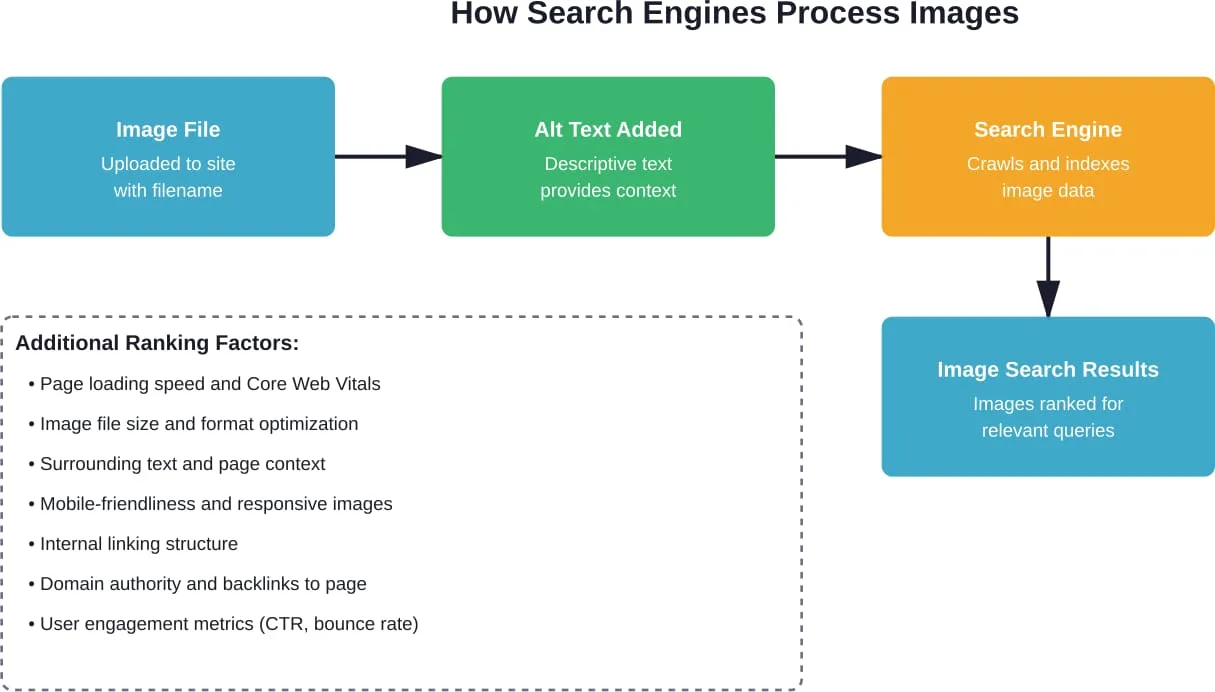
Image Search Traffic Is Significant
Google Images represents a massive traffic opportunity that many sites overlook. According to Moz’s research on image SEO, optimized images facilitate better indexing by search engines, contribute to faster loading times, and enhance user experience—all of which Google values in ranking results.
Real talk: if your images aren’t showing up in Google Images, you’re missing a significant chunk of potential visitors. And alt text is the foundation that makes image discovery possible.
Alt Text as a Relevance Signal
Search engines use alt text to understand how images relate to page content. When your alt text accurately describes an image and includes relevant terms, it reinforces the page’s topical focus.
But here’s where it gets interesting. Google doesn’t just look at alt text in isolation. They evaluate it alongside the page title, headings, body content, and even structured data. Consistent, descriptive alt text that aligns with your content strategy sends strong relevance signals.
Alt Text and Web Accessibility: The SEO Connection
Accessibility and SEO overlap more than most people realize. According to Moz research, 83% of people with accessibility needs prefer sites that meet accessibility standards, even if prices are higher.
Screen readers announce alt text to visually impaired users, allowing them to understand image content without seeing it. When images lack alt text, screen reader users miss critical information—and search engines face the same problem.
Google’s algorithms increasingly prioritize user experience signals. Sites with better accessibility tend to perform better in rankings because they provide value to more users. Alt text sits at the intersection of both goals.
Best Practices for Writing SEO-Effective Alt Text
Writing alt text that benefits both users and search engines requires a balanced approach. According to Google Search Central, alt text should be descriptive, specific, and contextually relevant to the page content.
Be Descriptive and Specific
Generic alt text like “image” or “photo” provides zero value. Search engines need concrete details about what the image shows.
| Bad Alt Text | Good Alt Text | Why It’s Better |
|---|---|---|
| picture | Red brick house with white trim and blue door | Descriptive, specific details paint a clear picture |
| product image | Stainless steel French press coffee maker, 34 oz capacity | Includes product type, material, and specifications |
| screenshot | Google Analytics dashboard showing traffic increase from 2,000 to 8,500 monthly visitors | Describes what the data shows, not just that it’s a screenshot |
| logo | Company ABC logo | Identifies the specific brand |
Include Context, Not Just Description
Consider how the image functions within the content. An image of someone working on a laptop might be described differently depending on whether the article discusses remote work, programming, or productivity tools.
The context matters. Alt text should connect the image to the surrounding content’s purpose.
Keep It Concise But Complete
Most screen readers cut off alt text around 125 characters. That doesn’t mean you can’t exceed that limit, but aim for clarity over verbosity.
According to accessibility guidelines, alt text should answer the question: “What information does this image convey?” If the answer requires a detailed explanation, consider whether a longer description method might be appropriate.
Avoid Keyword Stuffing
Look, everyone knows you want to rank for specific terms. But stuffing alt text with keywords makes content less useful for screen reader users and can trigger over-optimization penalties from search engines.
Bad example: “Best running shoes running shoes for men comfortable running shoes athletic shoes sneakers”
Good example: “Nike Air Zoom Pegasus 40 running shoes in blue and white on wooden floor”
The second version includes relevant information naturally without forced repetition.
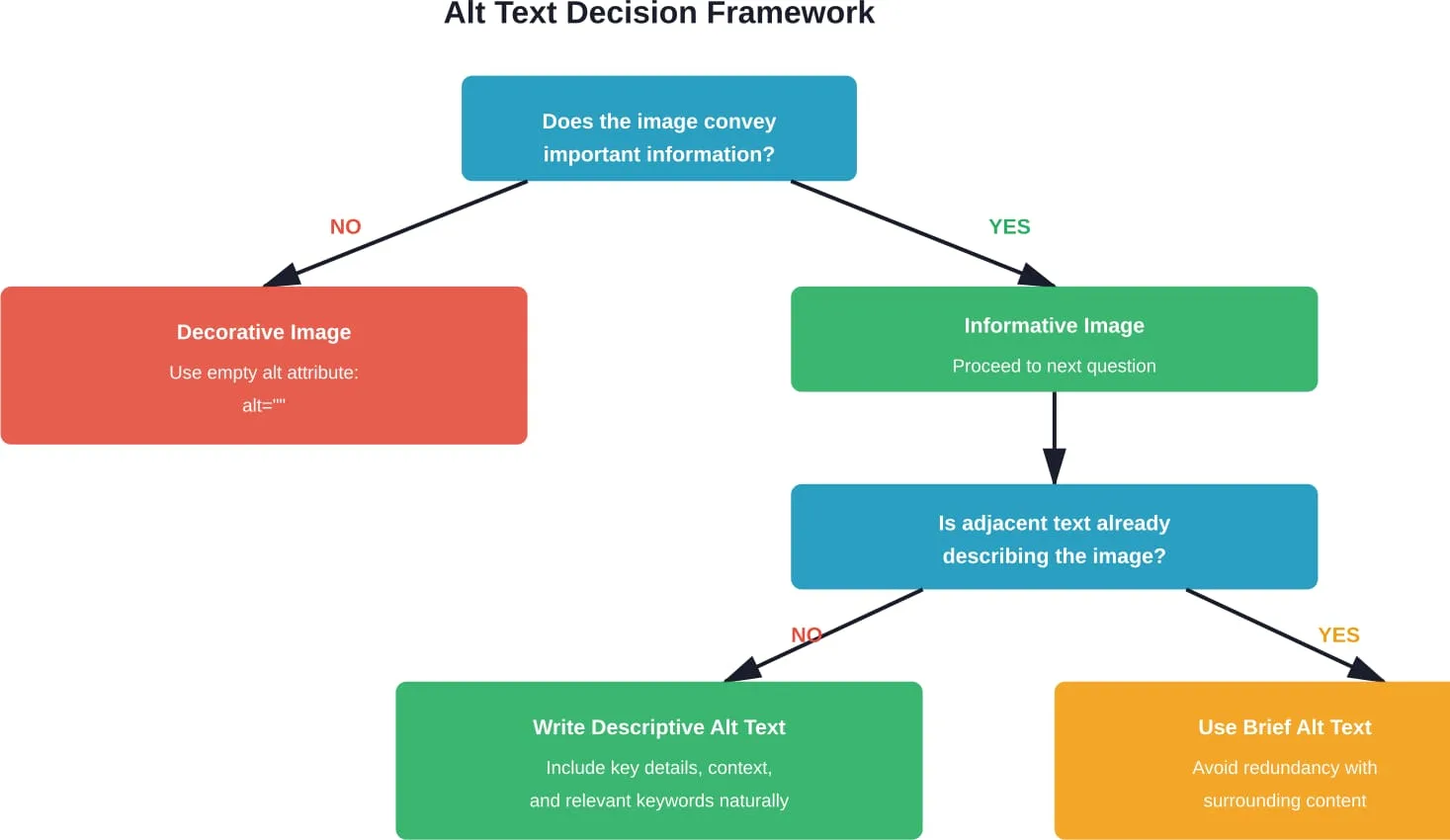
When to Use Empty Alt Text
Not every image needs descriptive alt text. Decorative images—those that don’t convey meaningful information—should use empty alt attributes: alt=””.
According to accessibility standards, empty alt attributes signal to screen readers that an image can be safely ignored. This prevents unnecessary distractions for users navigating with assistive technology.
Examples of decorative images include:
- Spacer or divider graphics
- Purely decorative borders or backgrounds
- Icons that duplicate adjacent text
- Images used only for visual styling
Common Alt Text Mistakes That Hurt SEO
Several alt text patterns actively harm SEO performance. Avoiding these mistakes can immediately improve how search engines interpret site images.
Starting with “Image of” or “Picture of”
Screen readers already announce that the element is an image. Starting alt text with “image of” or “picture of” wastes character count and sounds redundant to assistive technology users.
Using the Same Alt Text for Multiple Images
Each image should have unique alt text that describes its specific content. Duplicate alt text confuses search engines about which image is relevant for particular queries.
Leaving Alt Text Blank on Informative Images
Missing alt text on images that convey information creates accessibility barriers and prevents search engines from properly indexing those images.
Writing Alt Text for Search Engines Only
Alt text should make sense to humans first. If your alt text sounds unnatural when read aloud, it’s probably over-optimized for search engines.
How to Implement Alt Text Across Your Site
Adding alt text varies slightly depending on your content management system, but the underlying HTML remains consistent.
WordPress
When uploading images to the Media Library, WordPress provides an “Alternative Text” field. This field populates the alt attribute when the image is inserted into content. Alternatively, you can edit alt text directly in the block editor by selecting an image and modifying its settings.
Shopify
In the Shopify admin, navigate to the product, collection, or page containing the image. Click the image to open its settings, where an “Alt text” field is available. Shopify automatically applies this to the rendered HTML.
HTML/Custom Sites
Directly edit the img tag to include the alt attribute:
<img src=”path/to/image.jpg” alt=”Descriptive text here”>
Checking Existing Alt Text
Several tools help audit existing alt text implementation:
- Browser developer tools: Right-click an image and select “Inspect” to view the HTML and alt attribute
- SEO audit tools: Moz Pro Campaigns and similar platforms identify images missing alt text
- Accessibility checkers: Tools like WAVE or axe DevTools highlight alt text issues
- Screaming Frog: This crawler exports all images with their alt text attributes for bulk review
Use Alt Text to Support Search Visibility
Alt text helps search engines understand images and improves accessibility. Lengreo reviews your current implementation and aligns alt attributes with keyword strategy. The focus is on relevance, not keyword stuffing. This strengthens on-page SEO signals.
Ready to Improve Your Image Optimization?
Talk with Lengreo to:
- audit alt text usage
- align image descriptions with search intent
- clean up over optimized attributes
👉 Request an on-page SEO audit from Lengreo.
Alt Text vs. Title Attributes vs. Captions
These three elements serve different purposes and shouldn’t be confused.
| Element | Purpose | SEO Impact | When to Use |
|---|---|---|---|
| Alt Text | Describes image content for screen readers and when images don’t load | High – directly impacts indexing | Every informative image |
| Title Attribute | Provides additional information, often shown as a tooltip on hover | Low – minimal direct impact | Optional, when extra context helps |
| Caption | Visible text that accompanies an image for all users | Medium – part of page content | When images need explanation or credit |
Alt text is mandatory for SEO and accessibility. Title attributes are largely optional. Captions provide visible context and are indexed as regular page content.
Measuring Alt Text SEO Impact
Tracking the effectiveness of alt text optimization requires monitoring several metrics.
Image Search Traffic
Google Search Console separates web search traffic from image search traffic. Navigate to the Performance report and filter by “Search type: Image” to see queries driving image clicks.
An increase in image search impressions and clicks after adding or improving alt text indicates that search engines are better understanding and ranking images.
Indexing Status
Check how many images Google has indexed by searching: site:yourdomain.com in Google Images. Compare this count before and after alt text optimization.
Accessibility Scores
Tools like Lighthouse (built into Chrome DevTools) provide accessibility scores. Missing or poor alt text reduces these scores, which correlate with search performance.
Page Performance
Monitor overall organic traffic and rankings for pages where images play a significant role. Product pages, tutorials, and visual content often see measurable improvements from proper image optimization.
Industry-Specific Alt Text Strategies
Different types of sites benefit from tailored alt text approaches.
E-commerce Sites
Product images should include key specifications: brand, model, color, size, and distinguishing features. For example: “Sony WH-1000XM5 wireless headphones in black with carrying case.”
Multiple product images need distinct alt text. Don’t use identical descriptions for different angles or variations.
News and Media Sites
Journalistic images should identify who, what, where, and when. For instance: “President speaking at podium during United Nations General Assembly, September 2025.”
Educational Content
Screenshots, diagrams, and instructional images require precise descriptions. If the image shows a process, describe the key steps or elements visible.
Portfolio and Creative Sites
Artwork and design samples still need alt text, even though the visual is the point. Describe the medium, subject, style, and notable characteristics: “Abstract acrylic painting with swirling blue and gold patterns on 24×36 canvas.”
Advanced Alt Text Considerations
Multilingual Sites
Alt text should match the language of the page content. Search engines use language-specific indexes, and properly translated alt text helps images appear in regional search results.
Complex Images and Infographics
When an image conveys extensive information, alt text alone may not suffice. Consider combining brief alt text with a longer description elsewhere on the page or using aria-describedby for extended descriptions.
Responsive Images
Using different image files at different viewport sizes? The alt text should remain consistent unless the cropped versions show meaningfully different content.
Conclusion: Alt Text Is Non-Negotiable for Modern SEO
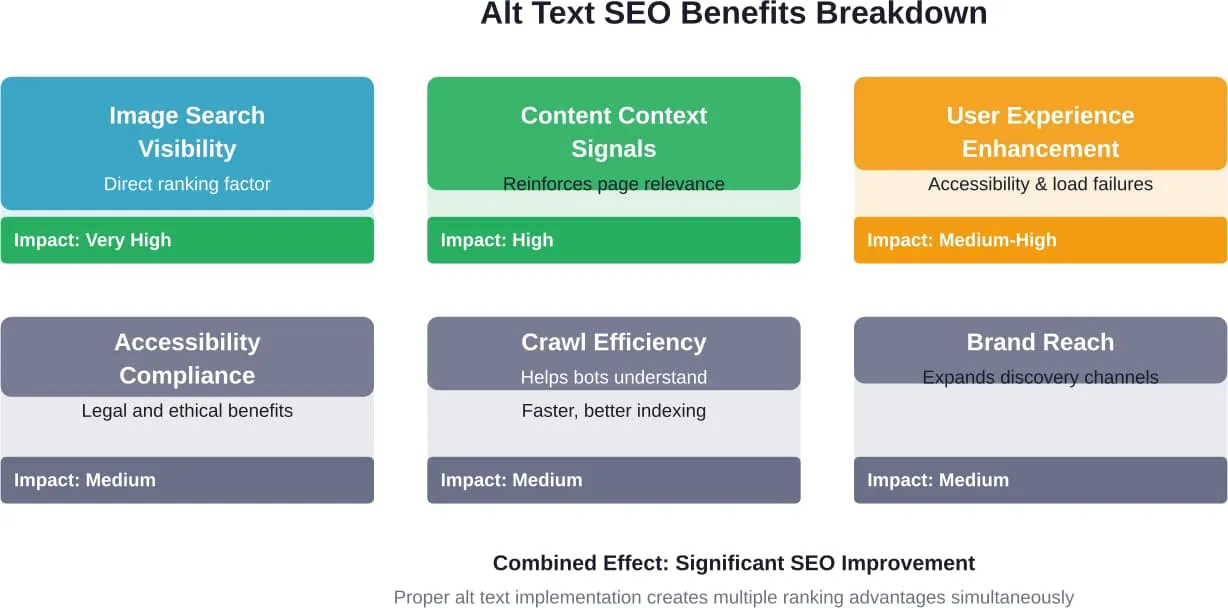
Alt text absolutely helps SEO—through improved image search visibility, stronger content relevance signals, better accessibility, and enhanced user experience. According to Google Search Central, properly implemented alt text helps search engines understand images and their context within pages.
The question isn’t whether alt text matters. It’s whether your implementation is good enough to capture the available traffic and rankings.
Start by auditing existing images, prioritizing high-traffic pages and product listings. Write descriptive, contextually relevant alt text that serves both users and search engines. Avoid keyword stuffing and generic descriptions.
The sites ranking at the top of search results haven’t overlooked this detail. Neither should you.
Ready to optimize your images? Start with your most important pages today. Even small improvements to alt text implementation can produce measurable traffic increases within weeks.