Understanding what people search for on Google isn’t just useful—it’s essential for anyone creating content, running a business, or trying to get found online. The right keywords can mean the difference between a website that gets ignored and one that attracts thousands of visitors.
But here’s the thing: Google processes billions of searches every day. How do you figure out which keywords matter for your specific needs?
The good news is that Google provides several free tools that reveal exactly what people are searching for. Even better, these tools show you search volume, competition levels, and trending patterns. This guide walks through the most effective methods for finding the most searched keywords on Google, using official Google tools that anyone can access.
Why Finding the Most Searched Keywords Matters
Before diving into the how-to, it’s worth understanding why keyword research matters in the first place.
When someone creates content or launches a website without researching keywords first, they’re essentially guessing what their audience wants. That approach rarely works. The content might be brilliant, but if it doesn’t align with what people are actually searching for, it won’t get found.
Keyword research removes the guesswork. It shows real data about what terms people use, how often they search for those terms, and how competitive each keyword is. This information helps create content that matches search intent—the actual reason someone types a query into Google.
For businesses, this translates directly to better visibility, more traffic, and ultimately more customers. For content creators, it means writing about topics that people genuinely want to read about.
Understanding Google’s Keyword Research Ecosystem
Google offers several tools for keyword research, each serving a slightly different purpose. According to Google Ads Help, Keyword Planner helps research keywords for Search campaigns, while Google Trends provides aggregated, anonymized search data that reveals interest patterns.
Here’s how these tools work together:
| Tool | Primary Purpose | Best For | Access Requirements |
|---|---|---|---|
| Google Keyword Planner | Search volume and forecasts | Finding specific keyword metrics and planning campaigns | Google Ads account (free) |
| Google Trends | Trending topics and comparative interest | Understanding seasonal patterns and rising searches | None—publicly accessible |
| Google Search Console | Actual performance data | Seeing what keywords already bring traffic to your site | Website ownership verification |
| Google Autocomplete | Search suggestions | Discovering long-tail variations and common questions | None—available in search |
Each tool provides a different angle on keyword data. The most effective approach uses multiple tools to build a complete picture of search behavior.
Method 1: Using Google Keyword Planner for Search Volume Data
Google Keyword Planner remains the most authoritative source for search volume information. It’s designed primarily for Google Ads campaigns, but it’s equally valuable for organic SEO research.
Setting Up Keyword Planner Access
To use Keyword Planner, you’ll need a Google Ads account. Don’t worry—creating an account is free, and you don’t need to run any paid campaigns to access the tool.
Once the account is set up, navigate to Tools & Settings, then select Keyword Planner from the Planning section. According to Google Ads Help, users must switch to Expert Mode to access Keyword Planner by clicking the “Tools” icon, selecting “Planning” from the section menu, then choosing “Keyword Planner”. Keyword Planner’s forecasts are based on historical search data (often incorporating the past 12 months or equivalent periods for seasonality adjustments), with historical metrics refreshing monthly.
Finding Keyword Search Volume
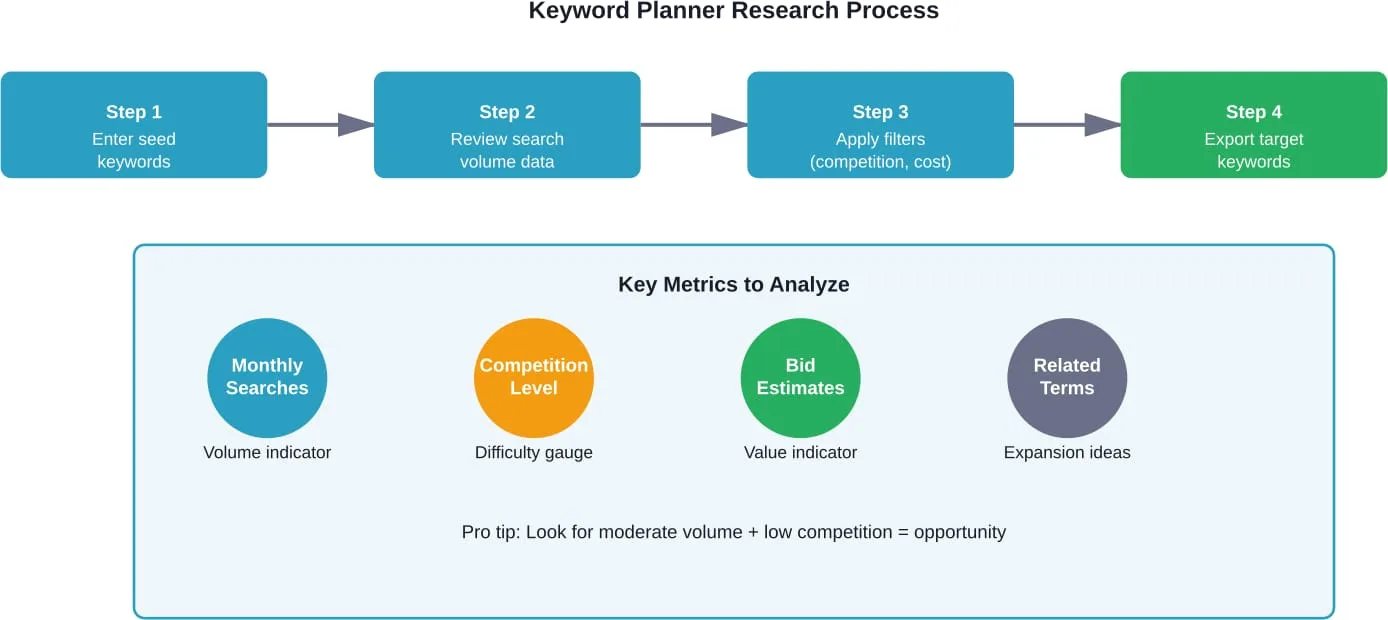
Keyword Planner offers two main options: “Discover new keywords” and “Get search volume and forecasts.”
For discovering the most searched keywords, start with “Discover new keywords.” Enter a few terms related to your topic, industry, or business. The tool returns a list of related keywords along with crucial metrics.
The key metrics to examine include average monthly searches, competition level, and bid ranges. Average monthly searches show how many times people search for a keyword each month. Competition indicates how many advertisers bid on that keyword, which often correlates with commercial value.
According to Google Ads Help, filters can narrow down keyword lists based on criteria like competition, impression share, and keyword text.
Interpreting Keyword Planner Results
The tool displays search volume in ranges rather than exact numbers for accounts without active campaigns. While exact numbers would be ideal, these ranges still provide valuable directional information about keyword popularity.
Look for keywords with substantial search volume in your niche. A keyword with 10,000 monthly searches might sound impressive, but if it’s completely unrelated to what your website offers, it’s worthless for your purposes.
The sweet spot often lies in keywords with moderate search volume and lower competition. These represent opportunities where it’s actually possible to rank without competing against massive, established websites.
Method 2: Leveraging Google Trends for Trending Keywords
While Keyword Planner excels at showing search volume, Google Trends reveals patterns, trends, and comparative popularity over time.
According to Google Search Central documentation, Google Trends provides a random sample of aggregated, anonymized, and categorized Google and YouTube searches. It lets users analyze interest in a particular query or topic from around the globe or at city-level geography.
Understanding Trends Data
Google Trends doesn’t show absolute search volume numbers. Instead, it displays relative interest on a scale from 0 to 100, where 100 represents peak popularity for the selected time period and location.
This relative scale is perfect for comparing multiple keywords or understanding seasonal patterns. For instance, searches for “tax software” spike every year around tax season. Trends make these patterns immediately visible.
Finding Trending Searches in Real Time
One of Trends’ most powerful features is the Realtime Search Trends section. This shows what’s trending right now—literally updated within the last 24 hours.
For content creators who can move quickly, realtime trends represent opportunities to create timely content that captures current search interest. The topics change constantly, reflecting news events, viral moments, and emerging interests.
Using Trends for Geographic Insights
Google Trends allows filtering by country, state, or city to identify geographic interest patterns. This geographic data reveals where specific keywords are most popular.
A business targeting specific regions can use this information to tailor content for local audiences. A keyword that’s incredibly popular in one state might barely register in another.
The “Related queries” section at the bottom of any Trends search provides additional keyword ideas, showing both “Rising” searches (gaining popularity quickly) and “Top” searches (consistently popular related terms).
Method 3: Mining Google Search Console for Performance Data
If you already have a website, Google Search Console provides the most valuable keyword data of all: the actual search queries that bring people to your site.
According to Google’s Search Console Help documentation, the Performance report shows important metrics about how sites perform in Google Search results, including search traffic changes over time, traffic sources, and which search queries most commonly display the site.
Setting Up Search Console
Search Console requires verifying ownership of a website. Google offers several verification methods, including uploading a file to the site, adding a meta tag, or using Google Analytics if it’s already installed.
Once verified, Search Console begins collecting data. It may take a few days for substantial data to accumulate, but the wait is worth it.
Analyzing the Queries Report
The Queries section of the Performance report shows every search term that led to the site appearing in search results, along with four key metrics: total clicks, total impressions, average click-through rate (CTR), and average position.
This data is gold for several reasons. First, it shows which keywords already drive traffic, indicating what’s working. Second, it reveals keywords where the site appears in search results but gets few clicks—opportunities to improve titles and descriptions. Third, it uncovers unexpected keywords that bring traffic, which might suggest new content directions.
Google introduced query groups in Search Console Insights, which group similar search queries together. This feature addresses one of the biggest challenges in analyzing search performance: the many variations people use to express the same search intent.
Finding Opportunity Keywords
Look for queries where the site ranks on page two (positions 11-20). These represent quick-win opportunities. The site already has some relevance for these terms; improving the content or adding internal links might push it onto page one, where it will get significantly more clicks.
Also examine queries with high impressions but low CTR. If the site appears frequently but people don’t click, the title or meta description likely needs improvement. Rewriting these elements to be more compelling can increase traffic without changing rankings.
Method 4: Using Google Autocomplete for Long-Tail Keywords
Sometimes the simplest methods work best. Google’s autocomplete feature—the suggestions that appear when typing in the search box—reveals exactly what people commonly search for.
How Autocomplete Works
When you start typing a query, Google suggests completions based on several factors: search popularity, your own search history (if signed in), and current trending topics. These suggestions represent real searches that many people perform.
Systematically Mining Autocomplete
To use autocomplete for keyword research, start with a base keyword, then add different letters or words to see what suggestions appear.
For example, searching “best laptops for” reveals suggestions like “best laptops for students,” “best laptops for gaming,” “best laptops for video editing,” and more. Each suggestion represents a popular search query.
Try adding question words before keywords: “how to,” “what is,” “why does,” “when should,” “where can.” This reveals informational queries that make excellent content topics.
Also check the “People also ask” boxes that appear in search results. These questions represent related queries that Google knows people commonly ask. Answering these questions in content helps capture that search traffic.
Combining Tools for Comprehensive Keyword Research
The most effective keyword strategy doesn’t rely on a single tool. Each method provides different insights that complement each other.
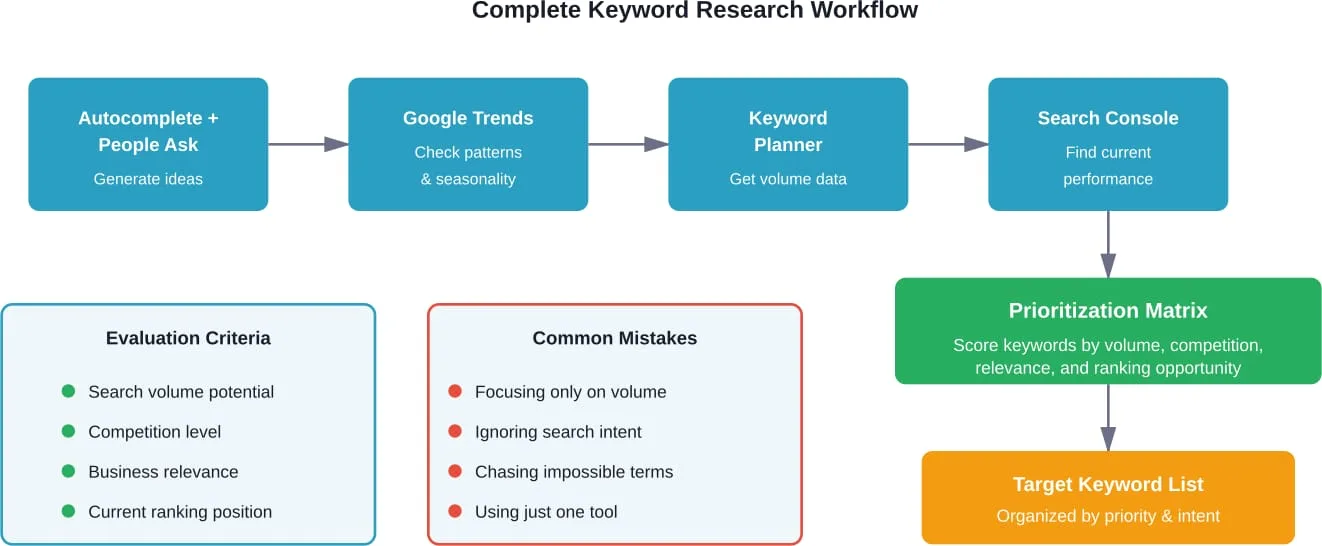
Here’s an effective workflow:
- Start with Google Autocomplete and People Also Ask boxes to generate a broad list of potential keywords and topics.
- Run those keywords through Google Trends to understand search patterns and identify which terms are growing versus declining.
- Use Google Keyword Planner to get search volume data and find additional related keywords.
- Check Search Console to see which keywords already bring traffic and identify improvement opportunities.
- Prioritize keywords based on search volume, competition, relevance, and current ranking position.
This workflow moves from broad discovery to specific data analysis, ensuring no opportunities get missed.
Lengreo’s Proven Strategy for SEO Success
At Lengreo, we don’t just talk the talk—we walk the walk when it comes to driving measurable SEO results. With years of experience under our belt, we focus on strategies that don’t just improve visibility but also elevate your brand’s presence online. Our team thrives on using a mix of tried-and-true methods and cutting-edge techniques to ensure your business not only ranks but also stands out in competitive spaces.
We leverage comprehensive SEO audits, keyword research, and competitor analysis to deliver organic growth. With services like content strategy development, white-label SEO, and link-building, we work to refine every aspect of your online presence. Our mission is to ensure that businesses like yours attract and convert valuable leads, fostering long-term success through targeted SEO efforts.
Understanding Search Intent Behind Keywords
Finding the most searched keywords is only half the battle. Understanding why people search for those keywords—the search intent—is equally crucial.
Search intent generally falls into four categories:
| Intent Type | User Goal | Example Keywords | Content Type Needed |
|---|---|---|---|
| Informational | Learn something | “how to fix a leaky faucet,” “what is SEO” | Guides, tutorials, explanations |
| Navigational | Find a specific website | “Facebook login,” “YouTube” | Homepage, branded pages |
| Commercial | Research before buying | “best smartphones 2026,” “iPhone vs Samsung” | Reviews, comparisons, lists |
| Transactional | Make a purchase | “buy iPhone 15,” “pizza delivery near me” | Product pages, services, checkout |
Creating content that matches search intent matters more than targeting high-volume keywords. A keyword with lower search volume but perfect intent alignment will convert better than a high-volume keyword where your content doesn’t match what searchers want.
Look at the actual search results for any keyword you’re considering. What types of pages currently rank? If Google shows mostly product pages, the intent is transactional. If blog posts and guides dominate, the intent is informational. Match that intent with your content.
Advanced Keyword Research Strategies
Once the basics are mastered, several advanced techniques can uncover even better keyword opportunities.
Analyzing Competitor Keywords
While Google’s tools are powerful, they don’t show which keywords competitors rank for. However, Search Console can reveal this information for your own site, which provides clues about what might work.
Study the top-ranking pages for your target keywords. What topics do they cover? What subtopics do they include? What questions do they answer? This reverse-engineering approach reveals the comprehensiveness needed to rank.
Finding Question-Based Keywords
Questions represent incredible keyword opportunities because they reveal specific problems people want solved. The People Also Ask feature in Google search results is a goldmine for these.
Create content that directly answers common questions. This approach aligns perfectly with featured snippet opportunities—those highlighted boxes at the top of search results that provide direct answers.
Identifying Seasonal Patterns
Google Trends excels at revealing seasonal search patterns. Some keywords spike at specific times of year.
Understanding these patterns allows planning content calendars months in advance. Create content for seasonal keywords well before the search volume peaks, giving the content time to rank.
Exploring Location-Based Keywords
For local businesses or region-specific services, location-based keywords are essential. These combine service terms with geographic modifiers: “plumber in Austin,” “Chicago pizza delivery,” “Los Angeles wedding photographer.”
Google Trends allows filtering by country, state, or city to identify geographic interest patterns. Keyword Planner also supports geographic analysis for location-specific services.
Common Keyword Research Mistakes to Avoid
Even with the right tools, several common mistakes can derail keyword strategy.
Focusing Exclusively on High-Volume Keywords
The biggest keywords in an industry are usually the most competitive. A brand-new website has virtually no chance of ranking for extremely competitive terms.
Better strategy: target long-tail keywords with lower search volume but also lower competition. These keywords often convert better because they’re more specific. Someone searching “shoes” is browsing; someone searching “women’s waterproof hiking boots size 8” knows exactly what they want.
Ignoring Current Rankings
If Search Console shows the site already ranks in position 15 for a keyword, that’s a much better target than a keyword where the site doesn’t rank at all. The site has some relevance for that first keyword; optimization might push it to page one.
Forgetting About Related Terms
No single page should target just one keyword. Modern SEO works best when content covers a topic comprehensively, naturally incorporating related terms and variations.
Modern search algorithms understand topic relationships and relevance beyond exact keyword matches. A page about “keyword research” should naturally mention related terms like “search volume,” “keyword tools,” “SEO,” and “search queries.”
Overlooking User Intent
As mentioned earlier, a keyword with massive search volume is worthless if the intent doesn’t match what the content offers. Always check what currently ranks for a keyword before targeting it.
Turning Keyword Research into Action
Data without action is useless. Once keyword research is complete, that information needs to guide content strategy.
Creating a Keyword Map
A keyword map assigns specific keywords to specific pages on a site. This prevents internal competition where multiple pages target the same keyword.
Organize keywords by intent and topic, then create or optimize pages to target each cluster of related keywords.
Optimizing Existing Content
Look at pages that already get some traffic. Can they be improved to target additional related keywords? Can outdated information be refreshed? Can the title or meta description be rewritten to improve CTR?
Optimizing existing content often delivers faster results than creating new content because the pages already have some authority and rankings.
Building a Content Calendar
Use keyword research to plan content months in advance. Prioritize topics based on search volume, competition, business value, and seasonal timing.
A well-planned content calendar ensures consistent publishing and strategic topic coverage rather than random content creation.
Monitoring and Adjusting
Keyword strategy isn’t set-it-and-forget-it. Search patterns change. New competitors emerge. Google’s algorithms evolve.
Regularly review Search Console data to see what’s working and what isn’t. Double down on successful keywords and adjust strategies for underperforming ones.
Conclusion
Finding the most searched keywords on Google isn’t mysterious or complicated—it just requires using the right tools and interpreting the data correctly.
Google provides everything needed through Keyword Planner, Google Trends, Search Console, and even basic features like autocomplete. Each tool offers different insights that work together to build a complete picture of search behavior.
The key is moving beyond just collecting keyword data to actually understanding what that data reveals about user intent, competition levels, and opportunities. A massive keyword list is worthless without strategic prioritization and action.
Start with the tools covered in this guide. Explore what people search for in your niche. Identify gaps where your content can provide value. Then create content that genuinely answers those searches better than existing results.
Keyword research isn’t about gaming the system—it’s about understanding what people want and providing it. Get that right, and the rankings will follow.
Ready to start? Open Google Keyword Planner and enter your first seed keyword. The data is waiting.