Key Takeaways: WordPress dominates as the best CMS for SEO, powering 49% of top-ranking domains according to analysis of 59,033 websites. Its extensive plugin ecosystem, clean code structure, and mobile optimization capabilities make it the top choice, though platforms like Contentful and Adobe Experience Manager excel in specific scenarios like headless architecture or enterprise accessibility.
The content management system choice shapes technical SEO performance before optimization work even begins. With over 50% of web pages now running on CMS platforms, these systems define baseline standards for structured data, mobile responsiveness, and page speed.
And here’s what matters: the right CMS doesn’t just make optimization easier. It actively sets technical foundations that directly impact search rankings.
WordPress Dominates Top-Ranking Domains
Analysis of 59,033 top-ranking domains shows WordPress powering 49% of the highest-performing websites in search results. That’s a 175% increase from 2016, when only 18% of top-ranking sites used the platform.
WordPress currently holds 62.6% market share among all CMS platforms. But the dominance among top-ranking domains specifically tells a different story—one about SEO effectiveness rather than just popularity.
The platform’s architecture supports clean HTML output, semantic markup, and efficient database queries. Combined with plugins like Yoast SEO and The SEO Framework, WordPress sites gain real-time optimization feedback and automated technical improvements.
Why WordPress Leads in SEO Performance
Several factors explain WordPress’s dominance. The platform generates clean, standards-compliant code that search engines parse efficiently. Theme frameworks like Genesis and Astra prioritize performance optimization from the ground up.
Plugin availability matters too. According to Google Search Central documentation, structured data markup helps search engines understand page content—and WordPress plugins automate this implementation. Sites implementing structured data see users spending 1.5x more time on pages and achieving 3.6x higher interaction rates on AMP pages with search features.
Mobile-first indexing, which Google uses to rank all content, works seamlessly with responsive WordPress themes. Google’s mobile-first indexing best practices emphasize that mobile versions must contain equivalent content—something WordPress handles automatically through responsive design.
CMS Market Share vs. SEO Performance
Market share doesn’t always correlate with SEO effectiveness. Here’s how the major platforms compare:
| CMS Platform | Overall Market Share | Top-Ranking Domain Usage | SEO Advantage |
|---|---|---|---|
| WordPress | 62.6% | 49% | Strong plugin ecosystem, clean code |
| Shopify | 6.5% | N/A (ecommerce focus) | Built-in performance optimization |
| Wix | 4.2% | Limited presence | Improving Core Web Vitals |
| Squarespace | 3.1% | Limited presence | Clean templates, limited control |
| Joomla | 2.4% | Minimal presence | Flexible but complex setup |
The gap between market share and top-ranking usage reveals which platforms actually deliver SEO results. WordPress converts its market dominance into search performance more effectively than competitors.
Core Web Vitals Performance Across Platforms
Core Web Vitals measure real-world user experience for loading performance, interactivity, and visual stability. According to Google Search Central, these metrics align with what core ranking systems reward.
Recent data from the Core Web Vitals Technology Report shows every major platform improved performance, but gains weren’t equal. Duda ranked first in July 2025 with 84.96% of sites passing Core Web Vitals. Joomla posted the largest month-over-month increase at +3.23%, while Wix gained +2.61%.
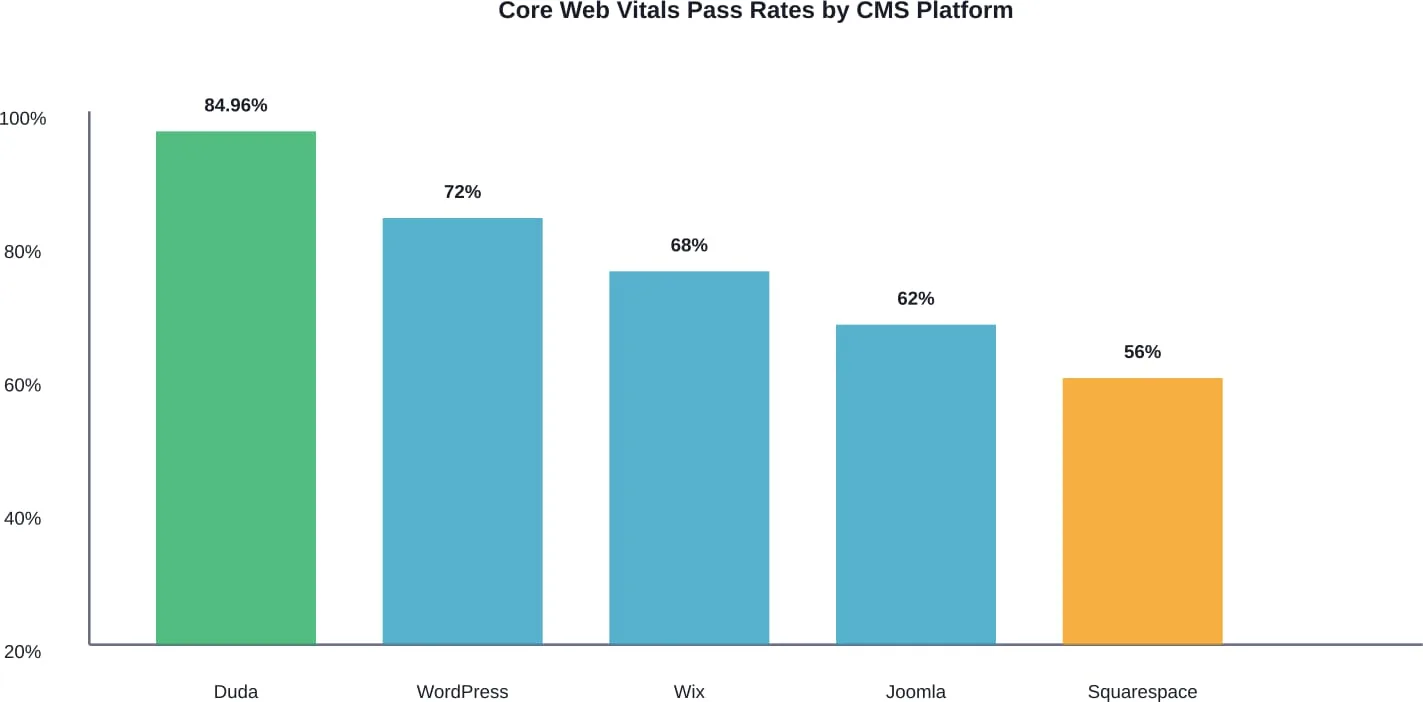
WordPress performance varies significantly based on theme and plugin choices. Testing of Shopify sites reveals average performance metrics including First Contentful Paint at 3.8 seconds and Time To Interactive at 22.1 seconds—numbers that improve dramatically with optimization.
Interaction to Next Paint Rankings
Interaction to Next Paint (INP) measures how quickly web pages respond to user input. According to HTTPArchive comparisons, INP has three ratings: Good (below or at 200 milliseconds), Needs Improvement (200-500 milliseconds), and Poor (above 500 milliseconds).
Nine content management systems were recently ranked by INP performance. The results show significant variation in how platforms handle user interactions during page visits.
Optimizing INP requires careful attention to JavaScript execution and main thread blocking. WordPress sites using minimal JavaScript frameworks and optimized themes consistently outperform heavily-customized installations.
Essential SEO Features in Modern CMS Platforms
An SEO-friendly CMS needs specific technical capabilities. These features separate platforms that actively support search optimization from those that create obstacles.
URL Structure Control
Clean, descriptive URLs matter for both users and search engines. The best CMS platforms allow complete control over permalink structure without requiring custom development.
WordPress offers flexible permalink options including post names, categories, and custom structures. This beats platforms that lock users into numeric IDs or hash-based URLs.
Meta Tag Management
According to Google Search Central documentation on meta tags, these HTML elements provide details about pages to search engines and other clients. Proper meta tag implementation belongs in the page head section.
Leading CMS platforms either include native meta tag management or support it through established plugins. Yoast SEO, installed on 10+ million WordPress sites, provides real-time feedback on meta descriptions, titles, and schema markup.
Structured Data Implementation
Google uses structured data markup to understand page content. According to their introduction to structured data, this standardized format provides explicit information about page meaning—like recipe ingredients, cooking time, or product prices.
The impact shows in user behavior. Rakuten found users spend 1.5x more time on structured data pages than non-structured pages. Nestlé measured that pages appearing as rich results in search have significantly higher engagement.
WordPress plugins automate structured data implementation. Other platforms like Contentful and Storyblok provide structured content models that naturally support schema markup.
Mobile Optimization
Google indexes and ranks mobile versions of content first, using smartphone user agents for crawling. This mobile-first indexing approach means mobile optimization isn’t optional.
Responsive design handles this automatically—content adapts to screen size without separate mobile versions. WordPress themes, Wix templates, and Squarespace designs all support responsive layouts by default.
But responsive design alone isn’t enough. Mobile performance matters too. Heavy images, render-blocking JavaScript, and excessive DOM size all hurt mobile experience and, consequently, rankings.
Traditional vs. Headless CMS for SEO
Headless CMS platforms separate content creation from presentation, offering flexibility for multi-channel publishing. But does this architecture help or hurt SEO?
The answer depends on implementation. According to analysis of headless website builds, SEOs should advocate for six critical elements: server-side rendering, proper redirect handling, XML sitemap generation, meta tag control, structured data support, and performance optimization.
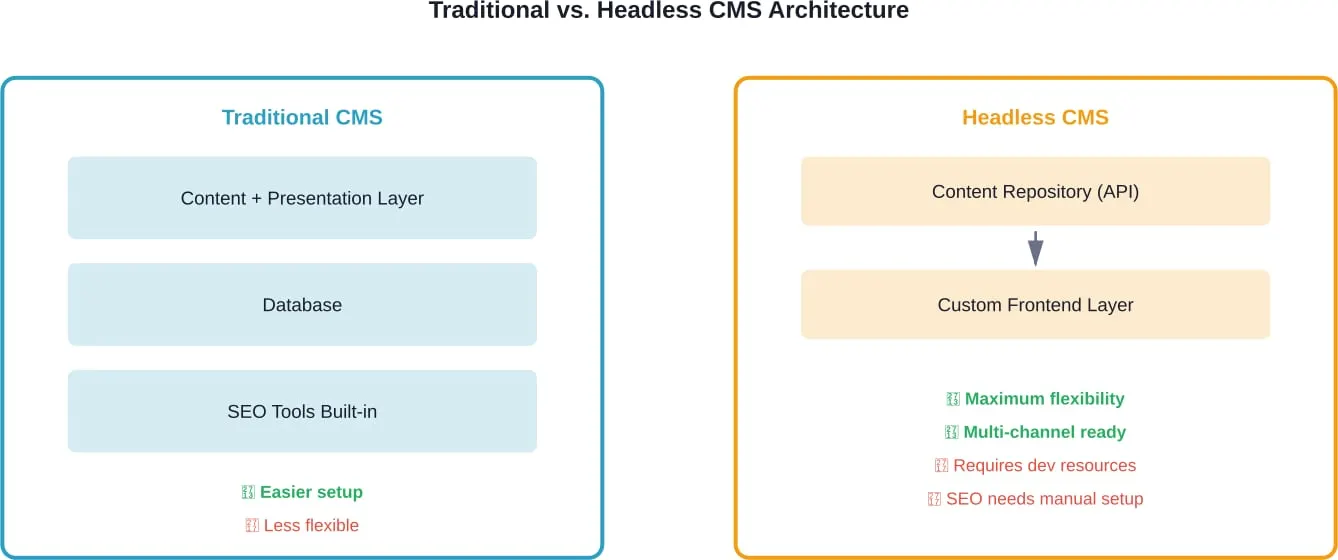
Traditional platforms like WordPress handle SEO requirements automatically. Headless platforms like Contentful, Storyblok, and Strapi require developers to implement these features in the frontend layer.
For teams with strong development resources, headless architecture offers performance advantages and publishing flexibility. For smaller teams, traditional CMS platforms provide better out-of-the-box SEO support.
Platform-Specific SEO Capabilities
Each major CMS brings different strengths to SEO optimization. Understanding these differences helps match platforms to specific needs.
WordPress: The All-Around Champion
WordPress dominates for good reason. The platform combines ease of use with powerful optimization capabilities.
Plugin availability sets WordPress apart. Yoast SEO provides real-time content analysis, schema markup, and XML sitemap generation. The SEO Framework offers similar features with faster performance. WP Meta SEO provides bulk SEO content and image SEO optimization features.
Theme quality varies dramatically. Premium frameworks like Genesis and Astra prioritize clean code and fast loading times. Custom themes can either enhance or destroy SEO performance depending on development quality.
Drupal: Enterprise-Grade Control
Drupal offers granular control over every aspect of site structure and output. This flexibility comes with complexity—developers need significant expertise to leverage Drupal’s capabilities.
For large organizations with complex content hierarchies, Drupal’s architecture supports sophisticated SEO strategies. URL aliasing, taxonomy management, and content relationships all work at enterprise scale.
Joomla: The Middle Ground
Joomla falls between WordPress simplicity and Drupal complexity. Recent Core Web Vitals data shows Joomla made the largest month-over-month performance gain at +3.23%.
The platform handles basic SEO requirements well. Built-in features include meta tag management, URL rewriting, and sitemap generation. Extensions add advanced capabilities, though the ecosystem isn’t as extensive as WordPress.
Wix: Improving but Limited
Wix has addressed many early SEO criticisms. The platform now supports custom meta tags, structured data, and mobile optimization. Core Web Vitals scores improved +2.61% month-over-month.
But Wix still limits technical control compared to open-source alternatives. Advanced users may find customization options restrictive.
Squarespace: Clean Design, Limited Flexibility
Squarespace templates produce clean, fast-loading pages with responsive design built-in. The platform handles basic SEO requirements automatically.
Customization limitations appear when implementing advanced strategies. Structured data support exists but requires manual JSON-LD injection. URL structure options are less flexible than WordPress.
Shopify: Ecommerce-Optimized
Shopify isn’t technically a traditional CMS, but its 6.5% market share makes it relevant for ecommerce SEO. The platform includes performance optimizations specifically for product catalogs and checkout flows.
Product schema markup works automatically. Mobile optimization is built-in. Speed optimization requires careful theme selection and app management—too many apps slow page loading significantly.
Accessibility and SEO Performance
Accessibility and SEO overlap significantly. Both prioritize clear content structure, semantic HTML, and usable navigation.
HTTP Archive research using Lighthouse Accessibility Audit scored platforms on accessibility performance. Adobe Experience Manager and Contentful topped traditional CMS rankings. WordPress scored surprisingly well, benefiting from accessible theme frameworks.
Among website builders, scores varied more widely. Platforms enforcing accessible templates outperformed those allowing unrestricted customization.
Accessibility matters for SEO beyond rankings. Screen reader compatibility requires the same semantic markup that helps search engines understand content structure. Keyboard navigation depends on logical DOM order—something that also improves crawlability.
AI-Driven SEO Tools in CMS Platforms
AI integration is reshaping CMS capabilities. Tools like One Click SEO Optimizer use artificial intelligence to analyze content and generate optimized meta tags, descriptions, and schema markup automatically.
These AI tools work best as assistants rather than replacements for strategic thinking. Automated optimization handles technical implementation efficiently, but content strategy still requires human judgment.
Looking ahead, AI-driven CMS features will increasingly handle routine optimization tasks. Platforms integrating these capabilities natively gain advantages over those requiring third-party plugins.
Choosing the Right CMS for SEO Needs
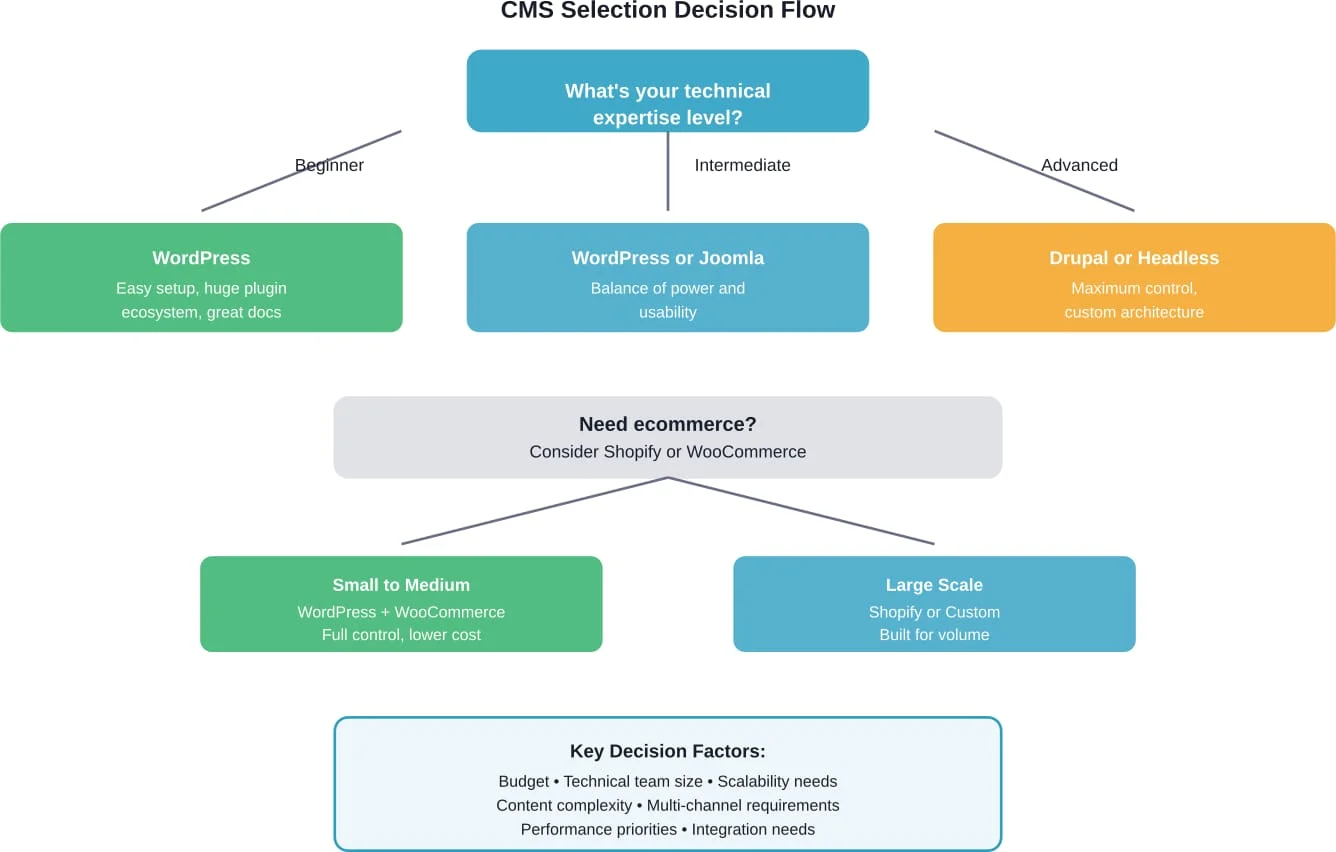
Platform selection depends on specific requirements, technical resources, and growth plans.
For Small Businesses and Blogs
WordPress remains the default choice. Low entry cost, extensive documentation, and proven SEO performance make it ideal for teams without dedicated developers.
Managed WordPress hosting from providers like WP Engine or Kinsta handles technical maintenance. SEO plugins automate optimization tasks. Thousands of tutorials cover every possible scenario.
For Enterprise Organizations
Scale changes requirements. Enterprise organizations often need Drupal’s granular control or headless architecture for multi-channel publishing.
Drupal supports complex content workflows, multilingual sites, and sophisticated user permissions. Adobe Experience Manager leads accessibility scores and integrates with enterprise marketing tools.
Headless platforms like Contentful work well when content needs distribution across web, mobile apps, and other channels. The cost appears in required development resources.
For Ecommerce Sites
Product catalog size determines the right choice. Sites with fewer than 1,000 products often do well with WordPress and WooCommerce. This combination offers flexibility and lower costs.
Larger catalogs benefit from Shopify’s purpose-built infrastructure. The platform handles inventory management, payment processing, and checkout optimization automatically.
For Publishers and Content-Heavy Sites
Publishing workflows require strong editorial tools and content organization. WordPress serves most publishers well, but very large operations may need custom solutions.
Consider factors like revision history, editorial workflow, content scheduling, and multi-author management. WordPress handles these with plugins, but performance can suffer at massive scale.
Implementation Best Practices
Platform choice matters, but implementation determines actual SEO results. Even the best CMS underperforms with poor configuration.
Theme and Template Selection
Choose themes prioritizing performance and clean code. Test Core Web Vitals scores before committing. Many popular themes load slowly despite attractive designs.
For WordPress, frameworks like Genesis provide solid technical foundations. For other platforms, official or verified templates generally outperform third-party options.
Plugin and Extension Management
Every plugin adds code execution overhead. Install only necessary tools. Deactivate and delete unused plugins rather than just disabling them.
Popular doesn’t always mean good. Research plugin performance impact before installation. Some widely-used plugins significantly slow page loading.
Image Optimization
Images typically represent the largest page weight. Implement automatic compression, proper sizing, and lazy loading.
Modern image formats like WebP reduce file sizes significantly. Most CMS platforms support automatic format conversion through plugins or built-in features.
Caching Strategy
Proper caching dramatically improves performance. Implement page caching, browser caching, and object caching where appropriate.
WordPress benefits from caching plugins like WP Rocket or W3 Total Cache. Other platforms may include caching by default or require server-level configuration.
Content Delivery Network
CDNs distribute static assets across geographic locations, reducing latency for distant visitors. Services like Cloudflare offer free tiers suitable for most websites.
CDN benefits increase with traffic volume and geographic distribution. Local businesses see smaller gains than international sites.
Common SEO Mistakes by Platform
Each CMS has typical pitfalls that hurt search performance.
WordPress Mistakes
Installing too many plugins tops the list. Each addition slows performance and increases security risk. Poor theme selection follows closely—attractive designs often hide inefficient code.
Neglecting updates creates security vulnerabilities and compatibility issues. WordPress updates frequently, and keeping core software, themes, and plugins current prevents problems.
Headless CMS Mistakes
Forgetting to implement server-side rendering creates indexing problems. Search engines need rendered HTML, not JavaScript that executes client-side.
Neglecting technical SEO basics happens when developers unfamiliar with optimization build frontend layers. Every feature that worked automatically in traditional CMS requires manual implementation in headless architecture.
Website Builder Mistakes
Over-customization in drag-and-drop builders often produces bloated code. Platforms like Wix and Squarespace work best when using their designed workflows rather than forcing custom designs.
Ignoring mobile preview during design causes responsive layout problems. Always test designs on actual mobile devices, not just desktop preview tools.
Choose the Right CMS for SEO Growth
CMS selection affects site structure, speed, indexing, and scalability. Lengreo analyzes your business needs before recommending a platform. The evaluation considers technical flexibility, content management workflow, and SEO control. This prevents limitations later.
Ready to Select an SEO Friendly CMS?
Talk with Lengreo to:
- compare CMS options based on SEO needs
- define technical requirements
- choose a scalable solution for growth
👉 Request a CMS and SEO consultation from Lengreo.
Measuring CMS SEO Success
Track specific metrics to evaluate platform effectiveness.
Core Web Vitals
Monitor Largest Contentful Paint, First Input Delay, and Cumulative Layout Shift. Google Search Console provides field data from real users.
Good scores don’t guarantee rankings, but poor scores create disadvantages. Aim for green ratings across all three metrics.
Crawl Efficiency
Check how search engines crawl the site. Google Search Console shows crawl statistics, errors, and indexing status.
Efficient CMS platforms make crawling easy. Look for low error rates and complete indexing of published content.
Technical SEO Compliance
Audit implementations of structured data, meta tags, sitemaps, and robots.txt. Tools like Google’s Rich Results Test verify structured data markup.
Regular technical audits catch problems before they impact rankings. Schedule quarterly reviews of technical SEO elements.
Page Speed Metrics
Beyond Core Web Vitals, monitor total page size, request count, and load times. These metrics indicate optimization opportunities.
Compare performance against competitors in your niche. Industry benchmarks vary—ecommerce sites naturally load more resources than blogs.
Future-Proofing CMS Selection
Technology changes rapidly. Consider long-term factors when choosing platforms.
Developer Community
Active communities mean continued development, security updates, and available help. WordPress’s enormous community provides support and extends platform life.
Smaller platforms risk abandonment. Check update frequency, community size, and commercial backing before committing.
Flexibility for Change
Business needs evolve. Choose platforms that support growth without requiring complete rebuilds.
WordPress scales from simple blogs to complex enterprise sites. Headless platforms support adding new channels without content restructuring.
API and Integration Support
Marketing technology stacks grow more complex. Platforms need integrations with analytics, marketing automation, and other tools.
WordPress offers plugins for virtually every integration. Headless platforms provide APIs that developers can connect to any service.
Making Your CMS Decision
WordPress dominates top-ranking domains for good reason. Its combination of flexibility, plugin ecosystem, and active community makes it the strongest all-around choice for most websites.
But “best” depends on context. Enterprise organizations with complex needs may require Drupal’s power. Ecommerce operations might prefer Shopify’s purpose-built infrastructure. Publishers with multi-channel distribution could benefit from headless architecture.
The data shows WordPress powering 49% of top-ranking sites—a 175% increase since 2016. That trend reflects actual SEO performance, not just popularity.
Real talk: platform choice matters less than implementation quality. Even the best CMS underperforms with poor themes, excessive plugins, and neglected optimization. Conversely, careful implementation can achieve strong results on multiple platforms.
Start by assessing technical resources, budget, and specific requirements. Match these factors to platform strengths. Then commit to proper implementation—clean themes, essential plugins only, image optimization, caching strategy, and regular technical audits.
The best CMS for SEO is the one that matches capabilities to needs while maintaining technical foundations that search engines reward.