Summary: The disavow tool is a last-resort feature in Google Search Console that tells Google to ignore specific backlinks pointing to your site. It’s primarily used when a site has received a manual penalty for unnatural links that cannot be removed, or when toxic backlinks may be harming rankings. Google now handles most spam links automatically, making disavowing necessary only in rare circumstances.
Backlinks are supposed to help websites rank better in search results. But what happens when those links become a liability instead of an asset?
That’s where the disavow tool enters the picture. According to Google Search Console Help, disavowing links is “an advanced feature” that should only be used when a site faces a manual action for unnatural links, or when there’s concern about receiving such a penalty.
Here’s the thing though—most sites will never need to disavow anything. Google has gotten remarkably good at filtering out spam on its own. But understanding this tool matters because using it incorrectly can actually damage rankings rather than help them.
Understanding What Disavow Means in SEO
Disavowing a link means asking Google to ignore that backlink when evaluating a site’s ranking factors. It’s essentially telling the search engine: “Don’t count this link against me.”
The disavow tool doesn’t remove links from the web. Those links still exist on other sites and will still appear in backlink analysis tools. What changes is how Google treats those links when calculating search rankings.
Google introduced this tool in 2012 to help sites recover from poor linking practices and manual penalties. While Google primarily intended the tool for cleaning up a site’s own past mistakes, they acknowledged from the start that it could be used to mitigate the effects of ‘negative SEO’ attacks by competitors.
When a disavow file gets submitted through Google Search Console, it tells Google’s algorithm to discount specific URLs or entire domains when assessing link equity. The process takes several weeks to fully implement, as Google needs to recrawl and reprocess the affected pages.
When Disavowing Backlinks Becomes Necessary
Real talk: most sites don’t need to touch the disavow tool. Google’s John Mueller has repeatedly emphasized that the search engine handles spam links automatically in the vast majority of cases.
But there are specific scenarios where disavowing makes sense:
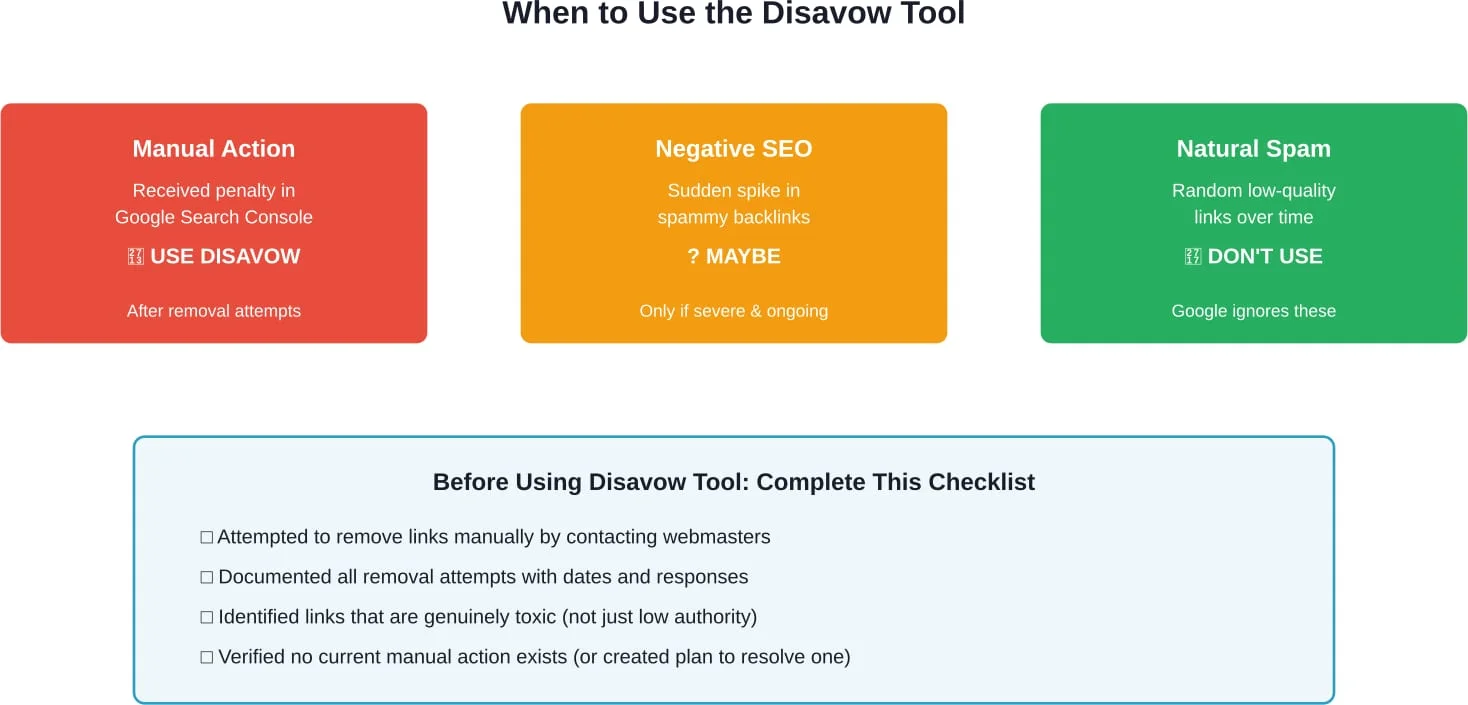
Manual Actions for Unnatural Links
According to Google’s official documentation, the primary reason to disavow is receiving a manual action penalty. These penalties occur when Google’s human reviewers determine a site has violated link spam policies through paid links, link schemes, or other manipulative practices.
A manual action notification appears directly in Google Search Console. Sites with this penalty see significant ranking drops until the issue gets resolved. First step? Remove as many problematic links as possible by contacting site owners. Then, and only then, disavow what can’t be removed.
Negative SEO Attacks
Negative SEO involves competitors building thousands of spammy backlinks to a target site hoping to trigger a penalty. Search Engine Journal notes that this tactic is “cheap, easy to do, and difficult to trace,” with some services offering “10,000 links for $10.”
While Google claims its algorithms can typically identify and ignore these attacks, severe cases with massive volumes of spam links may warrant disavowing. The key indicator? A sudden influx of links from obviously low-quality sources with exact-match anchor text.
Past Poor Link Building Practices
Sites that previously purchased links, participated in link networks, or used other black-hat tactics may need to clean up their link profiles. Even if there’s no current penalty, these historical links could pose future risks.
How Google Actually Handles Spam Links Today
Here’s what many SEO guides won’t tell upfront: Google’s gotten dramatically better at ignoring spam links automatically.
According to search industry reports, Google indicated the disavow tool remains available but that Google is handling spammy links automatically in most cases. This represents a major shift from the early 2010s when low-quality links could actively harm rankings.
Modern Google algorithms can identify and neutralize most spam link patterns without manual intervention. The search engine looks at factors like anchor text distribution, linking site quality, link velocity patterns, and contextual relevance to determine which links to count.
When Google identifies spam links, it simply ignores them—they neither help nor hurt rankings. This automatic filtering means that the random blog comment spam, forum profile links, and scraped content links that show up in most backlink profiles pose minimal risk.
That said, Google’s automated systems aren’t perfect. Massive coordinated attacks or sophisticated negative SEO campaigns can sometimes slip through. And manual actions still exist for the most egregious violations.
Manage Risk With Proper Disavow Strategy
Disavow is used to reduce risk from harmful backlinks. Lengreo reviews suspicious links before recommending action. The decision is based on real risk assessment, not automatic removal. This protects your domain authority.
Ready to Review Your Backlink Risk?
Talk with Lengreo to:
- analyze toxic link signals
- decide whether disavow is necessary
- prepare a safe submission strategy
👉 Request a backlink audit from Lengreo.
Identifying Toxic Backlinks Worth Disavowing
Not every low-quality link deserves disavowing. In fact, being too aggressive with the disavow tool can remove legitimate links and harm rankings.
Focus on these characteristics when evaluating links:
| Link Characteristic | High Risk (Consider Disavowing) | Low Risk (Ignore) |
|---|---|---|
| Link Source Quality | Known spam networks, PBNs, adult sites (if unrelated) | Low-authority but legitimate sites |
| Anchor Text | Excessive exact-match commercial terms | Branded, natural, or varied anchor text |
| Link Context | Sitewide footer/sidebar links, hidden text | Editorial content mentions |
| Linking Site Purpose | Sites built solely for selling links | Real businesses or content sites |
| Volume Pattern | Sudden spikes of thousands of links | Gradual organic growth |
Multiple tools help identify potentially problematic links. Google Search Console provides basic backlink data, though it’s incomplete. According to Search Engine Journal’s guide on link remediation, comprehensive analysis benefits from multiple sources to get a complete picture of the link profile.
Third-party tools like Ahrefs, Semrush, and Moz offer more complete link databases with spam scoring systems. But remember—these are algorithmic assessments, not Google’s actual evaluation. A link flagged as “toxic” by a tool might be perfectly fine in Google’s eyes.
Common False Positives to Avoid Disavowing
Many site owners make the mistake of disavowing links that aren’t actually harmful:
- Low domain authority links: A link from a small, legitimate site with low metrics isn’t toxic—it’s just not particularly powerful. Google already discounts its minimal impact.
- Directory submissions: Unless it’s a known spam directory, standard business directories pose no risk.
- Social media and user-generated content: These links are typically nofollowed and harmless.
- Old, inactive sites: A link from a dormant blog that went offline years ago isn’t worth disavowing.
The general principle? When in doubt, leave it out. Aggressive disavowing does more harm than good.
Step-by-Step Process to Disavow Links
If disavowing is genuinely necessary—typically after a manual action—here’s how the process works:
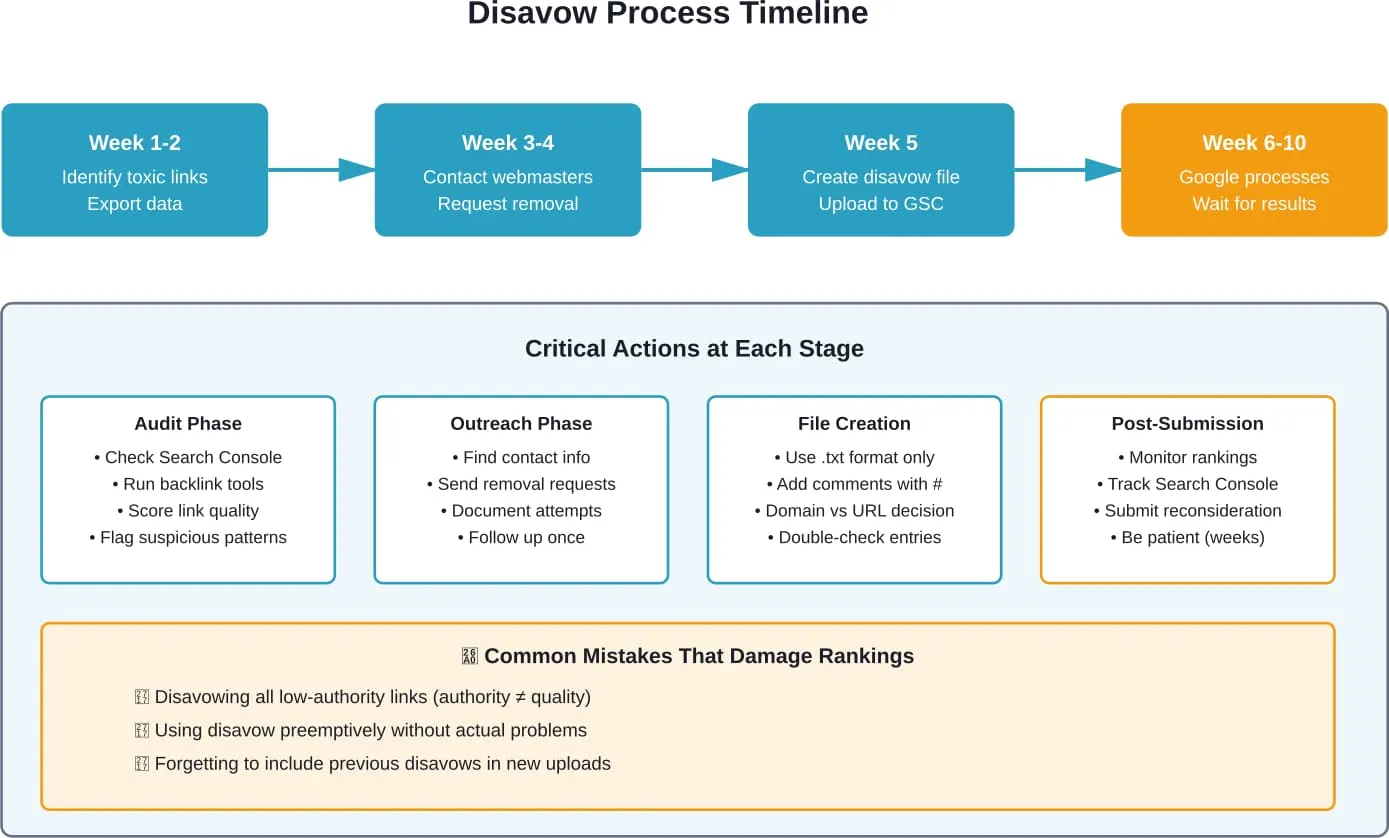
Step 1: Attempt Manual Link Removal
Before touching the disavow tool, try removing links directly. Google explicitly states this should be the first approach.
Find contact information for webmasters and send polite removal requests. According to Search Engine Journal, if a webmaster charges “$5 or $10 to remove the link go for it—anything more than that tend not to and just include them in the disavow list.”
Document every outreach attempt with dates, contact methods, and responses. This documentation proves due diligence when submitting a reconsideration request for manual actions.
Step 2: Create the Disavow File
The disavow file is a plain text file (.txt) with a specific format. Each line contains either a URL or domain to disavow.
Format examples:
- To disavow a specific page: http://spam.example.com/link-page.html
- To disavow an entire domain: domain:spam.example.com
Comments can be added using the # symbol. Lines starting with # are ignored by Google but help with file organization.
Use the domain-level disavow (domain:) for sites that are entirely spam or controlled by link networks. Use individual URLs when only specific pages on an otherwise legitimate site contain problematic links.
Step 3: Upload to Google Search Console
Navigate to the disavow tool in Google Search Console (this is a separate tool, not found in the main interface—search for “Google disavow tool” to find the direct link).
Select the property (website) to apply the disavow file to. Upload the text file. Google will process it during the next crawl and reprocessing cycle.
Important: The disavow file is cumulative. Each new upload replaces the previous file entirely. Always include previously disavowed links in updated files, or they’ll be re-evaluated.
Step 4: Submit Reconsideration Request (If Applicable)
For sites with manual actions, submitting the disavow file alone won’t lift the penalty. A reconsideration request must be filed through Google Search Console.
This request should explain what caused the unnatural links, detail all removal efforts including the disavow file submission, and commit to following Google’s guidelines moving forward. Include specific dates and statistics about removal attempts.
Google’s team reviews these requests manually. Response times vary from a few days to several weeks. If denied, the response will indicate what still needs addressing.
Critical Mistakes to Avoid
The disavow tool is powerful—and that means it can cause serious damage when misused.
Disavowing Legitimate Links
The most common mistake? Being overly aggressive. Disavowing links from legitimate sites—even if they have low domain authority—can remove valuable ranking signals.
A link from a small local business site or a genuine blog mention might not move the needle much individually, but hundreds of these natural links collectively matter. Strip them away and rankings suffer.
Using Disavow Without Manual Action
Many sites disavow links “just to be safe” when there’s no actual problem. This is unnecessary and risky.
If there’s no manual action in Search Console and rankings are stable or growing, leave the link profile alone. Google’s already handling whatever spam exists automatically.
Incomplete Documentation
For manual actions, Google expects proof of removal attempts before accepting a reconsideration request. Skipping straight to disavowing without documented outreach often results in denied requests and prolonged penalties.
Disavowing Only Domain Roots
When entering domains, include all variations. A site accessible at both example.com and www.example.com should have both versions disavowed if the entire domain is problematic.
Monitoring Results After Disavowing
After uploading a disavow file, patience is required. Google doesn’t instantly reprocess all disavowed links.
The search engine needs to recrawl the linking pages and recalculate rankings with the updated link graph. This typically takes several weeks to a few months for full implementation.
Monitor these metrics in Google Search Console:
- Impressions and clicks: Track whether organic visibility improves after disavowing
- Manual actions: Check if penalties are lifted following reconsideration requests
- Core Web Vitals and other signals: Ensure no unintended impacts on other ranking factors
Third-party rank tracking tools provide additional visibility into specific keyword performance changes over time.
If rankings drop after disavowing, the file likely removed too many legitimate links. In that scenario, remove those URLs from the disavow file and reupload. Google will restore the links during the next processing cycle, though this adds more waiting time.
Alternatives to Disavowing Links
Before reaching for the disavow tool, consider whether these alternatives might be more appropriate:
Focus on Building Quality Links
The best defense against a few spam links is a strong offense of quality links. According to academic research on SEO, organic search delivers significantly more traffic opportunities than paid advertising, making organic link building highly valuable.
Creating linkworthy content, earning media mentions, and building genuine business relationships naturally produces links that dwarf spam in Google’s evaluation.
Improve On-Page SEO
Strong content quality, technical SEO, and user experience signals can outweigh minor link profile issues. Focus energy on these controllable factors rather than obsessing over spam links Google likely ignores anyway.
Just Wait
Sound too simple? For many situations with natural spam accumulation, time is the best remedy. As Google continues crawling and reprocessing, its algorithms get better at identifying and discounting spam patterns without manual intervention.
Building a Healthy Link Profile Without Disavowing
The best long-term strategy for link health has nothing to do with the disavow tool. It’s about building genuine authority through quality content and legitimate outreach.
Focus on these fundamentals:
- Create comprehensive, useful content that naturally attracts links from relevant sources
- Build relationships with other sites, journalists, and industry figures
- Earn mentions through original research, expert commentary, and newsworthy initiatives
- Avoid shortcuts like purchasing links, participating in link schemes, or using automated link building
- Monitor regularly with backlink tools to catch any unusual patterns early
Sites that follow white-hat practices rarely encounter situations requiring the disavow tool. The occasional spam link that appears naturally poses no threat when surrounded by a strong foundation of legitimate backlinks.
The Bottom Line on Disavowing
The disavow tool exists for specific scenarios—primarily manual actions and severe negative SEO attacks. For the vast majority of sites, it’s an advanced feature that will never be needed.
Google’s algorithms handle spam links automatically in most cases. Random low-quality links appearing in backlink profiles don’t require action. The search engine has years of experience identifying and ignoring these patterns.
When disavowing becomes necessary, approach it conservatively. Remove only genuinely toxic links after attempting manual removal. Document everything. And never disavow links “just in case”—the tool can cause more harm than good when misused.
The most effective SEO strategy for link profiles isn’t defensive disavowing—it’s proactive building of quality content and legitimate relationships that naturally generate valuable backlinks. That’s what moves rankings sustainably over time.
Need help evaluating your backlink profile or recovering from a manual action? Start by auditing links in Google Search Console and identifying any manual action notifications. If a penalty exists, document removal attempts thoroughly before considering the disavow tool as a last resort.