Quick Summary: SEO reporting tools are software platforms that collect, analyze, and visualize search engine optimization data from multiple sources into consolidated reports. These tools automate the tracking of key metrics like rankings, organic traffic, backlinks, and technical issues, helping agencies and businesses demonstrate SEO value, identify optimization opportunities, and make data-driven decisions without manual spreadsheet work.
Search engine optimization generates mountains of data. Tracking rankings across hundreds of keywords, monitoring traffic patterns, analyzing backlink profiles, auditing technical issues—it’s overwhelming without the right infrastructure.
That’s where SEO reporting tools come in.
These platforms transform scattered data from Google Search Console, Google Analytics, rank trackers, and other sources into coherent, visual reports that actually make sense. But what exactly are these tools? How do they work? And more importantly, which features separate the useful platforms from the ones that just add noise?
Let’s break it down.
Understanding SEO Reporting Tools: Core Definition
SEO reporting tools are specialized software platforms designed to aggregate, analyze, and present search engine optimization data in a structured format. Rather than manually pulling data from different sources and building reports in spreadsheets, these tools automate the entire process.
Think of them as a centralized command center for all SEO metrics.
According to Moz’s SEO reporting guide, these tools serve a fundamental purpose: making jobs simpler and clients happier through more comprehensive and streamlined reports. After completing actionable SEO work—whether technical fixes, content optimization, or link building—reporting proves the value of that effort.
What Makes Them Different From Analytics Platforms
Google Analytics tracks website traffic. Google Search Console shows search performance. Rank tracking tools monitor keyword positions. SEO reporting tools pull data from all these sources and more, then synthesize everything into unified dashboards and reports.
The distinction matters. Analytics platforms provide raw data. Reporting tools provide context, comparison, and communication.
As Search Engine Journal notes, understanding the intricacies of SEO performance can be difficult, so demonstrating progress and efforts in a digestible way becomes essential. SEO reporting software showcases important metrics in visually represented formats that save guesswork and manual referencing.
Why SEO Reporting Tools Matter in 2026
The SEO landscape has changed dramatically. AI Overviews occupy more search real estate. Answer engines like Perplexity compete for attention. Traditional organic results face more competition than ever.
This complexity makes reporting more critical, not less.
The Leadership Gap
Research from UPCEA reveals a concerning disconnect: 62% of institutional leaders want reporting on SEO metrics, but just 31% receive regular updates. This gap creates a self-perpetuating pattern where lack of visibility prevents strategic investment in optimization efforts.
Proper reporting tools bridge this gap. They transform technical SEO work into business intelligence that leadership actually understands and acts upon.
Time Efficiency at Scale
Manual reporting consumes hours that could be spent on actual optimization. For agencies managing multiple clients, this time drain becomes unsustainable.
Automated reporting changes the equation. Over 50% of marketing agencies create monthly SEO reports for their clients. Automation makes this frequency practical rather than burdensome.
Proving Value and ROI
SEO success requires patience. Rankings don’t improve overnight. Traffic builds gradually. Without consistent reporting that shows progress, stakeholders lose confidence.
Reporting tools create the paper trail that proves optimization efforts are working. They highlight achievements over specified time periods, helping formulate action items and gauge performance against goals.
Use SEO Reporting to Improve Results
SEO reporting tools provide data, but LENGREO focuses on turning that data into actionable insights that improve performance over time. Reporting should guide decisions and help refine your strategy continuously.
- reporting frameworks
- data driven decisions
- ongoing optimization
If you want reporting that leads to better SEO outcomes, contact LENGREO to learn more.
Essential Features of SEO Reporting Tools
Not all reporting platforms are created equal. The best tools share certain core capabilities that separate them from basic analytics viewers.
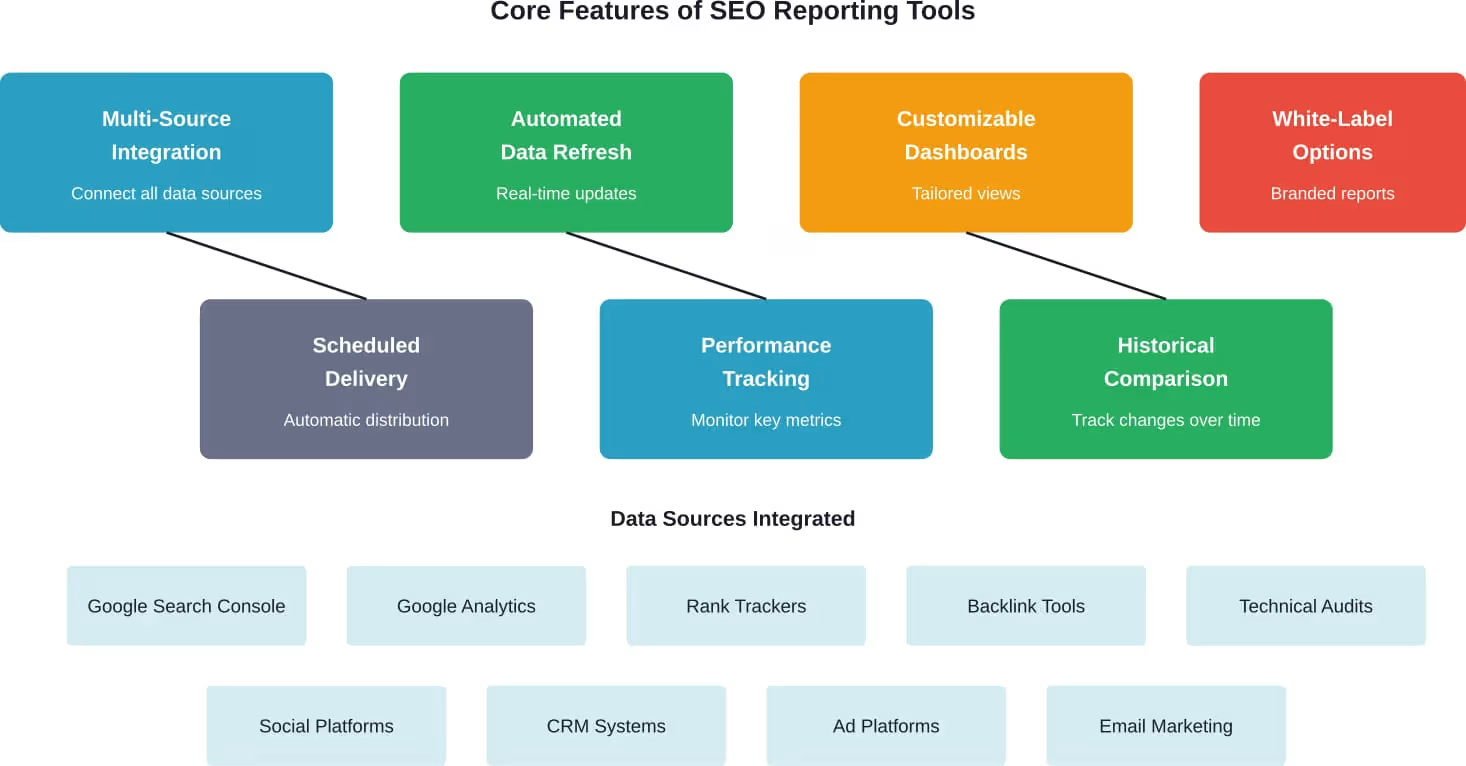
Multi-Source Data Integration
Modern SEO reporting requires data from numerous platforms. Google Search Console provides search query data. Google Analytics tracks user behavior. Third-party tools monitor rankings, backlinks, and technical issues.
Top-tier reporting tools connect directly to all major SEO platforms through native integrations. As noted in technical documentation, reliable platforms build integrations that pull data consistently and refresh automatically—not flaky third-party connectors that break frequently.
According to Google’s official documentation on using Search Console and Google Analytics together, combining these data sources provides a more comprehensive picture of how audiences discover and experience websites, helping inform SEO decisions.
Automated Data Refresh
Yesterday’s numbers can’t solve today’s problems. Real-time or near-real-time data refresh ensures reports reflect current performance.
Leading platforms refresh data every few hours rather than requiring manual updates. This automation eliminates the risk of presenting outdated information during client meetings or strategy sessions.
Customizable Dashboards
Different stakeholders need different views. Technical SEO specialists want crawl errors and site speed metrics. Content teams focus on organic traffic and keyword rankings. Executives care about high-level trends and ROI.
Flexible reporting tools allow dashboard customization so each audience sees what matters to them. Widget-based layouts enable users to arrange metrics according to priority.
Semrush’s SEO Dashboard, for example, comprises a set of widgets that display report excerpts from the most valuable and widely used tools, providing quick insights into current site status.
White-Label Capabilities
For agencies, branded reports are non-negotiable. Clients expect to see the agency’s logo and color scheme, not third-party branding.
White-label functionality removes all platform branding and allows full customization. This creates a professional presentation that reinforces agency credibility.
Scheduled Report Delivery
The best report is the one that arrives on time without anyone remembering to generate it. Scheduled delivery automates distribution to stakeholders on a recurring basis—weekly, monthly, or whatever cadence makes sense.
Email delivery, PDF exports, and shareable links all support different consumption preferences. Some tools even offer live dashboards that stakeholders can access anytime.
Key Metrics Tracked by SEO Reporting Tools
Effective SEO reporting focuses on metrics that matter. Not every data point deserves attention in executive reports.
Organic Traffic Metrics
Sessions, users, and pageviews from organic search represent the most fundamental SEO success indicators. Tools track not just totals, but trends over time, traffic by landing page, and geographic distribution.
Bounce rate and average session duration provide quality signals. High traffic means nothing if visitors immediately leave.
Keyword Rankings
Position tracking shows where the site ranks for target keywords. Daily or weekly monitoring reveals ranking volatility and the impact of optimization efforts or algorithm updates.
Advanced tools track ranking features like featured snippets, local packs, and knowledge panels—not just standard organic positions.
Backlink Profile
Links remain a crucial ranking factor. Reporting tools monitor total backlinks, referring domains, domain authority of linking sites, and anchor text distribution.
New and lost links receive special attention, helping identify both opportunities and potential negative SEO attacks.
Technical SEO Health
Crawl errors, broken links, page speed issues, mobile usability problems, and structured data errors all impact search performance. Technical auditing tools identify these issues automatically.
According to Google’s documentation on Core Web Vitals, these metrics determine how user-friendly pages are in practical use regarding load times, interactivity, and visual stability. Google recommends aiming for good Core Web Vitals scores to succeed in search results.
Content Performance
Which pages attract the most organic traffic? Which content ranks for the most keywords? Which pieces generate engagement?
Content-focused metrics help prioritize optimization efforts and identify successful content patterns worth replicating.
Conversion Data
Traffic matters, but conversions pay the bills. Integration with Google Analytics allows reporting tools to track goal completions, ecommerce transactions, and revenue attributed to organic search.
This closes the loop between SEO activity and business outcomes.
Types of SEO Reporting Tools
The market offers different categories of reporting tools, each with distinct strengths.
All-in-One SEO Suites
Platforms like Semrush, Moz Pro, and Ahrefs provide comprehensive SEO capabilities including reporting, rank tracking, site auditing, keyword research, and competitive analysis.
These suites excel at depth. Every tool within the platform shares data, creating a cohesive ecosystem. Moz Pro starts at $49 per month according to Moz’s official product page, though some of the tools work best for sites with a smaller footprint.
For agencies managing multiple clients or enterprises with complex needs, all-in-one suites provide the most complete solution.
Specialized Reporting Platforms
Tools like AgencyAnalytics, DashThis, and Databox focus specifically on reporting rather than trying to do everything. They integrate with existing SEO tools and consolidate data into unified dashboards and reports.
According to platform comparisons, AgencyAnalytics pricing starts at $12 per month per client with minimum purchase requirements. Minimum purchase requirements mean first two tiers work out to $60-180/month total. These platforms offer unlimited staff and client logins, white-label dashboards, and automated branded reports.
These platforms excel at presentation and automation. They’re particularly popular with agencies that already subscribe to separate rank tracking, auditing, and research tools.
Free Tools and DIY Solutions
Google Search Console and Google Analytics provide substantial reporting capabilities at no cost. Looker Studio (formerly Google Data Studio) allows users to build custom dashboards that combine data from both platforms.
As documented by Google developers, using Search Console and Google Analytics together through Looker Studio enables monitoring metrics from both sources, visualizing data together, and troubleshooting discrepancies.
The trade-off? These solutions require more manual configuration and technical knowledge. They lack some advanced features like automated client reporting and white-labeling.
Niche-Specific Tools
Certain tools specialize in specific reporting areas. Local SEO reporting, ecommerce analytics, enterprise-scale monitoring—niche tools optimize for particular use cases.
Moz Local focuses on listings management, local reputation management, and local reporting tools starting at $16 per month.
Choosing the Right SEO Reporting Tool
Selection criteria depend on organizational context, technical requirements, and budget constraints.
Consider Your Reporting Audience
Who will consume these reports? Internal teams need different information than external clients. Technical specialists want granular data; executives prefer high-level trends.
According to the UPCEA study on higher education SEO, various audiences need to review SEO metrics—from deans to marketing leaders to SEO analysts. Tools should accommodate these different perspectives through customizable views.
Evaluate Integration Capabilities
Which SEO tools does the organization already use? The reporting platform must integrate with existing infrastructure or force a complete platform migration.
Native integrations outperform third-party connectors. They’re more reliable and typically offer deeper data access.
Assess Automation Needs
Manual reporting makes sense for occasional analysis. For regular client deliverables or stakeholder updates, automation becomes essential.
Look for scheduled report generation, automatic data refresh, and templating capabilities that reduce recurring work.
Factor in Scale Requirements
A single website has different needs than an agency managing 50 clients. Some platforms charge per seat, others per domain, still others offer unlimited access within subscription tiers.
Pricing models matter. As noted in an SEO forum discussion on Moz, tool budget discussions are inevitable for agencies. Monthly costs of $99 or $199 won’t suffice for agencies of any size—$499 represents a more reasonable budget cap.
Test Reliability and Uptime
Reports are time-sensitive. Platform outages during client presentation preparation create serious problems.
According to platform documentation, leading tools maintain 99.95% uptime or higher. Downtime-proof reliability ensures meeting client deadlines regardless of system status.
Review White-Label and Branding Options
For agencies, branded reports are non-negotiable. Verify that white-label capabilities extend to all report types and delivery methods, not just PDF exports.
| Tool Type | Best For | Typical Pricing Range | Key Advantage |
|---|---|---|---|
| All-in-One Suites | Agencies and enterprises needing comprehensive capabilities | $99-500+ per month | Integrated ecosystem with shared data |
| Specialized Reporting | Teams with existing SEO tools needing better presentation | $12-200 per month per client | Superior reporting automation and customization |
| Free Tools | Small businesses and individual practitioners | Free | Zero cost with Google ecosystem |
| Niche-Specific | Specialized use cases like local SEO or ecommerce | $16-300+ per month | Optimized for specific contexts |
Common Challenges With SEO Reporting Tools
Even the best platforms present obstacles worth understanding before commitment.
Data Discrepancies Between Sources
Google Analytics and Google Search Console sometimes show conflicting numbers. Third-party rank trackers may differ from actual search results.
These discrepancies stem from different tracking methodologies, data sampling, and timing. As noted in Google’s documentation on using Search Console and Analytics together, troubleshooting data discrepancies between tools requires understanding how each platform collects and processes information.
Good reporting platforms acknowledge these differences and help explain them rather than pretending perfect accuracy exists.
Learning Curve and Complexity
Feature-rich platforms come with complexity. Teams need time to master customization options, understand which metrics matter, and build effective report templates.
This learning investment pays dividends long-term, but creates short-term productivity dips during onboarding.
Integration Maintenance
API changes, authentication updates, and platform modifications can break integrations. When Google updates Search Console or Analytics, connected reporting tools must adapt.
Reliable platforms handle these transitions smoothly, but occasional disruptions are inevitable in the integration ecosystem.
Cost Accumulation
Subscription costs stack up quickly. An all-in-one suite at $199 per month, plus a specialized reporting tool at $100 per month, plus rank tracking for $80 per month—suddenly the monthly bill approaches $400.
Agencies must balance tool capabilities against budget constraints and client billing structures.
Over-Reliance on Automation
Automated reporting creates efficiency, but removes human judgment. Not every metric fluctuation deserves attention. Context matters more than raw numbers.
The best reporting combines automated data collection with manual analysis and strategic interpretation. Tools provide the information; humans provide the insight.
Building Effective SEO Reports
Reporting tools provide capabilities. Effective reports require strategic thinking about what to include and how to present it.
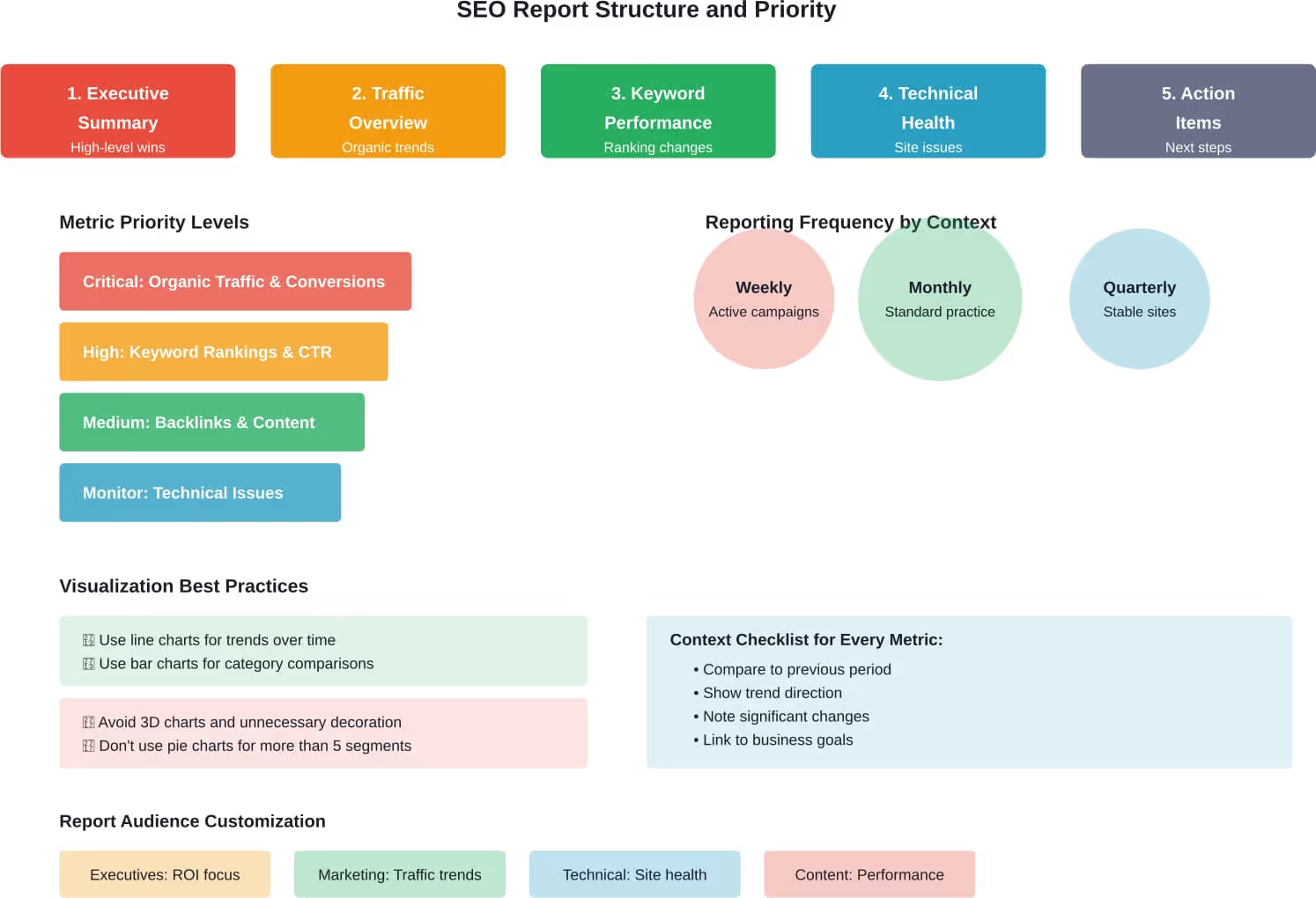
Start With Executive Summary
Busy stakeholders won’t read 20-page reports. Lead with a concise summary highlighting key wins, concerning trends, and recommended actions.
This section should standalone—readable in two minutes while conveying the essential story.
Focus on Goal-Aligned Metrics
What matters to this particular stakeholder? A content team cares about different metrics than a sales leader.
Tailor reports to audience priorities. Track everything internally, but surface only relevant metrics for each report recipient.
Provide Context and Comparison
Numbers without context mean nothing. Is 10,000 monthly organic sessions good? Depends on industry, site age, competitive landscape, and historical performance.
Compare current performance to previous periods, industry benchmarks, and stated goals. Show trends, not just snapshots.
Visualize Data Effectively
Charts and graphs communicate faster than tables of numbers. Line graphs show trends over time. Bar charts compare categories. Pie charts illustrate distribution.
But avoid chartjunk—unnecessary visual elements that distract rather than inform. Every visualization should have a clear purpose.
Highlight Action Items
The best reports don’t just describe the past—they inform future action. Based on performance data, what should happen next?
End each section or report with clear recommendations. Data without actionable insights is just noise.
Maintain Consistent Reporting Cadence
Monthly reporting represents the standard practice, with over 50% of marketing agencies creating monthly SEO reports for their clients. However, frequency should match campaign intensity and stakeholder needs.
Weekly reports make sense during active optimization campaigns. Quarterly summaries work for stable sites with less aggressive strategies. The key is consistency—establishing reliable expectations for when reports arrive.
Best Practices for SEO Reporting Success
Beyond tool selection and report structure, certain practices maximize reporting effectiveness.
Document Methodology and Definitions
Not everyone understands the difference between impressions and clicks, or knows what domain authority means. Include a glossary or methodology section explaining key terms and how metrics are calculated.
This transparency builds trust and prevents misinterpretation.
Separate Correlation From Causation
Organic traffic increased after publishing new content. Does that prove the content caused the increase? Not necessarily. Seasonality, algorithm updates, and external factors all influence performance.
Good reporting acknowledges complexity rather than oversimplifying cause and effect.
Balance Positive and Negative Findings
Every report shouldn’t be a celebration. Honest assessment of problems and setbacks builds credibility more than constant cheerleading.
Frame negative findings constructively, with action plans for improvement.
Include Competitive Context
Site performance exists within a competitive landscape. If organic traffic dropped 10% but competitors dropped 20%, that represents relative success.
Competitive analysis tools provide this broader perspective, showing whether performance changes reflect site-specific issues or industry-wide trends.
Archive Historical Reports
Past reports become valuable reference material. They document what was tried, what worked, and what failed.
Maintain an organized archive so teams can review historical context before planning new strategies.
The Future of SEO Reporting Tools
Reporting technology continues evolving alongside the search landscape itself.
AI-Powered Insights
Machine learning algorithms increasingly analyze SEO data to identify patterns and anomalies that humans might miss. These AI capabilities can automatically flag significant changes, predict future trends, and suggest optimization priorities.
AI tools can enhance SEO performance tracking by processing larger datasets.
Expanded Data Source Integration
As the digital marketing ecosystem grows more complex, reporting tools integrate with more platforms. TikTok Ads, Matomo, Mailchimp, various ad platforms—comprehensive reporting requires pulling data from dozens of sources.
The platforms that build robust integration libraries and maintain them reliably will dominate the market.
Real-Time Reporting
Traditional reporting looks backward. Real-time dashboards show what’s happening now, enabling faster response to issues and opportunities.
This shift from periodic reports to continuous monitoring changes how teams interact with SEO data.
Enhanced Visualization
Interactive dashboards, drill-down capabilities, and dynamic filtering allow stakeholders to explore data rather than passively consuming static reports.
These interactive elements make reporting more engaging and help different audiences find the specific information they need.
Common Mistakes to Avoid
Understanding what not to do matters as much as best practices.
Tracking Too Many Metrics
Just because a platform can track something doesn’t mean it should appear in reports. Metric overload creates confusion rather than clarity.
Focus on the vital few metrics that actually inform decisions and demonstrate progress toward goals.
Ignoring Data Quality Issues
Incorrect tracking implementation, bot traffic, and data sampling problems corrupt report accuracy. Regular audits of tracking setup prevent bad data from contaminating decisions.
Garbage in, garbage out remains true regardless of how sophisticated the reporting platform.
Reporting Without Storytelling
Data dumps aren’t reports. A coherent narrative that explains what happened, why it matters, and what comes next transforms numbers into actionable intelligence.
Every report should tell a story with beginning, middle, and end.
Setting Unrealistic Expectations
SEO takes time. Rankings don’t shoot to position one overnight. Traffic builds gradually. Reports should establish realistic timelines and celebrate incremental progress rather than promising immediate dramatic results.
Neglecting Mobile Performance
Mobile devices generate the majority of search traffic for most sites. Reports that focus only on desktop performance miss the bigger picture.
Separate mobile and desktop metrics where performance differs significantly.
Making the Investment Decision
Deciding whether to invest in dedicated reporting tools requires weighing costs against benefits.
Calculate Time Savings
How many hours per month does manual reporting consume? At what hourly rate? If manual reporting takes 10 hours monthly and staff costs $50 per hour, that’s $500 in labor.
A reporting tool at $100 per month saves $400 monthly while improving consistency and quality.
Consider Opportunity Cost
Time spent building reports manually is time not spent on optimization work. Which delivers more value?
For most organizations, automation allows teams to focus on high-value strategic work rather than data compilation.
Factor in Client Retention
For agencies, professional reporting directly impacts client satisfaction and retention. Clear demonstration of value through excellent reports reduces churn.
The cost of replacing a lost client far exceeds the cost of reporting tools that help retain them.
Start Small and Scale
Beginning with free tools or entry-level paid platforms reduces initial commitment while building reporting capabilities. As needs grow and value becomes clear, upgrading makes sense.
Avoid committing to enterprise platforms before confirming the organization will actually use advanced features.
Conclusion
SEO reporting tools transform scattered performance data into coherent intelligence that drives better decisions. They save time through automation, demonstrate value through clear presentation, and enable data-driven strategy through comprehensive tracking.
The right tool depends on organizational context. Small businesses may thrive with free Google tools and Looker Studio. Growing agencies need specialized reporting platforms with white-label capabilities and client management features. Enterprises often require all-in-one suites that integrate optimization and reporting in a unified ecosystem.
What matters more than the specific platform is the commitment to regular, honest, actionable reporting. Tools enable the process, but effective reporting requires strategic thinking about what to measure, how to present findings, and which actions the data suggests.
Start with clear goals. What questions should reports answer? Who needs the information? How will insights drive decisions? With those answers established, selecting and implementing the right reporting tools becomes straightforward.
The organizations that invest in proper reporting infrastructure gain competitive advantages. They make faster decisions based on better information. They demonstrate value more effectively. They optimize more strategically because they actually understand what’s working.
Ready to elevate your SEO reporting? Start by auditing current practices, identifying gaps, and researching platforms that address specific needs. Most tools offer free trials—test options with actual data before committing. The time invested in proper reporting infrastructure pays dividends through every subsequent optimization cycle.