Quick Summary: Website development for startups involves choosing between custom-built solutions, DIY website builders, or no-code platforms depending on budget, timeline, and technical expertise. According to the SBA, custom websites typically start at $2,000, while DIY platforms offer plans from free to around $30/month. These figures serve as a general guideline, but market conditions constantly evolve, and actual prices today are often higher — with custom websites frequently ranging from $3,000 to $10,000+ and quality DIY plans typically falling between $15–$50 per month depending on features. The right approach depends on your startup stage, growth goals, and whether you need basic validation or a scalable platform that supports product launches and customer acquisition.
Building a website for a startup isn’t the same as building one for an established business. Startups face unique constraints: limited budgets, tight timelines, and the constant need to test, iterate, and pivot based on market feedback.
But here’s the thing—your website often becomes the first impression potential customers, investors, and partners have of your business. Get it wrong, and doors close. Get it right, and it becomes a growth engine.
The landscape in 2026 offers more options than ever. From no-code platforms that let non-technical founders launch in days to full-stack custom development that scales with your ambitions, the spectrum is wide. So how do you choose?
Understanding Website Development Options for Startups
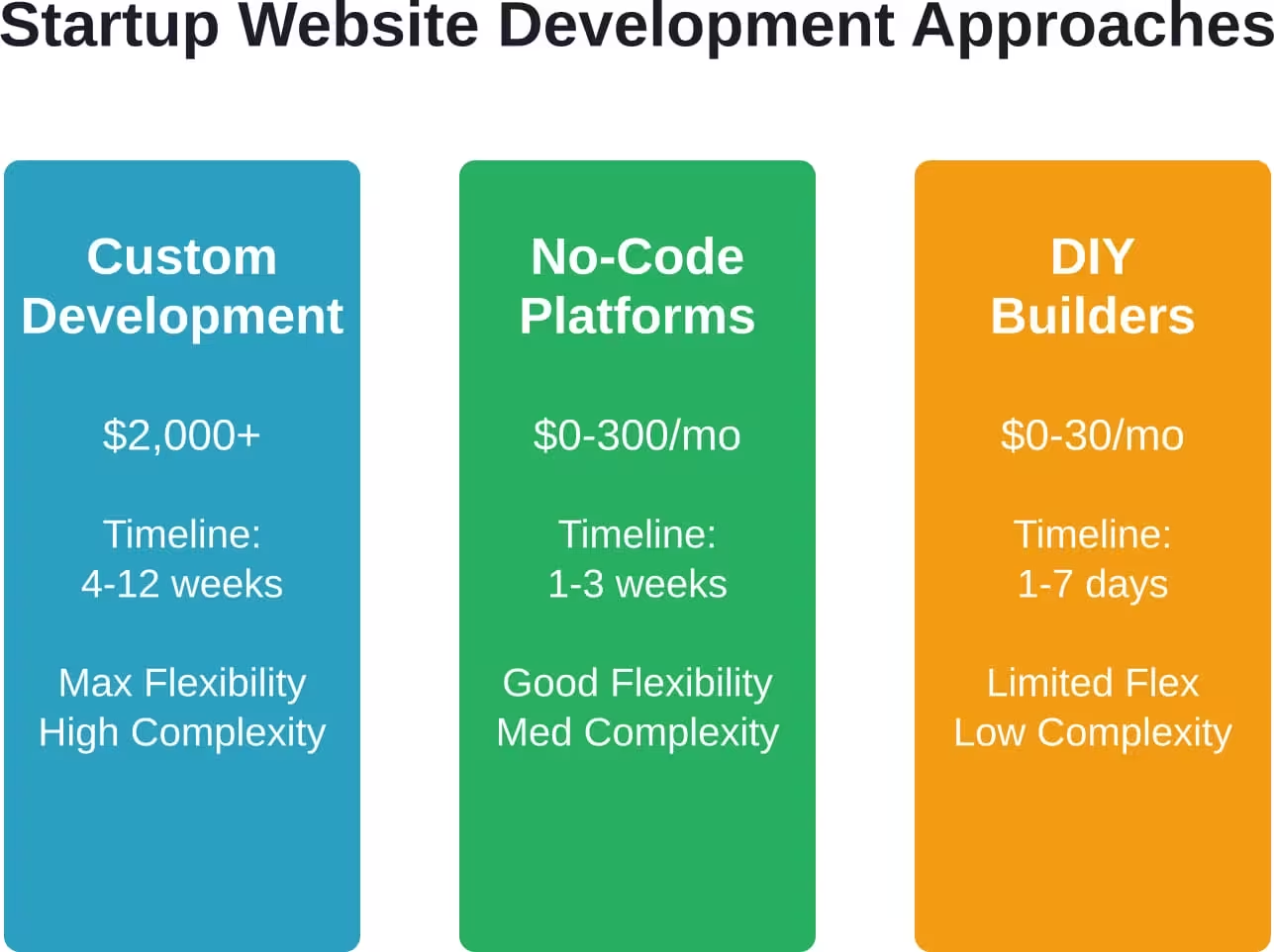
The startup website development market has evolved dramatically. Gone are the days when hiring a developer was the only path forward. Now, founders face three main approaches, each with distinct trade-offs.
Custom Development: Built From Scratch
Custom websites offer maximum flexibility and control. A development team builds exactly what you need, tailored to your specific business model and user experience requirements.
According to the SBA, typical custom website prices start at $2,000 and can extend into five figures for complex functionality. That’s a significant investment for early-stage companies operating on lean budgets.
The benefits? Complete creative control, unique functionality that competitors can’t easily replicate, and a codebase that’s entirely yours to modify. Custom development makes sense when your product requires sophisticated integrations, complex user workflows, or when your business model itself depends on unique web functionality.
The downsides are clear: higher upfront cost, longer development timelines, and ongoing dependency on developers for updates and maintenance. For many early-stage startups, this represents too much time and capital before reaching market validation.
DIY Website Builders: Speed and Simplicity
Platforms like Wix, Squarespace, and Webflow have democratized web development. Non-technical founders can build professional-looking sites without writing code.
These platforms typically offer free tiers for experimentation, with paid plans around $15-30 per month when billed annually. The SBA notes that typical paid website plan costs hover around $30/month, making this approach budget-friendly for bootstrapped startups.
DIY builders excel at getting startups online quickly. Launch timelines shrink from weeks to days—sometimes hours. Templates provide professional design foundations, and drag-and-drop interfaces eliminate technical barriers.
But there are limitations. Customization hits walls that code doesn’t. Performance can lag as your traffic grows. And switching platforms later often means rebuilding from scratch, creating lock-in concerns.
No-Code Development Platforms: The Middle Ground
A newer category has emerged: sophisticated no-code and low-code platforms that bridge the gap between DIY simplicity and custom development power.
Tools like Webflow, Framer, and Emergent enable startups to build complex, scalable websites without traditional development. These platforms offer more architectural control than basic builders while maintaining visual, intuitive interfaces.
Pricing varies widely. Many offer free tiers with core functionality, then scale to $20-300 per month depending on features, hosting needs, and team size. Some platforms target startups specifically—Webflow for Startups provides qualifying companies (fewer than 50 employees, raised less than $15M) with up to a full year of free CMS Site plan.
Choosing the Right Path for Your Startup Stage
Not all startups need the same website. A pre-revenue company validating product-market fit has different needs than a Series A startup scaling customer acquisition.
Pre-Launch and MVP Stage
At the earliest stage, speed and cost matter most. The primary goal? Validate whether anyone cares about what you’re building.
DIY website builders or simple no-code platforms work well here. A clean landing page explaining the value proposition, collecting email addresses, and maybe showcasing early product mockups is often sufficient.
Don’t overinvest in perfection before proving demand. Many successful companies launched with bare-bones websites that would embarrass them today. That’s fine. The goal is learning, not polish.
Recommended approach: Use a free or low-cost builder tier, invest 2-3 days maximum, and focus most energy on talking to potential customers rather than tweaking design elements.
Post-Launch Growth Stage
Once product-market fit starts crystallizing and customer acquisition becomes the priority, website requirements change. Now the site needs to convert visitors, support content marketing, integrate with tools, and reflect brand positioning.
This is where no-code platforms shine. Tools like Webflow and Framer provide enough design control to differentiate your brand while maintaining the agility to iterate quickly based on conversion data.
Budget allocation shifts too. Investing in professional templates (available for under $100 according to SBA resources) or hiring a designer for 10-20 hours to customize a platform makes sense when every percentage point of conversion rate impacts revenue.
Scaling and Series A Stage
At scale, website architecture becomes critical infrastructure. High traffic volumes, complex integrations with CRM and analytics tools, personalized user experiences, and content management for growing teams all demand more robust solutions.
Here, the choice between advanced no-code platforms and custom development depends on specific needs. If your business model itself requires unique web functionality—say, a complex product configurator or a marketplace with custom matching algorithms—custom development may be necessary.
But many scaling startups successfully run on platforms like Webflow or even migrate to headless CMS architectures that separate content management from front-end presentation. These approaches offer scalability without the full cost of custom builds.
Essential Features Every Startup Website Needs
Regardless of the development approach chosen, certain core elements separate effective startup websites from digital brochures.
Clear Value Proposition
Visitors should understand what the company does and why it matters within seconds. According to 2025 global B2B buyer behavior research by Gartner, a significant majority of buyers conduct most of their decision research online before engaging with sales, relying heavily on digital content to assess credibility early in the buying journey.
That means homepage clarity isn’t optional—it’s a competitive advantage. Avoid jargon, lead with benefits over features, and make the core value proposition the visual and textual focal point.
Essential Pages Structure
The SBA outlines five essential pages every small business website needs: homepage, about page, products/services page, contact page, and blog or resources section. For startups, this foundation should expand slightly.
A case studies or customer stories section builds credibility when you’re an unknown brand. A dedicated pricing page (even if it just offers a “contact for pricing” option) helps qualify leads. And a careers page signals growth and attracts talent even before active hiring begins.
| Page Type | Primary Purpose | Key Elements |
|---|---|---|
| Homepage | Communicate value and direct traffic | Hero section, benefits, social proof, clear CTA |
| Product/Services | Explain offering details | Features, use cases, screenshots/demos |
| About | Build trust and credibility | Mission, team, story, traction metrics |
| Pricing | Qualify leads and set expectations | Plan tiers, feature comparison, FAQ |
| Resources/Blog | SEO and thought leadership | Educational content, guides, insights |
| Contact | Convert interest to conversation | Form, email, calendar link, response time |
Mobile Responsiveness
Mobile traffic dominates web usage. A site that doesn’t work flawlessly on phones fails half its visitors before they read a word.
Modern website builders handle responsive design automatically, but custom builds require explicit mobile optimization. Test on actual devices, not just browser simulators. Pay special attention to form usability, button sizing, and page load speed on cellular connections.
Performance and Speed
Page load times directly impact conversion rates and search rankings. Research from University of Chicago and University of Washington researchers found they could make sites run several times faster with just small changes to code by detecting and analyzing inefficiencies in how a common framework for web applications interacts with databases.
For startups, this translates to practical advice: optimize images, minimize JavaScript, use modern hosting infrastructure, and regularly audit performance. Free tools like Google PageSpeed Insights identify specific bottlenecks.
Website Builder Platforms for Startups in 2026
The platform landscape has matured significantly. Here’s what stands out for startup use cases.
Webflow: Design Control Without Code
Webflow occupies the sweet spot between design freedom and technical accessibility. The visual builder gives pixel-perfect control over layout and styling while generating clean, performant code.
For qualifying startups (fewer than 50 employees, less than $15M raised, referred by a partner), Webflow for Startups offers qualifying startups up to a full year of free CMS Site plan. Standard plans typically range from $20 per month and up for basic sites to higher tiers for advanced ecommerce and team features.
The learning curve is steeper than drag-and-drop builders, but the payoff comes in unique designs that don’t scream “template” and the ability to implement sophisticated interactions without custom development.
Wix: Simplicity and Speed
Wix prioritizes ease of use. The platform offers extensive templates across industries and an intuitive editor that non-technical users can master in hours.
Pricing starts with a free tier for experimentation, then moves to paid plans starting around $17 per month for portfolio or basic business sites. Higher tiers add ecommerce capabilities and remove Wix branding.
The trade-off? Less design flexibility than Webflow and some limitations on custom functionality. But for straightforward business sites that need to launch quickly, Wix delivers reliable results.
Emergent: AI-Powered Development
Newer platforms like Emergent leverage AI to accelerate development. Non-technical founders describe what they need in natural language, and the system generates functional prototypes.
Pricing structures typically include free tiers with limited credits (10 credits per month), standard plans at $20 per month, professional tiers at $200 per month, and team plans at $300 per month with expanded features like custom AI agents and priority support.
These tools work well for rapid prototyping and experimentation but may require technical input for production deployment at scale.
Squarespace: All-in-One Simplicity
Squarespace bundles website building, hosting, domain registration, and email into streamlined packages. The platform emphasizes beautiful templates and cohesive design systems.
Plans typically start at $12 per month when billed annually for personal or basic business sites. Ecommerce tiers add transaction capabilities with competitive processing fees.
Squarespace trades some flexibility for coherence. Everything works together smoothly, but customization beyond template boundaries requires workarounds or third-party integrations.
When to Invest in Custom Development
Custom development makes sense in specific scenarios, despite the higher cost and longer timelines.
Unique Business Models Requiring Complex Logic
If your startup’s core value proposition depends on sophisticated algorithms, complex user interactions, or unique functionality that doesn’t exist in off-the-shelf tools, custom development becomes necessary rather than optional.
Marketplaces with custom matching, SaaS products with complex configuration flows, or applications requiring real-time data processing often can’t be built effectively on standard platforms.
Integration-Heavy Ecosystems
Some businesses need their website to integrate deeply with multiple backend systems: inventory management, custom CRMs, proprietary analytics, or third-party APIs with complex authentication requirements.
While modern platforms offer integration capabilities through tools like Zapier or Make, there are limits. When integration complexity crosses certain thresholds, custom development provides more reliable, performant solutions.
Long-Term Platform Control
Platform lock-in concerns aren’t paranoia—they’re real strategic considerations. If your startup’s 10-year vision includes being acquired by a larger company or going public, maintaining full control over your tech stack matters.
Custom development means owning the codebase completely. No monthly platform fees that increase as you scale. No surprise feature deprecations or pricing changes. No migration headaches if the platform pivots away from your use case.
That said, most early-stage startups overestimate how much this matters and underestimate how much their needs will change. Starting on a platform and migrating later if necessary is often smarter than over-investing in custom code before proving the business model.
Launch a Startup Website Without Wasting Budget on Rework
For startups, a website often needs to go live fast, but rushing the process usually leads to extra costs later. Lengreo works with a structured development approach that starts with business analysis and research before moving into prototyping and staged development. This helps startups avoid rebuilding key parts of the site and keeps the website aligned with what the product or service actually requires from the start.
Keep Your Website Build Under Control From Start to Launch
Lengreo provides a step-by-step setup that helps startups stay in control of time, scope, and costs:
- Business analysis and research before development begins
- Prototyping with regular reviews to validate structure early
- Separate front-end and back-end development stages with approvals
- Launch support including setup, migration, and quality assurance
Talk to Lengreo and get a website plan that saves your time and budget from the start.
Common Mistakes Startups Make With Websites
Watching hundreds of startups launch reveals patterns of avoidable mistakes.
Over-Designing Before Validation
Perfectionism kills momentum. Founders spend months obsessing over brand colors, illustration styles, and animation details before they’ve proven anyone wants what they’re building.
The reality? Most early visitors judge credibility based on clarity and professionalism, not design awards. A clean, clear site built in a week beats a stunning site that launches three months late.
Neglecting SEO Fundamentals
Search visibility doesn’t happen by accident. Even the most beautiful website generates zero value if nobody finds it.
Basic SEO isn’t complicated: write descriptive page titles and meta descriptions, use heading tags properly, optimize images, ensure fast load times, and create genuinely useful content. Most website builders handle the technical aspects automatically, but content quality remains a human responsibility.
Ignoring Analytics and Testing
Launching without analytics is like flying blind. How do visitors find the site? Where do they drop off? Which pages convert?
Free tools like Google Analytics answer these questions. Set up tracking before launch, not after. Use the data to guide iterations. Test different headlines, calls-to-action, and layouts based on actual user behavior rather than opinions.
Forgetting About Ongoing Maintenance
Websites aren’t set-and-forget assets. Content becomes stale. Links break. Security vulnerabilities emerge. Platform features change.
The SBA recommends scheduling a monthly reminder to check your website and update content on the homepage, citing an example of a restaurant website that highlighted its Thanksgiving menu in January as a missed execution opportunity. Plan for ongoing updates from day one, whether that means allocating founder time or budgeting for contractor hours.
Budget Planning for Startup Websites
Realistic budget planning prevents both under-investment and waste.
Bootstrap Budget: $0-500
Fully feasible with DIY platforms. Use free tiers initially, then upgrade to paid hosting (around $15-30/month) when ready to remove platform branding and connect a custom domain.
Invest in a professional template (under $100, as noted in SBA resources) if design skills are limited. Allocate a few hundred dollars for stock photography or illustration assets if needed. Write all content in-house.
This budget gets a professional-looking site live quickly. The limitation is time—founders must learn the platform and do the work themselves.
Lean Startup Budget: $2,000-5,000+
This range allows hiring a designer or developer for focused work. Either pay for 20-40 hours of professional design on a platform like Webflow, or pursue a simple custom build.
The SBA notes custom websites typically start at $2,000, which aligns with basic builds using freelance developers. At this budget, expect a straightforward site with 5-10 pages, basic SEO setup, and mobile responsiveness.
Alternatively, use platforms but hire professionals for strategy, design, and setup, then maintain content in-house. This often delivers better ROI than bare-bones custom development at the same price point.
Growth Stage Budget: $10,000-30,000+
At this level, comprehensive custom development or sophisticated platform implementations become possible. Expect full brand identity work, custom design, advanced functionality, integrations with marketing and sales tools, and initial content creation.
Working with established web development agencies becomes feasible. The deliverable should include strategy documentation, user research insights, conversion optimization, and training for internal team members to manage the site going forward.
| Budget Range | Best Approach | What You Get | Timeline |
|---|---|---|---|
| $0-500 | DIY Platform | Template-based site, self-managed | 1-2 weeks |
| $2,000-5,000 | Platform + Designer or Simple Custom | Professional design, basic custom features | 3-6 weeks |
| $10,000-30,000 | Custom Development or Advanced Platform | Full branding, strategy, advanced functionality | 8-12 weeks |
| $30,000+ | Agency or Full Dev Team | Enterprise features, extensive integrations | 12+ weeks |
Building for Growth: Scalability Considerations
Today’s simple landing page needs to evolve into tomorrow’s conversion engine. Planning for growth doesn’t mean over-building—it means making choices that don’t create unnecessary constraints.
Content Management Capabilities
As teams grow, multiple people need to update content without developer intervention. Choose platforms or architectures that support role-based access, content workflows, and non-technical editing.
Modern headless CMS approaches separate content management from presentation, enabling content teams to work independently while developers maintain site structure and functionality.
Traffic Handling and Performance
Sudden traffic spikes from press coverage, viral content, or product launches shouldn’t crash the site. Cloud hosting with automatic scaling prevents this, and most modern platforms include it by default.
For custom builds, plan infrastructure with growth in mind. Content delivery networks (CDNs), database query optimization, and caching strategies prevent performance degradation as visitor numbers climb.
Analytics and Conversion Tracking
Basic page view counts aren’t enough at scale. Implement event tracking, funnel analysis, cohort segmentation, and A/B testing capabilities from the start.
Tools like Google Analytics, Mixpanel, or Amplitude provide these capabilities, but they require proper implementation. Tag management systems like Google Tag Manager make it easier to add and modify tracking without code changes.
Security and Compliance Essentials
Security breaches destroy trust instantly. Even early-stage startups need to protect user data and maintain site integrity.
SSL Certificates and HTTPS
Non-negotiable in 2026. All sites must use HTTPS encryption. Most platforms and hosting providers include SSL certificates automatically, but verify this before launch.
Beyond security, HTTPS affects search rankings and browser warnings. Sites without it display scary alerts that drive visitors away.
Data Privacy Regulations
GDPR, CCPA, and similar regulations impose legal obligations on how sites collect and handle visitor data. Requirements include cookie consent notices, privacy policies, and mechanisms for users to access or delete their data.
Compliance tools and templates exist for common scenarios. Consult legal counsel for specific requirements based on where the business operates and who the customers are.
Regular Backups and Updates
Data loss happens. Hardware fails, human errors occur, and malicious attacks succeed. Automated backups protect against disaster.
Platform-based sites typically include automatic backups. Custom sites require explicit backup strategies—daily database snapshots, version-controlled code repositories, and tested recovery procedures.
Similarly, security patches and software updates aren’t optional. Outdated CMS installations, plugins, and dependencies create vulnerability vectors. Automate updates where safe, monitor for security advisories, and maintain update schedules.
Moving Forward: Launch and Iterate
The best startup website is the one that actually launches. Perfection is the enemy of progress, especially when you’re racing to validate ideas and acquire customers.
Start with the approach that matches current constraints and capabilities. DIY platforms work brilliantly for non-technical founders who need speed. Custom development makes sense when the product itself demands unique web functionality. No-code platforms bridge the gap for teams that want design control without code.
But here’s what matters more than the platform choice: clarity of message, quality of content, and speed of iteration. A simple site that clearly explains why someone should care, launched this week, beats a sophisticated site launched next quarter.
Treat the website as a living asset, not a project with an end date. Monitor how visitors behave. Test different approaches. Update content regularly. Research from the SBA emphasizes that keeping websites current maintains credibility.
Most importantly, remember the website serves business goals, not the other way around. It’s a tool for customer acquisition, a platform for demonstrating value, and a channel for building trust. Measure success by business outcomes—leads generated, customers acquired, revenue influenced—not aesthetic appreciation or technical complexity.
Whatever approach you choose, launch quickly, learn constantly, and iterate based on real user behavior. That’s how startup websites evolve from basic landing pages into growth engines that scale with the business.