Quick Summary: Website development for SMBs involves choosing between custom development (starting at $2,000), DIY website builders ($14-30/month), or professional templates (under $100). The best approach depends on budget, technical skills, and business needs, with most small businesses finding success using modern website builders that offer professional design, built-in tools, and scalability without requiring coding knowledge.
The digital storefront matters more than ever. For small and medium-sized businesses, a website isn’t just a nice-to-have anymore — it’s the first place potential customers look to verify legitimacy, explore services, and make purchasing decisions.
But here’s the thing: website development has changed dramatically. The days of needing a five-figure budget and a six-month timeline are gone for most SMBs. Today’s landscape offers multiple paths, each with distinct advantages and tradeoffs.
This guide breaks down everything small businesses need to know about website development in 2026, from choosing the right approach to understanding real costs and avoiding common pitfalls.
The Three Main Paths for SMB Website Development
Small businesses typically approach website development through one of three routes. Each serves different needs, budgets, and technical comfort levels.
Custom Website Development
Custom development means hiring a professional web developer or agency to build a site from scratch. According to the U.S. Small Business Administration, typical custom website costs start at $2,000 and can reach five figures depending on complexity and features.
This path offers maximum flexibility and unique design. Developers can create exactly what the business envisions, integrate specialized functionality, and build scalable architecture for future growth.
But custom development requires significant investment beyond the initial build. Communication time with developers adds up. Ongoing maintenance, updates, and changes mean continued reliance on technical expertise. For businesses with specific requirements that existing platforms can’t meet, though, custom development remains the best choice.
DIY Website Builders
Do-it-yourself platforms have revolutionized small business web presence. These tools — including Wix, Squarespace, Weebly, and others — let business owners build functional, professional-looking sites without coding knowledge.
According to SBA guidance and current platform pricing, typical paid DIY website plans start around $14-19 per month, with more advanced tiers reaching $29-159 monthly. Many platforms offer free tiers with limited features, though businesses serious about their online presence usually opt for paid plans that remove platform branding and add professional features.
The advantages are compelling: rapid deployment, intuitive interfaces, included hosting, and built-in tools for common business needs. Most platforms handle technical maintenance automatically. Updates roll out without requiring developer intervention.
The tradeoff comes in customization limits. While modern builders offer impressive flexibility, they can’t match the unlimited possibilities of custom development. Businesses with highly specialized needs might find themselves constrained.
Professional Templates
This middle-ground approach uses professionally designed templates as starting points. The SBA notes that quality templates cost under $100 from marketplaces like ThemeForest or TemplateMonster.
Templates require more technical knowledge than pure DIY builders but less than full custom development. Businesses get professional design at a fraction of custom costs, with room for customization through code modifications.
This path works well for businesses with some technical resources — perhaps a staff member comfortable with basic HTML and CSS, or budget for occasional developer consultation.
Build a Clear SMB Website With Lengreo
Lengreo builds and improves websites, then connects them with SEO, paid ads, tracking, and lead generation. For SMBs, this means a website that explains products, services, pricing, locations, reviews, and contact options without making visitors guess what to do next.
The focus is to make the website useful for daily business. Lengreo can help organize key pages, improve traffic setup, and make it easier for visitors to request a quote, book a call, or send an inquiry.
Need a Website That Supports Your Business?
Lengreo can help with:
- building or redesigning your website
- improving SEO and paid traffic setup
- setting up tracking and website structure
- refining service, product, and contact pages
👉 Contact Lengreo to discuss your website and setup.
Understanding Real Website Development Costs
Pricing transparency matters. Too many small businesses start website projects without understanding the full cost picture.
DIY Builder Pricing Structure
Website builders typically offer tiered pricing. Free plans exist but include platform branding and limited functionality. Professional plans that remove ads, add custom domains, and unlock business features start around $14-19 per month.
Wix plans start at $17 monthly. Squarespace charges similar rates for service-based businesses. More advanced tiers with eCommerce capabilities, enhanced analytics, and priority support range from $29 to $159 per month depending on features needed.
The key advantage: predictable monthly costs with no surprise bills. Hosting, security, and basic maintenance are included. Businesses can start small and upgrade as needs grow.
Custom Development Budget Reality
The SBA notes custom websites start at $2,000, but that baseline assumes relatively simple requirements. Five-figure projects aren’t uncommon for businesses needing extensive functionality, custom integrations, or sophisticated design.
Beyond initial development, factor in ongoing costs. Updates require developer time. Adding features means new development work. Even routine maintenance can mean monthly retainer fees.
Custom development makes financial sense when specific requirements justify the investment — proprietary functionality, complex integrations with existing business systems, or unique user experiences that provide competitive advantage.
Hidden Costs to Consider
Regardless of development approach, certain costs apply universally. Domain registration runs $10-15 annually. SSL certificates for security (often included with builders) cost $0-200 yearly if purchased separately. Email hosting might add $5-15 per mailbox monthly.
Content creation deserves budget attention too. Professional photography, copywriting, and ongoing content updates require either time or money. Many small businesses underestimate these costs.
Evaluating Modern Website Builders
The website builder market has matured significantly. Understanding what each platform excels at helps match solutions to business needs.
Key Features That Matter for Small Business
Not all website features carry equal weight. Small businesses should prioritize capabilities that directly impact business operations and customer experience.
Mobile responsiveness is non-negotiable. Most customers browse on phones. Sites that don’t work perfectly on mobile lose business immediately.
Payment processing matters for any business selling products or accepting payments. Modern builders integrate payment gateways without requiring separate merchant accounts or complex setup.
Contact forms and lead capture tools directly impact sales pipelines. The ability to collect customer information, automate follow-ups, and integrate with CRM systems separates serious business platforms from basic website builders.
Search engine optimization tools help small businesses get found. Built-in SEO features should include customizable meta descriptions, automatic sitemaps, clean URL structures, and page speed optimization.
| Feature Category | Why It Matters | What to Look For |
|---|---|---|
| Mobile Responsiveness | Majority of traffic comes from phones | Automatic mobile optimization, mobile preview tools |
| Payment Processing | Essential for transactions and bookings | Multiple payment gateway options, low transaction fees |
| SEO Tools | Determines online visibility | Meta tag control, fast loading, clean code |
| Contact Forms | Primary lead generation tool | Customizable fields, email notifications, spam protection |
| Analytics | Understanding visitor behavior | Traffic reports, conversion tracking, user flow data |
Platform Selection Criteria
Choosing the right website builder requires matching platform strengths to business type and goals.
Service-based businesses need appointment booking, service catalogs, and client testimonial displays. Platforms excelling at these features prioritize elegant design and content presentation over shopping cart functionality.
Product-based businesses require robust eCommerce features: inventory management, product variants, shipping calculations, and checkout optimization. Platforms like Shopify specialize in this space.
Content creators and publishers need flexible page layouts, media galleries, and content organization tools. Platforms with strong blogging features and content management capabilities serve these needs best.
Restaurant and food businesses benefit from specialized features like menu displays, online ordering integration, and reservation systems. Some platforms offer templates specifically designed for food service.
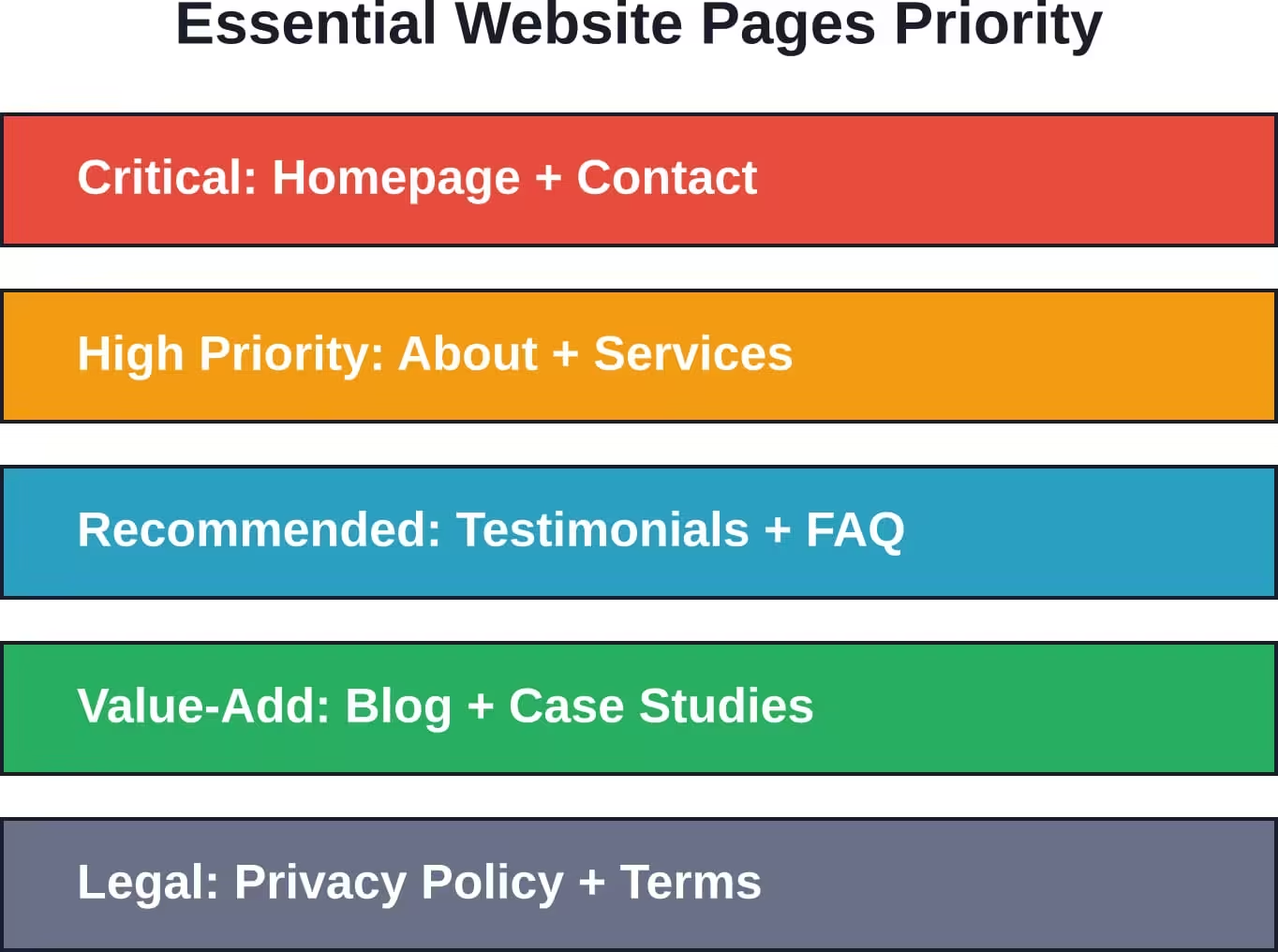
Essential Pages Every SMB Website Needs
According to SBA guidance, certain pages prove essential for small business sites. These foundational elements give visitors what they’re most likely seeking.
Homepage That Converts
The homepage serves as the virtual front door. Within seconds, visitors should understand what the business does, who it serves, and why they should care.
Clear value propositions belong above the fold. Don’t make visitors scroll to understand the core offering. Professional design matters — the SBA recommends regular homepage updates to maintain fresh, current content.
Outdated content kills credibility fast. A homepage highlighting last year’s Thanksgiving menu in January signals neglect. Regular refreshes keep sites feeling active and current.
About Page Builds Trust
Customers want to know who they’re working with. About pages humanize businesses through team photos, company history, and mission statements.
This page should answer why the business exists, what makes it different, and who stands behind it. Authentic storytelling beats corporate-speak every time.
Service or Product Pages Drive Action
Detailed service or product descriptions form the core of most small business sites. Each offering deserves its own page with specific benefits, pricing information (when appropriate), and clear calls to action.
Avoid vague descriptions. Specific details help customers self-qualify and make informed decisions. High-quality images showcase products and services far better than words alone.
Contact Page Removes Friction
Making contact easy directly impacts conversion rates. Multiple contact methods serve different customer preferences: phone numbers for those who want immediate answers, email forms for detailed inquiries, and physical addresses for local businesses.
Maps and directions matter for brick-and-mortar locations. Hours of operation prevent frustrated customers showing up when closed. Response time expectations set appropriate customer expectations.
Additional Recommended Pages
Beyond the essentials, several other pages strengthen small business sites. Testimonials and case studies provide social proof. FAQ pages reduce repetitive customer service inquiries. Blog or news sections demonstrate expertise and improve SEO.
Privacy policies and terms of service aren’t just good practice — they’re legally required for sites collecting customer data or processing transactions.
The Digitalization Advantage for SMBs
Research suggests productivity gains when small businesses embrace digital tools through digitalization.
Website presence forms the foundation of broader digital transformation. But there’s a gap between having a website and leveraging it effectively.
Beyond Basic Presence
Modern website development should prioritize business functionality over mere information display. Sites that actively contribute to operations — processing orders, booking appointments, collecting leads, providing customer service — deliver far more value than digital brochures.
Integration with Business Operations
The most effective small business websites integrate with existing tools and workflows. Calendar synchronization for appointment bookings, CRM integration for lead tracking, and inventory connections for product availability create seamless operations.
Many modern website builders include these integrations natively or through app marketplaces. The Small Business Digital Alliance (SBDA), a public-private partnership between the SBA and Business Forward, Inc., publishes a comprehensive library of free resources from members including Amazon, Comcast, Google, Meta, PayPal, and others to help small businesses expand reach and manage growth.
DIY vs Professional Development Decision Framework
The central question most SMBs face: handle website development internally or hire professionals?
When DIY Makes Sense
Small businesses should consider DIY approaches when they need to launch quickly, have limited budgets, and require standard functionality that modern builders provide out-of-box.
Service businesses with straightforward needs — displaying services, collecting contact information, sharing basic company information — rarely need custom development. DIY platforms handle these requirements perfectly well.
The learning curve matters less than it used to. Modern builders prioritize user experience. Setup wizards, template libraries, and drag-and-drop editors make professional-looking results achievable for non-technical users.
When Professional Help Becomes Necessary
Custom development justifies its costs when businesses need unique functionality, complex integrations, or design that provides competitive differentiation.
Large product catalogs with sophisticated filtering might exceed DIY platform capabilities. Integration with proprietary business systems often requires custom work. Unique user experiences that differentiate brands typically need professional design and development.
Some businesses split the difference: using builders for initial launch, then hiring developers for specific customizations or integrations the platform can’t handle natively.
The Hybrid Approach
Many successful small business websites start as DIY projects but bring in professionals for specific tasks. Professional photography elevates visual impact. Copywriters craft compelling messaging. Designers tweak templates for better brand alignment.
This approach controls costs while achieving professional results. Business owners maintain control and flexibility while leveraging expertise where it matters most.
| Business Scenario | Recommended Approach | Reasoning |
|---|---|---|
| Local service business, standard needs | DIY Builder | Cost-effective, fast launch, sufficient features |
| Small online store (under 100 products) | eCommerce Builder | Built-in payment and inventory management |
| Professional services firm needing credibility | DIY Builder + Professional Design | Balance cost with polished appearance |
| Business with proprietary systems integration | Custom Development | Requires specialized technical work |
| Startup testing market fit | DIY Builder | Minimize investment until concept proves viable |
Improving Existing Small Business Websites
Already have a site? The SBA offers guidance on low-cost homepage improvements that bring sites up to current standards.
Content Freshness Matters
Stale content damages credibility. Regular updates signal active businesses. Even simple changes — updating copyright years, refreshing testimonials, adding recent news — make sites feel current.
Seasonal content needs removal promptly. Nothing says “neglected website” like outdated promotional offers or last year’s holiday announcements.
Visual Refresh Options
Professional templates cost under $100 according to SBA guidance. For businesses with existing sites that look dated, template updates provide affordable facelifts.
Template purchases from marketplaces like ThemeForest or TemplateMonster offer modern design at fraction of custom redesign costs. Installation requires technical knowledge but remains accessible for small businesses with basic technical resources.
Mobile Optimization Priority
Sites that don’t work flawlessly on mobile devices lose customers immediately. With mobile browsing dominant, mobile optimization ranks among the most important improvements possible.
Testing on actual devices reveals issues desktop browsers miss. Buttons need finger-friendly sizing. Text needs readable sizing without zooming. Navigation needs thumb-friendly placement.
Speed Improvements
Slow sites frustrate users and hurt search rankings. Image optimization provides the biggest speed gains for most small business sites. Compressing images without visible quality loss dramatically reduces page load times.
Modern image formats like WebP offer superior compression. Many website builders automatically optimize images, but sites on older platforms or custom builds may need manual attention.
Search Engine Optimization for Small Business Sites
The best-designed website fails if customers can’t find it. SEO determines online visibility.
Technical SEO Foundations
Search engines prioritize fast, secure, mobile-friendly sites. HTTPS encryption (SSL certificates) provides security and ranking benefits. Most modern hosting includes SSL certificates automatically.
Clean URL structures help both users and search engines understand page content. Descriptive URLs like “yoursite.com/plumbing-services” work better than “yoursite.com/page?id=847”.
Sitemaps tell search engines which pages exist and how they’re organized. Modern builders generate sitemaps automatically. Custom sites need manual sitemap creation and submission to search engines.
Content Optimization
Page titles and meta descriptions appear in search results. These elements should clearly describe page content while encouraging clicks.
Content itself needs optimization around relevant terms customers actually search. Keyword research reveals what phrases potential customers use. Content should naturally incorporate these terms without awkward over-optimization.
Local businesses benefit enormously from location-based optimization. City and service combinations, local landmarks, and neighborhood names help sites appear for geographically relevant searches.
Building Authority
Search engines measure site authority through links from other websites. Local business directories, industry associations, and chamber of commerce listings provide valuable links for small business sites.
Content that others want to link to — helpful guides, original research, unique insights — naturally attracts links. Regular blogging builds content libraries that capture long-tail search traffic.
Security and Maintenance Considerations
Websites require ongoing attention to remain secure and functional.
Security Best Practices
Regular backups protect against data loss from hacks, server failures, or human error. Backup frequency should match update frequency — sites updated daily need daily backups, while static sites can backup weekly.
Strong passwords and two-factor authentication prevent unauthorized access. Default admin usernames like “admin” should be changed. Password managers help maintain unique, complex passwords across different systems.
Software updates patch security vulnerabilities. Platforms, plugins, and themes all need regular updates. DIY website builders handle this automatically, while custom sites require manual attention.
Maintenance Requirements
Link checking prevents broken links that frustrate users and hurt SEO. Regular testing catches issues before customers do.
Form testing ensures lead capture continues working. Regular submissions verify that forms deliver notifications properly and store data correctly.
Performance monitoring tracks load times and uptime. Many services offer free monitoring that alerts businesses when sites go down or slow significantly.
DIY vs Custom Maintenance
Website builders include maintenance as part of subscription costs. Security, backups, and platform updates happen automatically. This predictable, hands-off approach appeals to small businesses without technical staff.
Custom sites require active maintenance. Businesses either handle this internally or pay developers through maintenance contracts. These ongoing costs should factor into total cost of ownership calculations.
Common SMB Website Development Mistakes
Learning from others’ mistakes saves time and money.
Prioritizing Design Over Functionality
Beautiful websites that don’t convert visitors into customers miss the point. Functionality trumps aesthetics. Sites need clear calls to action, intuitive navigation, and easy contact methods.
Design should support business goals, not overshadow them. Overly complex layouts that confuse visitors or hide important information sacrifice results for appearance.
Neglecting Mobile Users
Desktop-first design thinking persists despite mobile traffic dominance. Testing exclusively on large monitors means missing how most customers actually experience sites.
Mobile considerations should drive design decisions from the start, not get tacked on afterward.
Information Overload
Trying to say everything results in communicating nothing clearly. Effective websites focus messages on what matters most to customers.
Edit ruthlessly. Every page element should serve specific purposes. Clutter dilutes impact and overwhelms visitors.
Ignoring Load Speed
Slow sites drive visitors away before content even loads. Massive image files, excessive scripts, and poorly optimized code create unnecessary delays.
Speed testing should happen regularly. Google’s PageSpeed Insights provides free analysis and specific improvement recommendations.
Setting and Forgetting
Websites aren’t fire-and-forget projects. Regular updates, fresh content, and ongoing optimization separate successful sites from digital tombstones.
Establish maintenance schedules. Monthly content reviews, quarterly performance checks, and annual strategic assessments keep sites aligned with business goals.
Measuring Website Success
Without measurement, improvement becomes impossible.
Key Metrics for Small Business Sites
Traffic volume shows how many people visit sites. But raw numbers matter less than traffic quality. Visitors who engage with content, explore multiple pages, and take desired actions provide more value than random browsers who immediately bounce.
Conversion rates measure how effectively sites turn visitors into leads or customers. Calculate conversions by dividing desired actions (form submissions, purchases, calls) by total visitors. Even small percentage improvements in conversion rates significantly impact business results.
Bounce rates indicate how many visitors leave after viewing only one page. High bounce rates often signal mismatch between visitor expectations and actual content, or poor user experience that drives people away.
Average session duration and pages per visit reveal engagement levels. Longer visits and more page views generally indicate greater interest and better content relevance.
Analytics Tools
Google Analytics provides comprehensive free tracking for websites. Installation requires adding tracking code to pages — DIY builders typically offer one-click setup, while custom sites need manual code insertion.
Heat mapping tools show where visitors click, how far they scroll, and which elements attract attention. These insights reveal whether important content and calls to action actually get noticed.
Form analytics track where users abandon multi-step processes. Understanding drop-off points enables targeted improvements that increase completion rates.
Setting Meaningful Goals
Generic goals like “increase traffic” lack specificity needed for effective action. Better goals target specific metrics with clear targets and timeframes: “increase contact form submissions 25% within three months” or “reduce bounce rate from 65% to 50% by quarter end.”
Align website goals with business objectives. Sites should contribute measurably to revenue, lead generation, customer service efficiency, or other concrete business outcomes.
Future-Proofing Small Business Websites
Technology evolves rapidly. Smart development choices today prevent expensive overhauls tomorrow.
Scalability Considerations
Choose platforms that grow with businesses. What works for five products may not handle five hundred. Plan ahead for likely expansion needs.
Most website builders offer upgrade paths. Starting small while maintaining room to grow provides cost-effective scaling. Custom development should architect for future requirements, not just current needs.
Platform Lock-In
Some platforms make moving difficult through proprietary features or content formats. Understanding export options before committing prevents future headaches.
Content ownership matters. Businesses should maintain copies of content, images, and customer data independent of website platforms.
Technology Trends
AI-powered chatbots increasingly handle basic customer service. Voice search optimization grows in importance as smart speakers proliferate. Progressive web apps blur lines between websites and mobile apps.
Stay informed about emerging technologies without chasing every trend. Adopt new capabilities when they solve real business problems, not because they’re novel.
Taking Action on Website Development
Knowledge without implementation changes nothing. Small businesses ready to move forward should start with clear goal definition.
What specific business problems should the website solve? More leads? Better customer service? Online sales? Clear objectives guide every subsequent decision from platform selection to content creation.
Next, honestly assess available resources. Time, budget, and technical skills all constrain options. Businesses with limited budgets but available time might DIY successfully. Those with capital but no time should hire professionals. Most fall somewhere between, suggesting hybrid approaches.
Start small and iterate. Perfect websites don’t launch — they evolve. Better to launch an adequate site quickly and improve based on real user feedback than delay months pursuing perfection.
Digital transformation efforts can result in substantial productivity gains for small businesses. But only those who take action capture those benefits. Website development doesn’t need to be complicated or expensive, but it does need to happen.
The digital storefront matters. In 2026, customers expect to find businesses online. Meeting that expectation opens doors. Exceeding it creates competitive advantage.
Whether choosing DIY builders, professional templates, or custom development, the right approach aligns with specific business needs, resources, and goals. No single path works for every business. But every business needs to choose a path and start moving forward.
Your website represents your business around the clock. Make it count.