Quick Summary: Website development for small businesses involves creating a professional online presence that drives growth, builds credibility, and reaches new customers. With nearly two-thirds of small businesses now operating digitally and e-commerce contributing over $1.1 trillion to the U.S. economy, a well-designed website is no longer optional—it’s essential. Modern website builders, AI tools, and security frameworks make it easier than ever for small businesses to establish effective websites without extensive technical knowledge.
The digital transformation of small business isn’t coming—it’s already here.
According to the U.S. Small Business Administration, nearly two-thirds of small businesses have gone digital since 2023. E-commerce sales in the U.S. exceeded $1.1 trillion in 2023 and continue to grow, representing approximately 15-16% of total retail sales, with projections to reach higher levels by 2026 Those numbers tell a clear story: customers expect to find businesses online, and those without a web presence are losing ground fast.
But here’s the thing—building a website doesn’t have to be complicated or expensive. The landscape has shifted dramatically from just a few years ago. Where website development once required hiring a developer and spending thousands, small business owners now have access to intuitive platforms, AI-powered tools, and turnkey solutions that make launching a professional site achievable in days, not months.
This guide covers everything from choosing the right platform to implementing cybersecurity measures that protect both the business and its customers.
Why Small Businesses Need a Professional Website
The barrier between a potential customer and a purchase decision is now measured in clicks, not miles.
According to SBA data, 73% of small businesses have a website. That means the businesses without one are increasingly the exception—and prospects notice. When someone searches for a service or product and finds no website, they don’t call. They moved on to a competitor who made it easy to learn about their offerings, check hours, read reviews, and make contact.
A professional website serves multiple critical functions:
- Establishes credibility and legitimacy in the market
- Provides 24/7 accessibility for customers to research and purchase
- Expands market reach beyond local geography
- Enables data collection and customer relationship management
- Supports multiple revenue streams through online sales
Real talk: customers judge businesses by their websites. A poorly designed site—or worse, no site at all—sends the message that the business isn’t serious or current. Meanwhile, a clean, functional website communicates professionalism and builds trust before the first conversation even happens.
The economic case is equally compelling. E-commerce’s share of worldwide retail sales currently stands at 20% and is projected to reach 22.6% by 2027. Small businesses that establish online sales channels now position themselves to capture a growing slice of that market.
Choosing the Right Website Builder Platform
Not all website builders are created equal. The platform that works for a photography portfolio won’t necessarily serve an e-commerce shop or a service-based business.
The key criteria for small businesses include ease of use, design flexibility, built-in features, scalability, and total cost of ownership. Testing shows that business owners with minimal technical experience should be able to create a working site in less than 30 minutes with the right platform.
Platform Comparison: Top Options for Small Business
| Platform | Best For | Starting Price | Standout Feature | Skill Level Required |
|---|---|---|---|---|
| Wix | Non-technical users | $17/month | User-friendly drag-and-drop interface | Very Low |
| Squarespace | Service-based businesses | $12/month (billed yearly) | Elegant design templates | Low |
| Shopify | E-commerce focused | Varies | Comprehensive selling tools | Low-Medium |
| WordPress | Advanced customization | Free (hosting extra) | Unlimited flexibility | Medium-High |
Wix consistently ranks as the easiest option for business owners who want to get online quickly. The interface is intuitive, templates are business-focused, and the platform includes everything from payment processing to appointment booking without requiring additional plugins.
Squarespace appeals to businesses where visual presentation matters—consultants, designers, photographers, and similar service providers. The templates are clean and modern, and the platform handles responsive design automatically.
For businesses planning to sell products online, Shopify offers purpose-built e-commerce functionality. Inventory management, payment processing, shipping integration, and sales analytics are all native features. The platform is designed specifically for online retail.
WordPress provides maximum flexibility but requires more technical comfort. The open-source platform powers a significant portion of the web and supports virtually unlimited customization through themes and plugins. However, that power comes with a steeper learning curve.
Get a Small Business Website That Brings You Clients
If your website was built without a clear plan, it will likely need to be redone later. This is where Lengreo fits in. They don’t jump straight into design or development. Their work starts with business analysis and research, then moves through prototyping and staged development. For small businesses, this reduces the chance of rebuilding things later and keeps the website aligned with how the business actually operates.
Build Your Website With a Clear Plan From Day One
With Lengreo, the focus is on doing the work in the right order and keeping control over each stage:
- Research and business analysis before development
- Prototyping with regular reviews
- Front-end and back-end development in separate stages
- Launch support with setup, migration, and QA
- Post-launch fixes and ongoing maintenance options
If you want to avoid rebuilding your website later, talk to Lengreo and go through your requirements before starting.
Essential Features Every Small Business Website Needs
Platform selection matters, but features matter more. A beautiful website that doesn’t convert visitors into customers is just expensive art.
Here’s what actually drives business results:
Mobile Responsiveness
Mobile traffic now exceeds desktop traffic for most business categories. A site that doesn’t render properly on phones and tablets alienates more than half of potential customers. Every modern website builder handles this automatically, but it’s worth testing on actual devices before launch.
Clear Calls to Action
Every page should guide visitors toward a specific action—schedule a consultation, request a quote, make a purchase, sign up for a newsletter. Vague sites that don’t direct visitor behavior generate traffic but not results.
Contact Information and Forms
Make it ridiculously easy for customers to reach the business. Phone numbers, email addresses, physical location (if applicable), and contact forms should be prominent and functional. Research and practitioner experience indicate that hidden or unclear contact information creates customer friction and lost opportunities.
Payment Processing
For businesses that sell products or accept deposits, integrated payment processing is essential. Modern platforms include secure payment solutions that handle credit cards, digital wallets, and alternative payment methods without requiring separate merchant accounts or complex integrations.
Search Engine Optimization Tools
Built-in SEO features help businesses appear in local and general search results. This includes customizable page titles, meta descriptions, URL structures, image alt text, and schema markup. Some platforms also generate XML sitemaps automatically and submit them to search engines.
Analytics Integration
Understanding who visits the site, how they found it, and what they do there informs marketing decisions. Google Analytics integration and native analytics dashboards provide visibility into traffic sources, popular pages, conversion rates, and user behavior.
Understanding Website Development Costs
The price for creating a small business website varies considerably depending on approach, features, and ongoing needs.
Website builder subscriptions typically start at $12 per month for basic plans. That covers hosting, templates, basic features, and a domain name for the first year. Mid-tier plans range from $29 to $159 per month and add e-commerce functionality, advanced analytics, priority support, and additional storage. Enterprise plans can reach $200 or more monthly.
Those subscription costs don’t include everything, though. Additional expenses often include:
- Domain name registration: $10-15 annually after the first year
- Premium templates or themes: $50-200 one-time
- Professional photography: $300-2,000 depending on scope
- Copywriting services: $500-5,000 for comprehensive content
- Extended plugins or apps: $5-50 monthly each
- Email marketing tools: $20-300 monthly based on list size
Custom development from a professional web designer or agency starts around $2,000 for basic sites and can exceed $10,000 for complex builds with custom functionality. That route offers maximum customization but requires ongoing maintenance contracts for updates and security.
For most small businesses, the DIY website builder approach offers the best balance of cost, capability, and control. The learning curve is manageable, results are professional, and changes can be made immediately without waiting for a developer.
Integrating AI and Automation
Artificial intelligence is no longer experimental technology for small business websites—it’s becoming standard practice.
According to Talkdesk, nearly 51% of small businesses now use AI-powered chatbots and virtual assistants for customer service. These tools handle common questions, qualify leads, schedule appointments, and provide 24/7 responsiveness without requiring staff availability.
Practical AI applications for small business websites include:
- Chatbots that answer FAQs and route complex questions to staff
- Automated email responses based on form submissions
- Personalized product recommendations based on browsing behavior
- Content generation for product descriptions and meta tags
- Automated social media posting and scheduling
AI streamlines processes, limits human error, and enables employees to focus on higher-value work. Instead of answering the same basic questions repeatedly, staff can concentrate on complex customer needs and strategic initiatives.
Most website builders now include basic automation features. More advanced capabilities often require third-party integrations with platforms like Zapier, which connects different tools and triggers actions based on specific events.
Local SEO and Online Visibility
Building a website solves only half the challenge. Customers still need to find it.
Local SEO helps small businesses appear in search results when potential customers look for nearby products or services. When someone searches for “plumber near me” or “best coffee shop in Portland,” search engines use location data, business listings, and website signals to determine which results to show.
Critical Local SEO Elements
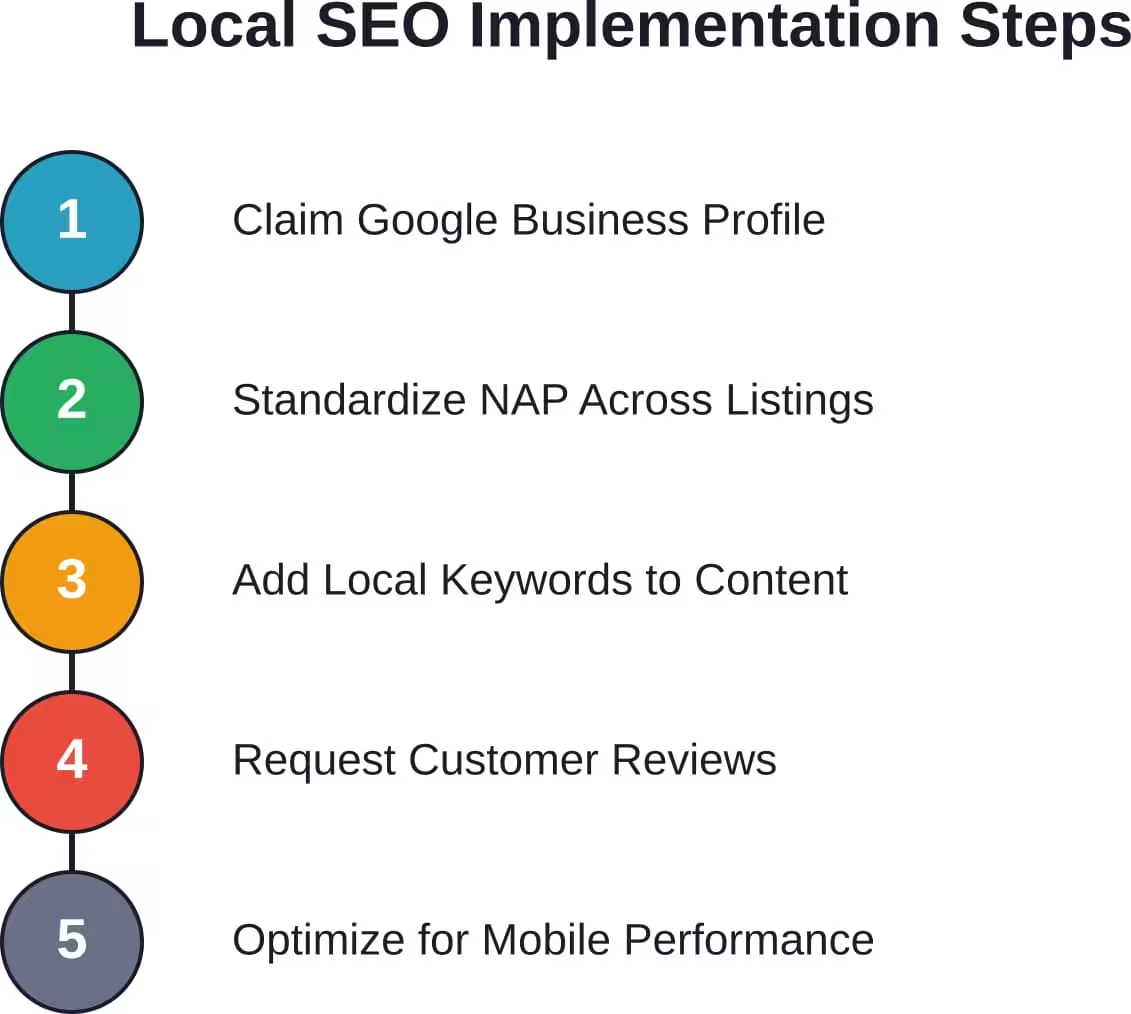
Google Business Profile is the foundation of local visibility. This free listing appears in Google Maps and local search results, displaying business information, photos, reviews, hours, and direct contact options. Claiming and optimizing this profile is non-negotiable for local businesses.
Consistent NAP (Name, Address, Phone number) across all online listings prevents confusion and strengthens search rankings. Discrepancies between the website, Google Business Profile, social media, and directory listings dilute credibility.
Local keywords in page content, titles, and meta descriptions signal geographic relevance. A bakery in Austin benefits from phrases like “Austin sourdough bread” and “downtown Austin bakery” rather than generic “fresh bread” terminology.
Customer reviews directly impact local rankings. Businesses with more positive reviews, higher average ratings, and recent feedback outrank competitors with sparse or outdated reviews. Actively requesting reviews from satisfied customers and responding to all feedback—positive and negative—demonstrates engagement.
Mobile optimization matters even more for local search because most local queries happen on phones. Fast load times, tap-friendly navigation, and click-to-call phone numbers improve the mobile experience.
Website Security and Cybersecurity Basics
Small businesses face the same cyber threats as larger organizations, but with fewer resources to defend against them.
According to the National Institute of Standards and Technology (NIST), cybersecurity has become essential as small businesses increasingly rely on data and technology to operate and scale. The NIST Cybersecurity Framework provides structured guidance that small businesses can implement without dedicated IT departments.
Basic website security measures include:
SSL Certificates
SSL (Secure Sockets Layer) encryption protects data transmitted between the website and visitors. Sites with SSL display “https://” in the URL and show a padlock icon in browsers. Beyond security benefits, SSL is a ranking factor for search engines—sites without it are penalized in search results.
Most website builders include SSL certificates at no additional cost. For custom sites, SSL certificates can be obtained free through services like Let’s Encrypt or purchased from certificate authorities.
Regular Updates and Patches
Website platforms, plugins, and themes require regular updates to address security vulnerabilities. Outdated software is the primary entry point for most website attacks. Enabling automatic updates when available reduces risk.
Strong Authentication
Password security prevents unauthorized access to website admin panels. Multi-factor authentication adds an additional verification step beyond passwords, making account compromise significantly more difficult even if passwords are stolen.
Backup Systems
Regular automated backups ensure business continuity if the site is compromised or experiences technical failure. Backups should be stored separately from the website itself—many platforms include automated backup features, or third-party backup services can be integrated.
Payment Security Compliance
Businesses that process credit card payments must comply with PCI DSS (Payment Card Industry Data Security Standard) requirements. Using established payment processors like Stripe, Square, or PayPal shifts most compliance responsibility to those providers.
The NIST Cybersecurity Framework 2.0 offers a comprehensive approach that small businesses can tailor to their specific needs and risk profiles. The framework is available free and includes a quick-start guide specifically designed for modest or nonexistent cybersecurity plans.
Social Media Integration and Digital Presence
Websites don’t exist in isolation—they’re part of a broader digital ecosystem that includes social media, email marketing, and online reviews.
Social media platforms extend website reach and provide channels for ongoing customer engagement. Research indicates that modest social media advertising budgets can generate significant ROI for small businesses. for boosting posts and expanding audience reach.
Effective social media integration connects website content with platforms where target customers already spend time. Facebook remains widely used across age groups according to demographic research.
Practical integration tactics include:
- Social sharing buttons on blog posts and product pages
- Embedded social feeds displaying recent posts on the website
- Consistent branding across website and social profiles
- Social login options that reduce friction for account creation
- Automated posting of new website content to social channels
Email marketing platforms integrate with websites to capture leads through signup forms, deliver automated welcome sequences, and nurture customer relationships over time. Building an email list creates a marketing channel that the business controls, unlike social media where algorithm changes can drastically reduce organic reach.
Measuring Success and Performance
Data without action is just noise. Websites generate massive amounts of analytics data—the challenge is identifying which metrics actually matter.
Key performance indicators for small business websites typically include:
| Metric | What It Measures | Why It Matters | Target Benchmark |
|---|---|---|---|
| Conversion Rate | Percentage of visitors who take desired action | Directly ties to revenue | 2-5% for most businesses |
| Traffic Sources | Where visitors come from | Guides marketing spend | Diversified across channels |
| Bounce Rate | Percentage leaving after one page | Indicates relevance and UX | Below 60% |
| Page Load Speed | Time to full page render | Affects rankings and conversions | Under 3 seconds |
| Mobile vs Desktop | Device split of traffic | Informs design priorities | Varies by industry |
Conversion rate is the most important metric because it directly impacts business results. A site with 1,000 monthly visitors and a 5% conversion rate generates more leads than a site with 5,000 visitors and a 0.5% conversion rate.
Traffic sources reveal where marketing efforts are working. Organic search, direct traffic, social media, paid ads, and referrals each indicate different aspects of digital presence. Overreliance on a single source creates vulnerability if that channel changes.
Bounce rate signals whether visitors find what they expected. High bounce rates often indicate mismatched keywords, slow load times, poor mobile experience, or irrelevant content. Some pages naturally have high bounce rates—contact information pages, for example—so context matters.
Page load speed affects both search rankings and user experience. Research consistently shows that conversion rates drop significantly when pages take more than three seconds to load. Most website builders optimize speed automatically, but large images, excessive plugins, and complex scripts can slow performance.
Common Mistakes to Avoid
Small business website development follows predictable patterns—including predictable mistakes.
The most common pitfalls include:
Skipping Mobile Testing
Designing on a desktop and never checking how the site renders on phones is a fast track to losing mobile traffic. Real-device testing catches issues that desktop preview modes miss.
Overcomplicating Navigation
Complex menu structures confuse visitors. The best navigation is intuitive—users should find what they need in two clicks maximum. When in doubt, simplify.
Ignoring Load Times
High-resolution images that aren’t compressed, autoplay videos, and unnecessary animations all slow page load. Speed optimization isn’t optional—it’s a ranking factor and conversion factor.
Hiding Contact Information
Making customers hunt for phone numbers or contact forms creates unnecessary friction. Contact information belongs in the header, footer, and dedicated contact page at minimum.
Launching Without SEO Basics
Publishing a site without page titles, meta descriptions, header tags, and image alt text wastes the opportunity to rank in search. These elements should be configured before launch, not added later.
Neglecting Security Updates
Ignoring update notifications leaves sites vulnerable. Setting a monthly reminder to check for platform, theme, and plugin updates takes minutes and prevents serious problems.
Writing for Search Engines Instead of People
Keyword-stuffed content that reads like it was written by a robot drives visitors away. Search engines have become sophisticated enough to recognize natural language—writing for humans first is both better practice and better SEO.
Getting Started: Step-by-Step Launch Process
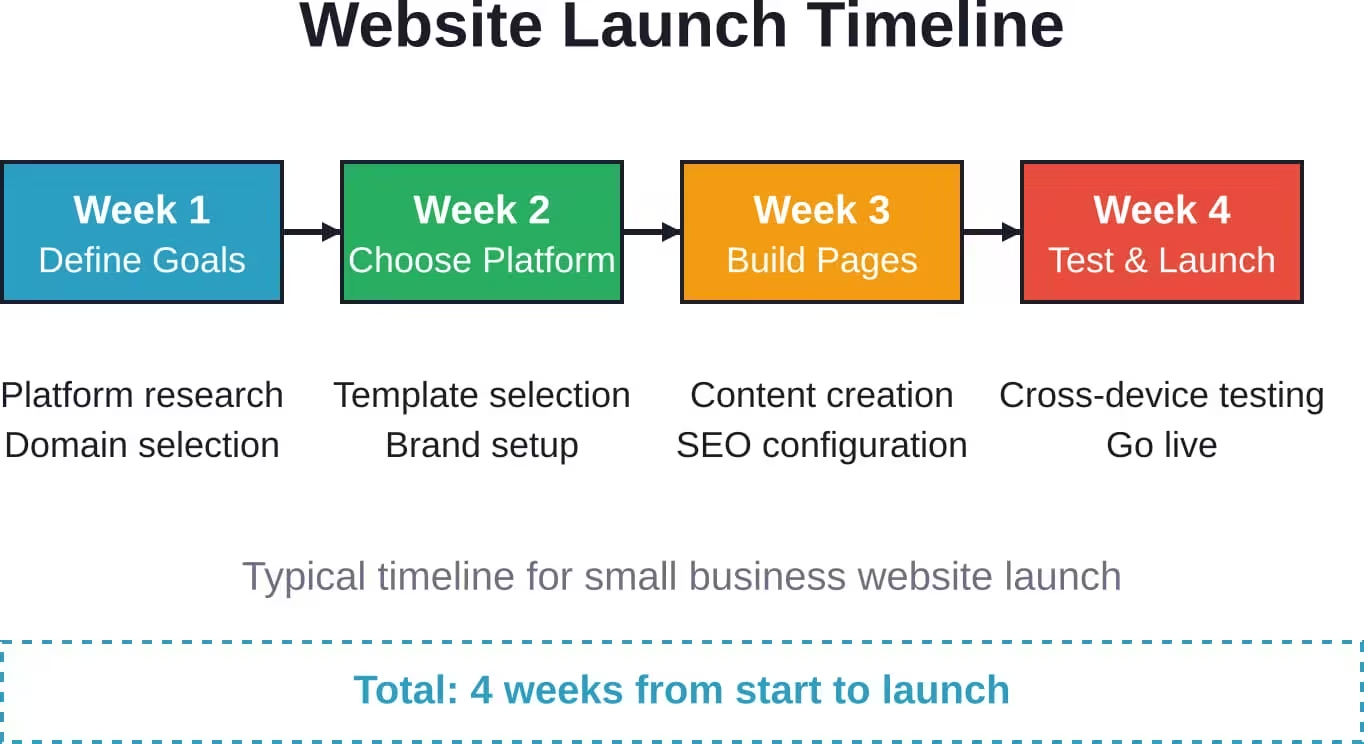
The path from concept to live website breaks down into manageable stages:
- Start by defining the primary goal. Is the site meant to generate leads, sell products, provide information, or establish credibility? That goal determines design priorities and feature requirements.
- Choose a platform based on technical comfort level, budget, and specific needs. For most small businesses, established platforms like Wix, Squarespace, or Shopify offer the best balance of capability and usability.
- Select a domain name that’s memorable, professional, and reflects the business name. Check availability through the website builder or domain registrars like Namecheap or GoDaddy. Avoid hyphens, numbers, and unusual spellings that complicate verbal communication.
- Pick a template that matches the business type and customize colors, fonts, and layout to reflect brand identity. Most platforms offer industry-specific templates that include appropriate page structures and sections.
- Create essential pages: home, about, services/products, contact, and privacy policy. Each page should have a clear purpose and guide visitors toward the desired action.
- Add high-quality content. Professional photography makes a significant difference in perception. If hiring a photographer isn’t feasible, stock photo services like Unsplash or Pexels offer free high-resolution images.
- Configure SEO settings for each page—unique titles, descriptions, header tags, and image alt text. These elements help search engines understand page content and relevance.
- Set up analytics before launch to track visitor behavior from day one. Google Analytics is free and integrates with most platforms.
- Test thoroughly on multiple devices and browsers. Check all links, forms, payment processing, and interactive features. Have someone unfamiliar with the site try to complete key tasks and note where they struggle.
- Launch and promote. Announcing the new website through email, social media, and local business networks drives initial traffic and establishes online presence.
Conclusion
Website development for small businesses has transformed from a complex technical challenge into an accessible opportunity.
The data is clear: nearly two-thirds of small businesses have gone digital, e-commerce contributes over $1.1 trillion to the U.S. economy annually, and online presence is now fundamental rather than optional. Small businesses that establish professional websites position themselves to compete effectively, reach broader audiences, and build credibility with potential customers.
The path forward doesn’t require large budgets or technical expertise. Modern website builders, AI-powered tools, and structured frameworks like the NIST Cybersecurity guidelines make professional web presence achievable for any small business willing to invest time and attention.
Start with clear goals, choose a platform that matches capabilities and needs, implement essential features, optimize for search and security, and measure results consistently. The businesses that thrive in the coming years will be those that recognize their website not as a one-time project but as a growing, evolving asset that supports every aspect of business development.
The best time to establish an online presence was five years ago. The second best time is today.