Quick Summary: Website development for multiple locations requires a scalable architecture that balances consistent brand identity with location-specific content. Businesses need dedicated pages for each location with unique local information, optimized navigation, and technical infrastructure that prevents duplicate content issues. The approach should prioritize local SEO while maintaining centralized management and performance across all locations.
Building a website for a business with multiple locations isn’t just about creating more pages. It’s about constructing an architecture that scales without sacrificing local relevance or search visibility.
The challenge? Each location needs to stand out in local search while the brand maintains consistency. Get it wrong, and search engines penalize duplicate content. Get it right, and each location becomes a revenue driver.
Here’s the thing though—generic websites fail multi-location businesses. Localized content on location pages boosts rankings by 107% compared to generic pages, according to research cited by multi-location website design resources. That’s not a small difference.
Why Multi-Location Website Architecture Matters
Multi-location businesses face a fundamental tension. Corporate wants brand consistency. Local managers need flexibility to highlight what makes their location unique. The website needs to serve both masters.
Traditional single-location websites collapse under this pressure. They either go too generic—creating identical pages that search engines ignore—or too fragmented, where each location feels like a different company entirely.
The technical stakes are high. Search engines like Google have become sophisticated at detecting thin, duplicate content. Simply copying the same template across 50 locations with only the address changed? That’ll tank rankings faster than slow load times.
And speaking of speed—having a fast-loading website is non-negotiable. According to competitor research, 53% of visits are abandoned if pages take longer than 3 seconds to load.
Build a Website Bringing Leads From Every Location You Serve
A single generic website rarely works when your business operates in multiple cities. If locations aren’t clearly structured, users get lost and search visibility drops. Lengreo approaches website development as part of a broader marketing setup. They combine development with SEO, paid ads, and lead generation activities, so the website supports client acquisition instead of just listing locations.
Set Up a Website That Works Across All Your Service Areas
Lengreo focuses on delivering websites that support real business goals:
- Full commitment to your plans and business goals
- Focus on meeting agreed timelines and budgets
- Experience across different industries and project types
- Project-based pricing with optional ongoing maintenance support
👉 Contact Lengreo to build a website that generates leads across all your locations.
Core Architecture Decisions for Multi-Location Websites
Before writing a single line of code, businesses need to make a fundamental architectural choice. This decision affects everything from SEO performance to maintenance costs.
Subdirectories vs. Subdomains vs. Separate Domains
The three main approaches each carry distinct tradeoffs:
| Architecture | Structure Example | SEO Impact | Management Complexity |
|---|---|---|---|
| Subdirectories | example.com/locations/chicago | Strongest—all authority flows to main domain | Lowest—centralized updates |
| Subdomains | chicago.example.com | Moderate—treated as separate sites by search engines | Moderate—requires coordination |
| Separate Domains | examplechicago.com | Weakest—dilutes brand authority | Highest—individual site management |
For most multi-location businesses, subdirectories win. They consolidate domain authority, simplify technical SEO, and make content management straightforward. New locations integrate seamlessly as additional subdirectories.
Subdomains make sense only when locations operate semi-independently or when different locations serve genuinely different products or markets. The technical overhead rarely justifies the separation otherwise.
Separate domains? Almost never the right call unless locations are truly independent franchises with separate branding.
Centralized vs. Distributed Content Management
Beyond URL structure, businesses must decide how content gets created and maintained. Centralized systems give corporate control. Distributed systems empower local managers.
The sweet spot? A hybrid approach. Corporate maintains templates, brand guidelines, and core content. Local managers customize specific sections—hours, staff bios, location-specific promotions, and local events.
This requires a content management system with robust permission structures. WordPress multisite, enterprise CMS platforms, or purpose-built multi-location systems can handle this, but the setup demands careful planning.
Building Effective Location Pages
Location pages are the workhorses of multi-location websites. These pages need to accomplish several objectives simultaneously: rank in local search, provide essential visitor information, convert browsers into customers, and maintain brand consistency.
Essential Elements Every Location Page Needs
Each location page requires specific components. Missing even one weakens performance:
- Unique, descriptive content about that specific location (minimum 300-500 words)
- Complete NAP information (Name, Address, Phone) in schema markup
- Embedded map showing the exact location with directions
- Location-specific hours, including holiday schedules
- Staff information or team photos when relevant
- Local testimonials and reviews from that location’s customers
- Location-specific images, never stock photos or images from other locations
- Local contact forms that route to the correct location manager
The content challenge is real. Writing unique descriptions for dozens of locations tests even skilled copywriters. But it’s non-negotiable for search performance.
Avoiding the Duplicate Content Trap
Here’s where most multi-location websites fail. They create templates with placeholder text: “Welcome to [LOCATION]! We’re proud to serve the [CITY] community with the same great service you’ve come to expect from [BRAND].”
Search engines see through this instantly. Each location page needs genuinely unique content that provides value.
Strategies that work:
- Highlight location-specific amenities or features
- Discuss the local area, nearby landmarks, or neighborhood characteristics
- Feature different team members or location managers
- Showcase location-exclusive services or products
- Include local success stories or case studies
Real talk: this requires effort. Businesses scaling to dozens of locations need either dedicated copywriters or a system that empowers local managers to create content within brand guidelines.
Technical SEO for Multi-Location Websites
Local search optimization goes beyond content. The technical foundation determines whether location pages even get indexed properly.
Schema Markup and Structured Data
Structured data helps search engines understand location information. Every location page needs LocalBusiness schema with complete details:
- Business name
- Full address
- Phone number
- Business hours (including special hours)
- Geographic coordinates
- Price range
- Accepted payment methods
Implementing schema correctly can mean the difference between appearing in local pack results or getting buried on page two.
XML Sitemaps and Location Hierarchies
Search engines need clear signals about site structure. Multi-location websites benefit from dedicated location sitemaps that organize all location pages logically.
The sitemap should reflect the URL structure. If locations are organized by state, then city, the sitemap hierarchy should mirror that: /locations/illinois/chicago/, /locations/illinois/springfield/, etc.
Submit location-specific sitemaps through Google Search Console. This gives visibility into indexing issues before they tank traffic.
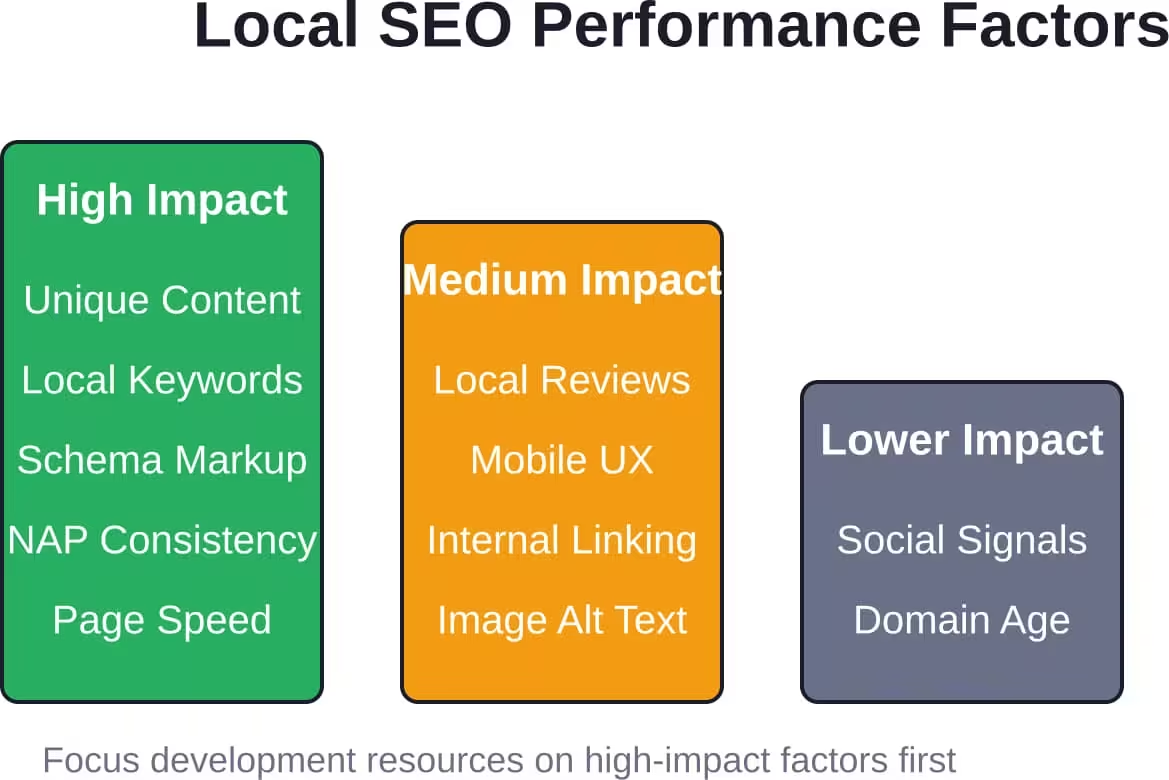
Page Speed Optimization at Scale
Page speed matters even more for multi-location sites. Research shows 40%-60% of searches end without website clicks, and AI assistants now answer questions directly in results without directing users to websites.
Common performance killers on multi-location sites:
- Unoptimized images across hundreds of location pages
- Bloated JavaScript frameworks that slow initial page load
- Excessive third-party scripts (maps, chat widgets, analytics)
- Lack of caching strategies for location-specific content
Solutions scale when automated. Image optimization pipelines, lazy loading for below-the-fold content, and content delivery networks become essential as location count grows.
Navigation and User Experience Design
Visitors to multi-location websites arrive with different intents. Some know exactly which location they want. Others need help finding the nearest one. Navigation must serve both.
Location Finder Implementation
A prominent location finder is mandatory. Best practices for implementation:
- Place the location finder in the main navigation, not buried in a footer
- Enable geolocation to suggest the nearest location automatically
- Provide both map view and list view options
- Filter by services, hours, or amenities when locations differ
- Show distance from the user’s current position or entered address
The location finder often gets the most interaction on multi-location websites. Invest in making it fast and intuitive.
Balancing Global Navigation with Local Content
Navigation presents a design challenge. The global navigation needs to work across all locations, but individual location pages need local emphasis.
Effective approaches include:
- Persistent location selector in the header showing currently selected location
- Global navigation for brand-level pages (About, Services, Contact Corporate)
- Location-specific secondary navigation for local information
- Breadcrumb trails that clearly show location hierarchy
Testing reveals that users get confused when they can’t tell whether content applies to all locations or just the one they’re viewing. Clear visual hierarchy prevents this.
Content Management Systems for Scale
Managing content across multiple locations requires systems purpose-built for the task. Generic CMS platforms can work, but they require careful configuration.
Platform Requirements
Multi-location websites need CMS platforms that support:
| Feature | Why It Matters | Common Solutions |
|---|---|---|
| Template inheritance | Ensures brand consistency while allowing local customization | WordPress multisite, Drupal, enterprise CMS |
| Role-based permissions | Lets local managers edit their pages without accessing others | Most modern CMS platforms |
| Bulk updates | Apply brand changes across all locations instantly | Custom development or specialized tools |
| Location data management | Central database for NAP information prevents inconsistencies | Custom post types, specialized plugins |
The platform choice impacts long-term maintenance costs significantly. Cheaper upfront solutions often cost more over time through manual update processes.
Workflow and Approval Processes
When local managers can edit content, governance becomes critical. Workflow systems prevent brand inconsistencies before they go live.
Typical workflows include:
- Local manager creates or edits content
- Regional manager reviews for brand compliance
- Corporate marketing approves if needed
- Scheduled publishing or immediate go-live based on change type
The workflow complexity should match business needs. Over-engineering approval processes slows everything down. Under-engineering risks brand damage.
Local Keyword Optimization Strategies
Each location page targets different keywords based on geography. The strategy differs from single-location SEO.
Keyword Research by Location
Location-based keyword research identifies search patterns in each market. Search volume for “pizza delivery Chicago” dwarfs “pizza delivery Naperville,” even though both cities are nearby.
Research should identify:
- Primary location + service keywords
- Neighborhood-specific search terms
- Local landmarks or business district terms
- Competitor brand terms in that market
The keyword strategy should acknowledge that not all locations will generate equal traffic. That’s fine. Smaller markets still deserve optimized pages.
Avoiding Keyword Cannibalization
Keyword cannibalization happens when multiple pages compete for the same search terms. Multi-location sites are particularly vulnerable.
If Chicago and Naperville pages both optimize for “Illinois pizza delivery,” they compete against each other. Search engines struggle to determine which page to rank, and both suffer.
Prevention strategies:
- Use specific city names, never just state names, in location page titles
- Create regional overview pages that link to specific location pages
- Use canonical tags strategically to consolidate similar pages
- Differentiate content between nearby locations meaningfully
Integration with Google Business Profile
Multi-location websites don’t exist in isolation. Integration with Google Business Profile amplifies local visibility.
Best practices for GBP integration:
- Ensure exact NAP match between website location pages and GBP listings
- Link from each GBP listing to the corresponding location page
- Use consistent categories across GBP and website schema markup
- Post location-specific updates to GBP that drive traffic to location pages
According to competitor research, 76% of people who make “near me” searches end up visiting a business within a day. The GBP listing often serves as the first touchpoint, but the website location page closes the deal.
Performance Tracking and Analytics
Multi-location websites require analytics strategies that surface location-level insights while maintaining aggregate visibility.
Key Metrics to Monitor
Track these metrics both at the aggregate level and per location:
- Organic search traffic to location pages
- Local pack appearances and click-through rates
- Conversion rates from location pages
- Bounce rates and time on page by location
- Mobile vs. desktop traffic split
- Direction requests and phone calls initiated
Analytics platforms should make it easy to compare location performance. Identifying underperforming locations quickly enables targeted optimization.
A/B Testing at Scale
Testing on multi-location websites offers unique opportunities. Changes can roll out to a subset of locations first, using other locations as controls.
This reduces risk. If a new location page template or call-to-action placement underperforms, only test locations are affected. Successful tests roll out system-wide with confidence.
Common Pitfalls to Avoid
Multi-location website development is littered with traps. Awareness prevents costly mistakes.
Treating All Locations Identically
Not all locations perform equally. Some locations drive significantly more revenue, serve different demographics, or offer unique services.
The website should reflect these differences. High-performing locations might warrant more detailed content, additional imagery, or enhanced features. Treating a flagship location identically to a small satellite office wastes opportunity.
Neglecting Mobile Experience
Mobile drives the majority of local search traffic. Yet many multi-location websites optimize for desktop first.
Mobile users need:
- One-tap calling and directions
- Thumb-friendly location selection
- Fast load times on cellular connections
- Streamlined forms that don’t require extensive typing
Test the mobile experience obsessively. If the location finder doesn’t work flawlessly on a phone, most local traffic is lost.
Ignoring Ongoing Maintenance
Multi-location websites require continuous maintenance. Hours change. Staff turns over. Services expand or contract. Locations close or open.
Without clear ownership and processes, location pages become stale. Outdated information erodes trust faster than no information.
Establish review cycles. Quarterly audits of all location pages catch outdated content before it damages conversions.
Conclusion
Website development for multiple locations demands a fundamentally different approach than single-location sites. The architecture needs to scale without diluting search performance. Each location requires unique content while maintaining brand consistency. Technical SEO must prevent duplicate content issues while maximizing local visibility.
The businesses that succeed treat their multi-location website as a system, not a collection of pages. They invest in scalable content management. They empower local managers within defined boundaries. They monitor performance relentlessly and optimize continuously.
But here’s what really matters—the website architecture chosen today determines expansion costs for years. Choose wisely upfront. Build templates that accommodate growth. Establish content processes that scale.
Start by auditing current location pages if they exist. Identify duplicate content. Map out the ideal architecture. Then execute methodically, location by location if necessary. The alternative—reactive patching as problems emerge—costs more and delivers less.
Multi-location website development isn’t a project with a finish line. It’s an ongoing optimization process that directly impacts how effectively each location attracts and converts local customers.