Quick Summary: Website development for CrossFit gyms involves creating a mobile-responsive, conversion-focused platform that showcases your community, simplifies scheduling and sign-ups, and integrates with gym management software. Professional CrossFit websites typically start around $3,000 and can scale up based on complexity and should prioritize fast load times, authentic visuals, and frictionless navigation to convert visitors into members.
The first impression most prospects get of a CrossFit gym doesn’t happen in the box—it happens on a smartphone screen.
That single fact changes everything about how affiliate owners should think about website development. Over 70% of gym website traffic comes from mobile devices, which means if the class schedule loads slowly or the contact form breaks on a phone, potential members simply disappear.
Building a website for a CrossFit gym isn’t just about slapping together a few photos and a contact form. It’s about creating a digital front door that converts curious visitors into committed athletes, showcases the unique culture of the affiliate, and integrates seamlessly with scheduling and membership management systems.
This guide covers everything gym owners need to know about CrossFit website development—from essential features and design principles to costs, platform choices, and conversion optimization strategies that actually work.
Why Your CrossFit Gym Website Matters More Than Ever
The fitness industry experienced massive digital acceleration during the COVID-19 pandemic. Health and fitness mobile apps experienced a significant increase, resulting in 405 million downloads in early 2025. That surge wasn’t temporary—it permanently shifted how people discover and evaluate gyms.
Prospects now research affiliates the same way they research restaurants or hotels: quick mobile searches, rapid judgments based on visuals and reviews, and immediate expectations for clear pricing and scheduling information.
But here’s the thing—poor website experience drives people away fast. Research indicates that poor user experience (UX) is a significant factor in fitness app user retention challenges, and the same principle applies to gym websites. When navigation feels confusing or essential information hides behind multiple clicks, visitors leave.
A well-developed CrossFit website serves three critical functions:
- Attracts organic traffic through search engine visibility
- Builds trust by showcasing authentic community and coaching credentials
- Converts visitors into trial class sign-ups and memberships
The affiliates that understand this don’t just have websites—they have lead generation machines that work 24/7.
Build a Clear CrossFit Gym Website With Lengreo
Lengreo builds and improves websites, then connects them with SEO, paid ads, tracking, and lead generation. For CrossFit gyms, this means a website that makes classes, schedules, coaches, memberships, trial sessions, and location details easy to find.
The focus is to help people understand how the gym works before they visit or sign up. Lengreo can help structure key pages, improve traffic setup, and make trial booking or membership inquiries easier to follow.
Need a Website That Helps People Join?
Lengreo can help with:
- building or redesigning your website
- improving SEO and paid traffic setup
- setting up tracking and website structure
- refining class, schedule, and membership pages
👉 Contact Lengreo to discuss your website and setup.
Core Features Every CrossFit Gym Website Needs
Not all features deliver equal value. Some elements directly impact conversions and member satisfaction, while others just add clutter.
Focus development resources on these essential components first.
Mobile-Responsive Design
This isn’t optional anymore. Mobile responsiveness means the site automatically adapts to whatever screen size a visitor uses—phone, tablet, or desktop.
Over 70% of gym website traffic comes from mobile devices. If forms don’t work properly on phones or images push content off-screen, the site fails at its primary job.
Test the website on actual devices, not just browser resize tools. Pay special attention to:
- Form field sizing (thumb-friendly tap targets)
- Image loading speed on cellular connections
- Navigation menu behavior on small screens
- Schedule calendar readability
Class Schedule and Booking System
Prospects want to see class times immediately. Current members need to book spots quickly.
The schedule should be visible from the homepage—ideally embedded directly, not hidden behind a “Schedule” link that leads to another page that requires yet another click to see actual times.
Integration with booking systems streamlines this further. When members can reserve their spot directly from the website calendar, it reduces no-shows and creates accountability.
Authentic Visual Content
Stock photos of impossibly fit models in pristine gyms don’t convince anyone. Real photos of actual members sweating through workouts do.
Authentic imagery gives prospects a preview of the culture they’re joining. They want to see:
- Real members (with their permission) during actual workouts
- Coaches actively teaching and correcting form
- The actual facility, including equipment and layout
- Community events, competitions, and social gatherings
Video content amplifies this effect. Even simple smartphone clips of a Saturday morning WOD communicate energy and community better than polished marketing copy ever could.
Clear Pricing and Membership Information
Hiding pricing frustrates prospects. Many gym websites make visitors fill out a contact form just to learn what membership costs.
That approach creates friction and signals a lack of transparency. Displaying clear pricing builds trust and pre-qualifies leads—people who contact the gym after seeing prices are genuinely interested, not just casually browsing.
At minimum, provide pricing ranges or starting points. For affiliates with complex membership tiers, a simple comparison table works well.
Frictionless Contact and Trial Sign-Up Forms
Every unnecessary form field reduces completion rates. Only ask for information actually needed to follow up with a prospect.
For a trial class sign-up, that’s typically:
- Name
- Email or phone
- Preferred class time
Nothing else. Not fitness history, not goals, not injury information—those conversations happen in person.
Make the call-to-action buttons obvious. “Start Your Free Trial” or “Book Your First Class” should appear above the fold on the homepage and at the end of every major content section.
Software Integration Capabilities
The website shouldn’t exist in isolation. It needs to connect with the tools gym owners already use for daily operations.
Common integrations include:
- Gym management software (scheduling, billing, member check-ins)
- Email marketing platforms
- Payment processors
- Social media feeds
When these systems talk to each other, it eliminates double data entry and ensures prospects don’t fall through administrative cracks.
Website Development Costs for CrossFit Gyms
Budget planning starts with understanding the realistic cost range for professional website development.
Hiring a freelance web designer typically runs several thousand dollars, while DIY website builders offer monthly subscription models that reduce upfront costs but require more hands-on work from gym owners.
Professional Development Options
Custom development from a web design agency or freelancer delivers maximum flexibility and unique branding. These projects typically start around $2,000 for basic builds and scale up based on complexity.
What drives costs higher:
- Custom functionality (member portals, advanced scheduling systems)
- Professional photography and videography
- Copywriting services
- Multiple rounds of design revisions
- Ongoing maintenance and hosting
For many affiliate owners, investing in professional development makes sense when the website serves as the primary lead generation channel and the gym has moved past the startup phase.
Template and Platform Solutions
Fitness-specific website platforms offer pre-built templates designed specifically for gyms. These reduce development time and cost while still delivering professional results.
Monthly costs typically range from $50 to $200, depending on features included. Many bundle hosting, basic SEO tools, and integration with popular gym management software.
The trade-off is less design flexibility—the site won’t be completely unique, though customization options usually allow sufficient branding differentiation.
DIY Website Builders
General-purpose platforms let gym owners build sites themselves with drag-and-drop tools. This approach minimizes financial cost but maximizes time investment.
The challenge is that most gym owners aren’t web designers. What seems simple in theory—”just pick a template and add content”—often turns into weeks of frustration trying to make elements align properly or forms work correctly.
For owners with genuine interest in web design or extremely tight budgets, DIY can work. For everyone else, it typically delays launch and produces suboptimal results.
Design Principles That Drive Conversions
Design isn’t just about aesthetics—it’s about guiding visitor behavior toward specific actions.
The best CrossFit gym websites share common design patterns that maximize conversion rates.
Clear Visual Hierarchy
Visitors should immediately understand what’s most important on any given page. Size, color, and positioning create that hierarchy.
The headline grabs attention first. Call-to-action buttons stand out through contrasting colors. Supporting information occupies secondary visual space.
When everything competes for attention equally, nothing gets attention at all.
Fast Loading Speed
Page speed directly impacts both search rankings and conversion rates. Sites that load in under two seconds perform significantly better than those taking five or more seconds.
Common speed killers:
- Oversized images that haven’t been compressed
- Too many external scripts (analytics, social media widgets, chat tools)
- Inefficient code or poorly configured hosting
- Auto-playing videos on the homepage
Test load speeds on actual mobile connections, not just high-speed office internet. Tools like Google PageSpeed Insights identify specific bottlenecks.
Consistent Branding
The website should feel like an extension of the physical gym. Colors, fonts, tone of voice, and imagery should all reinforce the same brand identity members experience during workouts.
This doesn’t mean using CrossFit’s official branding everywhere—it means developing the affiliate’s unique visual identity and applying it consistently across all digital and physical touchpoints.
Strategic Use of Social Proof
Testimonials, member success stories, and community photos build credibility. But dumping twenty testimonials on a single page creates clutter without adding value.
Strategic placement works better:
- One powerful testimonial near the pricing section
- Before-and-after transformations on the results/success page
- Coach credentials and certifications on the About page
- Member count or years in business on the homepage
Quality matters more than quantity. Three specific, detailed testimonials outperform fifteen generic “Great gym!” quotes.
Content Strategy for CrossFit Gym Websites
The content on a CrossFit gym website serves two audiences: search engines and human visitors. Both matter.
Homepage Content Structure
The homepage needs to accomplish several goals simultaneously: communicate what makes this affiliate unique, address common objections, and drive visitors toward trial sign-up.
An effective structure typically includes:
- Hero section with clear value proposition and prominent call-to-action
- Brief introduction to CrossFit for those unfamiliar with the methodology
- What makes this specific affiliate different (community, coaching, programming)
- Class schedule preview or link
- Social proof (testimonials, member results)
- Final call-to-action for trial class
Avoid the trap of cramming everything onto the homepage. It should entice and direct, not overwhelm.
About and Coach Pages
People join CrossFit gyms because of people—the coaches and community. The About section should introduce those people in authentic, relatable ways.
Skip the corporate speak. Instead of “Our mission is to empower individuals through functional fitness,” try “We started this gym because we were tired of treadmills and wanted to train like athletes again.”
Coach bios should highlight relevant credentials (CrossFit certifications, coaching experience, athletic background) while also revealing personality. What does this coach love about CrossFit? What do they do outside the gym?
Services and Pricing Pages
Clearly explain membership options, what’s included, and what they cost. Use comparison tables when offering multiple tiers.
Address common questions proactively:
- What if someone is completely new to CrossFit?
- Are drop-ins welcome?
- What’s included in membership (open gym access, nutrition support, etc.)?
- How does billing work?
The goal is to answer questions before they become reasons to delay signing up.
Blog and Resource Content
Regular blog content serves multiple purposes: improves search visibility, establishes coaching expertise, and provides value to current members.
Effective topics for CrossFit gym blogs:
- Movement tutorials and technique tips
- Nutrition advice and recipes
- Member spotlight features
- Competition recaps and announcements
- Answers to common CrossFit questions
Consistency matters more than perfection. One well-written post per month beats sporadic bursts of daily posting.
| Content Type | Primary Purpose | Update Frequency | SEO Impact |
|---|---|---|---|
| Homepage | First impression, drive trial sign-ups | Quarterly refresh | High |
| About/Coaches | Build trust, showcase expertise | As staff changes | Medium |
| Class Schedule | Information, booking integration | Real-time updates | Low |
| Pricing | Transparency, pre-qualification | As rates change | Medium |
| Blog Posts | SEO, authority building, member value | Monthly minimum | Very High |
| Member Results | Social proof, conversion optimization | Monthly additions | Medium |
Search Engine Optimization for CrossFit Websites
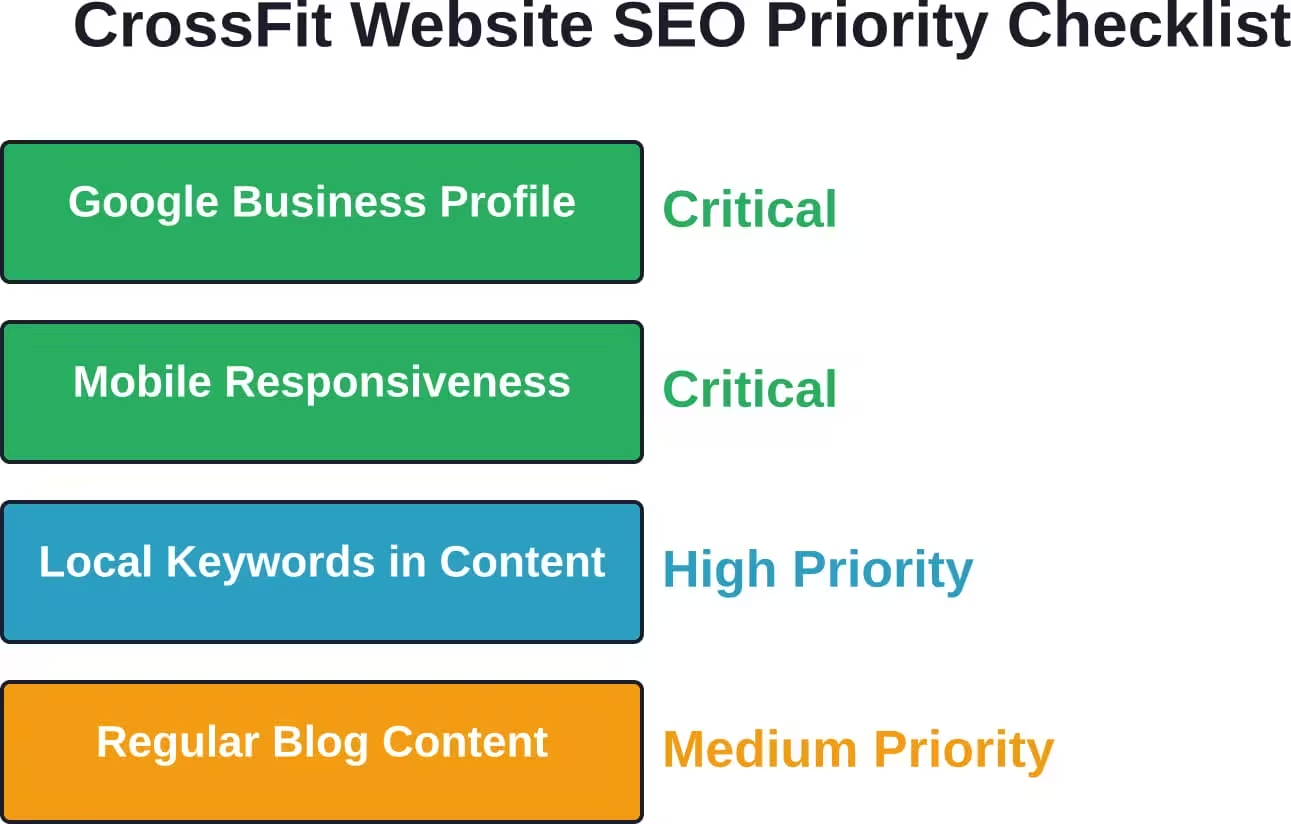
Building a beautiful website means nothing if prospects can’t find it. SEO ensures the site appears when people in the local area search for CrossFit gyms or related terms.
Local SEO Fundamentals
CrossFit gyms serve specific geographic areas, which makes local SEO critical. The goal is ranking for searches like “CrossFit gym near me” or “CrossFit [city name].”
Essential local SEO tactics:
- Claim and optimize Google Business Profile listing
- Ensure Name, Address, Phone (NAP) consistency across all online directories
- Include city and neighborhood names naturally in website content
- Create location-specific pages if serving multiple areas
- Encourage member reviews on Google
Geographic signals tell search engines exactly where the gym operates and which searches it should appear for.
On-Page SEO Elements
Each page needs proper optimization to rank well:
- Unique, descriptive title tags (under 60 characters)
- Compelling meta descriptions (150-160 characters)
- Header tags (H1, H2, H3) that organize content logically
- Alt text for images describing what they show
- Internal links connecting related pages
- Schema markup for business information, reviews, and events
These technical elements help search engines understand page content and context.
Content Optimization
Write for humans first, search engines second. That means creating genuinely useful content that answers questions and solves problems, not keyword-stuffed gibberish.
Natural keyword integration works best. If targeting “CrossFit gym [city],” use variations like:
- “Our CrossFit gym in [city] offers…”
- “Looking for a CrossFit affiliate near [neighborhood]?”
- “[City]’s premier CrossFit training facility…”
Aim for 1-2% keyword density—enough to signal relevance without sounding robotic.
Technical SEO Considerations
Behind-the-scenes technical factors impact rankings significantly:
- Mobile-friendliness (critical ranking factor)
- Page load speed
- Secure HTTPS connection
- XML sitemap submission to search engines
- Proper URL structure (readable, descriptive)
- Fix broken links and 404 errors
Most modern website platforms handle many technical SEO elements automatically, but it’s worth auditing periodically to catch issues.
Platform Choices for CrossFit Gym Websites
The platform decision shapes everything: cost, flexibility, ease of updates, and long-term scalability.
Fitness-Specific Website Platforms
Several platforms specialize in websites for gyms and fitness studios. These typically include templates designed specifically for CrossFit affiliates, built-in scheduling integration, and industry-specific features.
Benefits include faster setup, pre-built functionality that gyms need, and support teams that understand the fitness industry. The downside is less design flexibility and potential vendor lock-in.
These platforms work well for gym owners who want professional results without becoming web developers.
WordPress
WordPress powers roughly 43% of all websites globally. It’s flexible, customizable, and supported by thousands of developers and designers.
For CrossFit gyms, WordPress offers:
- Unlimited design possibilities through themes and custom development
- Extensive plugin ecosystem for adding functionality
- Strong SEO capabilities
- Complete ownership and control of the site
The trade-off is complexity. WordPress requires more technical knowledge to manage effectively, and security updates demand ongoing attention.
Website Builders
Platforms like Squarespace, Wix, and Webflow offer visual, drag-and-drop interfaces for building websites without code.
These work best for gym owners willing to invest time learning the platform in exchange for lower costs and direct control over updates. Design limitations exist, but modern builders offer enough flexibility for most affiliate needs.
The key consideration is whether the platform integrates with the gym’s existing management software and tools.
Custom Development
For gyms with unique requirements or complex functionality needs, custom development from scratch provides maximum flexibility.
This approach costs significantly more—often $10,000 and up—and requires ongoing developer support for updates and maintenance.
Real talk: most CrossFit affiliates don’t need custom development. The features that drive memberships (scheduling, sign-ups, content) work fine on standard platforms.
Conversion Optimization Strategies
Driving traffic to a website means nothing if visitors don’t convert into trial classes and memberships.
Above-the-Fold Optimization
The portion of the page visible without scrolling—above the fold—deserves obsessive attention. It determines whether visitors stay or leave.
Essential above-the-fold elements:
- Clear headline stating what the gym offers
- Subheadline explaining the unique value proposition
- Prominent call-to-action button
- High-quality hero image or video
Nothing else should compete for attention in this critical space.
Call-to-Action Placement and Design
CTA buttons need to be obvious, action-oriented, and strategically placed throughout the site.
Effective CTA copy focuses on benefits and next steps:
- “Start Your Free Trial” (not “Submit”)
- “Book Your First Class” (not “Contact Us”)
- “See Class Schedule” (not “Learn More”)
Color contrast makes buttons stand out. If the site uses primarily dark colors, bright CTAs pop. Test different colors to see what performs best.
Trust Signals
First-time visitors need reasons to trust an unfamiliar gym. Strategic trust signals reduce hesitation:
- Google reviews score and count
- Years in business or member count
- Coach certifications and credentials
- Member testimonials with photos and full names
- Transparent pricing
- Privacy policy and secure payment processing
Scatter these throughout the site, especially near conversion points like pricing and sign-up forms.
Reducing Friction
Every extra click, unnecessary form field, or confusing navigation element creates friction that reduces conversions.
Audit the conversion path:
- How many clicks from homepage to trial sign-up?
- How many form fields are truly necessary?
- Is the class schedule accessible from every page?
- Do forms work properly on mobile?
- Are error messages clear when something goes wrong?
Simplifying even one step in this path typically improves conversion rates.
| Conversion Element | Poor Implementation | Effective Implementation |
|---|---|---|
| Trial Sign-Up CTA | “Learn More” button in footer | “Start Free Trial” prominent on homepage hero |
| Form Length | 12 fields including fitness history | 3 fields: name, email, preferred time |
| Pricing Display | “Contact us for pricing information” | Clear membership tiers with costs listed |
| Schedule Access | PDF download on separate page | Embedded calendar on homepage with booking |
| Mobile Navigation | Tiny text links, broken menu | Clear hamburger menu, thumb-friendly tap targets |
Integrating Your Website With Gym Management Software
The website shouldn’t exist as a separate system from daily gym operations. Integration connects the digital front door with backend management.
Scheduling and Booking Integration
When the website calendar syncs with gym management software in real-time, members see accurate class availability and coaches don’t deal with double bookings.
Members should be able to:
- View current class schedules
- See remaining spots available
- Book or cancel reservations
- Join waitlists for full classes
All without requiring staff intervention or manual updates.
Lead Capture and CRM Connection
When someone fills out a trial class form on the website, that information should flow automatically into the gym’s lead management system.
This triggers follow-up sequences:
- Automated confirmation email with next steps
- Addition to prospect email list
- Task creation for staff to make welcome call
- Tracking for conversion analytics
Manual data entry creates delays and errors. Automation ensures no prospect gets forgotten.
Payment Processing
For gyms selling merchandise, nutrition programs, or allowing online membership sign-up, payment integration streamlines transactions.
The website should connect directly to the payment processor already used for in-person transactions, keeping all financial data in one system.
Email Marketing Integration
Growing an email list of prospects and members creates an owned marketing channel independent of social media algorithms.
Website integration allows automatic addition of:
- Trial sign-ups to prospect nurture sequences
- Blog subscribers to content distribution lists
- New members to onboarding email series
Segmentation becomes possible—sending different messages to prospects versus current members versus past members.
Maintaining and Updating Your CrossFit Gym Website
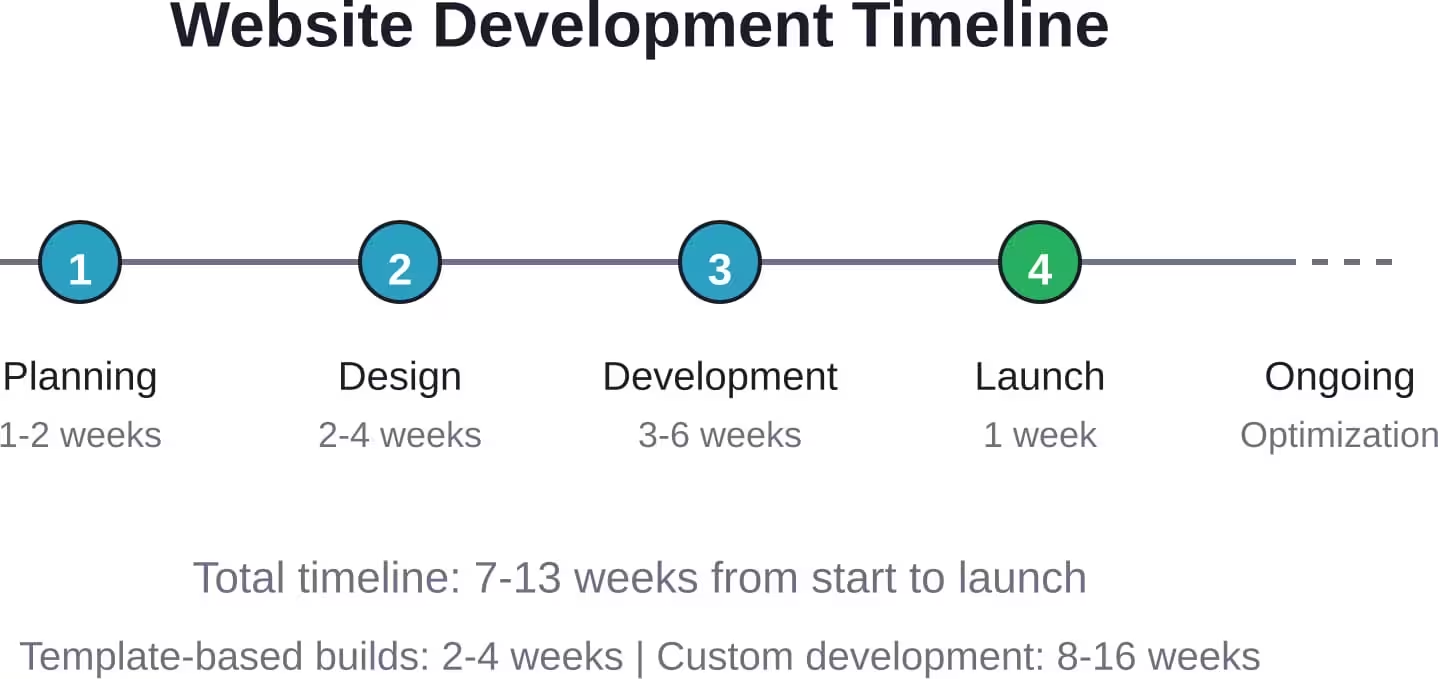
Launching the website isn’t the finish line—it’s the starting line. Ongoing maintenance keeps it secure, current, and effective.
Regular Content Updates
Stale content signals neglect. Schedule regular updates to:
- Add new blog posts (monthly minimum)
- Update coach bios when staff changes
- Refresh member testimonials and success stories
- Announce upcoming events and competitions
- Post new photos from community events
Fresh content improves SEO and gives existing members reasons to keep visiting the site.
Security and Software Updates
Websites require ongoing security maintenance—updating software, monitoring for vulnerabilities, backing up data.
Managed hosting plans often handle this automatically. For self-hosted WordPress sites, it requires manual attention or hiring ongoing support.
Ignoring updates creates security risks. Hacked websites damage reputation and can lead to data breaches.
Performance Monitoring
Track website performance through analytics:
- Traffic volume and sources
- Most visited pages
- Conversion rates (trial sign-ups per visitor)
- Bounce rates and time on site
- Mobile versus desktop usage
This data reveals what’s working and what needs improvement. If the pricing page has high traffic but low conversions, that signals a problem to investigate.
Continuous Optimization
The best websites evolve based on real user behavior. Small, iterative improvements compound over time.
Test changes one at a time:
- Different CTA button colors or text
- Alternative headline variations
- Simplified versus detailed pricing displays
- Form length experiments
Measure the impact of each change. Keep what improves conversions, discard what doesn’t.
Common Website Development Mistakes to Avoid
Learning from others’ errors saves time and money.
Prioritizing Aesthetics Over Functionality
Stunning design means nothing if the contact form doesn’t work or the site loads too slowly to use.
Function comes first. Beautiful design applied to a functional foundation creates an effective website. Beautiful design on a broken foundation creates an expensive problem.
Using Too Many Stock Photos
Generic fitness stock photos make every gym website look identical. They communicate nothing authentic about the specific affiliate.
Invest in real photography. Even smartphone photos of actual members and coaches outperform professional stock imagery of strangers.
Hiding Contact Information
Some gyms bury contact information, apparently wanting to force everyone through a web form. That frustrates prospects who prefer calling directly.
Display phone number, email, and physical address prominently. Include them in the header or footer of every page.
Overcomplicating Navigation
Complex mega-menus with dozens of options overwhelm visitors. Most CrossFit gym websites need only 5-7 main navigation items:
- Home
- About/Coaches
- Classes/Schedule
- Pricing
- Blog/Resources
- Contact
Everything else can live within those sections or in the footer.
Neglecting Mobile Experience
Testing only on a desktop computer misses how most people actually use the site. Always test on actual mobile devices before launch.
Common mobile issues:
- Text too small to read comfortably
- Buttons too small to tap accurately
- Forms that don’t work with mobile keyboards
- Images that push content off-screen
- Pop-ups that can’t be closed
Launching Without Analytics
Flying blind means never knowing what’s working. Install analytics tracking before launch to capture data from day one.
At minimum, track:
- Total visitors and traffic sources
- Goal completions (form submissions, trial sign-ups)
- Page-by-page performance
- User flow through the site
Real CrossFit Gym Website Examples and What Makes Them Work
Analyzing successful affiliate websites reveals patterns worth replicating.
Common Success Patterns
The best-performing CrossFit gym websites share several characteristics:
- Authentic imagery: Real members during actual workouts, showing sweat and effort. This signals authenticity and gives prospects a preview of the culture they’re joining.
- Clear value proposition: Immediately communicating what makes this affiliate different from the twenty other CrossFit gyms in the area.
- Visible social proof: Member testimonials, Google reviews, transformation photos, or community event pictures prominently displayed.
- Frictionless navigation: Essential information (schedule, pricing, trial sign-up) accessible within two clicks from anywhere on the site.
- Strong coach presence: Detailed coach bios with photos, credentials, and personality that helps prospects connect before walking through the door.
What Differentiates Top Performers
Beyond the basics, standout websites excel in specific areas:
Some emphasize community through extensive member spotlights and event coverage. Others focus on competitive achievement, showcasing athlete accomplishments and competition results. Some lean into beginner-friendliness, with dedicated sections explaining CrossFit fundamentals and addressing common fears.
The specific angle matters less than consistency. The entire site should reinforce the same core message about what makes this affiliate unique.
Conclusion: Building a Website That Grows Your CrossFit Affiliate
Website development for CrossFit gyms isn’t about creating something that merely exists online. It’s about building a conversion tool that works 24/7 to attract prospects, communicate value, and generate trial class sign-ups.
The fundamentals matter most: mobile responsiveness, authentic imagery, clear pricing, frictionless sign-up flows, and integration with gym management systems. These elements directly impact whether visitors become members.
Costs vary based on the approach—fitness-specific platforms offer the easiest path for most affiliate owners, balancing professional results with reasonable investment. Custom development makes sense for gyms with unique needs or substantial marketing budgets. DIY builders work for technically inclined owners willing to invest time instead of money.
But the platform choice matters less than execution. A simple website that loads fast, showcases authentic community, and makes trial sign-up obvious will outperform a complex, beautiful site that confuses visitors or works poorly on mobile devices.
The best CrossFit gym websites evolve continuously based on real performance data. Launch doesn’t mean finished—it means starting the optimization process that compounds improvements over months and years.
Ready to build a website that generates leads and grows membership? Start with the essentials: mobile responsiveness, authentic visuals, transparent pricing, and clear calls-to-action. Get those right, launch quickly, and optimize based on what actual visitors do. Perfect can wait—effective shouldn’t.