Quick Summary: Website development for colleges involves creating accessible, user-focused digital platforms that serve prospective students, current students, faculty, and alumni. Modern college websites must comply with federal accessibility standards, integrate with student information systems, and provide intuitive navigation across multiple audience segments while supporting enrollment goals and institutional branding.
College websites serve as the primary digital front door for institutions. They’re recruitment tools, information hubs, and community platforms rolled into one.
But here’s the thing—higher education website development isn’t like building a standard business site. Colleges juggle multiple audiences simultaneously: prospective students researching programs, current students accessing portals, parents seeking financial information, faculty managing course materials, and alumni staying connected.
The stakes are high. A poorly designed college website can mean lost enrollment opportunities, accessibility lawsuits, and frustrated users who can’t find critical information.
Why College Websites Need Specialized Development
Higher education institutions face unique digital challenges. Unlike corporate sites with a single conversion goal, college websites must serve dramatically different user needs on the same platform.
Prospective students want program information, campus tours, and application portals. Current students need course schedules, grades, and registration systems. Faculty require content management tools, while parents look for tuition details and financial aid resources.
This complexity demands thoughtful information architecture. Navigation must guide each audience segment to their specific content without overwhelming everyone else. That’s not easy.
Budget constraints add another layer. Many institutions need professional results without enterprise-level spending. Basic higher education websites typically start from $50,000–$100,000, with many mid-sized projects ranging between $150,000 and $500,000, covering professional design, solid content management systems, and essential features without complex integrations.
Get a College Website Built Around Everyday Usability
When students cannot quickly find programs, admissions information, schedules, or campus resources, even a modern-looking college website can become difficult to use in practice. Lengreo develops websites through a structured process that includes business analysis, prototyping, front-end and back-end development, QA, and post-launch support. Their approach focuses on building flexible websites that are easier to maintain and adapt as organizational needs change over time.
Upgrade Your Website Hassle-Free
Working with Lengreo includes:
- Development aligned with your timeline and operational needs
- Structured website navigation and content organization
- QA and launch support before release
- Ongoing maintenance options for long-term website performance
Talk to Lengreo about building a college website that is easier to manage, maintain, and use across devices.
Federal Accessibility Requirements for College Websites
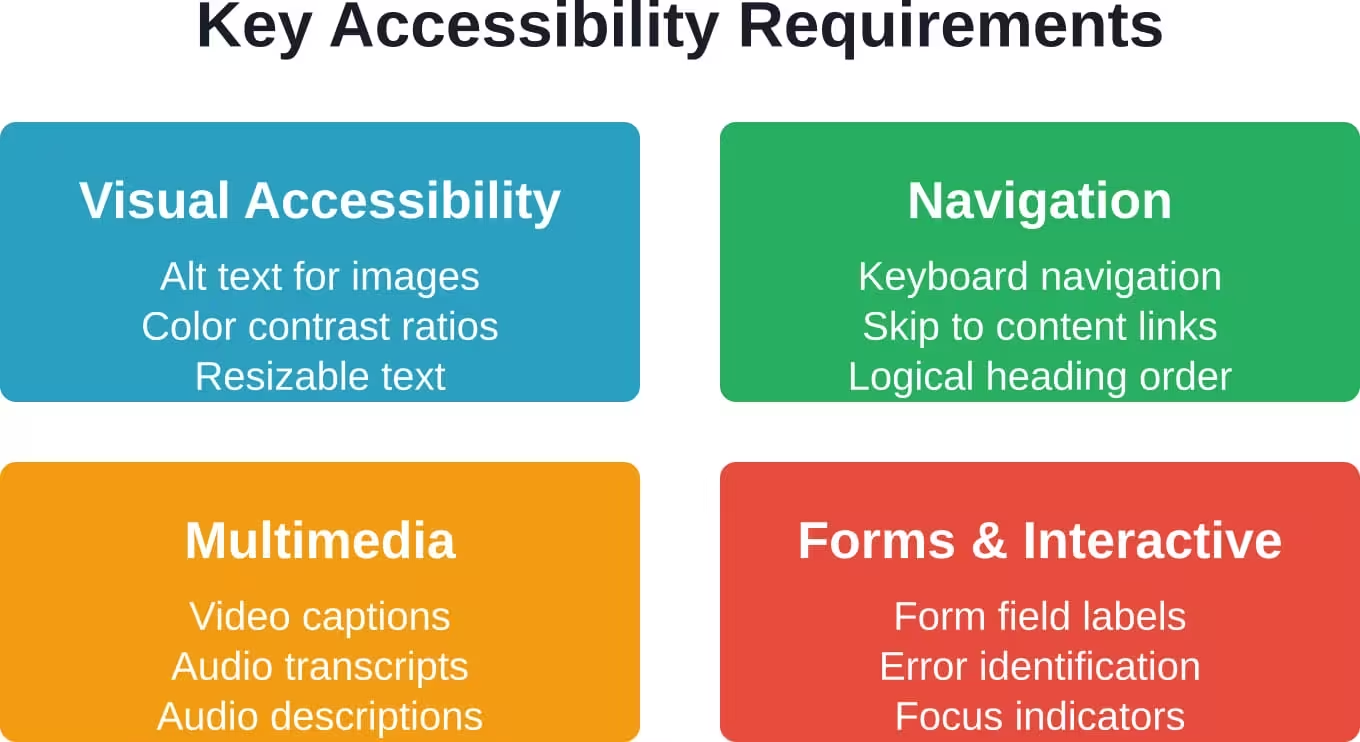
Accessibility isn’t optional for educational institutions—it’s legally required. Section 504 and Title II mandate that colleges provide equal access for individuals with disabilities to all educational benefits and opportunities provided online or in digital formats.
Many individuals with disabilities, including those with vision or hearing disabilities, need auxiliary aids and services to access digital content. The U.S. Department of Education considers accessibility to information a priority for all employees and external customers, including individuals with disabilities.
While Section 508 of the Rehabilitation Act technically applies only to federal agencies, other laws impose similar requirements on educational institutions. The U.S. Department of Justice finalized a new rule under Title II of the ADA in April 2024, requiring public entities, including public colleges, to meet WCAG 2.1 Level AA standards by 2026 or 2027 depending on population size.
Real talk: accessibility compliance isn’t just about avoiding lawsuits. It’s about serving all students effectively. Closed captions help students in noisy environments, not just those with hearing impairments. Keyboard navigation assists users with motor disabilities and power users who prefer keyboards. Clear heading structures benefit screen reader users and everyone scanning for information.
Essential Features for Modern College Websites
What separates effective higher education website development from generic web projects? Specific functionality that addresses institutional needs.
Content Management Systems
Colleges need robust CMS platforms that allow distributed content management. Academic departments, admissions offices, athletics programs, and administrative units all require the ability to update their own sections without IT intervention.
The CMS should support granular permissions, workflow approvals, and content scheduling. Faculty shouldn’t be able to accidentally delete the admissions homepage, but they should update department news independently.
Student Information System Integration
Modern college websites integrate with student information systems for real-time data access. Students check grades, register for courses, and manage financial accounts through web portals connected to backend databases.
These integrations require secure authentication, data synchronization, and failover systems. When registration opens, the website must handle thousands of simultaneous users without crashing.
Event Calendars and News Systems
Higher education institutions constantly publish events, news, and announcements across departments. The website needs centralized calendar systems with filtering by audience, department, and event type.
Prospective students shouldn’t wade through faculty research seminars to find campus visit days. Current students need quick access to academic deadlines and campus activities.
Search Functionality
College websites contain massive amounts of content. Effective search functionality becomes critical. Users should find course catalogs, faculty directories, department pages, and administrative forms quickly.
Search should support filtering by content type, department, and audience. Autocomplete helps users discover content they didn’t know existed.
| Feature Category | Basic Implementation | Advanced Implementation |
|---|---|---|
| Content Management | Standard CMS with role-based access | Distributed permissions, workflow approvals, scheduled publishing |
| Student Portal | Basic login and information display | Full SIS integration, real-time data, mobile app sync |
| Search | Basic keyword search across pages | Faceted search, autocomplete, audience-specific results |
| Event Management | Simple calendar listing | Multi-calendar system, RSVP functionality, integration with campus systems |
| Accessibility | WCAG 2.1 Level A compliance | WCAG 2.1 Level AA compliance, regular auditing, remediation process |
The College Website Development Process
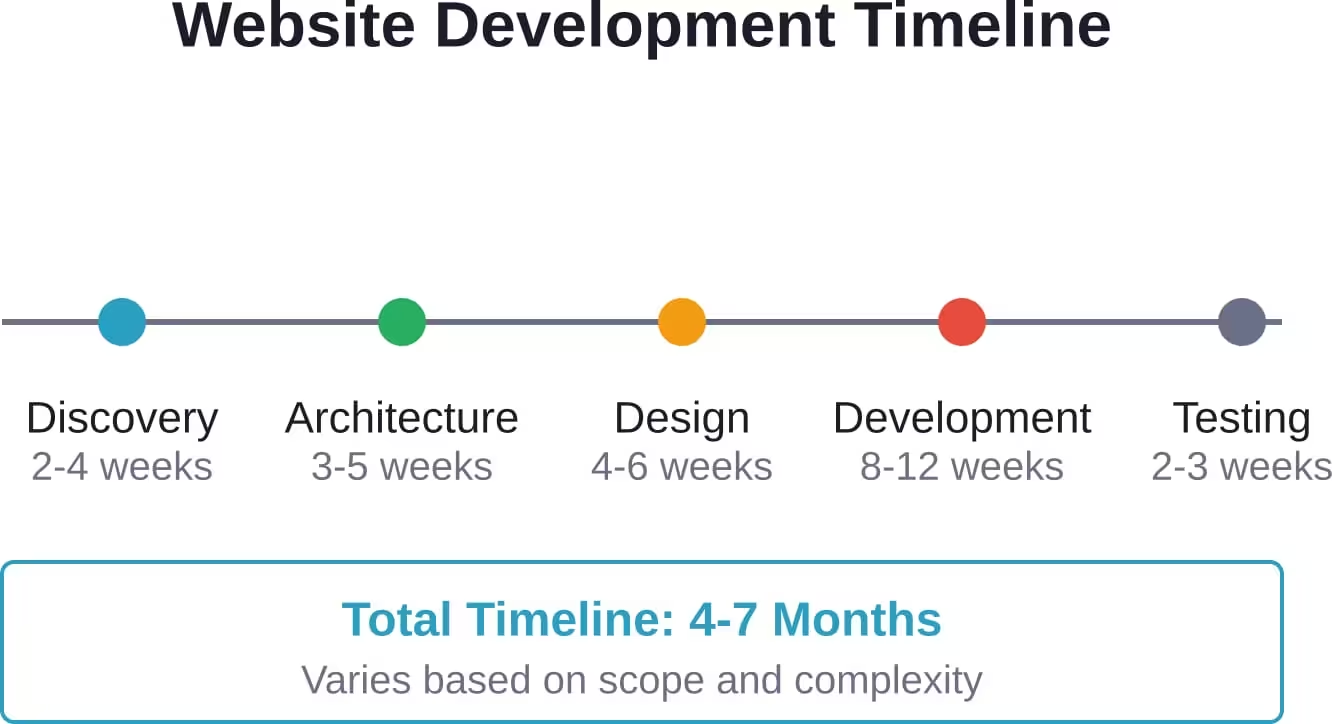
Successful higher education website projects follow structured processes that manage complexity and stakeholder expectations.
Discovery and Research Phase
Effective projects begin with comprehensive research. Who are the primary audiences? What are their top tasks? Which content gets the most traffic? Where do users currently struggle?
Analytics data reveals actual user behavior. Stakeholder interviews capture institutional priorities. User testing with prospective students, current students, and faculty uncovers real pain points.
This phase establishes the website vision. What should the site accomplish? How does it support enrollment goals? What makes this institution unique?
Information Architecture and Wireframing
With research complete, developers create structural blueprints. Information architecture defines how content organizes into categories, how navigation systems work, and how different audience segments find their content.
Wireframes map page layouts without visual design. They show where elements appear, how much prominence each gets, and how users move through the site.
Getting stakeholder buy-in at this stage prevents expensive revisions later. It’s easier to move boxes in a wireframe than redesign a fully coded page.
Design and Development
Visual design brings the structure to life. Designers create interfaces that reflect institutional branding while maintaining usability. Color schemes, typography, imagery, and interactive elements combine to create the user experience.
Development builds the functional website. Front-end developers create responsive interfaces that work across devices. Back-end developers build CMS functionality, database integrations, and server architecture.
Testing and Launch
Before launch, thorough testing catches issues. Accessibility audits ensure compliance. Cross-browser testing confirms consistent functionality. Load testing verifies the site handles traffic spikes during registration periods.
Content migration moves existing content into the new system. Staff training prepares content managers to use the new CMS effectively.
Ongoing Maintenance and Evolution
Launch isn’t the finish line. College websites require continuous maintenance, content updates, security patches, and periodic redesigns.
Technology evolves. User expectations shift. Accessibility standards update. Institutions add new programs, departments reorganize, and branding changes.
Smart institutions budget for ongoing support. Regular accessibility audits catch new issues. Analytics reviews identify content gaps and navigation problems. User feedback sessions reveal emerging needs.
Content governance establishes who maintains which sections, how often content updates occur, and quality standards. Without governance, websites decay quickly as outdated information piles up.
Common Challenges and Solutions
What roadblocks derail higher education website projects? Knowing them helps avoid disasters.
Too Many Stakeholders
Colleges involve numerous departments, each with opinions about the website. Design-by-committee produces mediocre results that satisfy no one.
Solution: Establish clear decision-making authority. Gather stakeholder input during research, but designate a project lead empowered to make final calls. Use data to resolve disagreements—what do analytics and user testing show?
Scope Creep
Projects expand as stakeholders request additional features mid-development. Timelines stretch and budgets balloon.
Solution: Define scope clearly upfront. Maintain a feature backlog for post-launch phases. Require formal change requests for scope additions, with corresponding timeline and budget adjustments.
Legacy System Integration
Colleges often run decades-old student information systems with limited integration capabilities. Connecting modern websites to legacy databases creates technical headaches.
Solution: Allocate extra development time for integration work. Consider middleware solutions that translate between old and new systems. In some cases, manual processes bridge gaps until legacy systems update.
Measuring Website Success
How do colleges know whether their website works? Metrics provide answers.
Enrollment-focused metrics track application starts, application completions, and information request submissions. These indicate whether the site effectively converts prospective students.
User experience metrics measure bounce rates, time on page, and task completion rates. High bounce rates on key pages signal problems. Low task completion rates reveal navigation issues.
Accessibility metrics track WCAG compliance levels, remediation backlogs, and accessibility-related user complaints. Regular audits benchmark progress.
Technical performance metrics monitor page load times, server uptime, and mobile performance. Slow sites drive users away, particularly mobile users on cellular connections.
| Metric Category | Key Indicators | Target Benchmarks |
|---|---|---|
| Enrollment | Application starts, info requests, campus visit registrations | 20%+ increase year-over-year after redesign |
| User Experience | Bounce rate, time on site, pages per session | Bounce rate under 50%, avg. session 3+ minutes |
| Accessibility | WCAG compliance level, critical issues count | WCAG 2.1 Level AA, zero critical issues |
| Performance | Page load time, mobile performance score | Under 3 seconds, 90+ mobile score |
Moving Forward with College Website Development
Building effective college websites requires balancing competing demands: prospective student recruitment, current student services, faculty needs, accessibility compliance, and budget constraints.
The institutions that succeed treat websites as strategic assets worthy of investment. They prioritize user needs over internal politics, measure results rigorously, and commit to ongoing improvement.
Start with solid research. Understand who uses the site and what they need to accomplish. Build accessible, well-structured foundations that support future growth. Measure what matters and iterate based on data.
College websites aren’t just digital brochures—they’re enrollment engines, community platforms, and service delivery channels. Invest accordingly.
Ready to start planning your institution’s website project? Begin with user research and competitive analysis. Understand current pain points before jumping to solutions. The time invested upfront prevents expensive mistakes during development.