Quick Summary: Common SEO issues include technical problems like slow page speed, broken links, duplicate content, and missing meta descriptions, as well as on-page mistakes such as thin content and poor internal linking. According to Google Search Central, crawling and indexing issues prevent search engines from properly discovering and ranking content. Regular audits using SEO tools can identify and fix these issues, improving organic visibility and user experience.
Search engine optimization seems straightforward until something breaks. Websites that once performed well start losing rankings. Traffic drops. Pages disappear from search results.
The frustrating part? Most SEO issues are fixable once identified.
An analysis of 418,125 unique website audits revealed consistent patterns—the same technical problems appear across the majority of sites. These aren’t exotic edge cases. They’re widespread issues affecting visibility, crawlability, and user experience.
Google’s algorithms have become increasingly sophisticated, but the fundamentals haven’t changed. Search engines need to crawl, index, and understand content. When technical barriers or content problems interfere with this process, rankings suffer.
This guide covers the most common SEO issues discovered through real website audits and explains how to address them. Some fixes take minutes. Others require more strategic planning. But all of them matter.
Get Broad SEO Support From Lengreo
Common SEO issues usually span more than one area – technical fixes, keyword targeting, content structure, and link authority often overlap. Lengreo offers SEO services that include website audits, optimizations, keyword research, competitor analysis, link building, and content planning. That makes the company relevant when SEO problems are spread across both site setup and content work.
Need Help Addressing SEO Problems?
Lengreo can help with:
- website audits and optimization
- keyword research and competitor analysis
- link building
- content strategy and planning
- Local SEO
👉 Contact Lengreo to discuss the SEO issues affecting your site.
Technical SEO Issues That Impact Crawling and Indexing
Technical problems create barriers between search engines and content. According to Google Search Central, crawling and indexing issues directly affect how content appears in search results and other Google properties.
These issues often go unnoticed until someone runs a proper audit.
No HTTPS Security
Sites still running on HTTP present security risks that Google flags. The protocol difference matters—HTTPS encrypts data between browsers and servers, protecting user information.
Google has prioritized secure sites for years. Chrome now labels HTTP sites as “Not Secure,” which damages trust and click-through rates.
The fix involves obtaining an SSL certificate and configuring servers to redirect all HTTP requests to HTTPS. After implementation, update internal links and canonical tags to reference the secure version.
Use the search operator site:yourdomain.com inurl:-https to find any remaining non-secure pages.
Incorrect Robots.txt Configuration
The robots.txt file controls crawler access. Misconfigured files block search engines from important content or fail to restrict low-value sections.
Common mistakes include accidentally blocking the entire site with Disallow: / or preventing access to JavaScript and CSS files that Google needs to render pages properly.
Test your robots.txt file using Google Search Console’s robots.txt Tester. The tool shows exactly what’s blocked and allows testing before deploying changes.
Real talk: this single file causes more accidental deindexing than almost any other technical issue.
Meta Robots NOINDEX Set Incorrectly
Pages with noindex directives tell search engines not to include them in results. Sometimes this is intentional—for thank-you pages or admin sections. But when applied accidentally to important content, those pages vanish from search results.
Check page-level meta robots tags and HTTP headers. Look for <meta name=”robots” content=”noindex”> in the HTML head or X-Robots-Tag: noindex in HTTP responses.
Content management systems and plugins sometimes add these tags without clear indication. After removing unintended noindex directives, submit the affected URLs to Google Search Console for recrawling.
Missing or Incorrect XML Sitemaps
XML sitemaps guide crawlers to important pages. According to Google Search Central documentation, while not required for all sites, sitemaps help search engines discover content more efficiently—especially on large or new sites.
Common sitemap problems include:
- No sitemap exists at all
- Sitemap contains URLs that return 404 errors or redirect
- Sitemap includes noindexed pages
- Sitemap exceeds 50,000 URLs or 50MB uncompressed
- Sitemap isn’t referenced in robots.txt or submitted to Search Console
Generate clean sitemaps that only include indexable, canonical URLs. Update them regularly as content changes. Submit the sitemap URL to Google Search Console and monitor for errors.
Site Indexing Issues
Sometimes pages don’t appear in search results at all. Google Search Central provides troubleshooting guidance for indexing problems.
Run a site search using site:yourdomain.com to see how many pages Google has indexed. Compare this to the actual number of pages that should be indexed. Significant discrepancies indicate problems.
Check Google Search Console’s Coverage report for specific indexing errors. Common causes include server errors, redirect chains, blocked resources, or pages returning incorrect status codes.
The URL Inspection tool shows Google’s view of individual pages—whether they’re indexed, any crawl issues encountered, and when they were last crawled.
Multiple Versions of Homepage Accessible
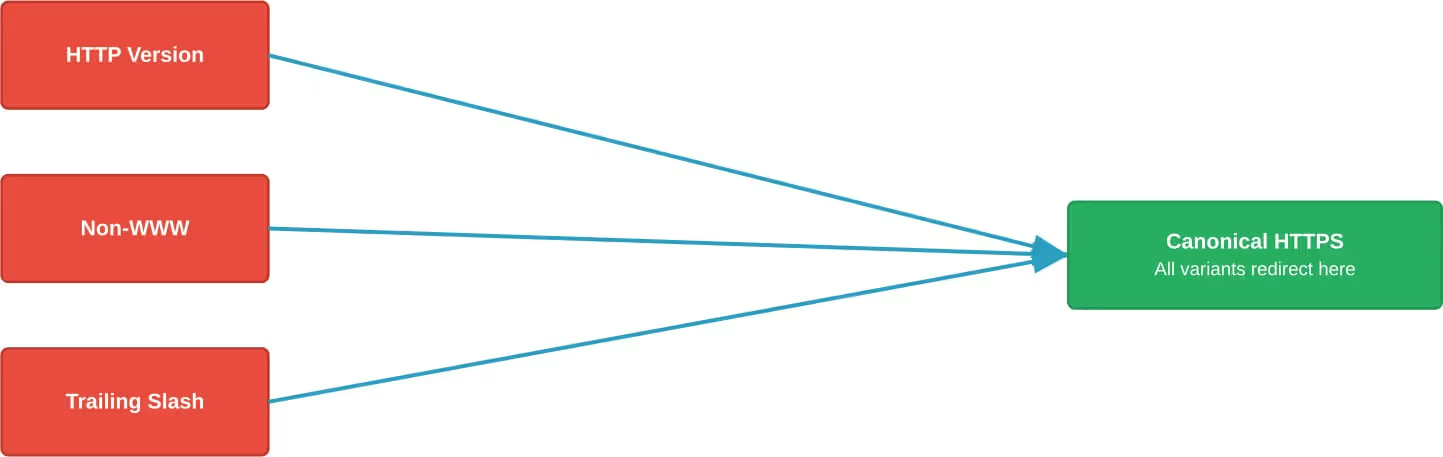
When the same homepage loads at multiple URLs—www vs non-www, HTTP vs HTTPS, trailing slash vs no trailing slash—it creates duplicate content issues and splits link equity.
Pick one canonical version and redirect all variants to it using 301 redirects. Common patterns include:
- http://example.com → https://www.example.com
- http://www.example.com → https://www.example.com
- https://example.com → https://www.example.com
Set the preferred domain in Search Console and ensure all internal links reference the canonical version.
Slow Page Speed
Site speed affects both user experience and rankings. Google’s Core Web Vitals—part of the page experience signals—measure loading performance, interactivity, and visual stability.
According to Google Search Central, achieving good Core Web Vitals helps with search success and provides better user experience. The metrics include:
- Largest Contentful Paint (LCP): measures loading performance
- Interaction to Next Paint (INP): measures responsiveness (replaced First Input Delay in March 2024)
- Cumulative Layout Shift (CLS): measures visual stability
Common speed issues include:
- Large, unoptimized images
- Render-blocking JavaScript and CSS
- Lack of browser caching
- Slow server response times
- Too many HTTP requests
Run PageSpeed Insights to identify specific problems. Prioritize fixes that address Core Web Vitals thresholds.
Mobile Optimization Problems
Google uses mobile-first indexing—the mobile version of content determines rankings. According to Google Search Central’s mobile-first indexing documentation, while mobile versions aren’t required, they’re strongly recommended.
Common mobile issues include:
- Content that differs between mobile and desktop versions
- Blocked resources on mobile that load on desktop
- Interstitials that cover content on small screens
- Text too small to read without zooming
- Tap targets placed too close together
Test mobile usability in Google Search Console. The Mobile-Friendly Test tool checks individual pages for mobile issues.
On-Page SEO Issues
On-page problems affect how search engines understand and rank individual pages. These issues typically relate to content quality, metadata, and page structure.
Duplicate Content
Identical or very similar content appearing on multiple URLs confuses search engines about which version to rank. Link equity splits across duplicates instead of consolidating.
Duplicate content happens in several ways:
- Multiple URLs serving the same content (with or without URL parameters)
- Printer-friendly versions of pages
- HTTP and HTTPS versions both accessible
- Product variations with identical descriptions
- Scraped or syndicated content without proper attribution
Use canonical tags to specify the preferred version. For legitimate duplicates—like regional variations—implement rel=”canonical” pointing to the primary URL.
For completely duplicate pages that serve no purpose, implement 301 redirects to the main version or use noindex if the duplicate must remain accessible.
Incorrect Rel=Canonical Implementation
Canonical tags tell search engines which version of a page to treat as authoritative. But wrong implementation causes problems.
Common canonical mistakes:
- Canonical pointing to a 404 or redirected URL
- Multiple conflicting canonical declarations on one page
- Self-referencing canonicals missing on important pages
- Canonical chains (Page A → Page B → Page C)
- Cross-domain canonicals without proper justification
Every important page should have a self-referencing canonical. Verify that canonicals point to accessible, indexable URLs that return 200 status codes.
Missing or Poorly Optimized Title Tags
Title tags appear in search results and browser tabs. They’re among the most important on-page ranking factors.
Title tag problems include:
- Missing titles entirely
- Duplicate titles across multiple pages
- Titles too long (over 60 characters, causing truncation)
- Titles too short (under 30 characters, wasting opportunity)
- Missing target keywords
- Generic titles like “Home” or “Untitled”
Craft unique, descriptive titles for every page. Include primary keywords near the beginning. Keep length between 50-60 characters.
Google sometimes rewrites titles it deems inadequate. If this happens frequently, the original titles probably need improvement.
Missing or Non-Optimized Meta Descriptions
Meta descriptions don’t directly affect rankings, but they influence click-through rates from search results. When search engines display snippets, compelling descriptions attract more clicks.
Description issues:
- No meta description present (Google generates one from page content)
- Duplicate descriptions across pages
- Descriptions too short (under 120 characters) or too long (over 160 characters)
- Descriptions that don’t accurately reflect page content
- Missing call-to-action or value proposition
Write unique descriptions for important pages. Include target keywords naturally. Make them compelling enough to earn clicks.
Improper Header Tag Structure
Header tags (H1-H6) organize content hierarchically. They help search engines understand page structure and topic relationships.
Common header problems:
- Multiple H1 tags on one page
- Skipping levels (H2 followed by H4, missing H3)
- Using headers for styling rather than structure
- Missing H1 entirely
- Headers that don’t reflect content topic
Use one H1 per page, typically matching or closely related to the title tag. Structure subsequent headers logically—H2 for main sections, H3 for subsections under H2s, and so on.
Thin or Low-Quality Content
Pages with minimal useful content struggle to rank. Google’s algorithms, particularly core updates documented in Google Search Central, prioritize helpful, high-quality content.
Thin content includes:
- Pages with very few words (under 300)
- Content that doesn’t satisfy search intent
- Automatically generated or spun content
- Affiliate pages with no unique value
- Doorway pages created solely for ranking
According to Google Search Central guidance on core updates, creating helpful, reliable, people-first content matters more than optimizing for search engines.
Audit low-performing pages. Either expand them with genuinely useful information, consolidate multiple thin pages into comprehensive resources, or remove them and redirect to better alternatives.
Keyword Stuffing
Overusing keywords damages readability and triggers quality filters. Modern algorithms easily detect unnatural keyword density.
Write naturally for humans. Include keywords where they fit contextually, but prioritize clarity and value over density targets.
Missing or Broken Images
Images affect both user experience and search visibility (through image search). Problems include:
- Broken image links returning 404 errors
- Missing alt text for accessibility and context
- Generic alt text like “image123.jpg”
- Oversized images slowing page load
- Images served from blocked directories
Add descriptive alt text to all meaningful images. Optimize file sizes using compression and modern formats like WebP. Ensure image URLs are accessible to crawlers.
Poor Internal Linking
Internal links distribute page authority and help search engines discover content. Link structure affects how well pages rank.
Internal linking issues based on audit data:
- 69.32% have no inbound links
- 68.09% lack descriptive anchor text
- 67.11% have only one inbound link
- 63.87% redirect to other pages instead of linking directly
Build a logical internal linking structure. Important pages should have multiple internal links from relevant content. Use descriptive anchor text that indicates what the linked page covers.
Find orphaned pages and integrate them into the site structure, or remove them if they add no value.
Content and Link Issues
Beyond technical and on-page factors, content quality and link-related problems affect rankings significantly.
Broken Links
Links that lead to 404 errors or server errors create poor user experience and waste crawl budget. They signal lack of maintenance.
Broken links occur when:
- Linked pages are deleted without redirects
- URLs are mistyped in href attributes
- External sites change their URL structure
- Domain names expire
Regularly audit internal and external links. Fix broken internal links by updating them or implementing 301 redirects. For broken external links, either find the new URL, link to a similar resource, or remove the link.
Lack of Quality Backlinks
Backlinks remain a significant ranking factor. Sites with few authoritative backlinks struggle to compete for competitive terms.
According to Semrush research on Google ranking factors, linking domain variety correlates with higher rankings.
Building quality backlinks requires creating link-worthy content, outreach, digital PR, and earning natural mentions. Quick-fix link schemes violate Google’s guidelines and risk penalties.
Unnatural Link Patterns
Google has issued thousands of “unnatural links” warnings through Search Console. These typically precede ranking drops.
Problematic link patterns include:
- Paid links without proper rel attributes
- Excessive exact-match anchor text
- Links from low-quality directories or link farms
- Footer links from unrelated sites
- Automated link building through software
If receiving a manual action notice, audit the backlink profile. Identify and disavow toxic links. Submit a reconsideration request after cleanup.
Lack of Structured Data
Structured data helps search engines understand content context and enables rich results. According to community discussions, under-utilization of schema markup represents a missed opportunity.
Common schema types include:
- Organization: business information
- Article: news and blog content
- Product: e-commerce items with prices and reviews
- BreadcrumbList: navigation paths
- FAQ: frequently asked questions
- HowTo: step-by-step instructions
Implement relevant schema using JSON-LD format. Test implementation using Google’s Rich Results Test. Monitor performance in Search Console’s Rich Results report.
JavaScript and Resource Loading Issues
Modern sites rely heavily on JavaScript, but implementation problems prevent search engines from accessing content.
JavaScript Rendering Problems
When critical content loads only through JavaScript, search engines may not see it if rendering fails. Google renders JavaScript, but delays and errors occur.
Common issues based on audit data:
- 50.21% of sites have unminified JavaScript
- 48.66% serve uncompressed JavaScript files
Ensure important content exists in the initial HTML when possible. Use server-side rendering or static generation for critical pages. Test how Google sees JavaScript-heavy pages using the URL Inspection tool’s “View Rendered HTML” feature.
CSS Loading Issues
CSS files affect page rendering and Core Web Vitals scores. Audit data shows:
- 57.72% of sites have CSS files that are too large
- 48.66% serve uncompressed CSS
- 43.66% don’t minify CSS files
- 17.64% don’t cache CSS properly
Minify and compress CSS files. Remove unused CSS. Implement proper caching headers. Consider inlining critical CSS for above-the-fold content.
Local SEO Issues
For businesses serving specific geographic areas, local SEO problems hurt visibility in local search results.
Inconsistent NAP Information
NAP (Name, Address, Phone Number) consistency matters for local rankings. Discrepancies across listings confuse search engines and users.
Audit all online mentions—Google Business Profile, directories, social media, website footer. Ensure identical formatting everywhere. Even minor differences (like “St” vs “Street”) can cause problems.
Missing or Incomplete Google Business Profile
Google Business Profile listings appear in local packs and Maps results. Incomplete profiles limit visibility.
Optimize profiles by:
- Selecting accurate business categories
- Adding complete business information
- Uploading high-quality photos
- Collecting and responding to reviews
- Posting regular updates
- Adding products or services
User Experience Issues
User engagement signals influence rankings indirectly. Poor experience leads to high bounce rates and low dwell time.
Intrusive Interstitials
Pop-ups and overlays that cover main content—especially on mobile—violate Google’s guidelines and hurt rankings.
Acceptable interstitials include:
- Legal requirements (age verification, cookie notices)
- Login dialogs for gated content
- Banners using reasonable screen space
Avoid full-page interstitials that appear immediately when users land on pages from search results.
Poor Navigation Structure
Confusing navigation frustrates users and prevents search engines from understanding site architecture.
Create clear, logical navigation. Important pages should be reachable within three clicks from the homepage. Use descriptive navigation labels. Implement breadcrumbs to show page hierarchy.
WordPress-Specific Issues
WordPress powers a significant portion of the web, but default configurations create SEO problems.
Image Attachment Pages
WordPress creates separate pages for uploaded images by default. These pages often contain minimal content—just the image—and Google indexes them.
These attachment pages dilute crawl budget and create thin content issues. Redirect attachment URLs to the parent post or the image file itself. Plugins like Yoast SEO can handle this automatically.
Archive Pages Creating Duplicate Content
WordPress generates multiple archive types: category, tag, date, author. Similar content appears across multiple URLs.
Strategies to address this:
- Noindex less important archive types (like date archives)
- Add unique descriptions to category and tag pages
- Limit archives to excerpts rather than full posts
- Use rel=prev/next for paginated archives
Monitoring and Prevention
Preventing SEO issues requires ongoing monitoring rather than one-time fixes.
Regular Technical Audits
Crawl the site monthly using tools like Screaming Frog SEO Spider, which identifies over 300 potential issues. Focus on:
- Response codes (404s, 500s, redirects)
- Redirect chains and loops
- Duplicate content
- Missing metadata
- Broken links
- Orphaned pages
Google Search Console Monitoring
Check Search Console weekly for:
- Coverage errors and warnings
- Manual actions
- Core Web Vitals issues
- Mobile usability problems
- Security issues
- Structured data errors
Address issues promptly before they impact rankings significantly.
Ranking and Traffic Monitoring
Track rankings for target keywords. Monitor organic traffic patterns. Sudden drops indicate potential issues requiring investigation.
Correlate traffic changes with Google algorithm updates. Google Search Central announces core updates on their ranking updates page. Traffic drops coinciding with updates may indicate content quality issues.
Common SEO Issues by Category
| Issue Category | Most Common Problems | Impact Level | Fix Difficulty |
|---|---|---|---|
| Technical | Slow speed, indexing errors, HTTPS issues | High | Medium |
| On-Page | Duplicate content, thin content, missing metadata | High | Low-Medium |
| Content | Low quality, keyword stuffing, poor structure | High | Medium-High |
| Links | Broken links, poor internal linking, unnatural backlinks | Medium-High | Medium |
| Mobile | Non-responsive design, blocked resources, interstitials | High | Medium |
| Local | Inconsistent NAP, incomplete profiles | Medium (for local businesses) | Low |
Priority Framework for Fixing Issues
Not all SEO issues require immediate attention. Prioritize based on impact and effort.
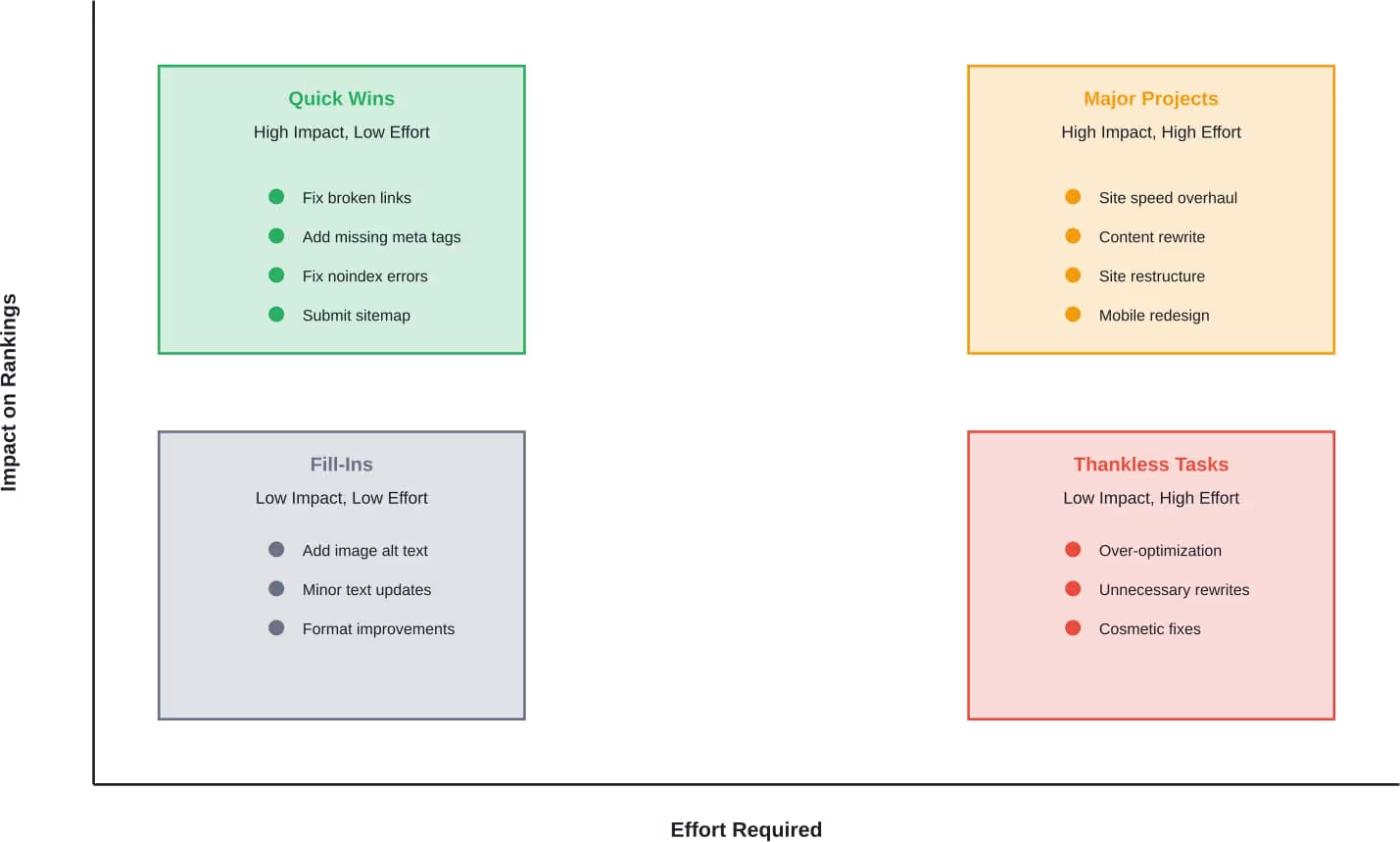
Start with quick wins—high-impact, low-effort fixes. These include addressing critical technical issues, fixing obvious on-page problems, and correcting indexing errors.
Next, tackle major projects that require more resources but deliver significant results. Site speed improvements, comprehensive content updates, and structural changes fall into this category.
Handle fill-ins during downtime—low-impact improvements that polish the site. Save thankless tasks (low impact, high effort) for last or skip them entirely.
Tools for Finding SEO Issues
| Tool | Best For | Cost |
|---|---|---|
| Google Search Console | Crawl errors, indexing status, Core Web Vitals, manual actions | Free |
| Screaming Frog SEO Spider | Comprehensive site crawls, technical audits, finding broken links | Free (limited) / Paid |
| PageSpeed Insights | Performance analysis, Core Web Vitals measurement | Free |
| Semrush | Site audits, keyword research, competitor analysis | Paid |
| Ahrefs | Backlink analysis, content gaps, site audits | Paid |
| GTmetrix | Page speed testing, performance recommendations | Free / Paid |
Conclusion
SEO issues happen. Even well-maintained sites develop problems over time as content grows, platforms update, and algorithms evolve.
The difference between sites that succeed and those that struggle comes down to consistent monitoring and timely fixes. Technical problems, on-page mistakes, and content quality issues all prevent search engines from properly understanding and ranking content.
Most common SEO issues fall into predictable patterns. Slow page speed. Broken links. Missing metadata. Duplicate content. Indexing errors. These aren’t exotic problems requiring advanced expertise—they’re fundamental issues with straightforward solutions.
Google Search Central provides extensive documentation on troubleshooting crawling and indexing issues. The guidance hasn’t fundamentally changed: make sites crawlable, create quality content, ensure good user experience, and build topical authority.
Start with a comprehensive audit using the tools mentioned. Identify critical issues blocking indexing or causing severe technical problems. Fix those first. Then work through high-impact improvements systematically.
But here’s the thing—SEO isn’t a one-time project. Sites need ongoing attention. Schedule regular audits. Monitor Search Console. Track performance metrics. Address new issues promptly.
The sites ranking at the top of search results aren’t necessarily the ones with zero issues. They’re the ones that consistently identify and fix problems before they cause lasting damage.
Ready to improve your site’s search visibility? Start by running a technical audit to identify which of these common issues affect your site. Focus on quick wins first, then build a systematic plan to address larger problems over time.