Quick Summary: Improving CTR for SEO involves optimizing title tags and meta descriptions to match user intent, adding emotional triggers and power words, implementing schema markup for rich results, and analyzing search intent to align content with what users actually want. Higher CTR signals to Google that your result is more relevant, which can boost rankings over time—creating a feedback loop of better visibility, more clicks, and increased conversions.
Click-through rate doesn’t get nearly enough attention in SEO conversations. Most discussions focus on backlinks, domain authority, or content depth. But here’s the thing—CTR is one of the fastest-moving levers available for improving organic performance.
Rankings matter. No question. But what happens when rankings stay flat while leads increase? That shift almost always comes down to one metric: how many people actually click when they see a result.
Click-through rate (CTR) is the percentage of people who click on a link after seeing it. The formula is simple: CTR = (Clicks / Impressions) × 100. For example, if a search result gets 2,500 impressions and 125 clicks, your CTR calculation would be: CTR = (125 ÷ 2,500) × 100 = 5%.
Sound straightforward? It is. But the impact goes beyond just traffic numbers.
Higher CTR often leads to better rankings over time because Google interprets more clicks as a signal that a result is relevant and engaging. That creates a feedback loop: better messaging leads to more clicks, more clicks lead to better rankings, better rankings lead to more visibility, and more visibility drives conversions.
Sometimes growth doesn’t come from creating more content or building more links. It comes from making what already exists more compelling.
Why Click-Through Rate Matters More Than Most SEOs Realize
Traffic gets treated as the end goal in SEO. Rankings go up, traffic follows, conversions happen. That’s the traditional model.
But the search landscape has fundamentally changed. According to research from Ahrefs published in April 2025, AI Overviews reduce clicks by 34.5%. Semrush data from their AI Overviews study shows that the overall zero-click rate of keywords with AI Overviews has slowly declined since January 2025, but informational queries are still heavily impacted.
In fact, Moz reported that higher rankings no longer guarantee more traffic. Moz.com ranks number one for a keyword with a search volume of 165,000, but suffered a 50% drop in traffic for that term.
Real talk: visibility doesn’t equal clicks anymore.
That makes CTR optimization critical. When search features like AI Overviews, featured snippets, and knowledge panels answer questions directly in the SERP, earning the click requires stronger hooks, clearer value propositions, and better alignment with what users actually want.
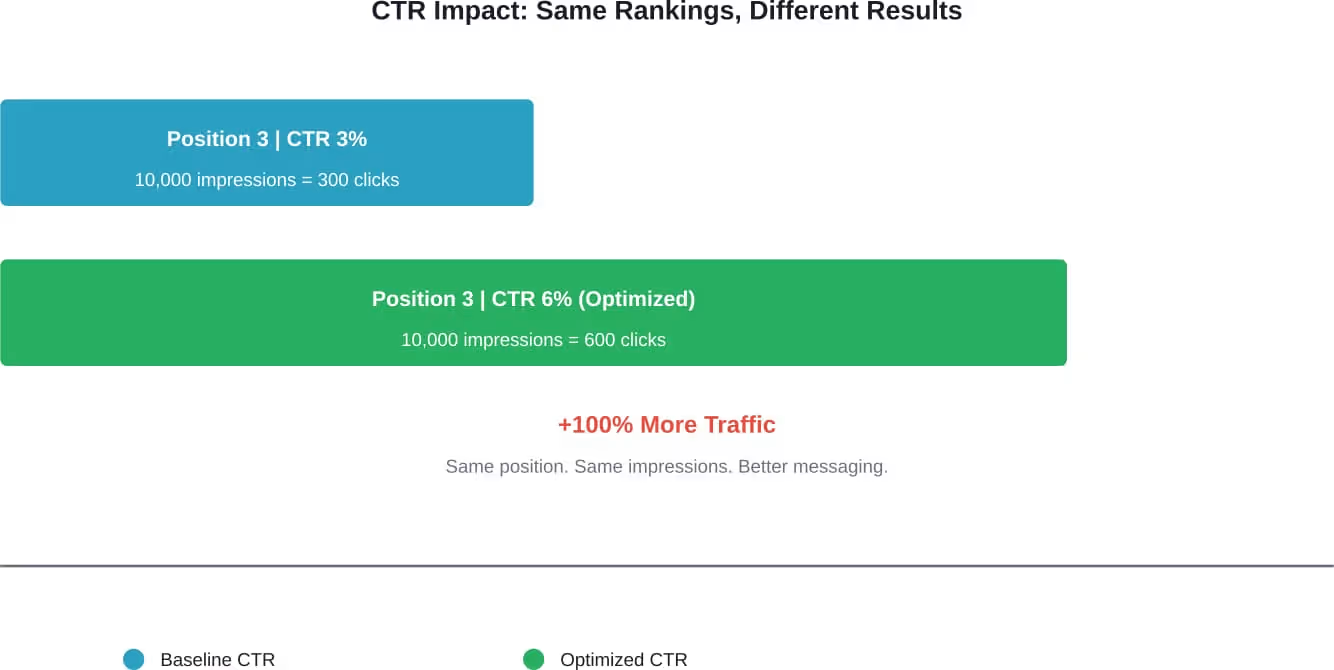
CTR improvement delivers results without requiring better rankings. A position 3 result with a 6% CTR will generate more traffic than a position 2 result with a 3% CTR. The math is simple, but the implications are significant.
What Good CTR Looks Like in Organic Search
Benchmarks help establish whether CTR needs work. But context matters—position, industry, and search intent all influence what constitutes a “good” click-through rate.
Generally speaking, position 1 results tend to see CTRs between 25-35% for informational queries. Position 3 typically falls between 10-15%. By position 10, CTR drops below 2-3%.
But those are broad averages. Commercial and transactional queries often see lower CTRs because users compare multiple options before clicking. Branded queries see higher CTRs because users know exactly what they want.
The presence of SERP features changes everything. When AI Overviews appear, Ahrefs found that clicks decrease by 34.5% on average. Featured snippets, knowledge panels, and local packs all compete for attention before users reach organic results.
Here’s the baseline: if CTR is significantly below the average for a given position, there’s room for optimization. If a position 3 result is pulling 4% CTR instead of 12%, that’s a clear signal that the title tag or meta description isn’t connecting with user intent.
Improve CTR and Capture More Traffic
Improving CTR in SEO means optimizing how your pages appear in search results, which can significantly increase traffic without higher rankings.
LENGREO focuses on maximizing visibility and click performance as part of a complete SEO strategy.
- SERP optimization and testing
- title and meta improvements
- ongoing performance tracking
If you want to get more traffic from existing rankings, get a free consultation with LENGREO.
How to Analyze Current CTR Performance
Before optimizing, establish a baseline. Google Search Console provides the cleanest data for understanding how search results perform.
Navigate to the Performance report. The default view shows clicks, impressions, average CTR, and average position. Filter by page or query to drill into specific performance metrics.
Look for pages with high impressions but low CTR. These represent the biggest opportunities—visibility is already there, but the messaging isn’t compelling enough to earn the click.
Sort by impressions, then filter for pages ranking in positions 1-10. If CTR is below 5% for a top-10 result, that page needs attention.
Pay attention to queries where position is stable or improving, but CTR is flat or declining. That often means competitors have improved their messaging, making their results more attractive even at lower positions.
Also worth checking: queries where CTR dropped suddenly. That can indicate a new SERP feature appeared (like an AI Overview or featured snippet), or a competitor changed their title tag to something more compelling.
Tactic 1: Rewrite Title Tags to Match User Intent
Title tags are the first impression. They determine whether a user clicks or scrolls past.
Most title tags focus on keywords rather than user needs. That’s a mistake. Keywords matter for rankings, but emotional triggers and clear value propositions drive clicks.
Moz notes that on-page optimization, including title tags, has a huge impact on ranking ability. But the way a page is optimized also affects whether users actually click.
Here’s what works: match the title to what the user is actually trying to accomplish. If someone searches “how to improve CTR SEO,” they want tactics, not theory. A title like “How to Improve CTR SEO: 11 Proven Tactics for 2026” signals exactly what the page delivers.
Include specifics. Numbers, years, and qualifiers like “proven,” “fast,” or “step-by-step” make titles more concrete and clickable.
Add emotional triggers. Words like “mistakes,” “checklist,” “cost,” and “timeline” tap into user concerns and motivations. A title like “Common CTR Mistakes That Kill Your Rankings” is more compelling than “CTR Best Practices.”
Keep titles under 60 characters. Google truncates longer titles in search results, which can cut off the most important part of the message.
And here’s a critical point: clarify the benefit instead of stuffing keywords. “Improve CTR SEO with These 11 Tactics” is clearer and more action-oriented than “CTR SEO Optimization Strategies Tips.”
Tactic 2: Optimize Meta Descriptions to Drive Action
Meta descriptions don’t directly impact rankings. But they absolutely impact CTR.
A meta description serves as ad copy. It’s the pitch that convinces someone to click instead of moving to the next result.
Many sites auto-generate meta descriptions or leave them blank. Google then pulls text from the page—often the first sentence or two, which may not be optimized for persuasion.
Write custom meta descriptions for high-value pages. Include the primary keyword naturally (Google bolds matching terms in the SERP, which draws attention).
Focus on benefits, not features. Instead of “This guide covers CTR optimization,” try “Discover proven tactics to improve CTR and boost rankings without building more links.”
Include a call to action. Phrases like “Learn how,” “Discover,” “Find out,” or “Get the tactics” create urgency and direction.
Keep descriptions between 150-160 characters. Longer descriptions get truncated, which can leave users without enough context to make a decision.
Align the description with the actual search journey. If users are comparing options, acknowledge that: “Compare the top 5 CTR tactics and find the best fit for your site.” If they’re looking for quick wins, promise speed: “Boost CTR in under 30 minutes with these simple changes.”
Tactic 3: Use Schema Markup to Earn Rich Results
Rich results take up more space in the SERP and draw more attention. They include star ratings, images, FAQs, how-to steps, and other enhanced features.
According to the UNU Computing for a Better World guide on SEO for the AI Era published in December 2025, schema markup and structured data help AI systems understand and cite content. Clear author bylines, dedicated author bio pages, and transparent About Us pages all serve as trust signals.
Schema markup provides search engines with structured data about a page’s content. When implemented correctly, it can trigger rich results that significantly increase CTR.
FAQ schema is particularly effective for informational content. Adding structured FAQ markup can result in a multi-line SERP entry with expandable question-and-answer pairs.
How-to schema works well for instructional content. It displays numbered steps directly in the SERP, giving users a preview of the process.
Review and rating schema adds star ratings to search results. Even a 4.5-star rating can dramatically increase CTR compared to a plain text result.
Product schema displays price, availability, and ratings for ecommerce pages. This makes the result more informative and actionable.
Implement schema using JSON-LD format in the page’s <head> section. Google’s Structured Data Markup Helper and Schema.org documentation provide templates for different schema types.
Test implementation with Google’s Rich Results Test tool to confirm markup is valid and eligible for rich results.
Tactic 4: Analyze Competitor Messaging and Differentiate
Look at the other results ranking on page one. What angles are they using? What value propositions appear most often?
If every result promises “10 tips” or “ultimate guide,” differentiation becomes critical. A different number (11, 17, 23) or a different format (checklist, case study, comparison) can make a result stand out.
Check competitor title tags and meta descriptions using SEO tools or by viewing page source. Identify patterns and gaps.
If competitors focus on breadth (“everything about CTR”), focus on depth (“advanced CTR tactics for technical SEO”).
If competitors are generic, get specific. Include a year, a metric, or a unique qualifier that competitors don’t offer.
If competitors use formal language, consider a more conversational tone (where appropriate for the audience). If they’re all casual, a more authoritative tone might differentiate.
The goal isn’t to be different for the sake of it. The goal is to offer something the other results don’t—whether that’s a unique angle, a clearer benefit, or a more specific promise.
Tactic 5: Align Content with Search Intent
Search intent determines what users expect to find when they click. Misalignment between intent and content kills CTR and increases bounce rate.
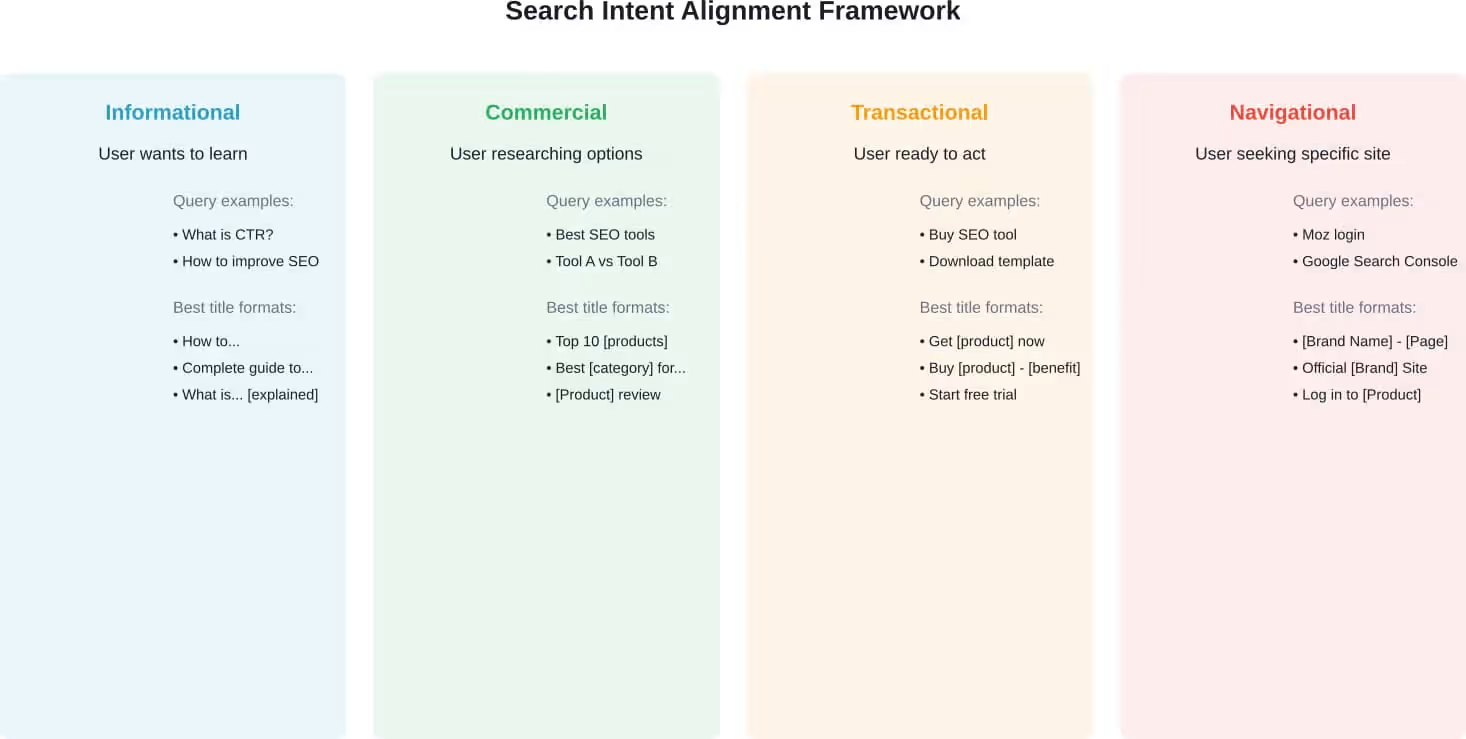
There are four main types of search intent: informational (learning something), navigational (finding a specific site), commercial (researching options), and transactional (ready to buy or take action).
Moz’s research on informational content published in May 2025 notes that many brands have reported rapid declines in organic traffic for informational queries due to AI Overviews. The shift means informational content must provide value beyond what an AI summary delivers.
For informational queries, users want answers, explanations, or how-to guidance. Titles should promise education: “How to,” “What is,” “Guide to.”
For commercial queries, users want comparisons, reviews, or lists of options. Titles should promise evaluation: “Best,” “Top 10,” “vs,” “Comparison.”
For transactional queries, users want to take action. Titles should promise outcomes: “Buy,” “Get,” “Download,” “Start.”
If a query is informational but the page is transactional (pushing a product without providing education first), CTR and engagement will suffer. Users will click back to the SERP and choose a different result.
Check the current top-ranking results for a target keyword. What format are they using? Blog posts, product pages, tools, videos? That reveals what Google believes matches user intent.
Align content format, title, and meta description with that intent. If top results are all how-to guides, don’t try to rank a product page for that query.
Tactic 6: Test Power Words and Emotional Triggers
Certain words drive more clicks. They create curiosity, urgency, or promise a specific benefit.
Power words include: proven, guaranteed, fast, simple, easy, ultimate, complete, essential, secret, advanced, expert, professional, free, bonus, checklist, template, mistake, warning.
Emotional triggers tap into motivations: save time, avoid mistakes, increase revenue, reduce cost, eliminate frustration, get results faster.
Numbers also increase CTR. “11 tactics” is more specific and credible than “several tactics.” Odd numbers often perform better than even numbers in headlines.
Years add recency and relevance. “2026 guide” signals current information, which matters in fast-changing fields like SEO.
Brackets or parentheses in titles can boost CTR. Examples: “CTR Optimization [2026 Update]” or “Improve CTR (Without Changing Rankings).”
Test different variations. Change one element at a time—add a number, include a power word, or add a year—and monitor CTR changes in Google Search Console over 2-4 weeks.
Tactic 7: Improve Page Speed and Core Web Vitals
Moz’s resources on on-page ranking factors note that Core Web Vitals can impact ranking ability. But speed also affects user behavior in the SERP.
When users click a result and it loads slowly, they often hit the back button and choose a different result. That pogo-sticking behavior sends a negative signal to Google.
While page speed doesn’t directly change the title or meta description (which drive the initial click), it affects whether users stay after clicking. And sustained engagement can indirectly improve CTR over time as Google learns which results satisfy users.
Focus on three Core Web Vitals: Largest Contentful Paint (LCP), First Input Delay (FID), and Cumulative Layout Shift (CLS).
LCP measures loading speed. Aim for under 2.5 seconds. Optimize images, use a CDN, and minimize render-blocking resources.
FID measures interactivity. Aim for under 100 milliseconds. Reduce JavaScript execution time and break up long tasks.
CLS measures visual stability. Aim for under 0.1. Set size attributes for images and ads to prevent layout shifts.
Test performance using Google’s PageSpeed Insights or Lighthouse. Address the highest-impact issues first.
Tactic 8: Monitor and Respond to SERP Feature Changes
SERP features change constantly. AI Overviews, featured snippets, People Also Ask boxes, local packs, and knowledge panels all compete for clicks.
According to Semrush’s AI Overviews study published in December 2025, the share of informational queries triggering AI Overviews dropped from 91.3% in January to 57.1% by October. Commercial and transactional AI Overviews increased.
When a new SERP feature appears for a target keyword, CTR for organic results can drop significantly. Ahrefs found AI Overviews reduce clicks by 34.5% on average.
Monitor SERP features using rank tracking tools. Semrush Position Tracking and Ahrefs Rank Tracker both show which SERP features appear for tracked keywords.
When a featured snippet appears, optimize content to earn it. Use clear, concise answers in a paragraph format (40-60 words) or a bulleted list directly answering the query.
When AI Overviews appear, focus on becoming the source AI cites. According to the UNU guide on SEO for the AI Era, clear author bylines, dedicated author bio pages, citations, and outbound links to reputable sources all serve as trust signals that increase the likelihood of being cited.
When People Also Ask boxes appear, consider adding FAQ schema and expanding content to cover related questions.
Tactic 9: Leverage Branded Search and Build Recognition
Branded searches deliver the highest CTR because users know exactly what they’re looking for. Building brand recognition increases the likelihood that users will click when they see the brand name in organic results.
Include the brand name in title tags for important pages. Format: “Primary Keyword | Brand Name” or “Brand Name: Primary Keyword.”
Maintain consistent branding across title tags, meta descriptions, and site identity. Recognition builds trust, and trust drives clicks.
Invest in brand awareness outside of SEO. Content marketing, social media, email, and even paid advertising all contribute to brand recognition—which translates into higher organic CTR when users encounter the brand in search results.
Monitor branded vs. non-branded CTR in Google Search Console. Filter queries by brand name and compare CTR. Branded queries should show significantly higher CTR than non-branded queries at the same position.
Tactic 10: Optimize for Featured Snippets and Position Zero
Featured snippets appear above position 1 in search results. They provide a direct answer to a query, often pulled from a page ranking in the top 5.
Earning a featured snippet can dramatically increase visibility and CTR—or it can reduce CTR if the snippet fully answers the question without requiring a click.
To optimize for featured snippets, identify queries that already trigger them. Use SEO tools to find featured snippet opportunities for keywords where a page already ranks on page one.
Structure content to answer questions directly. Use a clear question as an H2 or H3, then provide a concise answer in the following paragraph.
For definition snippets, provide a 40-60 word paragraph defining the term.
For list snippets, use numbered or bulleted lists with clear, concise items.
For table snippets, use HTML tables to display comparison data or feature lists.
Include the query phrase in the heading and the answer. If the query is “how to improve CTR SEO,” the heading should match that phrasing, and the answer should directly address it.
Tactic 11: A/B Test Titles and Descriptions
The only way to know what messaging works best is to test it. A/B testing for organic search is more challenging than for paid ads, but it’s still possible.
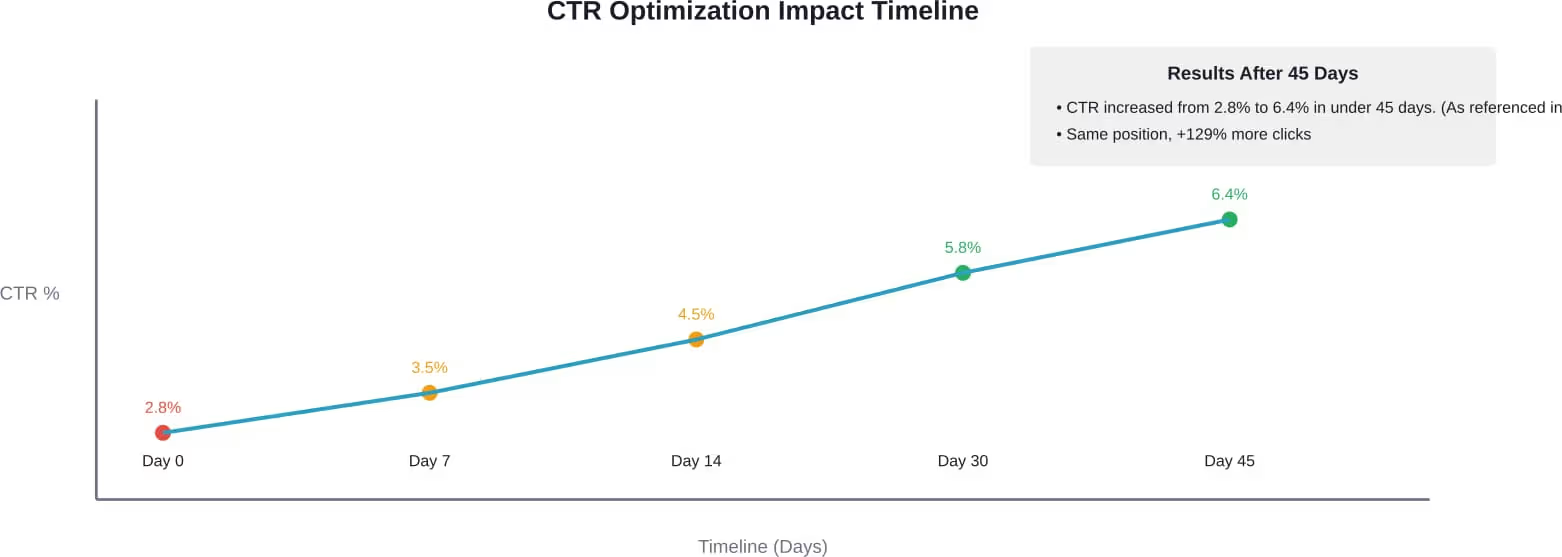
Test one page at a time. Change the title tag or meta description, wait 2-4 weeks for Google to recrawl and update the SERP, then compare CTR before and after in Google Search Console.
Test one element at a time. If both title and description change simultaneously, it’s impossible to know which drove the change.
Document tests in a spreadsheet: page URL, original title, new title, original CTR, new CTR, impressions, and date range.
Prioritize high-impression, low-CTR pages for testing. These offer the biggest potential impact.
Test variations like: adding a number, including a year, adding a power word, changing the benefit statement, or reordering elements in the title.
If a test shows improvement, apply the same approach to similar pages. If a test shows no change or a decline, revert to the original and test a different variation.
| Test Element | Original | Variation | Expected Impact |
|---|---|---|---|
| Number in title | Tips to Improve CTR | 11 Tips to Improve CTR | Adds specificity, increases credibility |
| Year in title | How to Improve CTR SEO | How to Improve CTR SEO in 2026 | Signals recency and relevance |
| Power word | How to Improve CTR | How to Improve CTR: Proven Tactics | Adds authority and trust |
| Benefit statement | Improve Your CTR | Improve CTR Without Changing Rankings | Clarifies unique value proposition |
| Brackets | CTR Optimization Guide | CTR Optimization Guide [2026 Update] | Adds visual distinction in SERP |
Common CTR Optimization Mistakes to Avoid
Keyword stuffing in titles hurts readability. A title like “CTR SEO CTR Optimization CTR Tips” is unreadable and looks spammy. Focus on clarity and persuasion, not keyword density.
Writing meta descriptions that duplicate the title adds no new information. The description should expand on the title, providing additional context or benefits.
Ignoring mobile users is a critical mistake. More than half of searches happen on mobile devices. Titles and descriptions need to work within the tighter character limits of mobile SERPs.
Making promises the page doesn’t deliver destroys trust. If the title says “11 tactics” but the page only covers 7, users will bounce. That increases pogo-sticking and can harm rankings.
Forgetting to update outdated information in titles and descriptions creates credibility issues. A title promising “2024 guide” in 2026 signals the content may be stale.
Optimizing only the homepage ignores where most traffic opportunities exist. Blog posts, product pages, and category pages all need optimized titles and descriptions.
How CTR Impacts Rankings Over Time
CTR is widely believed to be a ranking factor, though Google has never officially confirmed it. The logic is straightforward: if users consistently click a position 3 result over positions 1 and 2, that signals the position 3 result is more relevant.
Moz’s SEO strategy case study published in August 2025 showed a 493% increase in market penetration by focusing on strategic, lower-friction opportunities. Small wins across multiple keywords created compound growth.
Higher CTR leads to more clicks. More clicks lead to more engagement signals (time on page, pages per session, conversions). More engagement signals indicate to Google that the page satisfies user intent. That can result in better rankings.
The feedback loop works like this: optimize messaging → increase CTR → get more clicks → generate more engagement → improve rankings → gain more visibility → increase impressions → higher CTR → more clicks.
That cycle compounds over time. A 3% improvement in CTR might seem small, but if it also leads to a one-position ranking increase, the combined impact can double or triple traffic.
The key is consistency. One optimized title won’t transform performance. But systematically optimizing CTR across dozens or hundreds of pages creates meaningful growth.
Measuring and Tracking CTR Improvements
Set up a baseline before making changes. Export Google Search Console data for the pages being optimized, including clicks, impressions, CTR, and average position.
Track changes weekly. Google Search Console updates daily, but weekly tracking smooths out day-to-day volatility.
Compare periods before and after changes. Use the same date range length (e.g., 30 days before vs. 30 days after) to ensure fair comparison.
Filter by device type. Mobile and desktop CTR can differ significantly. Test whether optimizations perform differently on mobile vs. desktop.
Monitor position changes alongside CTR. If CTR increases but position drops, the optimization may have worked, but another factor (like a competitor gaining links) affected rankings.
Track conversions, not just clicks. CTR improvement is valuable, but if those clicks don’t convert, the optimization may be attracting the wrong audience. Connect Google Search Console to Google Analytics to track assisted conversions from organic search.
Conclusion
CTR is one of the most underutilized growth levers in SEO. Rankings matter, but the messaging that convinces someone to click matters just as much—sometimes more.
Most sites already have visibility for dozens or hundreds of keywords. The opportunity isn’t always about ranking higher. It’s about making what already exists more compelling.
Rewrite title tags to match user intent. Add emotional triggers and power words. Optimize meta descriptions to drive action. Use schema markup to earn rich results. Align content with search intent. Test variations and track results.
The feedback loop is real: better messaging leads to more clicks, more clicks lead to better rankings, better rankings lead to more visibility, and more visibility drives conversions.
Start with the pages that already rank on page one but have low CTR. Those are the fastest wins. Systematically optimize, measure, and refine.
Growth doesn’t always require more content or more links. Sometimes it just requires making what already exists impossible to scroll past.