Quick Summary: The best CMS for SEO in 2026 depends on your technical capabilities and scale. WordPress dominates with 42.4% market share and unmatched plugin flexibility, while headless options like Strapi and Agility CMS offer superior performance for enterprise teams. For most projects, WordPress paired with proper optimization delivers the strongest balance of SEO control, customization, and community support.
Choosing a content management system isn’t just about where content gets stored. The CMS determines whether metadata updates take 30 seconds or require developer tickets, whether pages load in 2 seconds or 8, and whether scaling content creates performance bottlenecks.
Search engine optimization lives or dies based on these technical foundations. Google’s mobile-first indexing and Core Web Vitals make CMS architecture a ranking factor, not just a backend concern.
This guide compares platforms based on real-world SEO performance, technical capabilities, and practical trade-offs. Not marketing fluff.
What Makes a CMS Good for SEO
SEO-friendly content management systems share specific technical characteristics. These aren’t optional features—they’re requirements for competitive search visibility.
Clean URL Structure Control
The CMS must allow full control over URL patterns without forcing database IDs, session parameters, or unnecessary subdirectories. Permalinks should be customizable at both global and individual content levels.
URLs need to support proper hierarchy, handle redirects efficiently, and generate clean paths for taxonomies and custom post types.
Metadata Management
Every content type requires editable title tags, meta descriptions, and structured data markup. The system should surface these fields in the content editor—not bury them in configuration files.
According to Google Search Central documentation, proper metadata helps search engines understand content context and display relevant snippets in search results.
Performance and Loading Speed
Core Web Vitals directly impact rankings. The CMS architecture determines baseline performance before optimization even begins.
Server response time, render-blocking resources, and cumulative layout shift all trace back to how the CMS generates and serves pages. Platforms that require dozens of plugins to function start with a performance deficit.
Mobile Responsiveness
Google uses mobile-first indexing, meaning the mobile version of content determines rankings. The CMS must either provide responsive templates by default or allow complete control over mobile rendering.
Based on Google Search Central’s mobile-first indexing best practices, having a mobile-optimized version isn’t optional anymore—it’s the primary version Google indexes.
Technical SEO Capabilities
Look for systems that handle canonical tags, XML sitemaps, robots.txt management, and schema markup without requiring extensive custom development.
The platform should support JavaScript rendering if needed (Google crawls with an evergreen Chromium version), handle pagination properly, and provide control over crawl directives.
Get SEO and Website Support in One Place
The best CMS for SEO is not always just a platform decision. It often depends on how the site is built, maintained, and optimized over time. Lengreo offers SEO alongside website development services, including business analysis, prototyping, implementation, and support. That can be useful when SEO decisions depend on site structure, technical setup, and ongoing content work rather than CMS choice alone.
Need Help With SEO and Website Setup?
Lengreo can help with:
- SEO audits and optimization
- website development
- keyword research and competitor analysis
- content strategy and planning
- business analysis and implementation support
👉 Contact Lengreo to discuss the SEO and website setup your business needs.
Top CMS Platforms for SEO in 2026
Different platforms excel in different contexts. Enterprise needs differ from solo publisher needs. Technical comfort levels matter.
WordPress: The Open-Source Standard
WordPress powers 42.4% of all websites globally and commands 59.8% market share among sites using a CMS, according to W3Techs usage statistics. That dominance exists for reasons beyond momentum.
The platform provides complete control over every SEO element through its plugin ecosystem. Yoast, Rank Math, and All in One SEO offer comprehensive optimization tools. WordPress handles custom post types, taxonomies, and complex site structures without custom coding.
Here’s the catch: WordPress.org (self-hosted) delivers maximum flexibility but requires ongoing maintenance. Security updates, plugin conflicts, and performance optimization demand technical attention. The fragmented ecosystem means selecting the right combination of themes and plugins matters enormously.
SEO Strengths:
- Granular control over all metadata and technical elements
- Massive plugin library for specialized SEO needs
- Strong community support and documentation
- Handles JavaScript rendering and dynamic content
- Advanced users can modify core functionality
Limitations:
- Performance requires active optimization
- Plugin conflicts create maintenance overhead
- Security depends on update discipline
- Quality varies dramatically across themes and plugins
Headless CMS Platforms
Headless architecture separates content management from presentation. Content lives in the CMS; frontend frameworks handle rendering.
This separation delivers performance advantages. Pages can be pre-rendered as static files, eliminating database queries and reducing server response time to milliseconds.
- Strapi leads the open-source headless category. The platform offers fully managed hosting through Strapi Cloud while maintaining extensive customization through its plugin ecosystem. Content APIs provide flexibility for omnichannel publishing. The approach works particularly well for teams comfortable with JavaScript frameworks like Next.js or Gatsby. These combinations enable advanced performance optimization including incremental static regeneration.
- Agility CMS targets enterprise content operations with built-in SEO controls and a dedicated SEO dashboard. The platform handles multi-brand management and complex content workflows without requiring developer intervention for basic SEO tasks. According to competitor content sources, 40% of B2B companies report lacking internal expertise for technical SEO. Platforms that surface SEO controls in the content editor bridge this gap.
Traditional CMS Options
- Drupal serves organizations needing robust security and complex taxonomy systems. The platform excels at handling large content volumes and intricate permission structures. W3Techs data shows Drupal maintains steady usage among enterprise and government installations. The learning curve is steep, but SEO capabilities are comprehensive once configured. Drupal’s taxonomy system allows sophisticated content relationships and faceted navigation. URL aliasing provides complete control over paths. The trade-off? Initial setup requires significant development resources.
- Joomla occupies middle ground between WordPress and Drupal. The platform offers more structure than WordPress with less complexity than Drupal. Built-in multilingual support makes Joomla valuable for international SEO. The extension directory provides SEO tools, though the ecosystem is smaller than WordPress.
Enterprise Content Platforms
- Adobe Experience Manager delivers comprehensive digital experience management with deep integration across Adobe’s marketing stack. The platform handles personalization, A/B testing, and content governance at scale. SEO capabilities are robust but require technical expertise to implement fully. Organizations choosing AEM typically have dedicated development teams.
- CoreMedia provides hybrid headless architecture with particular strength in speed, personalization, and governance. The platform suits global enterprises managing content across multiple brands and regions. Based on research from coremedia.com, enterprise CMS selection in 2026 prioritizes business impact through generative AI integration and extensible architecture alongside traditional content management.
SaaS and All-in-One Platforms
- Webflow combines visual design tools with clean code output. The platform generates semantic HTML and allows complete control over SEO elements without requiring coding knowledge. Performance is strong out of the box. Webflow’s hosting infrastructure and automated optimization handle Core Web Vitals effectively. The limitation? Less flexibility than open-source options for complex functionality.
- Wix has improved SEO capabilities significantly. The platform now supports proper server-side rendering, custom meta tags, and structured data. Automatic mobile optimization handles responsive design. Wix suits users who prioritize ease of use over maximum control. The platform handles technical SEO basics competently but offers less granular control than WordPress or headless options.
- Ghost focuses specifically on publishing. The platform delivers fast performance and clean markdown editing. Built-in membership and subscription features support content monetization. According to University of Illinois content management research, Ghost works well when publishing speed and workflow simplicity outweigh needs for extensive customization.
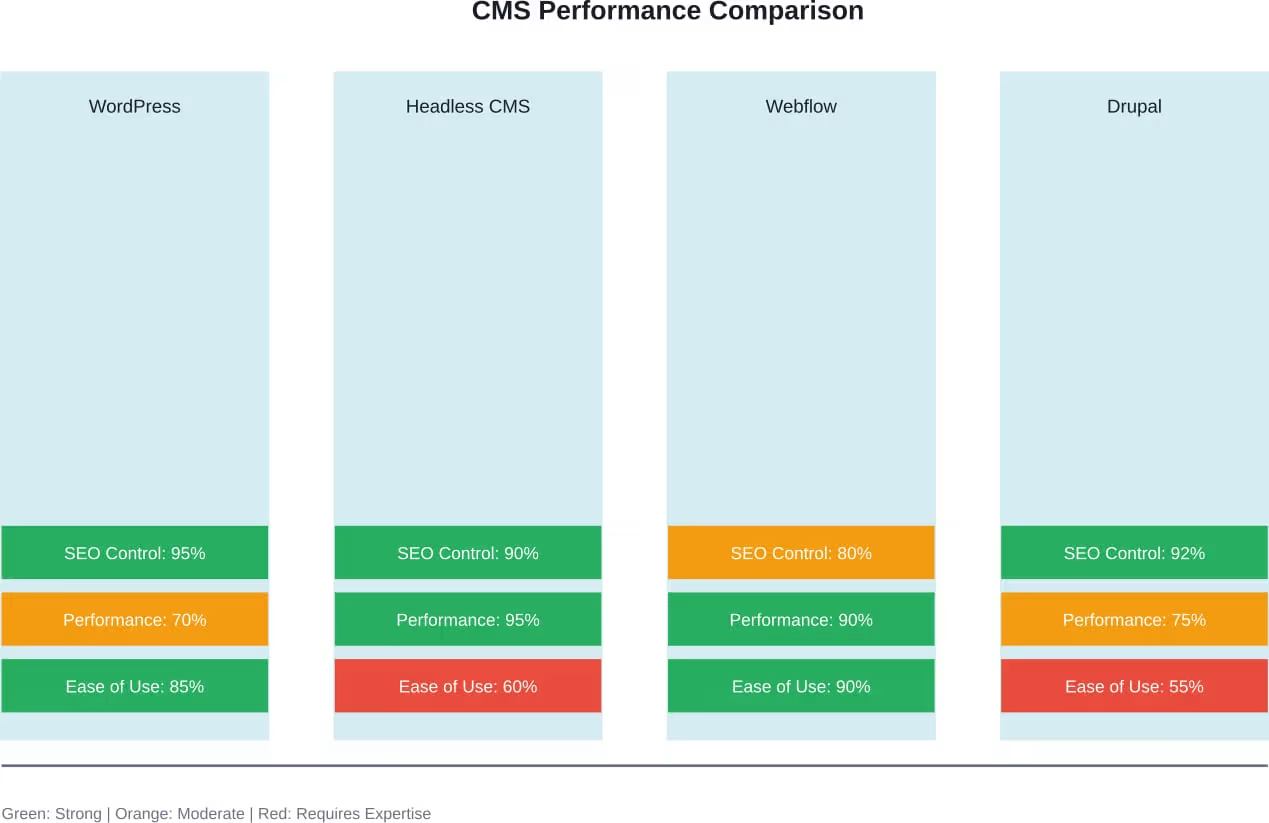
CMS Platform Comparison Table
Direct comparison clarifies which platforms suit specific requirements and team capabilities.
| Platform | Architecture | Best For | SEO Control | Technical Skill Required |
|---|---|---|---|---|
| WordPress | Traditional/Monolithic | Most websites, blogs, small-to-medium business | Excellent (with plugins) | Low to Medium |
| Strapi | Headless | API-first projects, omnichannel content | Excellent (developer-configured) | High |
| Agility CMS | Headless | Enterprise multi-brand management | Excellent (built-in dashboard) | Medium |
| Drupal | Traditional | Enterprise, government, complex taxonomy | Excellent (requires configuration) | High |
| Webflow | SaaS | Design-focused sites, agencies | Very Good | Low |
| Ghost | Traditional/SaaS | Publishers, membership sites | Good | Low |
| Wix | SaaS | Small business, ease-of-use priority | Good | Very Low |
| Adobe AEM | Enterprise | Large organizations, complex personalization | Excellent (requires expertise) | Very High |
How to Choose the Right CMS for SEO
Platform selection depends on specific requirements, not generic “best” rankings. The right choice balances technical needs against available resources.
Assess Technical Capabilities
Teams comfortable with JavaScript frameworks and API-first architecture benefit from headless platforms. The performance advantages are real, but so is the development overhead.
Organizations without dedicated developers should prioritize platforms that surface SEO controls in visual editors. WordPress, Webflow, and Wix make metadata management accessible without code.
Consider Scale and Growth
Platforms that work for 50 pages may struggle at 50,000. Content velocity matters too—publishing 5 posts per month differs from 50 per day.
Enterprise platforms like Drupal and Adobe AEM handle massive scale but require significant upfront investment. Starting with these systems for small projects wastes resources.
Evaluate Performance Requirements
E-commerce sites and content-heavy applications need fast loading speeds. Google’s Core Web Vitals make performance a ranking factor, not just user experience consideration.
Headless architectures deliver superior performance through static generation. Traditional platforms can achieve good performance with proper optimization, but baseline capabilities differ.
Budget Constraints
Open-source platforms like WordPress and Drupal eliminate licensing costs but require hosting and maintenance expenses. Development time represents the largest cost for complex implementations.
SaaS platforms bundle hosting, security, and updates into subscription pricing. Total cost of ownership may be lower despite monthly fees, particularly for teams lacking technical expertise.
Integration Requirements
Marketing automation, CRM systems, analytics platforms, and third-party services need to connect with the CMS. API capabilities determine integration flexibility.
According to Forrester’s CMS evaluation research, modern content management systems increasingly focus on extensible architecture to support complex marketing technology stacks.
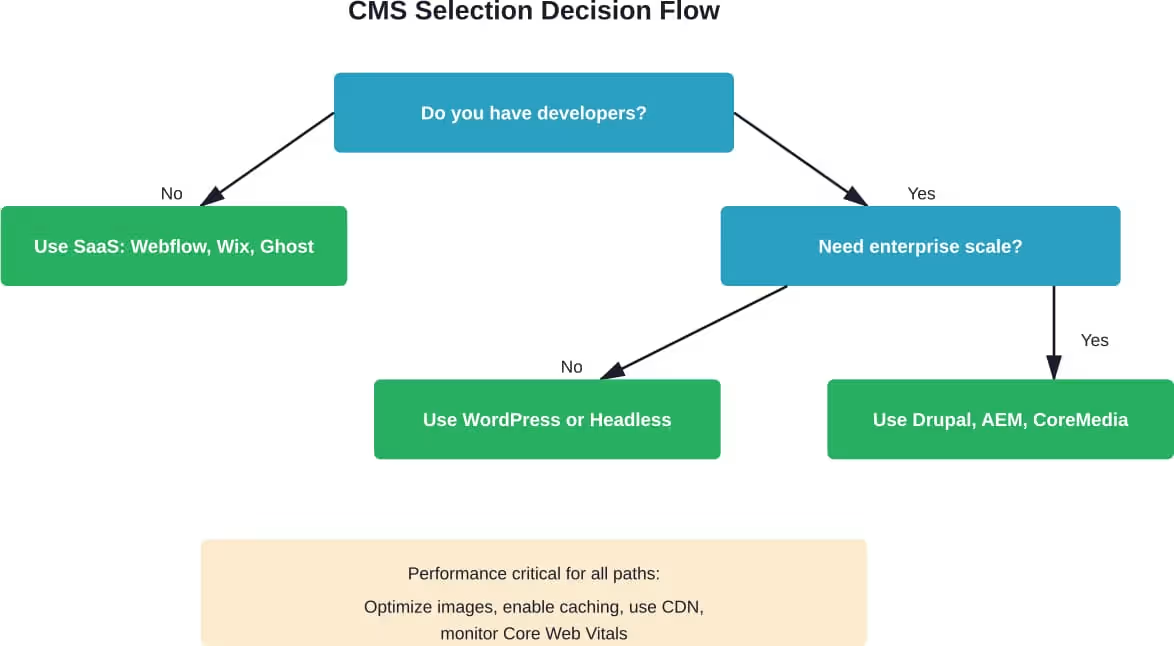
Common SEO Challenges by CMS Type
Each platform category presents characteristic SEO issues. Understanding these patterns helps with both selection and implementation.
WordPress Pitfalls
Plugin bloat kills performance. Sites running 30+ plugins often suffer from slow loading times and increased security vulnerabilities.
Theme quality varies enormously. Poorly coded themes generate messy HTML, fail accessibility standards, and create mobile responsiveness problems. These issues sabotage SEO regardless of content quality.
But WordPress’s biggest problem? The learning curve for doing it right. Basic setup is easy; proper optimization requires real knowledge.
Headless Complexity
Headless platforms shift responsibility for SEO implementation to developers. No plugin fixes metadata issues—custom code handles everything.
This creates a skills bottleneck. Content teams can’t deploy basic SEO improvements without technical support. For organizations with limited development resources, this dependency slows content velocity.
JavaScript rendering adds another layer. While Google handles modern JavaScript well, improper implementation can hide content from crawlers.
SaaS Platform Limitations
All-in-one platforms trade convenience for control. Custom functionality often requires workarounds or simply isn’t possible.
Wix and Squarespace have improved dramatically, but advanced users still hit ceilings. Complex schema markup, custom redirects, and granular robots.txt control remain limited compared to open-source options.
Enterprise Platform Overhead
Adobe AEM and similar enterprise systems deliver comprehensive capabilities at the cost of complexity. Simple tasks often require multiple steps and approvals.
The bureaucracy can slow SEO response times. When algorithm updates require quick adjustments, heavyweight systems create friction.
Key Technical SEO Features Comparison
| Feature | WordPress | Headless (Strapi) | Webflow | Drupal |
|---|---|---|---|---|
| Custom URL Structure | Full Control | Full Control | Full Control | Full Control |
| Metadata Management | Excellent (plugins) | Developer Configured | Built-in Editor | Excellent (modules) |
| Schema Markup | Plugin-dependent | Custom Implementation | Limited Built-in | Module-based |
| XML Sitemap | Automatic (plugins) | Custom Build | Automatic | Module-based |
| Mobile Optimization | Theme-dependent | Frontend Framework | Automatic | Theme-dependent |
| Performance | Variable | Excellent | Excellent | Good |
| Redirect Management | Plugin-based | Custom Code | Built-in | Module-based |
| Canonical Tags | Automatic | Manual Setup | Automatic | Automatic |
Real-World Performance Considerations
Theoretical capabilities differ from practical results. Implementation quality matters more than platform choice in many cases.
WordPress Done Right
Optimized WordPress installations compete effectively with any platform. The key? Disciplined approach to plugins, quality hosting, and performance optimization.
Combining WordPress with static site generation (through tools like WP2Static) delivers headless-level performance while maintaining WordPress’s content management advantages.
When Headless Makes Sense
Organizations publishing content across multiple channels (web, mobile apps, IoT devices) benefit enormously from headless architecture. Content APIs enable true omnichannel distribution.
Teams with strong JavaScript expertise can leverage Next.js, Nuxt, or Gatsby to build blazing-fast frontends. The performance advantages translate directly to better Core Web Vitals scores.
The SaaS Sweet Spot
Small businesses and solopreneurs often achieve better SEO results with managed platforms than poorly-maintained WordPress sites. The platform handles technical optimization automatically.
Webflow particularly shines for design-focused sites where visual presentation matters as much as technical SEO. The platform generates clean code that search engines parse efficiently.
Emerging Trends in CMS and SEO
The content management landscape continues evolving. Several trends are reshaping how platforms approach SEO.
AI-Powered Content Optimization
Academic research indicates AI integration is enhancing CMS SEO capabilities. Platforms are building content optimization suggestions, automated schema markup, and predictive performance analysis.
These features help bridge the expertise gap, making advanced SEO techniques accessible to non-specialists.
Composable Architecture
Modern implementations increasingly combine multiple specialized services rather than relying on monolithic platforms. CMS handles content, separate services manage search, personalization, and analytics.
This approach delivers best-of-breed capabilities but requires integration expertise. The trend particularly impacts enterprise implementations.
Edge Computing and Performance
Content delivery networks that execute code at edge locations enable new performance optimization strategies. Platforms leveraging edge computing can deliver personalized content with static-site speed.
This technology particularly benefits international sites serving diverse geographic audiences.
Making the Final Decision
No single platform wins every category. The right CMS matches organizational capabilities to technical requirements.
For most projects, WordPress remains the pragmatic choice. The ecosystem, community support, and flexibility handle the vast majority of use cases effectively. When implemented properly, SEO capabilities are comprehensive.
Teams with development resources should seriously evaluate headless options. The performance advantages are substantial, and API-first architecture supports modern digital ecosystems.
Organizations prioritizing ease of use over maximum control get excellent results from Webflow or Ghost. These platforms eliminate maintenance overhead while delivering solid SEO foundations.
Enterprise implementations with complex requirements, stringent security needs, or massive scale should evaluate Drupal or commercial enterprise platforms. The investment is justified when managing hundreds of thousands of pages or supporting complex governance requirements.
The decision isn’t permanent. Content migration between platforms is feasible, though not trivial. Starting with a platform that matches current needs and resources makes more sense than over-engineering for hypothetical future requirements.
What matters most? Implementation quality. A properly optimized WordPress site outranks a poorly implemented headless system every time. Platform capabilities enable success, but execution determines actual results.
Conclusion: Choosing Your SEO-Friendly CMS
The best CMS for SEO in 2026 matches technical requirements to organizational capabilities. WordPress dominates for good reasons—flexibility, ecosystem maturity, and comprehensive SEO control. Headless platforms deliver superior performance when development resources support proper implementation. SaaS options like Webflow provide excellent results for teams prioritizing ease of use.
Platform selection matters, but implementation quality determines actual SEO success. A properly optimized WordPress site outperforms a poorly configured enterprise system. Focus on fundamentals: clean URL structures, comprehensive metadata management, fast loading speeds, mobile optimization, and technical SEO capabilities.
Start with platforms that match current team capabilities rather than over-engineering for hypothetical future needs. Content quality, user experience, and consistent optimization matter more than choosing the theoretically perfect CMS.
Ready to improve your search visibility? Audit your current platform against the SEO requirements outlined here. Identify gaps between your CMS capabilities and your optimization needs. If significant gaps exist, evaluate whether configuration changes, plugin additions, or platform migration makes the most sense for your specific situation.