Quick Summary: Website development for small towns requires balancing limited budgets with essential online presence. According to the U.S. Small Business Administration, custom websites start at $2,000, while DIY platforms offer paid plans around $12-30/month. Small towns face unique challenges including limited broadband access—24% of rural adults reported high-speed internet as a major problem in 2018—and smaller technical teams, making the choice between custom development and platform-based solutions critical.
Small towns need websites just as much as big cities. Maybe more. Residents rely on municipal sites for everything from meeting minutes to trash pickup schedules. But here’s the thing—most small towns don’t have dedicated IT staff or five-figure budgets sitting around.
The digital divide makes this harder. As of 2018, 24% of rural adults reported high-speed internet as a major problem in their communities, compared to just 9% in suburban areas, according to Pew Research Center. That gap affects not just residents trying to access town information, but also the local governments trying to serve them online.
So how do small towns build effective websites without breaking the bank? The answer depends on budget, technical capacity, and long-term goals.
Custom Development vs. DIY Platforms: What Works for Small Towns
The U.S. Small Business Administration outlines two main paths for getting a website online: hiring a web developer for a custom build, or using a do-it-yourself platform like Wix, Squarespace, or specialized municipal platforms.
Custom websites start at $2,000 and can climb into five figures, according to SBA data from 2018. That’s a tough sell when your annual web budget is maybe $3,000 total. But custom sites offer something DIY platforms can’t match: complete control over features, design, and functionality.
DIY platforms run around $12-30 per month for paid plans. Professional templates cost under $100, as noted in SBA’s 2019 guidance. The trade-off? Less flexibility. Most towns find themselves wrestling with templates that almost fit their needs but never quite nail it.
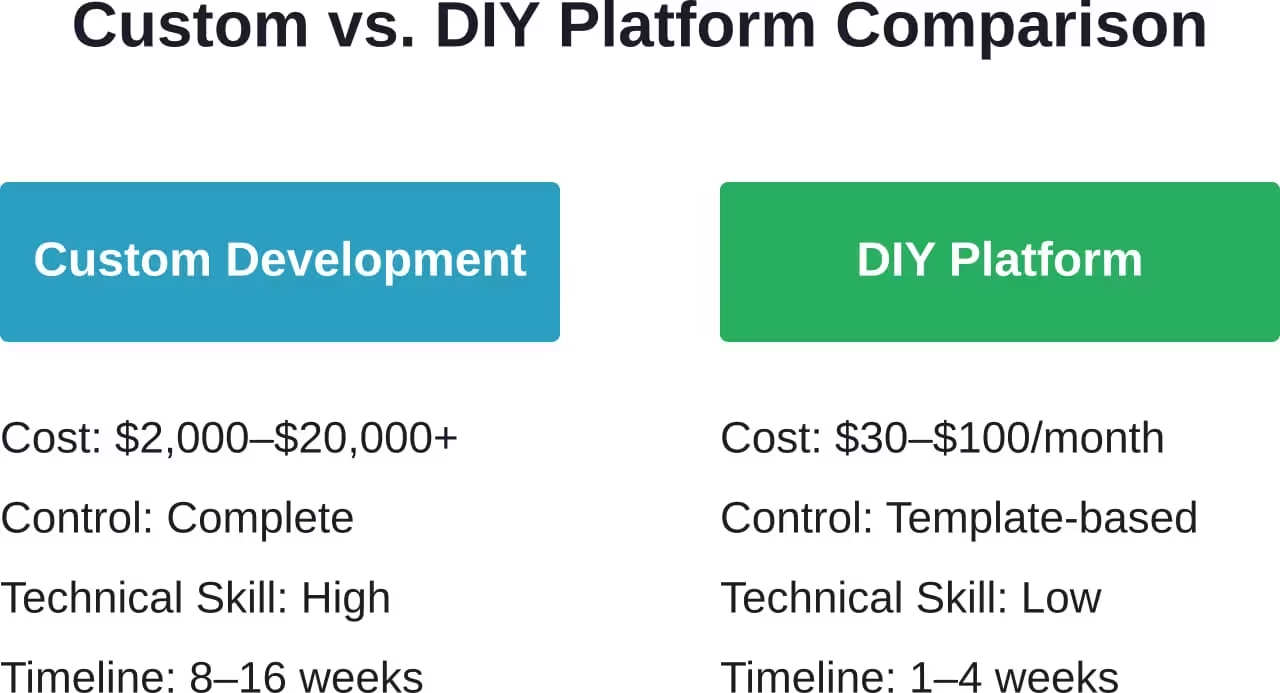
Real talk: most small towns don’t need custom development for their first website. A well-chosen platform gets you 80% of what you need at 5% of the cost. Save custom work for when your needs outgrow standard solutions.
Launch a Town Website That Works as Expected
In smaller towns, a website often has to do more with fewer resources – represent the business clearly, build trust, and make it easy for people to get in touch without overcomplicating things. Lengreo approaches website development with this in mind, focusing on building sites that are straightforward to manage and aligned with how local businesses actually operate. Instead of overloading projects with unnecessary features, they keep the setup practical and focused on long-term usability.
Turn to a Reliable Partner to Keep Your Website Easy to Manage
Lengreo delivers websites that are:
- Flexible for both simple and more complex setups
- Easy to maintain after launch
- Designed to perform reliably over time
Get a consultation with Lengreo to discuss your website and get it built on an approach that works long term.
Essential Pages Every Small Town Website Needs
The SBA identifies five essential pages every small business website needs. Municipal sites follow similar principles, but with a local government twist.
Start with a homepage that actually tells visitors what they’re looking at. Sounds obvious, but plenty of town sites assume everyone already knows which Springdale they’ve landed on. State the town name clearly, include the state, and add a brief welcome message.
Contact information deserves its own prominent page. List office hours, phone numbers, physical addresses, and—critically—who handles what. Residents shouldn’t have to guess whether the clerk or the supervisor handles building permits.
| Essential Page | Key Content | Update Frequency |
|---|---|---|
| Homepage | Town name, alerts, quick links | Weekly or as needed |
| Contact/Staff | Office hours, phone, email, addresses | When staff changes |
| Meeting Minutes | Council/board minutes and agendas | After each meeting |
| Services | Permits, payments, trash schedules | Quarterly review |
| Documents | Ordinances, budgets, forms | As adopted/updated |
Meeting minutes and agendas are non-negotiable. Many states require municipalities to post these online. Even if yours doesn’t, transparency builds trust. Upload minutes as PDFs if your platform makes that easier than formatting in HTML.
A services page centralizes what your town actually does for residents. Trash pickup schedules, permit applications, water bill payments—everything that used to require a phone call or office visit.
The Rural Broadband Challenge
Here’s where small town website development gets complicated. According to Pew Research Center data from 2021, only 30% of rural adults own a desktop/laptop, smartphone with data plan, home broadband, and tablet—compared to 43% of suburban adults and 44% of urban adults.
What does this mean for website design? Keep it light. Heavy graphics, auto-playing videos, and complex JavaScript might work fine on suburban fiber connections. On rural DSL or satellite internet, they make sites unusable.

The Broadband Equity, Access, and Deployment (BEAD) program represents a multi-billion-dollar federal investment in broadband infrastructure, as noted by Brookings Institution research on rural broadband deployment. That’s good news long-term. Short-term? Design like your residents are on slow connections, because many are.
Accessibility and Compliance Requirements
Municipal websites face stricter accessibility requirements than private business sites. The Americans with Disabilities Act applies to government websites, meaning your town site needs to work for residents with visual, hearing, motor, and cognitive disabilities.
The basics aren’t complicated: add alt text to images, use sufficient color contrast, make sure navigation works with keyboards (not just mice), and structure content with proper headings.
But wait. Do you need to test with screen readers? Audit every page for WCAG 2.1 compliance? Here’s the practical answer: pick a platform or developer who builds accessibility in from the start. Retrofitting accessibility later costs more than doing it right initially.
Budget-Friendly Solutions for Small Towns
Several platforms specifically target small municipalities. These typically cost more than generic DIY builders but less than custom development, and they include features town websites actually need.
Community discussions suggest starting with these priorities: reliable hosting, easy content updates (ideally by non-technical staff), mobile responsiveness, and document management for PDFs.
Skip the fancy stuff initially. Your town probably doesn’t need a custom mapping system, live chat, or multi-language support in version one. Launch with the basics, gather feedback from residents, then add features based on actual usage patterns.
Maintaining Your Town Website
The SBA’s 2019 guidance emphasizes keeping content fresh. A homepage highlighting last November’s Thanksgiving event in May signals abandonment. Residents stop checking sites they perceive as outdated.
Set a sustainable update schedule. Upload meeting minutes within 48 hours of approval. Review the homepage weekly for stale alerts. Update service information when policies change. This doesn’t require daily effort, but it does require consistency.
Contact your web developer for a homepage facelift if the design feels dated, as the SBA suggests. Professional templates under $100 can modernize an aging site without rebuilding from scratch.
Moving Forward with Your Town Website
Small towns face unique website development challenges: limited budgets, smaller technical teams, and residents with varied internet access. But these constraints don’t prevent effective online presence.
Start with platform-based solutions unless your town has specific needs that genuinely require custom development. Focus on essential pages and core functionality before adding bells and whistles. Design for the slowest connections in your community, not the fastest.
The digital divide persists—96% of U.S. adults used the internet according to Pew Research Center data from 2025, but rural adoption patterns and connection quality lag behind urban and suburban areas. Your town website bridges that gap by providing essential services and information to all residents, regardless of technical sophistication.
Check platforms specifically designed for small municipalities. Compare features against your town’s actual needs, not a wish list. Get proposals from multiple sources. Then build something functional, accessible, and maintainable with the resources you actually have.