Quick Summary: Website development for bloggers involves choosing the right platform, designing for mobile responsiveness, optimizing page speed, and implementing SEO best practices. Successful blogger websites balance ease of use with flexibility, allowing content creators to focus on writing while maintaining professional design and fast load times. The choice between platforms like WordPress, Squarespace, or specialized blog builders depends on technical skill, customization needs, and growth plans.
Building a blog website has never been more accessible, yet the choices can feel overwhelming. Content creators face a fundamental decision: pick a platform that handles the technical details, or gain full control with a self-hosted solution that demands more expertise.
The right development approach shapes everything from publishing workflow to monetization potential. A poorly configured site can derail even the best content strategy, while a well-built foundation lets writers focus on what matters—creating compelling stories.
This guide examines the technical and strategic considerations that separate struggling blogs from thriving ones. From platform selection to performance optimization, these principles apply whether launching a first blog or rebuilding an existing one.
Understanding Blogger Website Requirements
Blog websites have distinct needs compared to other site types. Content management sits at the center—writers need intuitive editors, reliable scheduling, and straightforward media handling. But technical requirements extend beyond the publishing interface.
Speed matters more than most realize. According to 2026 industry benchmarks, the probability of a bounce increases by 123% as page load time goes from 1 second to 10 seconds, while 53% of mobile users abandon a site if it takes more than 3 seconds to load. That threshold can make the difference between a casual visitor becoming a regular reader or bouncing immediately.
Mobile responsiveness isn’t optional anymore. For bloggers, that means every post must render perfectly on devices ranging from phones to tablets to desktop monitors.
Search visibility determines whether content reaches its intended audience. Blogs thrive on organic traffic, making SEO capabilities a core development requirement rather than an afterthought.
Content Management Priorities
The publishing workflow impacts consistency. Look for these features:
- Visual editor with WYSIWYG formatting
- Draft saving and version history
- Post scheduling for publication timing
- Category and tag organization
- Media library with image optimization
- Excerpt and featured image controls
Some platforms excel at content management while weak in other areas. Others provide technical power but make simple publishing tasks cumbersome. The best fit depends on how often posts publish and how complex the content structure needs to be.
Technical Infrastructure Essentials
Behind the scenes, several technical elements support blog functionality. Hosting reliability affects uptime—downtime means lost readers and damaged search rankings. Security updates protect against vulnerabilities that attackers commonly exploit on popular platforms.
Database efficiency matters as content libraries grow. A blog with hundreds of posts needs optimized queries to maintain speed. Caching mechanisms reduce server load and accelerate page delivery for returning visitors.
Backup systems prevent catastrophic data loss. Whether automated through the platform or configured manually, regular backups ensure recovery options when things go wrong.
Build a Better Blogger Website With Lengreo
Lengreo builds and improves websites, then connects them with SEO, paid ads, tracking, and lead generation. For bloggers, this means a website that organizes articles, categories, newsletter forms, author pages, affiliate sections, and contact options in a clean structure.
The focus is to make the site easier to read, search, and measure. Lengreo can help improve page structure, traffic setup, and user paths so visitors can find content faster and take the next step when needed.
Need a Website That Helps Readers Stay Engaged?
Lengreo can help with:
- building or redesigning your website
- improving SEO and paid traffic setup
- setting up tracking and website structure
- refining blog, category, and newsletter pages
👉 Contact Lengreo to discuss your website and setup.
Platform Selection for Blogging Success
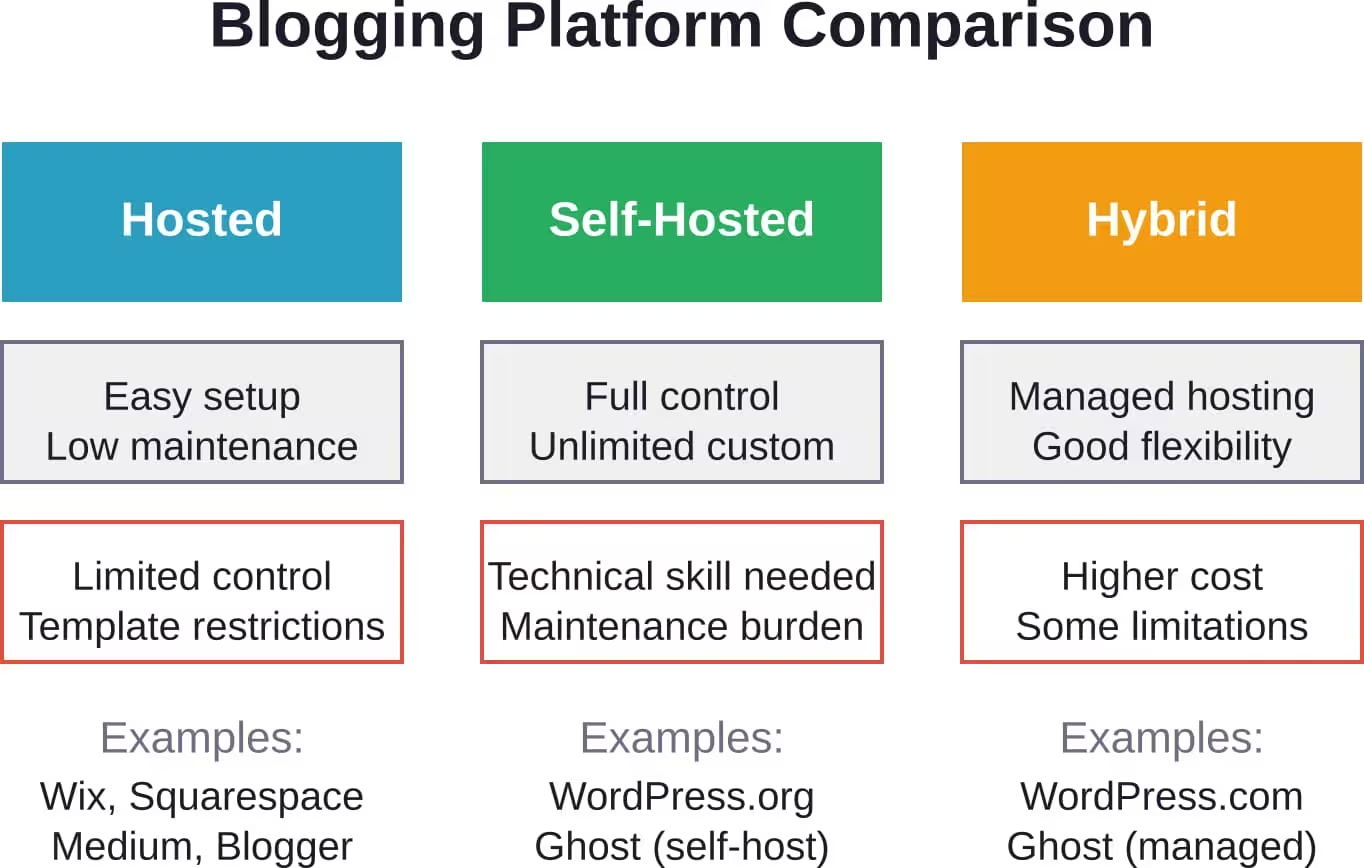
The platform decision shapes development complexity, ongoing maintenance, and long-term flexibility. Three categories dominate the blogging landscape: hosted solutions, open-source platforms, and hybrid services.
Each approach trades convenience for control. Hosted platforms handle technical management but limit customization. Self-hosted solutions offer unlimited flexibility at the cost of increased responsibility. Hybrid services attempt to balance both.
WordPress: The Content Powerhouse
WordPress powers 43.4% of all websites according to industry data, including countless blogs across every niche imaginable. This dominance stems from its content-focused design and massive ecosystem of themes and plugins.
The self-hosted WordPress.org version offers complete control. Developers can modify any aspect of functionality, install custom themes, and integrate third-party services without restriction. This flexibility supports complex content strategies and unique design requirements.
But that power demands technical capability. Self-hosted WordPress requires hosting setup, security hardening, regular updates, and backup configuration. For bloggers without development experience, this learning curve can feel steep.
WordPress.com provides a managed alternative. The platform handles hosting, security, and updates while maintaining some WordPress flexibility. Plans range from free basic tiers to premium options with custom domain support and advanced features.
Hosted Website Builders
Platforms like Wix and Squarespace simplify blog creation through drag-and-drop interfaces and curated template libraries. These services bundle hosting, security, and support into subscription packages.
The appeal lies in convenience. New bloggers can launch professional-looking sites within hours rather than days. Updates happen automatically, security monitoring runs in the background, and customer support teams handle technical questions.
Template quality varies across platforms. Squarespace particularly excels at design aesthetics, offering modern layouts that look polished by default. Wix provides more template variety but sometimes sacrifices visual coherence.
Limitations become apparent as blogs mature. Custom functionality often requires expensive plan upgrades or simply isn’t available. Migrating away from these platforms later can prove difficult since proprietary systems don’t export cleanly.
Specialized Blogging Services
Ghost targets professional publishers, focusing on membership features and newsletter integration. The platform’s clean writing interface removes distractions, while built-in analytics track audience engagement.
Medium takes a different approach—community over customization. Writers gain immediate access to Medium’s existing audience but sacrifice branding control and monetization options. The platform works well for building following before launching an independent site.
Substack specializes in newsletter-based blogging with subscription monetization. The model suits writers who prioritize email delivery over traditional blog discovery, though the platform’s SEO capabilities lag behind full-featured website builders.
Design Principles for Blogger Sites
Design decisions affect readability, navigation, and conversion rates. The best blog designs fade into the background, letting content take center stage while still conveying brand identity.
Typography forms the foundation. Body text should measure 16-18 pixels minimum, with sufficient line height (1.5-1.7 ratio) for comfortable reading. Heading hierarchy needs clear visual distinction—readers should understand content structure at a glance.
White space prevents cognitive overload. Cramped layouts tire readers quickly, while generous spacing around text blocks and between sections creates breathing room that encourages continued reading.
Mobile-First Design Strategy
Mobile traffic now dominates web usage across most niches. Designing for small screens first ensures core content remains accessible regardless of device.
Navigation must simplify on mobile. Hamburger menus work when properly implemented, but critical links should remain immediately visible. Sticky headers provide persistent access to menu and search without consuming excessive screen space.
Touch targets need adequate sizing. Buttons and links smaller than 44×44 pixels frustrate mobile users who struggle to tap accurately. Spacing between interactive elements prevents accidental clicks.
Test thoroughly across devices. What looks perfect on iPhone might break on Android tablets. Browser developer tools help, but nothing replaces actual device testing.
Content Layout Best Practices
Blog post layouts follow established conventions for good reason. Featured images set visual tone, while post metadata (date, author, categories) provides context without cluttering.
Optimal line length measures 50-75 characters for body text. Wider columns force eyes to scan excessive horizontal distance, slowing reading speed and increasing fatigue. Container widths around 700 pixels typically achieve this range.
Break long posts into scannable sections. Subheadings every 300-400 words give readers mental rest stops and make finding specific information easier. Bullet lists highlight key points that might otherwise disappear in paragraph blocks.
Sidebar utility depends on content strategy. Sidebars showcase popular posts, opt-in forms, and related content effectively. But they consume valuable horizontal space and disappear on mobile. Many successful blogs now favor single-column layouts with strategic in-content calls to action.
Technical Performance Optimization
Site speed directly impacts both user experience and search rankings. Slow sites lose visitors before content even loads, while search engines downrank pages that deliver poor performance.
Performance optimization spans multiple layers—server response, asset delivery, browser rendering, and perceived speed. Each area offers improvement opportunities.
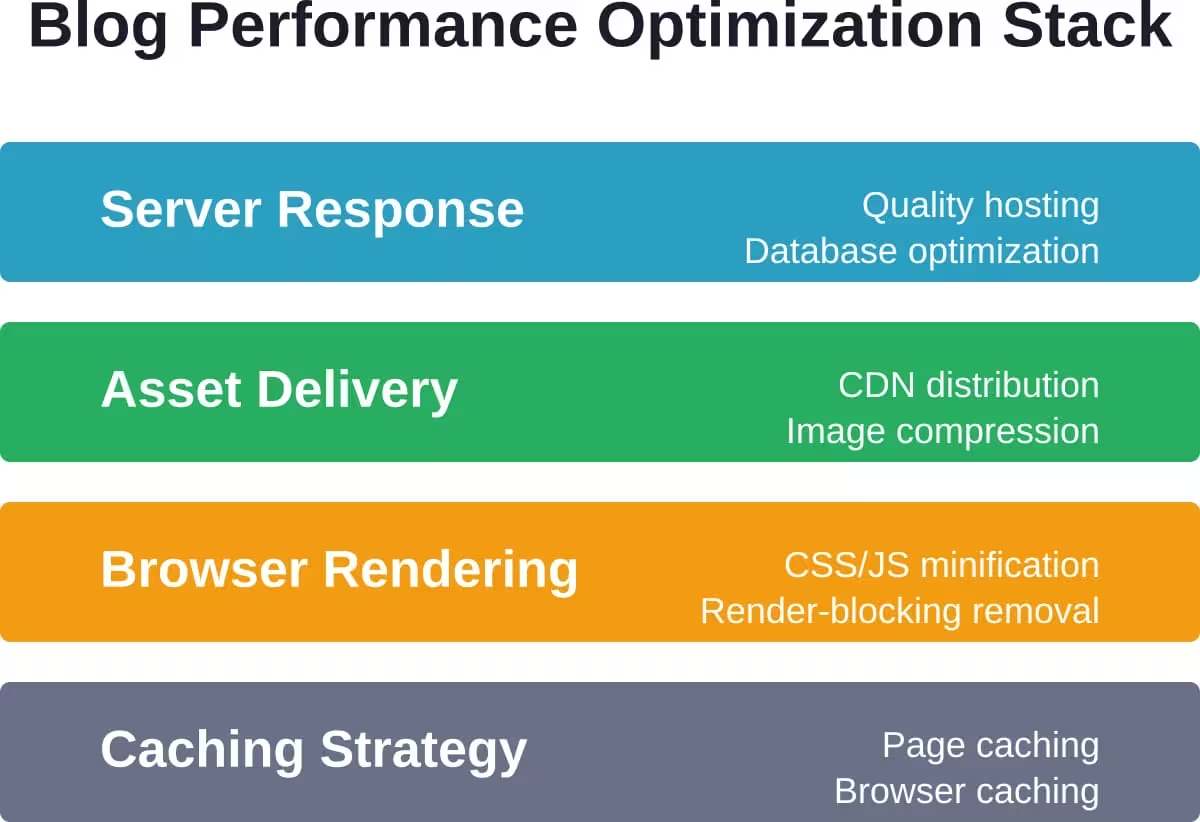
Image Optimization Strategies
Images typically account for the majority of page weight. Unoptimized photos can exceed several megabytes each, devastating load times especially on mobile connections.
- Compression reduces file size without visible quality loss. Tools like TinyPNG or ImageOptim strip unnecessary metadata and apply efficient compression algorithms. Most platforms now offer automatic compression on upload.
- Format selection matters. WebP provides superior compression compared to JPEG while maintaining quality, though fallback formats ensure compatibility with older browsers. PNG suits graphics with transparency, while JPEG remains efficient for photographs.
- Lazy loading defers offscreen images until users scroll near them. This technique dramatically improves initial page load by only fetching visible content immediately. Modern browsers support native lazy loading through simple HTML attributes.
- Responsive images serve appropriate sizes based on device characteristics. The picture element and srcset attributes let browsers choose optimal resolution, avoiding situations where mobile devices download desktop-sized images.
Hosting and Server Configuration
Shared hosting works for new blogs with minimal traffic but creates performance bottlenecks as audiences grow. Multiple sites compete for limited server resources, causing slowdowns during traffic spikes.
Managed WordPress hosting services like WP Engine or Kinsta optimize specifically for WordPress performance. These platforms implement server-level caching, security hardening, and automatic scaling that shared hosts can’t match.
Cloud hosting through services like DigitalOcean or AWS provides maximum control and scalability. This approach requires technical expertise to configure properly but offers the best performance potential for high-traffic blogs.
Geographic server location affects load times. Visitors far from the server experience higher latency. Content delivery networks (CDNs) solve this by distributing assets across global edge locations, serving content from the nearest available server.
Caching Implementation
Page caching generates static HTML versions of dynamic blog posts. Instead of rebuilding pages from database queries on every request, the server delivers pre-generated files instantly.
WordPress caching plugins like WP Rocket or W3 Total Cache handle this automatically. They detect content changes and regenerate cached versions accordingly, balancing freshness with performance.
Browser caching instructs visitors’ browsers to store static assets locally. CSS files, JavaScript libraries, and images don’t need to download repeatedly on subsequent visits. Proper cache headers can reduce bandwidth consumption by 70% or more for returning visitors.
Object caching stores database query results in fast memory systems like Redis or Memcached. This reduces database load significantly on blogs with complex queries or real-time features.
SEO Architecture for Blogs
Search engine optimization determines whether target audiences discover content. Technical SEO creates the foundation, while content optimization and link building drive rankings.
Blog structure affects how search engines understand and categorize content. Clear hierarchies help algorithms determine topic relevance and expertise.
URL Structure and Permalinks
Clean URLs improve both SEO and user experience. Descriptive paths that include keywords help search engines understand page topics while making links more shareable.
Avoid date-based URL structures unless running a news site. Paths like /2026/05/post-title suggest time-sensitive content that may age poorly. Category-based or post-name structures maintain relevance longer.
Keep URLs concise—aim for 3-5 words that capture the topic. Excessive length dilutes keyword relevance and creates unwieldy links that break in emails or social posts.
Once published, never change URLs without implementing proper redirects. Broken links destroy search rankings and frustrate visitors who bookmarked or shared content.
On-Page SEO Elements
- Title tags should incorporate target keywords naturally while remaining compelling to human readers. Position important keywords toward the beginning when possible, keeping total length under 60 characters to avoid truncation in search results.
- Meta descriptions don’t directly impact rankings but influence click-through rates. Write descriptions that accurately summarize content while incorporating target keywords and calls to action. Aim for 150-160 characters.
- Header tags establish content hierarchy. One H1 per page (typically the post title) signals primary topic, while H2s and H3s organize supporting sections. Search engines use this structure to understand content organization and topic coverage.
- Image alt text serves accessibility and SEO simultaneously. Descriptive alt attributes help visually impaired readers understand images while providing keyword opportunities and helping images appear in visual search results.
Content Structure and Internal Linking
Comprehensive content tends to rank better than thin posts. Deep coverage signals expertise and answers visitor questions more completely. But length alone doesn’t guarantee rankings—quality and relevance matter more than word count.
Strategic internal linking distributes page authority across the site. Link to relevant older posts from new content, establishing topical relationships that help search engines understand site expertise. Descriptive anchor text reinforces these connections.
Pillar content and topic clusters organize related posts around core themes. Pillar posts provide comprehensive overviews while cluster posts dive deep into specific subtopics. This structure demonstrates topical authority to search algorithms.
Schema markup helps search engines extract structured data from posts. Article schema identifies published dates, authors, and featured images. FAQ schema can trigger special search result features that increase visibility.
Security Considerations for Blog Sites
Security breaches damage reputation and search rankings while potentially compromising reader data. Bloggers must implement protective measures proportional to their platform and content value.
According to NIST guidelines on code verification and security practices, security should integrate into the development lifecycle rather than bolting on afterward. This principle applies to bloggers choosing platforms and configuring sites.
Platform Security Features
Hosted platforms typically handle security automatically. Providers patch vulnerabilities, monitor for attacks, and implement protective measures as part of service agreements. This represents a key advantage for non-technical bloggers.
Self-hosted WordPress requires active security management. Keep WordPress core, themes, and plugins updated—outdated components create vulnerabilities that attackers actively exploit. Security plugins like Wordfence or Sucuri add firewall protection and malware scanning.
Strong authentication prevents unauthorized access. Use complex passwords combining letters, numbers, and symbols. Two-factor authentication adds critical protection against brute force attacks.
Limit user permissions to minimum necessary levels. Contributors shouldn’t have administrative access. Regular audits identify inactive accounts that should be removed.
SSL Certificates and HTTPS
SSL certificates encrypt data transmission between browsers and servers. HTTPS has become standard—search engines now flag non-HTTPS sites as insecure, damaging trust and rankings.
Most hosting providers offer free SSL through Let’s Encrypt. Managed platforms typically include SSL automatically. Self-hosted bloggers need to install and renew certificates, though automation tools simplify this process.
Implement HTTPS site-wide rather than selectively. Mixed content warnings undermine security and break functionality. Update all internal links and embedded resources to use HTTPS.
Backup and Recovery Planning
Regular backups prevent catastrophic data loss from security incidents, server failures, or human error. Backup frequency should match publishing cadence—daily for active blogs, weekly for occasional publishers.
Store backups separately from the live site. Local-only backups don’t help when servers fail. Cloud storage services like Dropbox or Google Drive provide reliable off-site storage.
Test restoration procedures before needing them in crisis. Backup plugins can fail silently, creating false security. Periodic test restores verify backup integrity and familiarize administrators with recovery processes.
Monetization Technical Requirements
Revenue strategies demand specific technical capabilities. The platform must support required functionality while maintaining performance under advertising or e-commerce load.
| Monetization Method | Technical Requirements | Platform Considerations |
|---|---|---|
| Display Advertising | Ad placement controls, page speed optimization, ad blocker detection | Most platforms support through plugins or integrations |
| Affiliate Marketing | Link management, disclosure notices, tracking integration | Works universally but needs organized link tracking |
| Digital Products | E-commerce functionality, payment processing, download delivery | Requires platform with store capabilities or third-party integration |
| Memberships | Paywall controls, user authentication, recurring billing | Specialized platforms or plugins needed for full functionality |
| Sponsored Content | Disclosure management, analytics tracking, media kits | No special platform requirements beyond standard features |
Advertising Integration
Display ads through networks like Google AdSense require script integration. Placement affects both revenue and user experience—too many ads hurt readability while too few limit income potential.
Header bidding maximizes ad revenue by letting multiple ad networks compete for impressions. This requires technical setup beyond basic ad insertion but can increase earnings significantly for high-traffic blogs.
Ad density must balance revenue with page speed. Heavy ad loads can double page weight and triple load times. Lazy loading ads or implementing refresh limits help maintain acceptable performance.
E-Commerce Capabilities
Selling digital products requires secure payment processing and automated delivery. WooCommerce dominates WordPress e-commerce, while hosted platforms typically offer native shop functionality.
Payment gateway integration connects to services like Stripe or PayPal. Transaction fees vary—compare rates when choosing gateways. Some platforms include payment processing in subscriptions while others charge per transaction.
Digital delivery systems automate file distribution after purchase. Manual fulfillment doesn’t scale. Plugins like Easy Digital Downloads handle licensing, download limits, and version updates for digital goods.
Membership and Subscription Models
Paywall implementation restricts content access to paid subscribers. This requires user authentication systems and content protection that prevents bypassing through direct URLs or search cache.
Recurring billing management handles subscription renewals, failed payments, and cancellations. Services like MemberPress or Patreon integration provide these capabilities without building custom systems.
Tiered access levels let subscribers choose different membership grades. Technical implementation varies by platform—some handle multiple tiers elegantly while others make complex configurations cumbersome.
Analytics and Performance Tracking
Data-driven decisions require comprehensive analytics. Understanding audience behavior, content performance, and traffic sources guides strategy refinement.
Multiple analytics layers provide different insights. Traffic analytics show visitor counts and sources, engagement metrics reveal content effectiveness, and conversion tracking measures business goal achievement.
Traffic Analysis Implementation
Google Analytics remains the standard for traffic measurement despite privacy concerns driving some bloggers toward alternatives. The platform tracks visitor demographics, behavior flow, and acquisition channels without cost.
Setup requires adding tracking code to all pages. Most platforms offer simple integration through settings or plugins. Verify installation through real-time reports before relying on data for decisions.
Goal configuration tracks specific achievements—newsletter signups, product purchases, or content downloads. These conversions measure business impact beyond vanity metrics like page views.
Privacy-focused alternatives like Fathom or Plausible offer simpler analytics without invasive tracking. They sacrifice some advanced features for better privacy compliance and faster page loads.
Content Performance Metrics
Time on page indicates engagement quality. Quick exits suggest content didn’t meet expectations while extended sessions signal valuable material. Compare metrics across posts to identify successful topics and formats.
Scroll depth tracking reveals how far readers progress through posts. High bounce rates at specific points may indicate sections that confuse or bore audiences. Heatmaps visualize interaction patterns, showing which elements attract attention.
Social sharing counts measure content virality. High shares relative to traffic indicate particularly resonant posts worth replicating or expanding into series.
Search console data exposes which queries drive organic traffic. This reveals actual search intent behind visits, often differing from assumed target keywords. Use these insights to refine content strategy.
Conversion Optimization
A/B testing compares variations to identify highest-performing options. Test headlines, calls to action, form placements, and content formats. Statistical significance requires adequate sample sizes—don’t conclude from limited data.
Conversion funnel analysis identifies where visitors drop off before completing desired actions. Technical issues, unclear messaging, or friction points all reduce conversion rates. Fix obstacles systematically starting with the biggest leaks.
Email capture optimization directly impacts list growth. Test opt-in placement, incentive offers, and form design. Exit-intent popups convert abandoning visitors though some find them intrusive.
Development Workflow and Maintenance
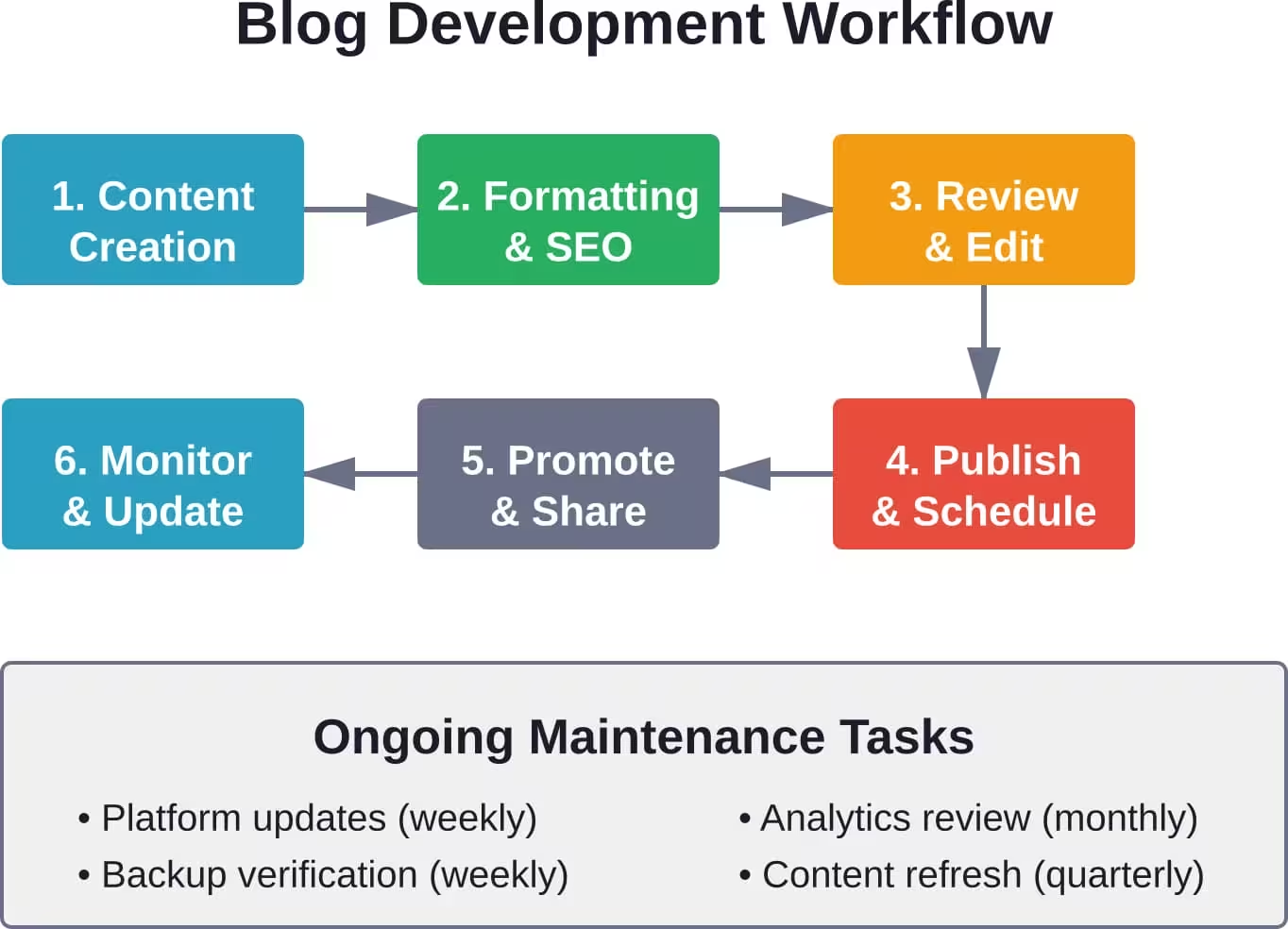
Consistent publishing requires efficient workflows. Technical processes should support creativity rather than hindering it with complexity.
Content Management Systems
Editorial calendars prevent inconsistent publishing. Plan content weeks or months ahead, accounting for seasonal topics, product launches, or recurring themes. Spreadsheets work for simple calendars while dedicated tools like CoSchedule offer advanced scheduling features.
Draft management keeps work-in-progress organized. Use categories or status labels to track posts through research, writing, editing, and approval stages. Version control prevents loss of previous iterations when making major revisions.
Media libraries accumulate quickly. Establish naming conventions and folder structures before uploading hundreds of unorganized images. Tag media with relevant keywords to enable quick searches later.
Platform Maintenance Schedules
Update frequency depends on platform choice. Hosted solutions handle updates automatically while self-hosted sites require manual attention. WordPress core updates arrive multiple times monthly, with security patches demanding immediate application.
Plugin and theme updates need testing before applying to live sites. Staging environments let administrators verify compatibility without risking site breakage. When staging isn’t available, schedule updates during low-traffic periods.
Database optimization becomes necessary as content libraries grow. WordPress databases accumulate post revisions, spam comments, and transient data that bloat size and slow queries. Optimization plugins clean unnecessary data safely.
Content Refresh Strategies
Older posts lose relevance as information ages. Regular content audits identify outdated material needing updates. Statistics, tool recommendations, and technique guides require more frequent refreshing than evergreen content.
Update publication dates carefully. Search engines may interpret date changes as manipulation if content hasn’t substantially changed. Only update dates when meaningfully refreshing information.
Redirect or remove underperforming content. Posts that never gained traction may dilute site quality signals. Consider consolidating multiple weak posts on similar topics into one comprehensive resource.
Scaling Considerations
Growth brings new technical challenges. Sites that performed well with minimal traffic can buckle under success. Planning for scale prevents crisis management later.
Traffic Growth Preparation
Load testing identifies breaking points before real traffic triggers outages. Services like Load Impact simulate thousands of concurrent users, exposing bottlenecks in database queries, hosting capacity, or caching configurations.
Horizontal scaling adds server capacity to handle increased load. Cloud hosting platforms enable adding resources dynamically during traffic spikes then scaling down afterward to control costs.
Database scaling requires different approaches. Read replicas distribute query load across multiple database servers. For write-heavy applications, database sharding splits data across servers though most blogs never reach this complexity level.
Content Strategy Evolution
As blogs mature, content strategies often expand beyond text posts. Video content, podcasts, and interactive tools diversify offerings but demand additional technical infrastructure.
Video hosting requires significant bandwidth. Third-party platforms like YouTube or Vimeo handle delivery while embedded players maintain on-site viewing. Self-hosting video rarely makes financial sense given storage and bandwidth costs.
Podcast integration needs RSS feed generation and media hosting. WordPress podcast plugins generate proper feeds automatically. Specialized podcast hosts like Buzzsprout or Transistor offer better analytics and distribution than generic hosting.
Interactive content—calculators, quizzes, comparison tools—requires custom development or specialized plugins. These features engage audiences effectively but increase maintenance complexity.
Team Collaboration Tools
Multi-author blogs need workflow management. Role-based access controls limit contributors to appropriate permissions. Editors review submissions before publication while administrators handle technical configuration.
Collaboration plugins add approval workflows, editorial comments, and revision tracking. Edit Flow and PublishPress bring publication management features similar to traditional newsrooms.
Communication channels prevent workflow confusion. Slack or Discord creates dedicated spaces for content discussion separate from email threads. Project management tools like Asana track assignments and deadlines.
Migration and Platform Switching
Outgrowing initial platform choices happens frequently. Migration requires careful planning to preserve SEO value and minimize disruption.
Export and Data Preparation
Most platforms offer export functionality, though formats and completeness vary. WordPress exports to XML files containing posts, pages, and comments. Hosted builders may limit exports or require manual copying.
Clean data before migration. Remove spam comments, outdated drafts, and unwanted media. Smaller, cleaner datasets migrate more reliably than bloated exports carrying years of accumulated clutter.
Document current site structure—URL patterns, navigation hierarchy, and category organization. The new platform should replicate or improve upon this structure to maintain user experience and SEO signals.
URL Preservation and Redirects
URL changes destroy search rankings unless properly redirected. Map every old URL to its new equivalent, accounting for changed permalink structures or reorganized content.
301 redirects transfer SEO value from old URLs to new ones. Implement server-level redirects when possible for best performance. WordPress redirect plugins work but add processing overhead.
Test redirects exhaustively before removing the old site. Verify every important page redirects correctly. Check for redirect chains where URLs redirect multiple times—these dilute SEO value and slow page loads.
Post-Migration Verification
Search console submission tells Google about URL changes. Submit both old and new sitemaps, monitoring crawl errors and coverage reports. Address errors promptly to maintain search visibility.
Monitor traffic patterns closely after migration. Temporary ranking drops are normal but sustained losses indicate migration issues needing investigation.
Test all functionality thoroughly—forms, comments, media galleries, and e-commerce features. Migrations commonly break features that worked on previous platforms.
Conclusion
Website development for bloggers balances technical capability with content creation priorities. The platforms, tools, and strategies that work depend entirely on specific needs, technical skills, and growth ambitions.
Success requires choosing appropriate technology foundations then optimizing systematically. Performance, security, and SEO can’t be afterthoughts—they fundamentally shape whether blogs reach intended audiences and achieve business goals.
The blog development landscape continues evolving. New platforms emerge regularly while established options add features and change pricing. Stay informed about options, but don’t chase every trend. Solid fundamentals—fast loading, clean design, quality content, and consistent publishing—matter more than following the latest platform hype.
Start with platforms matching current skill levels, building expertise gradually. Technical knowledge develops through experience. What feels overwhelming today becomes routine after months of hands-on practice.
Now it’s time to build. Choose a platform, set up hosting, and publish that first post. Every successful blog started exactly where you are now—with an empty site and an idea worth sharing.