Quick Summary: Website development for beginners involves learning fundamental web technologies (HTML, CSS, and JavaScript), understanding the difference between front-end and back-end development, and building practical projects. According to Mozilla’s MDN curriculum, successful front-end developers need structured learning paths covering essential skills from code editors to deployment. With web developer jobs projected to grow 7% from 2024 to 2034 according to the Bureau of Labor Statistics and a median salary of $78,580, it’s an excellent career path for newcomers willing to commit to consistent practice and hands-on learning.
Every website you visit—from simple blogs to complex e-commerce platforms—exists because a web developer wrote the code to make it work. That developer was once a beginner, just like you.
The good news? Website development isn’t as intimidating as it seems. Sure, there’s a learning curve. But with the right roadmap and consistent effort, anyone can build functional, professional-looking websites.
This guide breaks down everything beginners need to know to start their web development journey. No fluff, no unnecessary jargon—just practical information that gets you building.
What Is Website Development?
Website development is the process of building and maintaining websites. It encompasses everything from creating a simple static page with text and images to developing complex web applications, e-commerce platforms, and social networks.
At its core, development involves writing code that tells browsers how to display content and respond to user interactions. Developers use programming languages, frameworks, and tools to transform design concepts into functional websites that people can access through the internet.
The field splits into three main areas:
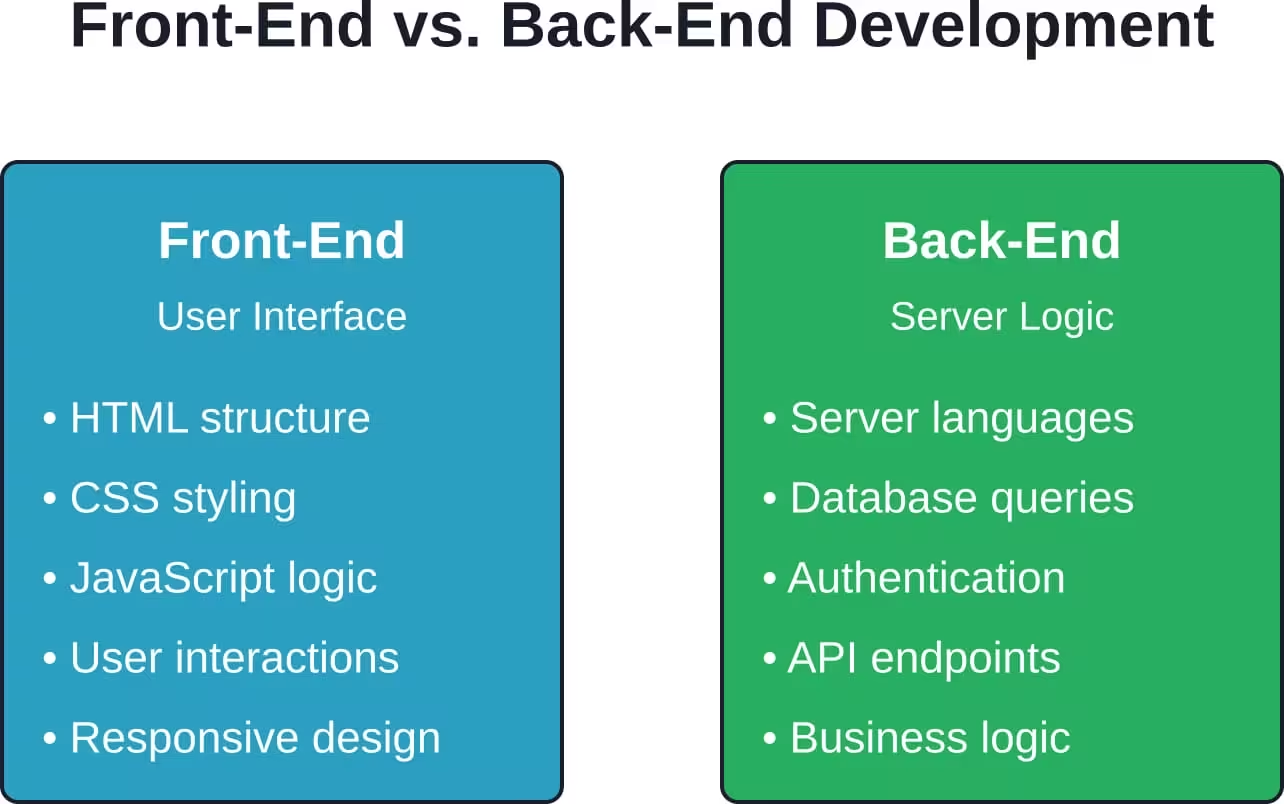
- Front-end development: What users see and interact with directly in their browsers
- Back-end development: Server-side code that powers functionality behind the scenes
- Full-stack development: Combining both front-end and back-end skills
According to Mozilla’s MDN Web Docs, web development teaches essential skills and practices for career success as a front-end developer, following industry-defined standards and best practices.
Why Learn Website Development in 2026?
The employment outlook for web developers remains strong. Between 2022 and 2032, web developer jobs are projected to grow 7% from 2024 to 2034 according to the Bureau of Labor Statistics, faster than the average for most technology careers. The median annual salary was $78,580 as of 2022, making it a financially viable career path.
But money isn’t the only reason to learn.
Web development gives you the power to create. Got an idea for a business? Build the website yourself. Want to share your photography? Create a portfolio site. Need to automate a task? Develop a web app.
The barrier to entry is lower than most tech careers. You don’t need a computer science degree or expensive bootcamp. Everything you need to learn is available online, much of it free.
And here’s the thing—demand keeps growing. As more businesses move online and digital transformation accelerates, companies need developers who can build, maintain, and improve their web presence.
Understanding Front-End vs. Back-End Development
Before diving into learning paths, grasp this fundamental distinction. Web development divides into two main specializations that work together to create functional websites.
Front-End Development: The Visual Layer
Front-end developers build everything users see and interact with directly. When you click a button, fill out a form, or watch an animation on a website, that’s front-end code at work.
The core technologies are:
- HTML (HyperText Markup Language): Structures content and defines page elements
- CSS (Cascading Style Sheets): Handles visual styling, layout, and responsive design
- JavaScript: Adds interactivity, dynamic content, and complex functionality
Front-end developers also work with frameworks and libraries like React, Vue, or Angular to build more complex user interfaces efficiently.
Back-End Development: The Engine Room
Back-end developers build the server-side logic that powers websites behind the scenes. They handle database operations, user authentication, server configuration, and application logic.
Common back-end technologies include:
- Server-side languages: PHP, Python, Ruby, Node.js (JavaScript), Java
- Databases: MySQL, PostgreSQL, MongoDB
- Server management: Apache, Nginx, cloud platforms
When you submit a contact form, log into an account, or retrieve data from a database, back-end code processes those requests and returns the appropriate responses.
Full-Stack Development: Combining Both Worlds
Full-stack developers possess skills in both front-end and back-end development. They can build complete web applications from start to finish, handling everything from user interface design to database architecture.
Most beginners start with front-end development before expanding into back-end technologies. This progression makes sense—HTML, CSS, and JavaScript provide immediate visual feedback, making the learning process more engaging and less abstract.
Essential Technologies Every Beginner Should Learn
Starting web development means mastering the fundamentals first. These core technologies form the foundation of every website on the internet.
HTML: The Structural Foundation
HTML defines the structure and content of web pages. It uses tags to mark up different elements—headings, paragraphs, links, images, forms, and more.
Every website starts with HTML. It’s not a programming language—it’s a markup language that tells browsers what content to display and how to organize it semantically.
Basic HTML is straightforward to learn. Within a few hours of practice, beginners can create simple pages with headings, paragraphs, lists, and links. MDN Web Docs provides structured tutorials for learning HTML from the ground up, starting with basic syntax and progressing to more complex structures.
CSS: Making Websites Look Good
CSS controls the visual presentation of HTML elements. It handles colors, fonts, spacing, layouts, animations, and responsive design that adapts to different screen sizes.
While HTML provides structure, CSS makes websites aesthetically pleasing and user-friendly. Modern CSS includes powerful features like Flexbox and Grid for layout, custom properties for maintaining consistent design systems, and media queries for responsive design.
CSS has a learning curve steeper than HTML but gentler than JavaScript. The basics are accessible, but mastering advanced layout techniques and responsive design takes practice.
JavaScript: Adding Interactivity
JavaScript brings websites to life. It’s a full programming language that runs in browsers, enabling dynamic content, user interactions, form validation, animations, and complex application logic.
Unlike HTML and CSS, JavaScript requires understanding programming concepts like variables, functions, loops, conditions, and data structures. The Mozilla JavaScript Guide provides comprehensive coverage of language features and best practices.
JavaScript also extends beyond browsers. Node.js allows developers to use JavaScript for back-end development, making it possible to build entire applications with a single language.
Setting Up Your Development Environment
Before writing code, set up the tools that make development efficient and productive. The good news? You don’t need much, and most tools are free.
Choosing a Code Editor
Code editors are specialized text editors designed for writing code. They provide features like syntax highlighting, auto-completion, error detection, and debugging tools.
Popular choices for beginners include:
- Visual Studio Code: Free, powerful, with extensive plugins
- Sublime Text: Lightweight and fast
Visual Studio Code dominates the market for good reason. It’s free, regularly updated, and supports virtually every programming language through extensions.
Understanding Web Browsers and Developer Tools
Modern browsers include built-in developer tools for inspecting HTML, debugging JavaScript, analyzing performance, and testing responsive designs.
Chrome DevTools and Firefox Developer Tools let developers:
- Inspect and modify HTML and CSS in real-time
- Debug JavaScript with breakpoints and console logging
- Monitor network requests and performance
- Test mobile layouts and different screen sizes
Learning to use browser DevTools is essential. They provide immediate feedback and help diagnose issues quickly.
Version Control with Git
Git tracks changes to code over time, allowing developers to collaborate, maintain history, and revert to previous versions when needed.
While not strictly necessary for absolute beginners, learning Git early establishes good habits. Platforms like GitHub host repositories and facilitate collaboration, making them valuable for building portfolios and contributing to open-source projects.
Your First Website: A Practical Approach
Theory only takes you so far. Real learning happens through building actual projects.
According to MDN’s “Your First Website” module, beginners should start small rather than attempting complex projects immediately. Building a simple webpage and publishing it online provides practical experience with the entire development workflow.
Planning Your Project
Before writing code, decide what to build. Simple first projects include:
- Personal portfolio showcasing your skills and projects
- Tribute page to someone you admire
- Simple blog or landing page
- Recipe collection or hobby site
Keep it simple. A single-page website is perfectly acceptable for a first project.
Gathering Assets and Content
Collect everything needed before coding:
- Text content (headings, paragraphs, descriptions)
- Images (optimized for web use)
- Color scheme (choose 2-3 primary colors)
- Fonts (Google Fonts offers free options)
Having assets ready keeps you focused on learning code rather than creating content on the fly.
Writing the HTML Structure
Start with semantic HTML that outlines your page structure:
- Header section with navigation
- Main content area with sections
- Footer with contact information or links
Use appropriate HTML5 semantic elements like header, nav, main, section, article, and footer. This creates cleaner, more accessible code.
Styling with CSS
Once HTML structure is solid, add CSS for visual design:
- Set typography (fonts, sizes, line heights)
- Apply color scheme consistently
- Create layout using Flexbox or Grid
- Add spacing and visual hierarchy
- Implement responsive design for mobile devices
Test frequently in different browsers and screen sizes as you build.
Adding JavaScript Functionality
For a first project, JavaScript might be minimal—perhaps a mobile menu toggle or simple form validation. That’s fine. Focus on mastering HTML and CSS before adding complex JavaScript.
Publishing Your Website
Making your website live completes the learning cycle. Free hosting options include:
- GitHub Pages (integrates with Git repositories)
- Netlify (drag-and-drop deployment)
- Vercel (optimized for modern frameworks)
Publishing your first website, however simple, provides a huge confidence boost and something tangible to show others.
Skip the Learning Curve and Get Your Website Built Properly
Not everyone who starts learning web development wants to spend months building their first website. Sometimes you just need a working site without going through the full process yourself. That’s where Lengreo fits in. They handle website development as a custom project, building websites based on specific requirements. This allows you to get a finished result without relying on templates or basic setups.
Get a Website Without Building It Yourself
If you don’t want to go through the full development process, Lengreo can handle it for you. Here’s what that includes:
- Website built based on your requirements, not a preset layout
- Ability to include features beyond basic website builders
- No dependency on templates or limited platforms
- Stable, ready-to-use website
Talk to Lengreo and get your website built while you focus on your next steps.
Structured Learning Paths for Beginners
Self-teaching web development requires structure. Random tutorials lead to knowledge gaps. A clear roadmap keeps learning focused and progressive.
The Front-End Development Roadmap
Start here if building user interfaces and visual design appeals to you:
Phase 1: Fundamentals (2-3 months)
- HTML basics and semantic markup
- CSS fundamentals and the box model
- Basic JavaScript syntax and DOM manipulation
- Responsive design principles
- Git version control basics
Phase 2: Intermediate Skills (3-4 months)
- Advanced CSS (Flexbox, Grid, animations)
- JavaScript ES6+ features
- Asynchronous JavaScript and APIs
- CSS preprocessors (Sass)
- Build tools and package managers
Phase 3: Modern Frameworks (3-6 months)
- React, Vue, or Angular
- State management
- Component-based architecture
- Testing fundamentals
- Performance optimization
The Back-End Development Roadmap
Choose this path if server-side logic and databases interest you more than visual design:
Phase 1: Foundations (2-3 months)
- HTML and CSS basics (still necessary)
- Programming fundamentals with Python, PHP, or Node.js
- Command line and terminal usage
- Git version control
- Basic database concepts
Phase 2: Server-Side Development (3-4 months)
- Server-side language mastery
- RESTful API design
- SQL databases (MySQL, PostgreSQL)
- Authentication and authorization
- Server deployment basics
Phase 3: Advanced Backend (3-6 months)
- NoSQL databases (MongoDB, Redis)
- Caching strategies
- Microservices architecture
- Security best practices
- Cloud platforms (AWS, Azure, Google Cloud)
These timelines assume consistent daily practice. Some learners progress faster, others need more time. The key is consistent effort rather than speed.
Best Free Resources for Learning Web Development
Quality learning materials are abundant and often free. Here are the most reliable resources for beginners.
Comprehensive Learning Platforms
- MDN Web Docs stands as the gold standard for web development documentation. Mozilla’s MDN Learning Web Development provides structured tutorials covering essential skills for front-end developers, created by the MDN community and refined based on industry standards.
- The curriculum progresses logically from basic concepts to advanced topics, with practical exercises reinforcing each lesson.
- freeCodeCamp offers a complete curriculum from basic HTML to full-stack development, entirely free. It combines tutorials with coding challenges and real-world projects for nonprofit organizations.
- The Odin Project provides another comprehensive, free curriculum focusing on practical skills and project-based learning. It covers both front-end and back-end development thoroughly.
Interactive Coding Platforms
Codecademy offers interactive courses in web development, teaching HTML, CSS, JavaScript, React, and more through hands-on coding exercises in the browser.
These platforms provide immediate feedback, making them excellent for reinforcing syntax and basic concepts.
Video Learning
YouTube hosts countless free web development tutorials. Channels consistently recommended by the community include Traversy Media, The Net Ninja, and Web Dev Simplified.
Video learning works well for visual learners who benefit from watching someone code in real-time.
Documentation and Reference
Beyond tutorials, developers constantly reference official documentation:
- MDN Web Docs for HTML, CSS, and JavaScript
- W3C specifications for web standards
- Framework-specific docs (React, Vue, Angular official documentation)
Learning to read documentation is a critical skill. Tutorials get you started, but documentation keeps you productive long-term.
| Resource | Best For | Cost | Learning Style |
|---|---|---|---|
| MDN Web Docs | Complete reference and structured learning | Free | Reading, exercises |
| freeCodeCamp | Project-based full curriculum | Free | Interactive challenges |
| The Odin Project | In-depth full-stack path | Free | Projects, reading |
| Codecademy | Interactive beginner courses | Free/Paid tiers | Browser-based coding |
| YouTube Tutorials | Visual learning and specific topics | Free | Video demonstrations |
Common Beginner Mistakes to Avoid
Every beginner makes mistakes. Recognizing common pitfalls helps avoid wasted time and frustration.
Tutorial Hell: Watching Without Building
The biggest trap? Endless tutorial consumption without building original projects. Watching someone code feels productive, but real learning happens through struggling with your own projects.
After completing a tutorial, build something similar without following along. This reveals what you actually retained versus what you just watched passively.
Jumping to Frameworks Too Early
React, Vue, and Angular are powerful, but beginners who skip JavaScript fundamentals struggle with frameworks later. Frameworks come and go; core JavaScript skills remain valuable regardless of trends.
Master vanilla JavaScript before touching frameworks. Understanding the underlying language makes learning any framework much easier.
Perfectionism Over Progress
Beginners often spend hours tweaking pixel-perfect designs instead of moving forward with functionality. Perfect is the enemy of done.
Early projects should be functional, not beautiful. Polish comes with experience. Ship imperfect projects and build new ones rather than endlessly refining the same page.
Ignoring Responsive Design
Building only for desktop screens creates a bad habit. Over half of web traffic comes from mobile devices. Learning responsive design from the start prevents developing a desktop-only mindset.
Test every project on multiple screen sizes using browser DevTools or actual devices.
Not Using Version Control
Putting off Git until later seems reasonable—why learn version control before learning to code? But Git saves you from disaster when code breaks, and starting early makes it second nature.
Even solo projects benefit from version control. Track changes, experiment freely, and maintain backup copies automatically.
Building a Portfolio as a Beginner
A portfolio demonstrates skills to potential employers or clients. Beginners often wait too long to build one, thinking they need advanced skills first.
Start your portfolio after completing 3-4 projects, even simple ones. A portfolio itself is a project that improves as skills develop.
What to Include
Essential portfolio elements:
- About section: Brief introduction, skills, background
- Projects: 4-6 best projects with descriptions, technologies used, and live links
- Contact information: Email, GitHub, LinkedIn
- Blog (optional): Writing about learning demonstrates communication skills
Each project should include:
- Screenshot or demo
- Brief description of purpose and functionality
- Technologies and tools used
- Link to live site
- Link to source code (GitHub repository)
Quality Over Quantity
Four well-executed projects impress more than ten mediocre ones. Focus on diversity—include different types of projects showcasing various skills.
Good beginner portfolio projects:
- Personal portfolio site itself
- Responsive landing page
- Interactive web app (calculator, to-do list, weather app)
- Clone of an existing site (Airbnb homepage, Netflix interface)
Understanding Web Development Career Paths
Web development skills open various career opportunities beyond the traditional developer role.
Front-End Developer
Focuses exclusively on user interface and user experience. Works closely with designers to implement visual designs in code. Requires strong HTML, CSS, and JavaScript skills plus modern frameworks.
Front-end developers need good visual sense and attention to detail alongside technical skills.
Back-End Developer
Builds server-side logic, manages databases, handles authentication, and creates APIs. Requires strong programming skills and understanding of server architecture, databases, and security.
Back-end developers typically come from computer science backgrounds but self-taught developers also succeed in these roles.
Full-Stack Developer
Handles both front-end and back-end development. Full-stack developers build complete features from database to user interface.
This role requires broader knowledge across more technologies, though often less specialized than dedicated front-end or back-end developers.
Alternative Paths
Web development skills also support related careers:
- Web Designer: Focuses on visual design with some coding skills
- UX Developer: Bridges user experience design and development
- DevOps Engineer: Manages deployment, infrastructure, and automation
- Technical Writer: Documents code and creates developer resources
The median annual salary for web developers was $78,580 as of 2022, with experienced developers and specialists earning significantly more.
Staying Current in Web Development
Web development evolves constantly. New frameworks emerge, best practices change, and technologies that seemed essential become obsolete.
Here’s how developers stay current without getting overwhelmed:
Focus on Fundamentals First
Core HTML, CSS, and JavaScript change slowly. Master fundamentals before chasing trends. Strong basics make learning new tools much easier.
Frameworks come and go. React dominates today, but Vue and Svelte are growing. Ten years ago, jQuery was essential; today it’s often unnecessary. Core web technologies remain valuable regardless of framework popularity.
Follow Reliable Sources
Quality over quantity applies to learning resources. A few trusted sources beat dozens of random blogs.
Recommended sources for staying updated:
- MDN Web Docs for standards and best practices
- CSS-Tricks for front-end techniques
- Smashing Magazine for design and development
- Dev.to community for diverse perspectives
Build Real Projects
The best way to learn new technologies? Use them in actual projects. Reading about new features teaches less than implementing them.
Set aside time for experimental projects using technologies outside your comfort zone.
Join Developer Communities
Online communities provide support, resources, and exposure to different approaches:
- Stack Overflow for troubleshooting
- Reddit communities like r/webdev
- Discord servers focused on web development
- Local meetups and conferences
Community discussions on platforms like Reddit offer real-world perspectives on learning strategies and career paths that complement formal resources.
How Long Does It Take to Learn Web Development?
The most common beginner question—and the most difficult to answer definitively.
It depends on several factors:
- Time commitment (hours per day/week)
- Prior programming experience
- Learning approach (structured courses vs. independent)
- Career goals (freelance, employment, hobby)
Generally speaking, reaching job-ready competency takes 6-12 months of consistent daily practice for complete beginners. That means 2-4 hours daily, not occasional weekend sessions.
Breaking it down:
- Basic literacy (can build simple static sites): 2-3 months
- Intermediate skills (responsive sites, basic JavaScript): 4-6 months
- Job-ready (modern frameworks, portfolios, professional projects): 8-12 months
Some learn faster through intensive bootcamps or previous programming experience. Others need more time balancing learning with full-time work or other commitments.
But here’s the thing—learning never really stops in web development. Technologies evolve, and developers continuously acquire new skills throughout their careers.
Getting Your First Web Development Job
Transitioning from learning to employment requires more than technical skills. The job search itself is a skill requiring strategy and persistence.
Build a Strong Portfolio
Portfolios matter more than degrees for web development positions. Employers want to see what developers can build.
Include diverse projects demonstrating different skills. One responsive site, one interactive web app, and one project using a modern framework provides good variety.
Contribute to Open Source
Open-source contributions demonstrate collaboration skills and provide real-world experience working with existing codebases.
Start small—fix documentation, address beginner-friendly issues, or improve accessibility. These contributions count and teach valuable skills.
Network Actively
Many positions fill through referrals before public posting. Networking opens doors that applications alone cannot.
Attend local meetups, participate in online communities, connect with developers on LinkedIn, and engage authentically rather than just asking for jobs.
Apply Strategically
Mass applications rarely succeed. Target companies where skills match requirements, customize each application, and demonstrate specific interest in the organization.
Junior positions receive hundreds of applications. Standing out requires showing genuine interest and cultural fit alongside technical competency.
Consider Alternative Entry Points
Traditional developer roles aren’t the only path:
- Freelancing builds experience and portfolio
- Internships provide foot-in-door opportunities
- Technical support roles transition into development
- Internal transfers leverage existing employment relationships
The first job is the hardest. Once employment history includes developer experience, subsequent positions become significantly easier to obtain.
Web Development vs. Web Programming: Understanding the Distinction
These terms often get used interchangeably, but subtle differences exist.
Web development is broader, encompassing design, content creation, client liaison, network security configuration, and maintenance alongside coding. Developers might work on visual design, user experience, content strategy, and deployment processes.
Web programming focuses specifically on writing code—the logic, functionality, and technical implementation. Programmers typically concentrate on back-end systems, databases, and application architecture rather than visual design.
In practice, smaller organizations expect developers to handle both. Larger companies employ specialized roles—front-end developers, back-end developers, designers, and DevOps engineers each handling specific aspects.
For beginners, the distinction matters less than building skills across the full spectrum of website creation.
Security Considerations for Beginner Developers
Security seems advanced, but beginners should understand basic principles from the start. Bad habits formed early create vulnerabilities later.
Common Security Issues
Even simple websites face security concerns:
- Input validation: Never trust user input; validate and sanitize everything
- Authentication: Use established libraries rather than building from scratch
- HTTPS: Encrypt data transmission, especially for forms and login pages
- Dependencies: Keep packages and libraries updated to patch vulnerabilities
Developing Security Awareness
Beginners don’t need to become security experts immediately, but should:
- Learn about common vulnerabilities (SQL injection, XSS attacks)
- Follow security best practices in tutorials and documentation
- Use package managers that alert to vulnerable dependencies
- Never commit sensitive information (passwords, API keys) to public repositories
Security consciousness from the beginning prevents developing insecure coding patterns.
Taking Your First Steps in Web Development
Web development offers an accessible entry point into technology careers with strong job growth, decent salaries, and flexibility for remote work or freelancing.
Success requires consistent practice more than natural talent. Developers aren’t born—they’re made through thousands of hours writing code, debugging errors, building projects, and learning from mistakes.
Start small. Build a simple webpage this week. It won’t be perfect—that’s fine. Every expert developer once struggled with basic HTML tags and CSS styling that wouldn’t cooperate.
The web development community generally welcomes beginners. Resources abound, from Mozilla’s comprehensive MDN documentation to countless free tutorials, courses, and supportive online communities.
The most important step is the first one—installing a code editor and writing your first line of HTML. Everything else follows from that initial commitment to learning.
Web development in 2026 offers opportunities limited only by willingness to learn and persist through inevitable frustrations. The websites and applications you’ll build as an experienced developer start with the foundational knowledge you acquire today as a beginner.
Ready to start? Pick a tutorial from MDN or freeCodeCamp, open your code editor, and write that first HTML tag. The journey of a thousand commits begins with a single line of code.