Quick Summary: Website development for nonprofits is the process of building or redesigning a digital platform that serves as the public face of a mission-driven organization, focusing on transparency, accessibility, donor trust, and engagement. Nonprofit sites differ from commercial websites in that they must balance limited budgets with rigorous compliance requirements, storytelling that inspires action, and features like donation processing and volunteer management. Choosing the right development approach—whether custom design, website builders, or agency partnership—depends on mission complexity, technical capacity, and long-term scalability needs.
Nonprofits operate in a digital environment where trust is earned or lost in seconds. According to a 2025 Nonprofit Tech for Good report, over 60 percent of donors research an organization’s website before making a donation, and nearly half abandon donations if the site feels outdated or unclear. That single stat tells the whole story: your website is not a brochure. It’s a fundraising engine, a credibility checkpoint, and often the only impression a potential supporter will ever get.
But here’s the thing—nonprofit website development isn’t just commercial web design with a mission statement slapped on top. It’s a distinct discipline. Nonprofits face constraints commercial sites don’t: tight budgets, volunteer-driven updates, public disclosure obligations, accessibility mandates, and stakeholder audiences that range from major donors to grassroots volunteers. Getting it right requires strategy, not just templates.
This guide walks through what makes nonprofit web development different, what to look for in tools and partners, and how to avoid the traps that waste time and donor dollars. Whether starting from scratch or redesigning an aging site, the goal is the same: build a platform that advances the mission without draining resources.
Why Nonprofit Websites Are Different
A nonprofit website serves multiple masters. Donors want transparency and impact data. Volunteers need clear calls to action and event calendars. Beneficiaries look for program details and eligibility criteria. Regulators expect public disclosure of IRS filings. And all of it has to load fast, work on mobile, and meet accessibility standards.
Commercial websites optimize for conversions—usually sales. Nonprofit sites optimize for trust and engagement across vastly different user journeys. A single homepage might need to speak to a first-time visitor curious about the cause, a monthly donor checking financials, and a journalist researching a story. That’s a tougher design challenge than selling shoes.
Then there’s compliance. Tax-exempt organizations under section 501(c)(3) of the Internal Revenue Code must make annual returns and exemption applications available for public inspection, according to IRS disclosure requirements. That means Form 990s, organizing documents, and certain schedules need to be downloadable or linked clearly. Many nonprofits bury these in PDFs three clicks deep, which frustrates donors who want to verify legitimacy before giving.
Accessibility is another legal and ethical mandate. An equitable website isn’t just a nice-to-have—it’s a core part of serving the mission and the community, as NTEN notes. Sites must meet WCAG 2.1 AA standards at minimum: screen-reader compatibility, keyboard navigation, sufficient color contrast, alt text for images, and captions for video. Failing here excludes people the nonprofit exists to serve and opens the door to legal complaints.
Budget constraints shape every decision. Most nonprofits can’t spend $40,000 on a custom site every three years. They need platforms that staff can update without hiring developers, that integrate with donation processors and CRMs, and that scale as the organization grows. The wrong choice locks the nonprofit into expensive maintenance cycles or forces a costly rebuild when needs change.
What to Look for in a Nonprofit Web Design Agency
Not every web design firm understands nonprofit work. Agencies that specialize in e-commerce or SaaS marketing bring the wrong instincts. Look for partners who have built sites for mission-driven organizations and can speak fluently about donor psychology, impact storytelling, and compliance requirements.
Experience with nonprofit platforms matters. WordPress powers a huge share of nonprofit sites because of its flexibility, plugin ecosystem, and cost-effectiveness. An agency that knows WordPress development for nonprofits can leverage tools like GiveWP for donations, Volunteer Management plugins, and accessibility auditing tools like WP Accessibility. Generic agencies often recommend bloated page builders or proprietary systems that create vendor lock-in.
Strategy comes before pixels. The best agencies start with stakeholder interviews, user journey mapping, and content audits—not design mockups. They ask what success looks like: more monthly donors? Higher volunteer signups? Better program awareness? A site built without clear goals becomes a digital brochure that looks nice and does nothing.
Transparency in pricing and scope prevents disasters. Most professional nonprofit website development projects range from $8,000 to $40,000 or more, depending on complexity. Agencies experienced in the sector provide phased payment options and detailed scoping documents. If an agency can’t explain what’s included in each phase or dodges questions about ongoing costs, walk away.
Strategy, Technology, and Compliance: The Three-Legged Stool
A nonprofit website succeeds when three elements align: strategic clarity, appropriate technology, and regulatory compliance. Miss one leg and the whole structure wobbles.
Strategic clarity means knowing who the site serves and what actions it should drive. Donor-centric sites foreground impact stories, transparent financials, and friction-free giving. Volunteer-focused sites emphasize opportunities, calendars, and signup forms. Advocacy sites prioritize petitions, social sharing, and legislative updates. Most nonprofits need all three, which requires prioritization and clear information architecture.
Technology choices shape what’s possible. Website builders like Wix, Squarespace, Weebly, and Duda offer low-code paths for small nonprofits with simple needs. WordPress offers more control and extensibility for organizations that will grow. Custom development provides maximum flexibility but demands technical capacity and budget. No single answer fits every nonprofit—it depends on staff skills, complexity, and timeline.
Compliance isn’t optional. Beyond IRS disclosure requirements, nonprofits must consider data privacy (GDPR if serving EU residents, state laws like CCPA in California), payment security (PCI DSS for credit card processing), and accessibility (ADA Title III, Section 508 for government grantees). NTEN’s Cybersecurity for Nonprofits Professional Certificate highlights that nonprofits work with sensitive information every day—donor records, beneficiary data, community information. A website that leaks data or fails accessibility audits damages the mission and invites lawsuits.
Common Mistakes Nonprofits Make When Hiring an Agency
Choosing based on price alone is the fastest way to waste money. The cheapest bid often comes from agencies that cut corners on strategy, accessibility testing, or post-launch support. A $5,000 site that doesn’t convert donors or breaks on mobile costs far more than a $15,000 site that works.
Skipping the discovery phase is another common error. Nonprofits rush to design without clarifying goals, audiences, or content strategy. The result: a beautiful site that doesn’t align with how people actually use it. Discovery isn’t overhead—it’s how agencies learn enough to build the right thing.
Ignoring content migration and training leaves staff stranded. An agency delivers a gorgeous new site, but no one knows how to update events, add blog posts, or swap images. Budget for training sessions and documentation, or the site becomes a static monument no one can touch.
Not planning for integrations creates silos. The website, donor database, email marketing tool, and volunteer management system all live in separate universes. Donors give on the site but don’t get added to the CRM. Event registrations arrive via email instead of feeding into a calendar. Integration planning should happen during discovery, not after launch.
Choosing the Right Development Path: Builders, WordPress, or Custom
Small nonprofits with limited budgets and simple needs often thrive on website builders. Platforms like Wix, Squarespace, Weebly, and Duda provide drag-and-drop interfaces, hosting, and templates designed for nonprofits. Many offer donation processing integrations and discounted plans for 501(c)(3) organizations. The tradeoff: less flexibility and potential platform limitations as the organization scales.
WordPress strikes a middle ground. It’s open-source, endlessly extensible via plugins, and supported by a massive developer community. Nonprofits can start with a simple theme and grow into custom functionality—donation forms, event calendars, member portals, multilingual content—without switching platforms. The downside: WordPress requires some technical literacy or budget for developer support when things break.
Custom development makes sense for large nonprofits with complex needs: multi-chapter structures, custom program databases, intricate user roles, or integration with legacy systems. Custom sites cost more upfront and demand ongoing developer partnerships, but they deliver exactly what the mission requires without forcing workflows into off-the-shelf constraints.
Website Builders: When They Work, When They Don’t
Website builders shine for organizations that need a professional online presence quickly and affordably. A local food bank with five staff members and a $2,000 web budget isn’t hiring a development agency. A builder like Squarespace or Wix lets them launch a clean, mobile-friendly site in weeks, integrate Square or PayPal for donations, and update content themselves.
But builders hit limits fast. Customization options are constrained by template boundaries. Advanced features—custom donation workflows, CRM integrations, multilingual content, member-only areas—either don’t exist or require expensive workarounds. And scaling can be painful: migrating off a builder to WordPress or a custom platform later means rebuilding from scratch.
Website builder pricing typically ranges from free tiers with basic features to $10–$20 per month for personal or standard plans. These annual plans unlock custom domains, remove platform branding, and add donation or e-commerce capabilities. For nonprofits just starting out, that’s manageable. For those with complex needs or rapid growth, it’s a temporary solution.
WordPress: Flexibility for Growth
WordPress development for nonprofits offers a scalable path. Start simple with a theme like Astra or GeneratePress, add a donation plugin like GiveWP, and launch. As the organization grows, add event management (The Events Calendar), volunteer coordination (Volunteer Management by GoodVibes), email marketing integration (Mailchimp for WordPress), and accessibility tools (WP Accessibility).
The plugin ecosystem is both WordPress’s strength and its risk. Poorly coded plugins create security vulnerabilities, slow page loads, and compatibility headaches. Stick to well-maintained plugins with active support and regular updates. Run staging environments to test updates before pushing to production. Budget for developer help when things break—because they will.
WordPress also demands attention to security. Nonprofits are frequent targets for cyberattacks because they often lack dedicated IT staff and handle sensitive donor data. Use strong hosting (avoid cheap shared hosts), keep WordPress core and plugins updated, implement two-factor authentication, and run regular backups. NTEN’s cybersecurity resources emphasize that protecting data and communities starts with foundational security practices.
Custom Development: When to Invest
Custom development makes sense when off-the-shelf tools can’t deliver what the mission requires. A national nonprofit with state chapters, each needing separate donation tracking and reporting, benefits from a custom-built chapter management system. An organization running complex program applications with eligibility screening, document uploads, and approval workflows needs custom forms and databases.
Custom projects start at the high end of the cost spectrum—often $40,000 and up—and require ongoing developer partnerships for maintenance, updates, and feature additions. The payoff is precision: workflows that match how the organization operates, integrations that connect every system, and a platform that scales without hitting artificial limits.
The risk is over-engineering. Nonprofits sometimes build custom platforms for problems a WordPress plugin could solve. Always ask: is this complexity necessary, or are we building a custom tool because it feels more professional? Custom development should solve real constraints, not satisfy aspirations.
Create a Nonprofit Website That Clearly Presents Your Work
Nonprofit websites often mix too many goals on one platform – explaining initiatives, sharing updates, and staying in touch with supporters. Without a clear structure, information becomes harder to follow. With Lengreo, the website isn’t built around a preset layout. They shape it based on how your organization shares updates and manages content, so you’re not limited by a rigid structure later.
Make Your Website Easier to Navigate and Manage
Lengreo focuses on building websites that support how nonprofits communicate and operate:
- Organized content structure that keeps key information easy to find
- Flexible setup that can adapt as new content is added
- Custom-built elements where standard solutions fall short
- Direct connections with internal tools without plugin limitations
- Stable performance for consistent access across pages
Get a website that helps you present your work clearly — talk to Lengreo and plan your project.
Core Features Every Nonprofit Website Needs
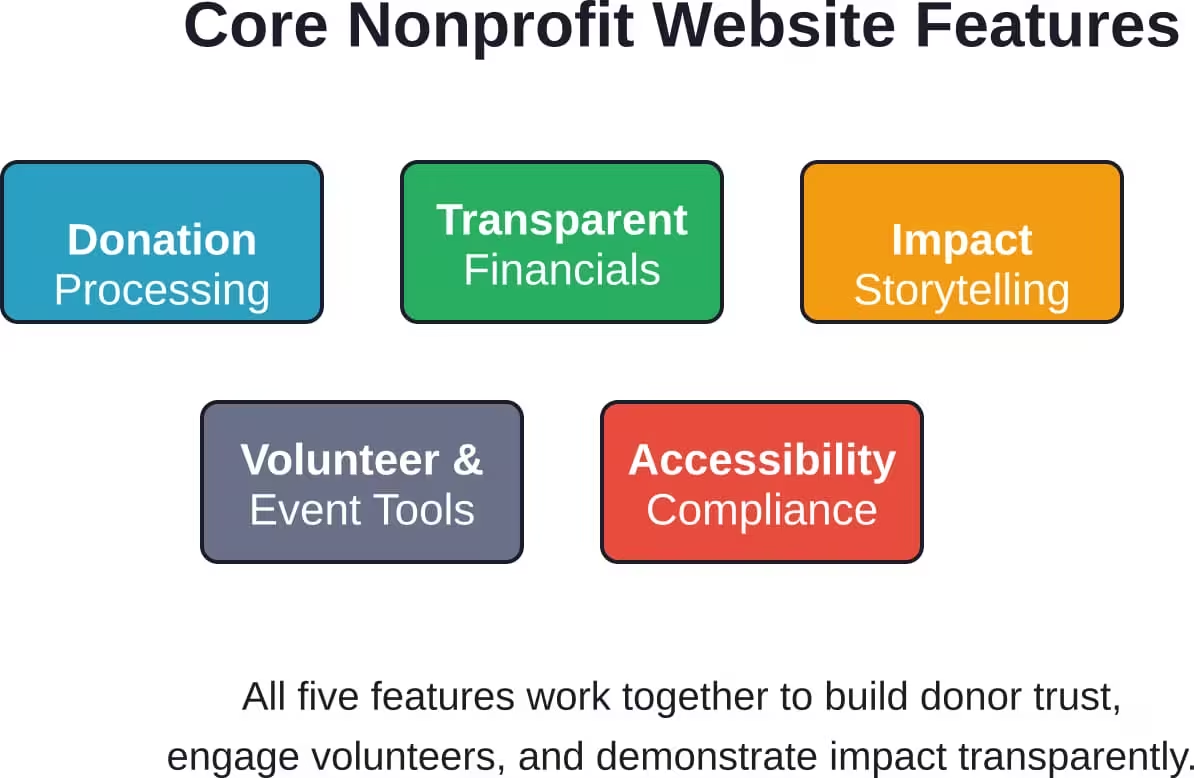
Regardless of platform, certain features are non-negotiable for nonprofit websites. These aren’t nice-to-haves—they’re table stakes for credibility and effectiveness:
- Donation processing is the obvious one: Whether integrated via Stripe, PayPal Giving Fund, or a dedicated nonprofit processor like Network for Good, the donation flow must be simple, secure, and mobile-friendly. Donors should complete a gift in under 60 seconds. Every extra click or confusing field costs conversions.
- Transparent financials and IRS documents build trust: Tax-exempt organizations must make annual returns and exemption applications available for public inspection under IRS rules. Link Form 990s, audited financials, and annual reports prominently—ideally in a dedicated “Financials” or “Transparency” page. Donors who want to verify legitimacy before giving shouldn’t have to hunt.
- Impact storytelling turns abstract missions into tangible outcomes: Data visualizations, beneficiary testimonials, photo galleries, and program summaries help donors see where their money goes. But storytelling must be accessible: alt text for images, captions for videos, and plain-language explanations that don’t assume insider knowledge.
- Volunteer and event management streamlines engagement: Calendar plugins, RSVP forms, and automated confirmation emails reduce manual coordination. Volunteer portals where people can log hours, view schedules, and access resources deepen commitment and reduce staff workload.
- Accessibility compliance is both a legal requirement and mission alignment: Run regular audits using tools like WAVE or Axe, test with screen readers, ensure keyboard navigation works, and provide text alternatives for all visual content. NTEN’s equity guidance makes clear: an equitable website is part of serving the mission and the community.
Navigating the AI-First Search Landscape
Search behavior is shifting fast. Google’s AI Overviews now appear above traditional results, answering queries directly without requiring clicks. According to research, AI Overviews could reduce organic traffic by 18-64% for websites with informational content—exactly the type of educational material nonprofits create.
That’s a problem. Nonprofits rely on search traffic to attract new supporters, educate the public, and amplify advocacy campaigns. If AI summaries siphon off that traffic, awareness and engagement suffer.
The response isn’t to abandon content—it’s to adapt. First, focus on original, mission-specific content that AI can’t easily replicate: local program data, beneficiary stories, community impact reports, and firsthand research. Generic “What is climate change?” pages lose traffic; “How our tree-planting program restored 12 acres in Detroit” pages hold value because they’re unique.
Second, optimize for featured snippets and structured data. AI systems pull answers from snippets, schema markup, and clearly structured content. Use FAQ schema, table markup, and concise definitions in H2 headings. Make it easy for algorithms to extract and cite your content.
Third, diversify traffic sources. Relying solely on organic search is risky in an AI-first world. Invest in email lists, social media communities, partnerships with other nonprofits, and direct navigation (people typing your URL). Owned channels insulate the nonprofit from algorithm changes.
Real Costs: What to Budget for Nonprofit Website Development
Transparency about costs helps nonprofits plan realistically. Website builders start low—free tiers with limited features, or $10–$20/month for personal and standard plans that unlock custom domains and donation integrations. Annual costs might total $120–$240, which is manageable for small organizations.
WordPress hosting, themes, and plugins add up. Shared hosting runs $5–$15/month. Managed WordPress hosts like WP Engine or Kinsta cost $30–$100/month but include security, backups, and support. Premium themes range from $50–$200 one-time. Premium plugins (donation tools, event management, SEO) might add another $100–$500 annually. A DIY WordPress site can launch for under $1,000 in year one if staff handle setup and content.
Agency-built WordPress sites start around $8,000 for basic builds (discovery, custom theme or child theme, basic plugins, content migration, training) and scale to $40,000+ for complex projects with custom post types, advanced integrations, multilingual support, and extensive content production. Ongoing maintenance and hosting packages typically run $100–$500/month depending on service level.
Custom development projects start at $40,000 and easily exceed $100,000 for large, feature-rich platforms. Factor in 15–20% of build cost annually for hosting, maintenance, security updates, and feature additions. Custom development is a multi-year investment, not a one-time expense.
Training and support are often overlooked budget lines. If staff can’t update the site, it becomes static. Budget $1,000–$3,000 for initial training (documentation, video tutorials, live sessions) and ongoing support retainers if internal capacity is low.
| Development Path | Typical Cost Range | Best For |
|---|---|---|
| Website Builders (Wix, Squarespace, Weebly) | $0–$240/year | Small nonprofits, simple needs, limited budget |
| DIY WordPress | $500–$1,500 first year | Orgs with some technical capacity, moderate complexity |
| Agency WordPress Build | $8,000–$40,000+ | Growing nonprofits, custom design, integrations, training |
| Custom Development | $40,000–$150,000+ | Large orgs, complex workflows, unique requirements |
| Ongoing Maintenance | $100–$500/month | All paths (except fully managed builders) |
How Equity and Accessibility Shape Nonprofit Web Development
An equitable website ensures everyone—regardless of ability, language, device, or internet speed—can access information and take action. For nonprofits, this isn’t just compliance; it’s mission integrity. Organizations that serve marginalized communities must ensure their digital front door doesn’t exclude the people they exist to help.
WCAG 2.1 AA is the baseline standard. Key requirements include sufficient color contrast (4.5:1 for normal text, 3:1 for large text), keyboard navigation for all interactive elements, alt text for images, captions and transcripts for video and audio, and clear focus indicators. Testing tools like WAVE, Axe, and Lighthouse flag violations, but manual testing with screen readers (NVDA, JAWS, VoiceOver) catches nuances automated tools miss.
Language access expands reach. If the nonprofit serves multilingual communities, the website should too. WordPress plugins like WPML or Polylang enable multilingual content. Ensure translations are accurate and culturally appropriate—machine translation alone isn’t enough for sensitive topics or program eligibility criteria.
Mobile-first design is non-negotiable. More than half of nonprofit website traffic comes from mobile devices. Sites that don’t load fast or work well on small screens lose donors and volunteers. Test on real devices, not just browser simulators, and optimize images, minimize scripts, and use responsive layouts.
NTEN’s equity guidance emphasizes that an equitable website is part of serving the mission. When a visually impaired donor can’t navigate the site, when a Spanish-speaking family can’t find program details, when a slow connection makes pages unusable—the nonprofit has failed its community, regardless of how good the programs are.
Integration Strategy: Connecting Website, CRM, and Email
A nonprofit website shouldn’t be an island. Donors give on the site but live in the CRM. Email campaigns drive traffic but don’t sync with web forms. Event registrations land in spreadsheets instead of calendars. This fragmentation creates manual work, data errors, and missed opportunities.
Integration planning starts during discovery. Map out every system the nonprofit uses: donor database (Salesforce, Bloomerang, Little Green Light), email marketing (Mailchimp, Constant Contact), event management (Eventbrite, Givebutter), volunteer coordination, accounting (QuickBooks, Xero). Then identify critical data flows: web donations feeding the CRM, email signups syncing to marketing lists, event registrations updating calendars.
Zapier and similar tools provide no-code integration for many common scenarios. A donation submitted via GiveWP can trigger a Zap that creates a donor record in Salesforce and adds the email to a Mailchimp list. Event registrations from Eventbrite can update Google Calendar and send Slack notifications. These workflows reduce manual data entry and ensure consistency.
Native integrations are cleaner when available. Many CRMs offer WordPress plugins or direct API connections. Salesforce, for example, integrates directly with GiveWP and Gravity Forms, syncing data in real time without middleware. Native integrations are more reliable, faster, and easier to troubleshoot than Zapier chains.
Document every integration. When staff turnover happens—and it will—the next person needs to understand what connects to what and how data flows. A simple diagram showing systems, data types, and sync frequency prevents disasters when something breaks.
Content Strategy: Storytelling That Inspires Action
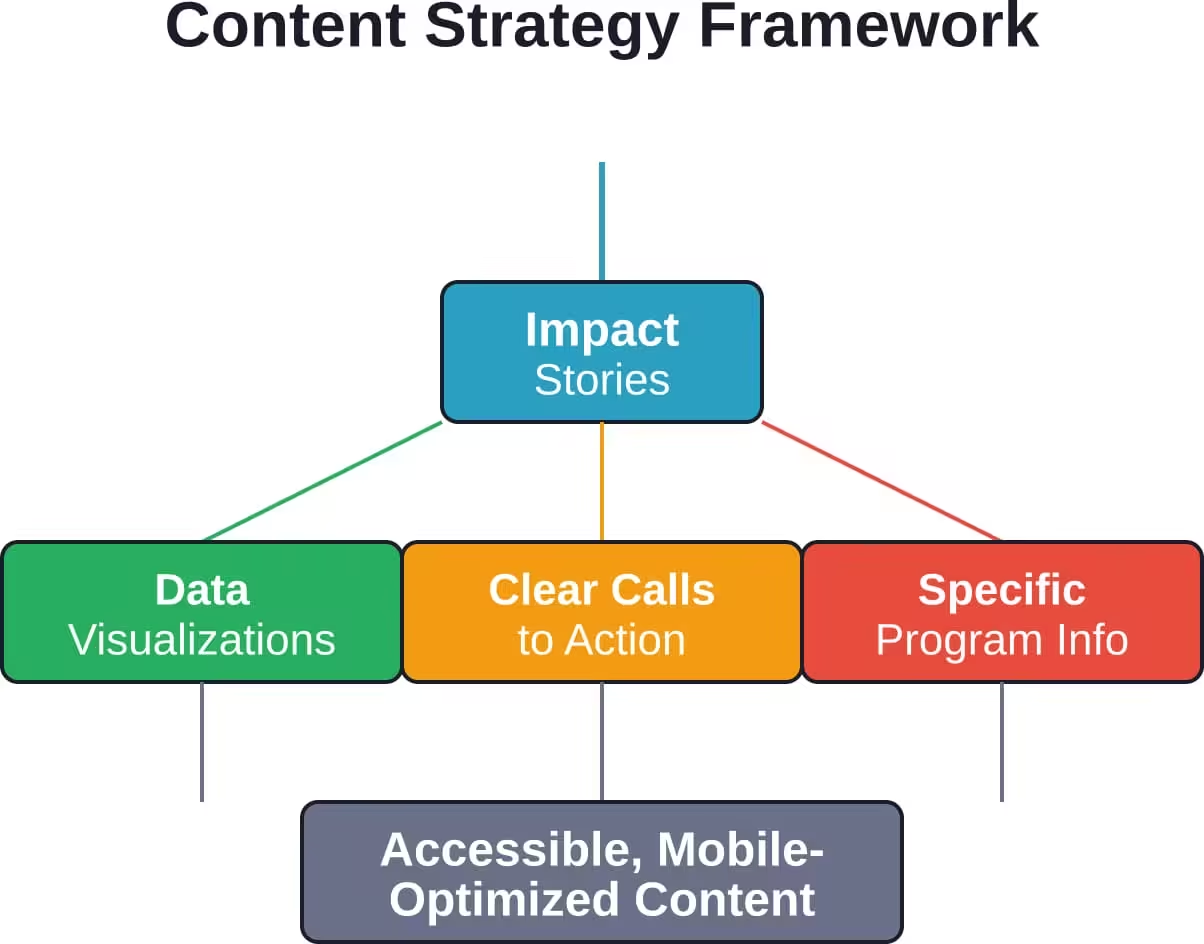
Nonprofit websites fail when they talk about the organization instead of the impact. Donors don’t give to annual budgets; they give to transformed lives, protected ecosystems, cured diseases, and strengthened communities. Content strategy must center impact, not infrastructure.
Start with beneficiary stories. A literacy nonprofit shouldn’t lead with “We’ve operated for 30 years.” Lead with “Maria learned to read at 42 and now helps her kids with homework.” Stories create emotional connection and demonstrate tangible outcomes. Use photos, quotes, and specific details—not abstract mission statements.
Data visualizations make impact legible. “We served 12,000 families last year” is a number. A chart showing 12,000 families fed, broken down by neighborhood, with trend lines over five years, tells a story. Use simple bar charts, maps, and timelines to show scale, growth, and reach. Keep visuals accessible with alt text and screen-reader-friendly descriptions.
Clear calls to action guide visitors to next steps. Every page should answer: what do you want someone to do here? Donate? Volunteer? Learn more? Share? Don’t bury CTAs in footers. Use prominent buttons, contrasting colors, and action-oriented language: “Feed a Family,” “Join the Team,” “Download the Report.”
Program pages need specificity. Vague descriptions like “We support underserved youth” don’t help potential beneficiaries understand eligibility or how to apply. Spell out who qualifies, what the program provides, how to enroll, and what to expect. Include FAQs, contact info, and downloadable forms.
Security and Privacy: Protecting Donor and Beneficiary Data
Nonprofits handle sensitive information: credit card numbers, contact details, program eligibility data, health information, immigration status. A data breach doesn’t just embarrass the organization—it harms real people and destroys trust that took years to build, so:
- Start with secure hosting: Cheap shared hosts often skip security basics. Look for hosts that provide SSL certificates (HTTPS encryption), regular backups, malware scanning, and DDoS protection. Managed WordPress hosts include these by default. If using a VPS or dedicated server, ensure the sysadmin implements firewalls, intrusion detection, and patch management.
- Keep everything updated: Outdated WordPress cores, themes, and plugins are the top entry point for attacks. Enable automatic updates for minor releases and test major updates in staging before pushing to production. Uninstall unused plugins and themes—attackers exploit abandoned code.
- Use strong authentication: Require complex passwords and enable two-factor authentication for all admin accounts. Limit login attempts to block brute-force attacks. Use role-based access control so volunteers and staff only access what they need, not the entire admin panel.
- Encrypt sensitive data: Donation forms must use HTTPS and PCI-compliant payment processors (Stripe, PayPal, Authorize.net). Never store credit card numbers on the web server. For program applications that collect personal information, ensure data is encrypted at rest and in transit, and limit who can access it.
- Have an incident response plan: NTEN’s cybersecurity resources emphasize that nonprofits need policies, practices, and habits that protect data and keep communities safe. Document what to do if a breach happens: who to notify (affected individuals, board, legal counsel, authorities), how to contain the damage, and how to communicate transparently without causing panic.
Mobile Optimization and Performance
Mobile traffic dominates. If the nonprofit’s site doesn’t load fast and work smoothly on phones, donors bounce, volunteers give up, and advocacy campaigns lose momentum. Mobile optimization is not optional.
Page speed matters. Google’s Core Web Vitals measure loading performance, interactivity, and visual stability. Slow sites rank lower and frustrate users. Optimize images (use WebP format, lazy loading, proper sizing), minimize JavaScript, enable caching, and use a content delivery network (CDN) to serve assets faster globally.
Responsive design ensures the site adapts to any screen size. Test on real devices—iPhones, Android phones, tablets—not just browser resize tools. Check that navigation menus work on small screens, forms don’t require zooming, and buttons are large enough to tap accurately.
Simplify mobile navigation. Desktop menus with six top-level items and dropdown submenus become unusable on mobile. Use a hamburger menu or priority navigation that surfaces the most important links first. Ensure the donation button is visible without scrolling.
Reduce friction on mobile forms. Autofill, input type optimization (numeric keyboards for phone numbers, email keyboards for email fields), and minimal required fields speed up completion. Every extra field on a mobile donation form costs conversions.
Measuring Success: Analytics and Iteration
A website isn’t done at launch—it’s a platform for continuous improvement. Analytics reveal what’s working, what’s broken, and where to invest effort.
Google Analytics (or privacy-focused alternatives like Plausible or Matomo) tracks traffic sources, popular pages, user flows, and conversion goals. Set up goals for key actions: donations, volunteer signups, event registrations, newsletter subscriptions. Monitor goal completion rates and identify drop-off points.
Heatmaps and session recordings (Hotjar, Crazy Egg) show how people actually use the site. Where do they click? How far do they scroll? Which form fields cause confusion? This qualitative data complements quantitative analytics and surfaces usability issues numbers alone miss.
A/B testing optimizes conversion rates. Test different donation page headlines, button colors, form lengths, and impact stories. Even small changes—swapping “Donate” for “Feed a Family”—can lift conversion rates significantly. Use tools like Google Optimize or Convert for structured testing.
Regular content audits identify outdated pages, broken links, and underperforming content. Every six months, review top pages, prune or update stale content, and ensure information stays current. An outdated events page with last year’s calendar signals neglect.
Solicit user feedback. Add a simple feedback form or exit survey asking what visitors were looking for and whether they found it. Complaints and suggestions reveal blind spots analytics can’t.
The Role of AI in Nonprofit Website Development
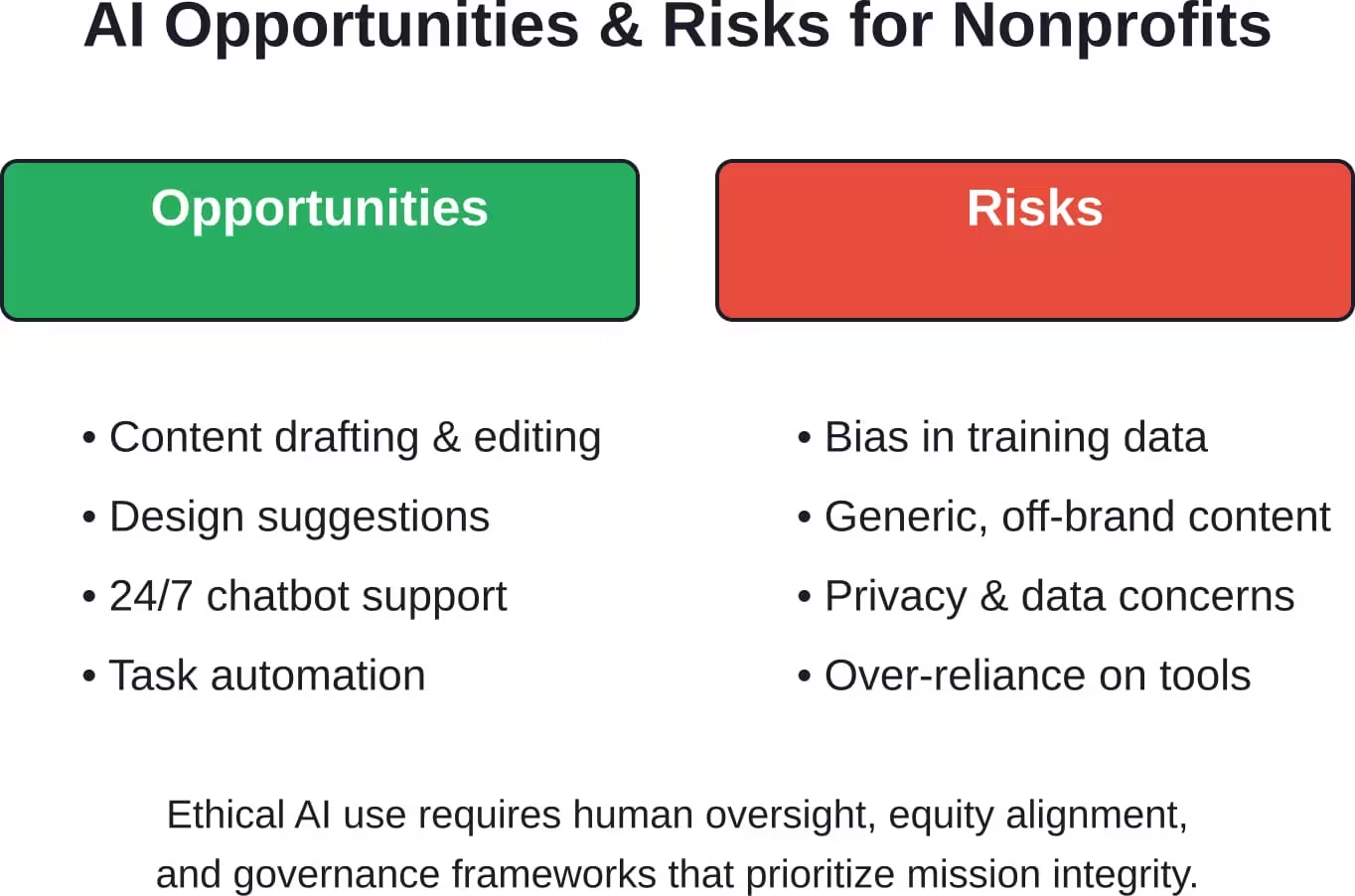
Artificial intelligence is reshaping how nonprofits create and manage websites. Generative AI tools can draft content, suggest designs, and automate repetitive tasks—but they also introduce risks and ethical questions.
Content generation tools like ChatGPT or Claude can help draft blog posts, program descriptions, and FAQs. For small nonprofits without dedicated writers, this lowers barriers. But AI-generated content needs human oversight: fact-checking, voice consistency, and avoiding generic phrasing that fails to capture the organization’s unique mission. According to a Cal State LA thesis on AI and nonprofit websites, the goal is to empower nonprofits that rarely have access to emerging technology, not replace human storytelling.
Design assistance platforms use AI to suggest layouts, color schemes, and responsive breakpoints. Tools like Framer or Wix’s AI builder generate starter templates based on brief descriptions. These accelerate initial design but still require customization to reflect brand identity and accessibility standards.
Chatbots and virtual assistants can answer common questions, guide donors to relevant pages, and provide 24/7 support. But poorly implemented chatbots frustrate users when they can’t escalate to humans or misunderstand queries. Use chatbots for simple, high-volume questions (hours, eligibility, how to donate) and always offer a human fallback.
Ethical considerations matter. AI training data often reflects societal biases. Content generation and design tools can perpetuate stereotypes or exclude marginalized groups if not carefully supervised. Nonprofits must ensure AI tools align with equity values, not undermine them. NTEN and academic institutions like Notre Dame’s Institute for Ethics and the Common Good emphasize principled AI governance and institutional resilience when adopting these technologies.
Post-Launch: Maintenance, Updates, and Evolution
Launching the website is the beginning, not the end. Websites decay without maintenance: plugins break, content goes stale, security vulnerabilities emerge, and user needs evolve.
Schedule regular maintenance windows. Monthly tasks: review analytics, check for broken links, update plugins and themes, test forms and donation flows, and review security logs. Quarterly tasks: audit content for accuracy, run accessibility scans, review backup integrity, and assess performance metrics. Annual tasks: reassess strategy and goals, conduct user surveys, and evaluate whether the platform still fits the organization’s needs.
Budget for ongoing costs. Hosting, domain renewal, plugin licenses, security monitoring, and support retainers add up. A $15,000 website launch might cost $2,000–$5,000 annually to maintain properly. Nonprofits that skip maintenance end up with broken sites that require expensive emergency fixes or full rebuilds.
Plan for content updates. Assign responsibility for blog posts, event listings, program updates, and news. If no one owns content, the site becomes a static monument. Even small, frequent updates (monthly blog posts, weekly event additions) signal the organization is active and engaged.
Iterate based on data. Analytics and user feedback reveal opportunities for improvement. If the volunteer signup page has high traffic but low conversions, test simpler forms or clearer instructions. If mobile bounce rates spike, investigate performance issues. Continuous small improvements compound over time.
Choosing Between DIY, Freelancers, and Agencies
Nonprofits face a build-or-buy decision: handle website development internally, hire freelancers, or engage an agency. Each path has tradeoffs.
DIY works when staff have time and technical skills. Small nonprofits with tight budgets and simple needs can launch effective sites using builders like Wix or Squarespace, or install WordPress and a good theme. The cost is sweat equity and learning curves. The risk: projects drag on for months, quality suffers without design or accessibility expertise, and no one to call when things break.
Freelancers offer flexibility and affordability. A skilled freelance designer or developer costs less than an agency and provides personalized attention. The challenge: vetting quality, ensuring availability for ongoing support, and managing project scope without formal contracts. Freelancers also lack the multi-disciplinary teams agencies provide—strategy, design, development, content, and SEO under one roof.
Agencies bring specialized expertise, structured processes, and accountability. They handle discovery, design, development, testing, training, and launch as a cohesive package. The cost is higher, but so is the likelihood of a site that meets goals and avoids costly mistakes. Agencies experienced in nonprofit work understand donor psychology, compliance requirements, and budget constraints. They also offer ongoing support retainers, ensuring help is available when needed.
Hybrid approaches can work: hire an agency for strategy and initial build, then bring maintenance in-house or shift to a freelancer for updates. This balances upfront investment with long-term affordability.
Final Checklist Before Signing a Contract
Before committing to a web development partner—whether builder subscription, freelancer, or agency—run through this checklist to avoid regrets:
- Does the partner have nonprofit experience? Ask for case studies, client references, and examples of sites serving similar missions or audiences. Generic web firms often underestimate nonprofit complexity.
- Is the scope clearly defined? Detailed proposals spell out deliverables, timelines, payment schedules, and what’s not included. Vague scopes lead to scope creep, surprise costs, and conflict.
- Who owns the site after launch? Ensure contracts specify that the nonprofit owns the domain, hosting account, content, design files, and source code. Some agencies retain ownership, creating vendor lock-in.
- What’s the post-launch support plan? Are training, documentation, and a support retainer included? How long is the warranty period for bugs? What happens when staff have questions six months later?
- How will accessibility and compliance be ensured? Ask specifically about WCAG testing, IRS disclosure implementation, and data privacy measures. If the partner doesn’t mention these proactively, that’s a red flag.
- What’s the migration and exit strategy? If the nonprofit outgrows the platform or wants to switch vendors later, how hard is it to export data and move to a new system? Platforms that lock data in proprietary formats create expensive transitions.
| Question | Why It Matters |
|---|---|
| Does the partner have nonprofit experience? | Generic firms miss compliance, accessibility, and donor psychology nuances. |
| Is scope clearly defined in writing? | Vague scopes lead to scope creep, surprise costs, and missed expectations. |
| Who owns the site and source code? | Ensures the nonprofit can switch vendors or bring work in-house later. |
| What post-launch support is included? | Training, documentation, and retainers determine long-term success. |
| How is accessibility ensured? | Legal compliance and mission alignment depend on WCAG testing and remediation. |
| What’s the data export and exit plan? | Prevents vendor lock-in and protects the nonprofit’s flexibility. |
Conclusion: Building Digital Infrastructure That Advances the Mission
Website development for nonprofits is not a vanity project or a checkbox on a strategic plan. It’s infrastructure that determines whether the organization can reach new supporters, retain existing donors, engage volunteers, serve beneficiaries, and demonstrate impact transparently. Getting it right multiplies the mission’s reach. Getting it wrong wastes scarce resources and erodes trust.
The path forward depends on the nonprofit’s size, complexity, budget, and technical capacity. Small organizations with straightforward needs can launch effective sites using builders or DIY WordPress. Growing nonprofits benefit from agency partnerships that bring strategy, design, and technical expertise under one roof. Large organizations with unique requirements invest in custom development that scales with the mission.
Regardless of path, certain principles hold: prioritize accessibility and equity, ensure compliance with IRS disclosure and data privacy rules, integrate systems to reduce manual work, measure success with analytics, and iterate continuously based on user feedback. The website is never finished—it evolves as the organization grows and the digital landscape shifts.
Nonprofits that treat their website as strategic infrastructure, not a one-time expense, build trust, amplify impact, and create sustainable engagement. Those that neglect it lose donors to organizations that make giving easy, lose volunteers to platforms that make signup simple, and lose credibility to competitors that demonstrate transparency.
Start with clarity about goals. Who does the site serve? What actions should it drive? What constraints must it navigate? Answer those questions before choosing platforms or partners. Then build deliberately, test rigorously, launch confidently, and improve relentlessly. The mission deserves nothing less.